
Analyzing your prompt, please hold on...
An error occurred while retrieving the results. Please refresh the page and try again.
An SVG transformation matrix expresses translation, scaling, rotation, and skewing as one matrix(a,b,c,d,e,f) transform. It is useful when several transformations must be combined, calculated, or exported from graphics tools. If you only need a simple move, resize, or rotation, the separate transform functions in
SVG Transformations are usually easier to read.
In this article, you will learn to:
matrix(a,b,c,d,e,f).The SVG transformation matrix is a 3 × 3 matrix that combines translation, scaling, rotation, and skewing. Only the first six values are written in the SVG matrix(a,b,c,d,e,f) syntax:
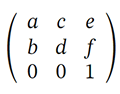
| Parameter | Typical Use | SVG Symbol |
|---|---|---|
| a | Scaling factor in the X-axis or the cosine value of the rotation angle | sx / cos(α) |
| b | Skewing factor in the Y-axis or the sine value of the rotation angle | tan(α) / sin(α) |
| c | Skewing factor in the X-axis or the negative sine value of the rotation angle | tan(α) / -sin(α) |
| d | Scaling factor in the Y-axis or the cosine value of the rotation angle | sy / cos(α) |
| e | X-axis translation | tx |
| f | Y-axis translation | ty |
The matrix transforms a point (x prev, y prev) into (x new, y new):
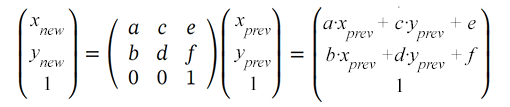
SVG elements use the transform attribute with the matrix syntax. So you provide 6 values to the matrix transformation function to set translation, scaling, rotation, and skewing:
transform="matrix(a,b,c,d,e,f)"
matrix(1 0 0 1 0 0).e and f to translate an element by tx and ty.a and d to scale along the x-axis and y-axis.a, b, c, and d for rotation.b or c for skewing, depending on the axis.e and f when scaling or rotating around a pivot point instead of (0,0).The translation is a transformation in SVG that moves all the points of an object at the same distance along parallel lines. This transformation shifts the origin of the element’s coordinate system. The translation matrix looks like this:
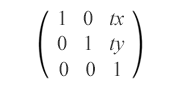
matrix(1,0,0,1,tx,ty)
The translation matrix combines both tx and ty values to move an element horizontally and vertically. It shifts the object by tx along the x-axis and by ty along the y-axis.
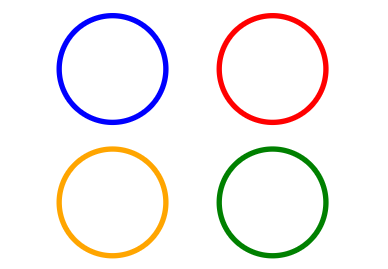
Look at the example with the original blue circle translated along the x-axis (red), y-axis (orange), and both axes (green):
 1<svg viewBox="0 0 200 200" xmlns="http://www.w3.org/2000/svg">
 2    <g fill="none">
 3        <!-- no translation -->
 4        <circle cx="15" cy="15" r="10" stroke="blue" />
 5        <!-- horizontal translation (tx = 30) -->
 6        <circle cx="15" cy="15" r="10" stroke="red" transform="matrix(1 0 0 1 30 0)" />
 7        <!-- vertical translation (ty = 25) -->
 8        <circle cx="15" cy="15" r="10" stroke="orange" transform="matrix(1 0 0 1 0 25)" />
 9        <!-- both horizontal and vertical translation (tx = 30, ty = 25) -->
10        <circle cx="15" cy="15" r="10" stroke="green" transform="matrix(1 0 0 1 30 25)" />
11    </g>
12</svg>
The action of attribute transform="matrix(1,0,0,1,tx,ty)" means the changing of object coordinates according to the formula:
x(new) = a·x(prev) + c·y(prev) + e = x(prev) + txy(new) = b·x(prev) + d·y(prev) + f = y(prev) + ty
In the code example, the <g> element groups the circles, and fill="none" applies to every circle inside the group. The image below shows the original circle and three translated copies:
Scaling is an SVG transformation that enlarges or reduces an object using a scaling factor. A scaling matrix is used to scale objects uniformly or non-uniformly along the coordinate axes.
sx and sy are the scaling factors for the x and y axes. If sx and sy are greater than 1, the object will be scaled up; if they are between 0 and 1, the object will be scaled down. If the scale factors are set to different values, the scale of the object will be uneven, resulting in a stretching or shrinking effect. The scaling matrix looks like this:
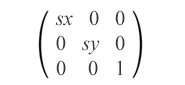
matrix(sx,0,0,sy,0,0)
Look at the example with the original blue rectangle that scales uniformly and non-uniformly, relative to the origin (0, 0) – pictures a and b, and scales uniformly relative to the point (10, 10) – picture c:
 1<svg viewBox="0 0 400 300" xmlns="http://www.w3.org/2000/svg">
 2	<!-- uniform scale is shown in fig.a -->
 3	<g fill="none">
 4	    <rect x="10" y="10" width="20" height="20" stroke="blue" />
 5		 <rect x="10" y="10" width="20" height="20" stroke="red" transform="matrix(1.5,0,0,1.5,0,0)" />
 6		 <rect x="10" y="10" width="20" height="20" stroke="orange" transform="matrix(2,0,0,2,0,0)" />
 7		 <rect x="10" y="10" width="20" height="20" stroke="green" transform="matrix(0.7,0,0,0.7,0,0)" />
 8	 </g>
 9	 <!-- non-uniform scale is shown in fig.b -->
10	 <g transform="translate(70)">
11		<rect x="10" y="10" width="20" height="20" fill="blue" />
12		<rect x="10" y="10" width="20" height="20" fill="red" transform="matrix(1.5,0,0,2,0,0)" />
13		<rect x="10" y="10" width="20" height="20" fill="orange" transform="matrix(3,0,0,2.5,0,0)" />
14		<rect x="10" y="10" width="20" height="20" fill="green" transform="matrix(0.7,0,0,0.5,0,0)" />
15	 </g>
16	 <!-- uniform scale relative to point (10, 10) is shown in fig.c -->
17	 <g fill="none" transform="translate(170)">
18	    <rect x="10" y="10" width="20" height="20" stroke="blue" />
19	    <rect x="10" y="10" width="20" height="20" stroke="red" transform="matrix(1.5,0,0,1.5,-5,-5)" />
20	    <rect x="10" y="10" width="20" height="20" stroke="orange" transform="matrix(2,0,0,2,-10,-10)" />
21	    <rect x="10" y="10" width="20" height="20" stroke="green" transform="matrix(0.7,0,0,0.7,3,3)" />
22	 </g>
23</svg>
Here is the resulting image:
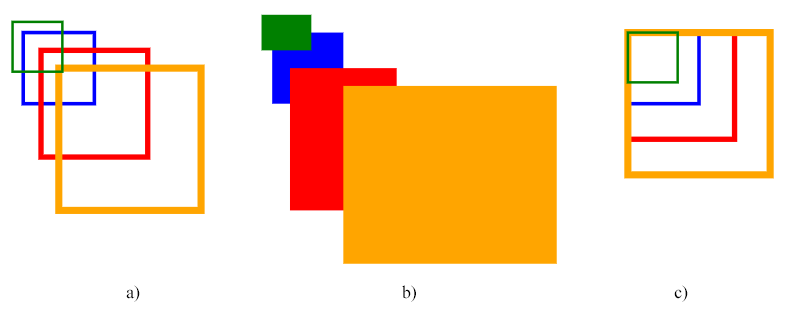
The code above uses the scaling matrix. The first group shows uniform scaling (fig. a), the second group shows non-uniform scaling (fig. b), and the third group shows uniform scaling around point (10, 10) (fig. c).
Note: Scaling is performed relative to the coordinate system origin (0, 0). If the SVG object is not positioned at the origin, scaling can also shift its visible position. This is why the rectangles in figures a and b appear to move.
In order to scale around a specific pivot point (сx, сy), you need to apply an additional move to the scaled shape to move it to the pivot point (fig. c). Full transformation matrix combining translation and scaling:
matrix(sx,0,0,sy,cx·(1-sx),cy·(1-sy))
This matrix will correctly scale the object around the pivot point (cx, cy) without any translation. The cx·(1-sx) and cy·(1-sy) coefficients handle the necessary translation to ensure the object remains at its original position after scaling.
Let’s calculate these values for the red rectangle (fig. c). The pivot point (cx, cy) in this example is (10, 10) – the top-left corner of the blue (initial) rectangle:
cx·(1-sx)=10·(1-1.5)=10·(-0.5)=-5cy·(1-sy)=10·(1-1.5)=10·(-0.5)=-5
The rotation matrix uses the sine and cosine of the rotation angle:
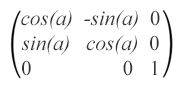
matrix(cos(α),sin(α),-sin(α),cos(α),0,0), where α is the angle around the point with coordinates (0, 0) of the initial coordinate system.
Look at the example with the initial blue rectangle rotated by 90° (green), 180° (grey), 270° (teal), -45° (red), and 135° (orange):
 1<svg viewBox="-50 -50 200 200" xmlns="http://www.w3.org/2000/svg">
 2	<!-- rotation around point with coordinates (0, 0) is shown in fig.a -->
 3    <g>
 4	  <rect x="0" y="0" width="20" height="20" fill="blue" />
 5	  <rect x="0" y="0" width="20" height="20" fill="green" transform="matrix(0,1,-1,0,0,0)" />
 6	  <rect x="0" y="0" width="20" height="20" fill="grey" transform="matrix(-1,0,0,-1,0,0)" />
 7	  <rect x="0" y="0" width="20" height="20" fill="teal" transform="matrix(0,-1,1,0,0,0)" />
 8	  <rect x="0" y="0" width="20" height="20" fill="red" transform="matrix(0.7071,-0.7071,0.7071,0.7071,0,0)" />
 9	  <rect x="0" y="0" width="20" height="20" fill="orange" transform="matrix(-0.7071,0.7071,-0.7071,-0.7071,0,0)" />
10	<!-- rotation around point with coordinates (0, 0) is shown in fig.b -->
11    </g>
12	<g transform="translate(70)">
13	  <rect x="5" y="5" width="20" height="20" fill="blue" />
14	  <rect x="5" y="5" width="20" height="20" fill="green" transform="matrix(0,1,-1,0,0,0)" />
15	  <rect x="5" y="5" width="20" height="20" fill="grey" transform="matrix(-1,0,0,-1,0,0)" />
16	  <rect x="5" y="5" width="20" height="20" fill="teal" transform="matrix(0,-1,1,0,0,0)" />
17	  <rect x="5" y="5" width="20" height="20" fill="red" transform="matrix(0.7071,-0.7071,0.7071,0.7071,0,0)" />
18	  <rect x="5" y="5" width="20" height="20" fill="orange" transform="matrix(-0.7071,0.7071,-0.7071,-0.7071,0,0)" />
19	</g>
20    <!-- rotation around point with coordinates (5, 5) is shown in fig.c -->
21	<g transform="translate(140)">
22	  <rect x="5" y="5" width="20" height="20" fill="blue" />
23	  <rect x="5" y="5" width="20" height="20" fill="green" transform="matrix(0,1,-1,0,10,0)" />
24	  <rect x="5" y="5" width="20" height="20" fill="grey" transform="matrix(-1,0,0,-1,10,10)" />
25	  <rect x="5" y="5" width="20" height="20" fill="teal" transform="matrix(0,-1,1,0,0,10)" />
26	  <rect x="5" y="5" width="20" height="20" fill="red" transform="matrix(0.7071,-0.7071,0.7071,0.7071,-2,5)" />
27	  <rect x="5" y="5" width="20" height="20" fill="orange" transform="matrix(-0.7071,0.7071,-0.7071,-0.7071,12,5)" />
28	</g>
29</svg>
Note: If we use a positive angle value, then the rotation will be clockwise, and conversely, a negative angle value gives us counterclockwise spin.
The result of SVG rotation can be seen on the figure:
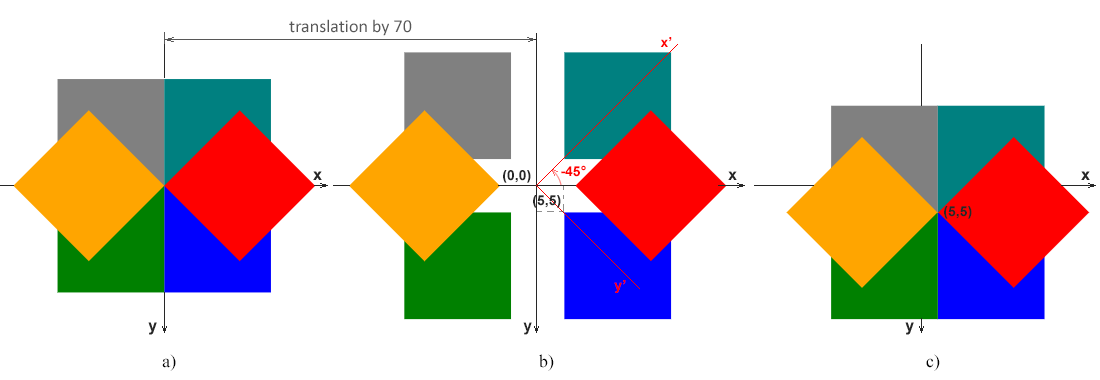
(0, 0) matches the coordinate system origin (0, 0).(5, 5), away from the origin. The global x-y axes apply to all three figures, and the red x’-y’ axes show the coordinate system after a 45-degree counterclockwise rotation (α=-45°).(5, 5), so the pivot follows the rectangle instead of the global origin.Note: The following matrix will rotate the object around the pivot point (cx, cy):
matrix(cos(α), sin(α), -sin(α), cos(α), cx·(1-cos(α))+cy·sin(α), cy·(1-cos(α))-cx·sin(α))
The cx·(1-cos(α))+cy·sin(α) and cy·(1-cos(α))-cx·sin(α) coefficients provide the translation needed to rotate around the pivot point. Let’s calculate these values for the red rectangle (fig. c). The pivot point (cx, cy) in this example is (5, 5) – the top-left corner of the blue (initial) rectangle, and the angle for red rectangle is -45°:
cos(-45°)=0.7071, sin(-45°)=-0.7071
cx·(1-cos(α))+cy·sin(α)=5·(1-0.7071)+5·(-0.7071)=-2cy·(1-cos(α))-cx·sin(α)=5·(1-0.7071)-5·(-0.7071)=5
Skewing is a transformation that rotates one of the axes of the element’s coordinate system by a certain angle α clockwise or counterclockwise. SVG elements can be skewed through the use of the skewing matrix that looks like this:
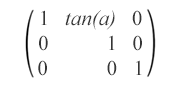
matrix(1,0,tan(α),1,0,0) – This skew matrix specifies a skew transformation along the x-axis by α degrees.
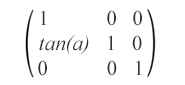
matrix(1,tan(α),0,1,0,0) – This skew matrix specifies a skew transformation along the y-axis by α degrees.
Here is shown an example of the circle with skew transformations:
 1<svg viewBox="0 0 200 200" xmlns="http://www.w3.org/2000/svg">
 2	<g fill="none">
 3		<circle cx="20" cy="20" r="10" stroke="blue" />
 4		<!-- skew transformation along the x-axis by α=45° -->
 5		<circle cx="20" cy="20" r="10" stroke="red" transform="matrix(1,0,1,1,0,0)" />
 6	</g>
 7	<g fill="none" transform="translate(70)">
 8		<circle cx="20" cy="20" r="10" stroke="blue" />
 9		<!-- skew transformation along the y-axis by α=45° -->
10		<circle cx="20" cy="20" r="10" stroke="orange" transform="matrix(1,1,0,1,0,0)" />
11	</g>
12</svg>
The rendered example looks like:
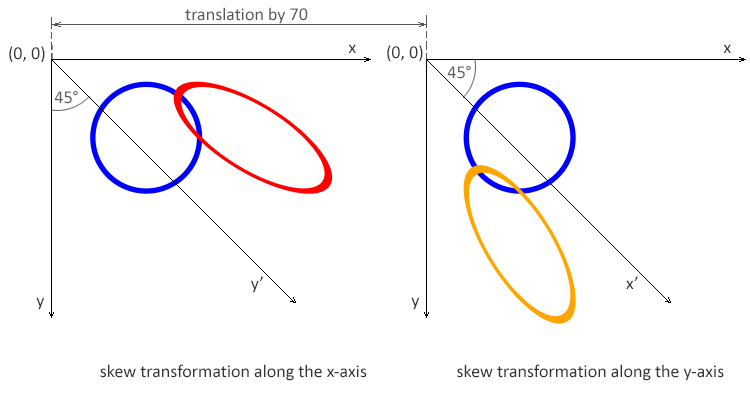
Note: The angle α represents a skew transformation in degrees. With the x-axis skew matrix, x coordinates change while y coordinates remain unchanged. With the y-axis skew matrix, y coordinates change while x coordinates remain unchanged.
| Problem | Cause | Solution |
|---|---|---|
| Transformation works but object moves unexpectedly | Transformations are applied relative to the origin (0,0) | Translate the object to the desired pivot point before applying scale or rotation |
| Rotation happens around the wrong point | Rotation matrix is applied without compensating translation | Combine translation → rotation → reverse translation in a single matrix |
| Scaling distorts position | Scaling is applied without adjusting translation values | Adjust e and f values or scale around a specific point |
| Matrix produces no visible effect | Matrix values are incorrect or equal to the identity matrix | Verify that matrix values differ from 1 0 0 1 0 0 |
| Multiple transforms override each other | Matrix replaces previous transform operations | Combine transformations into a single matrix or apply them in the correct order |
| Unexpected skewing | Incorrect b or c values | Ensure skew values are intentional and match the desired angle |
| Difficult to debug transformations | Matrix values are hard to interpret | Start with simple transformations (translate, scale) and build up gradually |
| Goal | Matrix | Notes |
|---|---|---|
| No transformation (identity) | matrix(1 0 0 1 0 0) | Resets all transformations |
| Translate by (tx, ty) | matrix(1 0 0 1 tx ty) | Moves the object without scaling or rotation |
| Scale uniformly by s | matrix(s 0 0 s 0 0) | Scales relative to the origin |
| Scale by (sx, sy) | matrix(sx 0 0 sy 0 0) | Non-uniform scaling |
| Scale around point (cx, cy) | matrix(s 0 0 s cx*(1-s) cy*(1-s)) | Keeps the center point fixed |
| Rotate by θ (around origin) | matrix(cosθ sinθ -sinθ cosθ 0 0) | θ is in radians |
| Rotate around point (cx, cy) | matrix(cosθ sinθ -sinθ cosθ cx-cx*cosθ+cy*sinθ cy-cx*sinθ-cy*cosθ) | Most common rotation case |
| Skew horizontally by θ | matrix(1 0 tanθ 1 0 0) | Skews along the x-axis |
| Skew vertically by θ | matrix(1 tanθ 0 1 0 0) | Skews along the y-axis |
| Mirror horizontally | matrix(-1 0 0 1 w 0) | w is the object width |
| Mirror vertically | matrix(1 0 0 -1 0 h) | h is the object height |
| Combine scale + rotate | matrix(a b c d e f) | Precompute combined values |
The six matrix values work together as one transform and are interpreted in the current SVG coordinate system.
Translate an object by (tx, ty)
1<rect x="50" y="50" width="100" height="60" transform="matrix(1 0 0 1 40 30)" />Scale an object by 2× (uniform)
1<rect x="50" y="50" width="80" height="40" transform="matrix(2 0 0 2 0 0)" />Scale an object around its center (cx, cy)
1<rect x="50" y="50" width="100" height="60" transform="matrix(2 0 0 2 -100 -80)" />(Translation compensates for scaling around the center.)
Rotate an object by 45° around the origin
1<rect x="50" y="50" width="100" height="60" transform="matrix(0.707 0.707 -0.707 0.707 0 0)" />Rotate around a specific point (cx, cy)
1<rect x="50" y="50" width="100" height="60" transform="matrix(0.707 0.707 -0.707 0.707 85 -35)" />Apply horizontal skew
1<rect x="40" y="40" width="120" height="60" transform="matrix(1 0 0.5 1 0 0)" />Combine translation, scaling, and rotation
1<rect x="30" y="30" width="100" height="60" transform="matrix(1.5 0.5 -0.5 1.5 40 20)" />matrix(a,b,c,d,e,f) is the SVG transform function that stores scaling, skewing, rotation, and translation in six values. Values a, b, c, and d affect scale, skew, and rotation; e and f move the element.
The identity matrix is matrix(1 0 0 1 0 0). It leaves the element unchanged and is a useful starting point when building a transformation matrix step by step.
Matrix transformations are applied relative to the current coordinate system origin. Scaling or rotating an object away from (0,0) can also change its visible position unless e and f compensate for the pivot point.
Use separate functions such as translate(), scale(), and rotate() when you want readable SVG markup. Use matrix() when values are calculated, exported by a tool, or need to combine several transformations into one transform.
translate(), scale(), rotate(), skewX(), and skewY() examples.
Analyzing your prompt, please hold on...
An error occurred while retrieving the results. Please refresh the page and try again.