

Analyzing your prompt, please hold on...
An error occurred while retrieving the results. Please refresh the page and try again.
嵌入内容是从其他资源导入到文档中的内容。 SVG <image> 和 <foreignObject> 元素用于 SVG 嵌入内容支持。
SVG <image> 元素允许在 SVG 对象中包含和渲染位图。它也可以显示图像格式 JPEG、PNG 和 SVG 图片。 <image> 元素的属性指示文件(位图)的内容应显示在当前用户坐标系内的给定矩形(“窗口”)中。
主要属性有:
x 和 y – 图像左上角的坐标。
width 和 height – 用于图像渲染的“窗口”的宽度和高度。这些属性是必需的。
href 和 xlink:href – 指向图像文件的 URL。
preserveAspectRatio – 控制图像的缩放方式。
如何使用 SVG <image> 元素?以下代码片段显示为可以嵌入 SVG 文档中的 .png 和 .svg 图像:
1<svg width="500" height="400" xmlns="http://www.w3.org/2000/svg">
2    <image href="https://docs.aspose.com/svg/images/svg.png" x="20" y="20" height="180" width="180" />
3    <image href="https://docs.aspose.com/svg/files/shapes.svg" x="250" y="10" height="350" width="350" />
4    <text x="40" y="250">Embedded PNG image</text>
5    <text x="300" y="250">Embedded SVG image</text>
6</svg>
上面的代码片段显示如下:
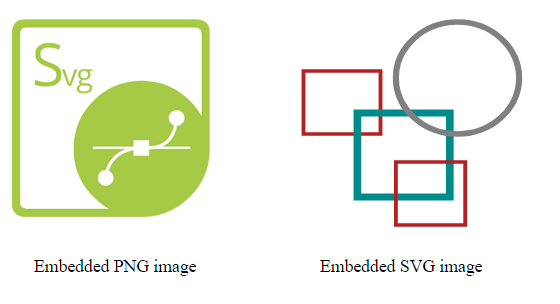
SVG 设计为与其他 XML 语言一致,用于描述和呈现嵌入内容。 <foreignObject> 元素允许在 SVG 文件中包含非 SVG 命名空间中的元素。在浏览器上下文中,它很可能是 HTML。外部图形内容可以通过转换、过滤、剪切、屏蔽和合成进行处理。
作为属性,您必须指定 <foreignObject> 容器的 x、y 坐标、width 和 height。否则,子元素将根本不会显示。
让我们看一个例子:
 1<svg viewBox="0 0 300 300" xmlns="http://www.w3.org/2000/svg">
 2    <style>
 3        div {
 4            color: grey;
 5            font: 14px serif;
 6            }
 7    </style>
 8    <circle cx="65" cy="60" r="60" fill="red" fill-opacity="0.1" />
 9    <!-- example of  HTML text embedding in SVG -->
10    <foreignObject x="20" y="20" width="200" height="180">
11    <!--In the context of HTML embedded in the SVG document, the XHTML namespace is mandatory-->
12        <div xmlns="https://www.w3.org/1999/xhtml">
13        Convert SVG to PNG. Aspose.SVG for .NET can read and convert SVG files to PNG, PDF, XPS, and major image formats.
14        </div>
15    </foreignObject>
16</svg>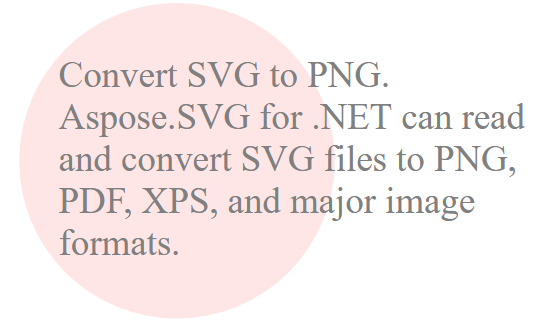
在 SVG 中使用“
<div xmlns="https://www.w3.org/1999/xhtml">
Aspose.SVG 提供 SVG 免费 Web 应用程序,用于转换 SVG 或图像文件、合并 SVG 文件、图像矢量化、SVG 精灵生成、SVG 到 Base64 数据编码以及文本矢量化。这些在线应用程序可在任何带有网络浏览器的操作系统上运行,不需要安装额外的软件。这是一种快速、简单的方法,可以高效、有效地解决您的 SVG 相关任务!

Analyzing your prompt, please hold on...
An error occurred while retrieving the results. Please refresh the page and try again.