

Analyzing your prompt, please hold on...
An error occurred while retrieving the results. Please refresh the page and try again.
Aspose.SVG Builder API 允许开发人员使用 fluent builder 语法在 C# 中以编程方式创建和编辑 SVG 元素。与手动构造 SVG XML 或直接操作 DOM 属性相比,Element Builders 提供了一种更清晰、更易维护的 SVG 生成方式。
Builder API 支持常见 SVG 元素,例如矩形、圆、路径、线、多边形、文本和组。通过嵌套 builders 和链式方法,开发人员可以用更少的样板代码生成复杂的 SVG 图形,并提升代码可读性。
本文介绍如何使用 Aspose.SVG for .NET 在 C# 中创建 SVG 元素、以编程方式构建 SVG 图形,以及修改现有 SVG 文档。您将了解
SVGElementBuilder
Element Builders 是用于以编程方式创建 SVG 元素的专用 builder 类。每个 builder 对应一个特定的 SVG 元素,并提供强类型方法来配置 SVG 属性和样式。
Builder API 支持:
Fluent 语法简化了 SVG 生成,并提高了 .NET 应用程序中代码的可维护性。
| Builder | SVG 元素 |
|---|---|
| SVGSVGElementBuilder | <svg> |
| SVGRectElementBuilder | <rect> |
| SVGCircleElementBuilder | <circle> |
| SVGLineElementBuilder | <line> |
| SVGPathElementBuilder | <path> |
| SVGTextElementBuilder | <text> |
| SVGGElementBuilder | <g> |
| SVGPolygonElementBuilder | <polygon> |
| SVGPolylineElementBuilder | <polyline> |
完整的 SVG element builders 列表可在 API Reference Aspose.Svg.Builder 页面中查看。
Aspose.SVG SVG Builder API 使用 Fluent Builder Pattern,这种设计方法适合在 SVG 操作中实现简单、清晰和灵活的代码。
在 SVG Builder API 中,Fluent Builder Pattern 用于简化 SVG 元素的创建和更新,使过程更加直观并减少出错概率。该模式的核心是配置 SVG 元素并返回 builder 实例的方法,从而支持方法链调用。
在这种场景下,lambda 表达式可以提高 builder 配置方法的清晰度和简洁性。它们允许以详细但紧凑的方式定义 SVG 元素的属性和样式:
1    using (SVGDocument document = new SVGDocument())
2    {
3        SVGSVGElement svgElement = new SVGSVGElementBuilder()
4            .AddCircle(circle => circle
5                .Cx(100).Cy(100).R(50)
6                .Fill(Color.Red).Stroke(Paint.None)
7                .StrokeWidth(2))
8            .Build(document);
9 }这里,circle => circle.Cx(100).Cy(100).R(50).Fill(Color.Red).Stroke(Paint.None).StrokeWidth(2) 是配置圆心、半径、填充和描边的简洁方式。这种方法不仅简化了元素配置,还提高了代码的可读性和可维护性。
下面展示一种使用 C# 从头创建 SVG 的简洁方法。
1using Aspose.Svg.Builder;
2using System.Drawing;
3using System.IO; 1 // Create an SVG document from scratch using the SVG Builder API in C#
2
3 // Create an <svg> element with specified width, height and viewBox, and add into it other required elements
4 SVGSVGElement svg = new SVGSVGElementBuilder()
5 .Width(700).Height(300)
6 .ViewBox(0, 0, 700, 300)
7
8 .AddG(g => g
9 .AddCircle(circle => circle.Cx(130).Cy(130).R(60).Fill(Paint.None).Stroke(Color.FromArgb(200, 0, 0)).StrokeWidth(70).StrokeDashArray(2, 14))
10 .AddText("I can create SVG from scratch!", x: 270, y: 140, fontSize: 30, fill: Color.Teal)
11 )
12 .Build(document.FirstChild as SVGSVGElement);
13
14 // Save the document
15 document.Save(Path.Combine(OutputDir, "svg-from-scratch.svg"));
16}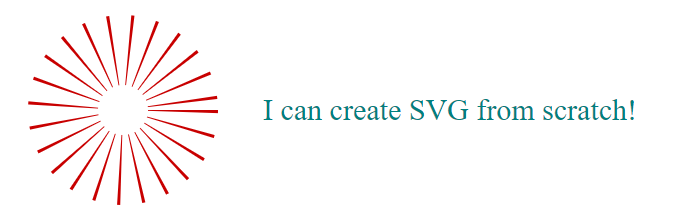
该示例使用 SVGSVGElementBuilder 中的 Fluent Builder Pattern 构建 SVG 元素。与 编辑 SVG 文件 文章中更依赖低层 DOM 操作和显式属性设置的方法相比,这种模式为生成 SVG 文档提供了一种极具表现力且易于维护的方式。此方法:
cx、cy、r 和 fill 等属性可直接通过 builder 方法设置。使用 Element Builders 是以编程方式编辑 SVG 的一种强大方法。
使用 Element Builders 编辑 SVG 为以编程方式操作矢量图形提供了灵活的方法。以下示例打开现有 SVG 文件,添加元素并保存:
1using Aspose.Svg.Builder;
2using System.Drawing;
3using System.IO; 1// Add circle and polyline elements to an existing SVG using SVG Builder in C#
2
3string documentPath = Path.Combine(DataDir, "circles.svg");
4
5// Initialize an SVG document
6using (SVGDocument document = new SVGDocument(documentPath))
7{
8 // Create a <circle> element with attributes
9 SVGCircleElement circle = new SVGCircleElementBuilder()
10 .Cx(350).Cy(70).R(50).Fill(Paint.None).Stroke(Color.FromArgb(80, 132, 132)).StrokeWidth(10)
11 .Build(document);
12
13 // Append the newly created <circle> element to the root <svg> element
14 document.RootElement.AppendChild(circle);
15
16 // Create a <polyline> element with attributes
17 SVGPolylineElement polyline = new SVGPolylineElementBuilder()
18 .Points(new double[] { 125, 130, 275, 180, 425, 130 }).Stroke(Color.FromArgb(80, 132, 132)).Fill(Paint.None).StrokeWidth(10)
19 .Build(document);
20
21 // Append the newly created <polyline> element to the root <svg> element
22 document.RootElement.AppendChild(polyline);
23
24 // Save the document
25 document.Save(Path.Combine(OutputDir, "circles-edited.svg"));
26}在此示例中:
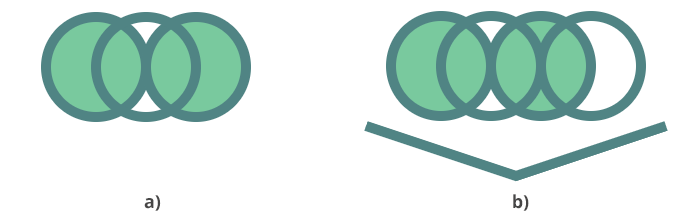
<circle> 元素,并通过 fluent 方法配置 cx、cy、r、fill、stroke 和 stroke-width 属性。<polyline> 元素,并以编程方式定义点和描边设置。Document document) 方法会构建该元素并将其返回,以便添加到文档中。<circle> 和 <polyline> 元素被追加为 SVG 文档根 <svg> 元素的子元素。图 (a) 显示原始 circles.svg 文件,图 (b) 显示添加了圆和折线后的 circles-edited.svg 文件。
在下面的 C# 示例中,我们通过更改文档中第一个 SVG <circle> 元素的填充和描边颜色来更新现有 SVG 文档:
1using Aspose.Svg;
2using Aspose.Svg.Builder;
3using System.Drawing;
4using Aspose.Svg.Dom.Svg;
5using System.Linq;
6using System.IO; 1// Modify an existing SVG circle element using SVG Builder in C#
2
3string documentPath = Path.Combine(DataDir, "circles.svg");
4
5// Initialize an SVG document
6using (SVGDocument document = new SVGDocument(documentPath))
7{
8 // Assume an existing SVG element is part of the document
9 SVGCircleElement circle = document.GetElementsByTagName("circle").First() as SVGCircleElement;
10
11 // Modify the first <circle> element using SVGCircleElementBuilder
12 new SVGCircleElementBuilder()
13 .Stroke(Color.DarkRed).Fill(Color.LightGray)
14
15 // The first <circle> element is now updated with new configurations
16 .Build(circle);
17
18 // Save the document
19 document.Save(Path.Combine(OutputDir, "circles-modified.svg"));
20}Element Builders 提供
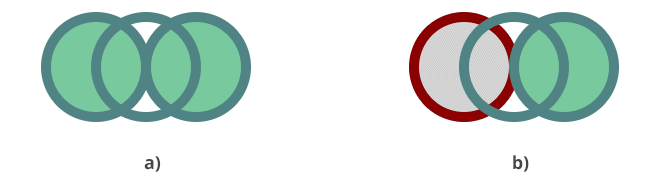
Build(T element) 方法,用于更新现有 SVG 元素并修改其属性或样式。图 (a) 显示原始 circles.svg 文件,图 (b) 显示第一个圆被重新着色后的 circles-modified.svg 文件。
以下代码片段展示如何使用 Element Builders 创建包含各种 SVG 形状元素的 SVG 文档。
1using Aspose.Svg;
2using Aspose.Svg.Builder;
3using System.Drawing;
4using Aspose.Svg.Dom.Svg;
5using System.IO; 1// Create basic SVG shapes programmatically using SVG Builder in C#
2
3string svgContent = "<svg xmlns=\"http://www.w3.org/2000/svg\"></svg>";
4using (SVGDocument document = new SVGDocument(svgContent, "."))
5{
6 SVGSVGElement svg = new SVGSVGElementBuilder()
7 .Width(100, LengthType.Percentage).Height(100, LengthType.Percentage)
8 .ViewBox(0, 0, 800, 800)
9
10 .AddG(g => g.FontSize(20).TextAnchor(TextAnchor.End)
11 .AddText("<rect>", y: 30)
12 .AddText("<circle>", y: 70)
13 .AddText("<ellipse>", y: 110)
14 .AddText("<line>", y: 150)
15 .AddText("<polyline>", x: 300, y: 30)
16 .AddText("<polygon>", x: 300, y: 70)
17 .AddText("<path>", x: 300, y: 110)
18 )
19
20 .AddG(gg => gg.Fill(Color.Teal).StrokeWidth(3)
21 .AddRect(r => r.X(35).Y(5).Width(30).Height(30))
22 .AddCircle(c => c.Cx(50).Cy(60).R(17))
23 .AddEllipse(e => e.Cx(50).Cy(100).Rx(25).Ry(12))
24 .AddLine(l => l.X1(30).X2(70).Y1(140).Y2(140).Stroke(Color.Teal))
25 )
26 .AddG(ggg => ggg.Fill(Paint.None).StrokeWidth(3).Stroke(Color.Teal).Transform(t => t.Translate(300, -160))
27 .AddPolygon(points: new double[] { 30, 215, 90, 215, 120, 230, 70, 240, 30, 215 }, fill: Color.Teal)
28 .AddPolyline(points: new double[] { 30, 200, 65, 170, 90, 190, 120, 180 })
29 .AddPath(d: path => path.M(30, 275).Q(55, 250, 70, 250).T(80, 275).T(120, 260))
30 )
31
32 .Build(document.FirstChild as SVGSVGElement);
33 document.Save(Path.Combine(OutputDir, "svg-elements.svg"));
34}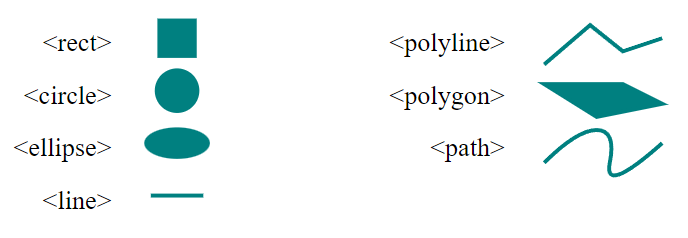
Element Builders 提供流畅且表达性强的语法来构建 SVG 元素,从而提高代码的可读性和可维护性。在此示例中,SVGSVGElementBuilder 构建带有 width、height 和 viewBox 属性的 SVG 元素。随后使用 Fluent Builder Pattern 创建矩形、圆、椭圆、线、折线、多边形和路径,并在 <g> 元素中设置位置和样式。
| DOM 操作 | Builder API |
|---|---|
| 手动处理属性 | 强类型方法 |
| 代码更冗长 | Fluent 链式语法 |
| 更难维护 | 更易阅读 |
| 重复 XML 操作 | 可复用的 builder 逻辑 |
1. 为什么开发人员使用 Builder APIs 而不是直接生成 XML?
Builder APIs 使用类型化 fluent 方法替代手动 XML 构造,使 SVG 代码更易阅读、维护和扩展。
2. 生成的 SVG 是否符合标准?
是。Aspose.SVG 生成基于标准的 SVG 标记,并与现代 SVG 渲染引擎兼容。
3. 可以使用 Element Builders 生成交互式 SVG 图形吗?
可以。生成的 SVG 元素之后可以在 Web 应用程序中使用 CSS 和 JavaScript 进行样式设置、动画处理或操作。
4. 生成的 SVG 图形可以直接嵌入 HTML 页面吗?
可以。使用 Aspose.SVG 创建的 SVG 文档可以内联嵌入 HTML,也可以作为独立 SVG 文件使用。
| 问题 | 可能原因 | 建议修复 |
|---|---|---|
| SVG 元素不可见 | 缺少填充或描边 | 应用 Fill() 或 Stroke() |
| SVG 更改未保存 | 修改后未保存文档 | 更新后调用 document.Save() |
| 元素出现在画布之外 | 坐标或 viewBox 不正确 | 检查 SVG 尺寸和位置 |
| 现有元素未更新 | 元素引用不正确 | 确保正确获取目标 SVG 元素 |
| 形状显示变形 | viewBox 比例无效 | 使用一致的 SVG 坐标系统 |
stroke 或 fill 属性的值。
Analyzing your prompt, please hold on...
An error occurred while retrieving the results. Please refresh the page and try again.