

Analyzing your prompt, please hold on...
An error occurred while retrieving the results. Please refresh the page and try again.
SVG 文档通过 <style> 元素支持 CSS 样式,因此开发人员可以将可复用的视觉规则应用到 SVG 图形。使用 Aspose.SVG Builder API,您可以在 C# 中以编程方式配置 SVG 样式,而无需手动编写 CSS 字符串。
本文介绍如何在 C# 中创建 SVG 样式规则、将 CSS 选择器应用到 SVG 元素、配置自定义字体,以及使用 Aspose.SVG for .NET 以编程方式管理可复用的 SVG 样式。
RuleBuilder 是 Aspose.SVG Builder API 的一部分,用于以编程方式配置 SVG 样式规则中的 CSS 声明。它与 SVGStyleElementBuilder 一起使用,使开发人员能够:
<style> 元素;集中管理 CSS 规则可以简化 SVG 维护,并减少重复的样式代码。
Aspose.SVG Builder API 提供
SVGStyleElementBuilder 类,它是用于构造 SVG <style> 元素的元素 builder。该类便于创建和配置带有 CSS 规则的 SVG <style> 元素。
此示例展示如何创建 SVG <style> 元素,向其中添加 CSS 规则 @font-face,并使用
AddRule() 方法为 SVG 文档中的文本元素定义字体样式:
1using Aspose.Svg.Builder;
2using System.Drawing;
3using System.IO; 1// Configure SVG styles with external @font-face rules using Rule Builder in C#
2
3// Initialize an SVG document
4using (SVGDocument document = new SVGDocument())
5{
6 // Create an <svg> element and use Builder API to add other rules and elements to it
7 SVGSVGElement svg = new SVGSVGElementBuilder()
8
9 .AddDefs(def => def
10 .AddStyle(st => st
11 .Type("text/css")
12 .AddRule("@font-face", r => r
13 .FontFamily("VeinlineRegular")
14 .Attribute("src", "url(https://assets.ithillel.ua/wiki/VeinlineRegular.ttf)")
15 )
16 .AddRule("text", t => t
17 .FontFamily("VeinlineRegular")
18 .FontSize(30, LengthType.Pt)
19 )
20 )
21 )
22 .AddText(t => t
23 .X(20).Y(60).Fill(Color.DarkRed).FontWeight(FontWeight.Bold)
24 .AddContent("Configure SVG Style")
25 )
26 .AddText(t => t
27 .X(20).Y(150)
28 .AddContent("Set your SVG style with Rule Builder!")
29 )
30 .Build(document.FirstChild as SVGSVGElement);
31
32 // Save the SVG document
33 document.Save(Path.Combine(OutputDir, "font-face.svg"));
34}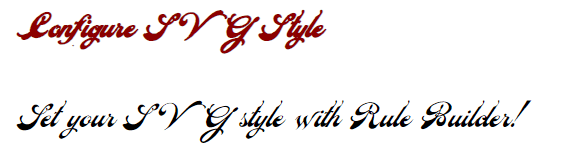
@font-face CSS 规则允许您指定用于显示文本的字体,这些字体可以从远程服务器或用户计算机下载。该规则定义自定义字体系列名称,并指定字体文件的源 URL。
font-family CSS 属性。它指定用于匹配文本元素的字体名称。RuleBuilder 类的
Attribute() 方法在 @font-face 规则内设置 src CSS 描述符,并提供字体文件的源 URL。在上面的示例中,@font-face 规则定义了名为 "VeinlineRegular" 的自定义字体系列。该规则确保字体已加载并可在 SVG 文档中使用。
AddRule() 方法属于 SVGStyleElementBuilder,用于在 SVG 文档中创建 CSS 规则。它接受两个参数: CSS 选择器名称,以及使用 RuleBuilder 定义样式属性的 lambda 表达式。
在上面的 C# 示例中,添加了两条规则:
SVG Builder API 引入了语法糖 (syntactic sugar),以进一步完善 SVG 创建和操作的过程。这包括针对各种 SVG 元素的嵌套 builder,提供了一种更直观、更高效的方式来定义复杂的 SVG 结构。“builder within a builder”模式涉及使用多个 builder 类,其中一个 builder 嵌套在另一个 builder 中,以方便构建复杂的对象或结构。
以下代码片段演示如何使用 RuleBuilder 作为 builder 内部 builder 的示例,以编程方式创建 SVG 图形并设置其样式:
SVGStyleElementBuilder 的
AddRule() 方法按选择器定义 CSS 规则,例如 “circle” 或 “text”。在每个 lambda 表达式中,
RuleBuilder 配置填充颜色、描边颜色和字体系列等声明,并将其应用到匹配的 SVG 元素。1using Aspose.Svg.Builder;
2using System.Drawing;
3using System.IO; 1// Create styled SVG circle and text elements using the Rule Builder API in C#
2
3// Initialize an SVG document
4using (SVGDocument document = new SVGDocument())
5{
6 // Create an <svg> element and use Builder API to add other rules and elements to it
7 SVGSVGElement svg = new SVGSVGElementBuilder()
8
9 .AddStyle(st => st
10 .AddRule("circle", r => r
11 .Fill(paint: Paint.None)
12 .Stroke(color: Color.DarkRed)
13 .StrokeWidth(60)
14 )
15 .AddRule("text", t => t
16 .Fill(color: Color.Red)
17 .Stroke(color: Color.Teal)
18 .StrokeWidth(1)
19 .FontFamily("Arial")
20 .FontSize(30, LengthType.Pt)
21 )
22 )
23 .AddG(g => g
24 .AddCircle(circle => circle.Cx(100).Cy(130).R(60).StrokeDashArray(2, 14))
25 .AddText("Rule Builder", x: 230, y: 140)
26 )
27 .Build(document.FirstChild as SVGSVGElement);
28
29 // Save the SVG document
30 document.Save(Path.Combine(OutputDir, "rule-builder.svg"));
31}AddRule() 方法在 SVG <style> 元素中创建可复用的 CSS 规则。在此示例中:
"circle" 选择器为所有 SVG circle 元素设置样式;"text" 选择器配置 SVG 文本的排版;这种方法将样式逻辑与 SVG 结构分离,并提高 SVG 的可读性。
| 问题 | 可能原因 | 建议修复 |
|---|---|---|
| SVG 样式未应用 | CSS 选择器不正确 | 确保 AddRule() 指向正确的 SVG 元素 |
| 自定义字体未显示 | 字体 URL 无效 | 检查字体文件路径和可访问性 |
| 文本渲染在不同系统中不同 | 所需字体不可用 | 使用嵌入字体或 Web 加载字体 |
| SVG 元素忽略样式规则 | Inline 属性覆盖 CSS | 移除冲突的 inline 样式 |
| 缺少描边或填充样式 | 样式属性配置不正确 | 检查 Fill() 和 Stroke() 规则 |
1. RuleBuilder 是否比 SVG inline 样式更好?
对于复杂 SVG 图形,可复用的 CSS 规则通常比重复的 inline 属性更易维护。Rule Builder 有助于集中管理 SVG 样式逻辑并减少重复代码。
2. 可以使用 RuleBuilder 设置 SVG 类和 ID 的样式吗?
可以。AddRule() 支持标准 CSS 选择器,包括元素选择器、类选择器和 ID 选择器。
3. 为什么在 SVG 内部使用 CSS 规则,而不是外部 CSS 文件?
嵌入式 SVG 样式使 SVG 图形自包含,更便于在应用程序、导出文件和独立 SVG 文件中复用。
4. 可以为多个元素复用同一个 SVG 样式块吗?
可以。单个 SVG <style> 块可以通过共享选择器将可复用规则应用到多个 SVG 元素。
stroke 或 fill 属性的值。
Analyzing your prompt, please hold on...
An error occurred while retrieving the results. Please refresh the page and try again.