

Analyzing your prompt, please hold on...
An error occurred while retrieving the results. Please refresh the page and try again.
填充和描边是 SVG 中两个核心绘制操作。形状、paths 和文本可以用 fill 绘制内部区域,用 stroke 绘制轮廓。它们既可以写成 presentation attributes,例如 fill="red",也可以写在 CSS style 属性中。
本文解释 SVG fill 和 stroke 的工作方式,说明 properties 与 attributes 的区别,并展示如何实际控制颜色、不透明度、线宽、线帽、连接和虚线模式。
本文将学习:
fill 绘制 SVG 形状、paths 和文本的内部区域。stroke 和 stroke-width 绘制轮廓。SVG 形状渲染时,绘制通常分两步进行:
两者都是可选的:
SVG 颜色可以使用颜色名称、HEX、RGB、currentColor、渐变或图案。下面的示例展示在 SVG 标记中书写 fill 和 stroke 值的几种方式。
在 SVG 中,fill 和 stroke 是 CSS properties,但可以用不同方式应用。
fill、stroke-width。| 概念 | 示例 |
|---|---|
| CSS property | fill, stroke, stroke-width |
| Presentation attribute | fill="red" stroke="#00ff00" stroke-width="2" |
| Inline CSS | style="fill:red; stroke:#00ff00; stroke-width:2" |
本文中:
简单 SVG 标记适合使用 presentation attributes;当多个样式属性需要集中在同一个元素上时,可以使用 inline CSS。两种形式在 SVG 文件中都很常见。
<path>、<rect>、<circle>、<polyline> 或 <text>。fill 绘制内部区域;如果只需要轮廓,使用 fill="none"。stroke 定义轮廓颜色。stroke-width 让轮廓可见并控制粗细。stroke-linecap、stroke-linejoin 或 stroke-dasharray。fill-opacity 和 stroke-opacity。fill property 定义形状或文本内部如何被绘制。它适用于 <rect>、<circle>、<path> 等 SVG 形状以及文本元素。如果未指定 fill,默认值是 black。
| 值 | 说明 | 示例 |
|---|---|---|
| color value | 用纯色填充形状 | fill="red" |
none | 禁用填充 | fill="none" |
url(#id) | 使用 paint server,例如渐变或图案 | fill="url(#gradient1)" |
currentColor | 使用当前文本颜色 | fill="currentColor" |
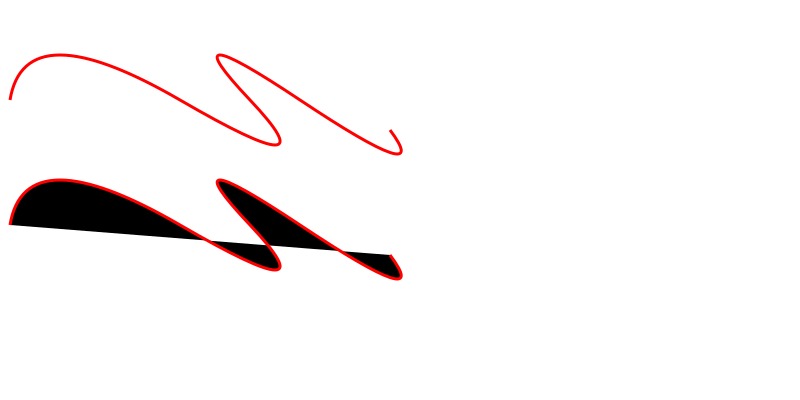
下面的示例比较 fill="none" 的 path 与未显式设置 fill 的同一 path(
two-paths.svg):
1<svg height="400" width="800" xmlns="http://www.w3.org/2000/svg">
2    <path d="M 10 100 Q 25 10 180 100 T 250 100 T 300 100 T 390 130" stroke="red" stroke-width="3" fill="none" />
3    <path d="M 10 100 Q 25 10 180 100 T 250 100 T 300 100 T 390 130" stroke="red" stroke-width="3" transform="translate(0 125)" />
4</svg>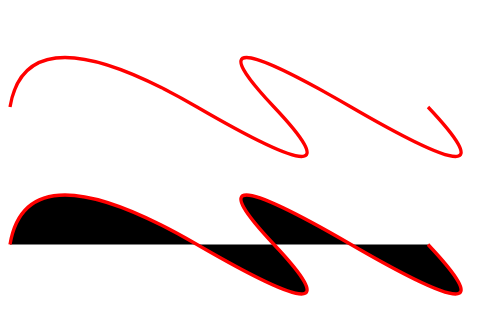
stroke property 定义形状轮廓使用的绘制颜色。与 fill 不同,stroke 默认是关闭的。stroke 位于形状路径中心,向内外两侧等量扩展。
| Property | 说明 | 示例 |
|---|---|---|
stroke | 设置描边颜色 | stroke="red" |
stroke-width | 控制描边粗细 | stroke-width="5" |
stroke-linecap 的值对于任意线条,都可以设置端点形状。stroke-linecap property 定义 SVG 线条端点的渲染方式,有三个常用值:
| 值 | 外观 |
|---|---|
butt | 平直端点,正好结束在路径终点。 |
square | 平直端点,但向路径终点外延伸半个 stroke-width。 |
round | 半圆端点,半径等于 stroke-width 的一半。 |
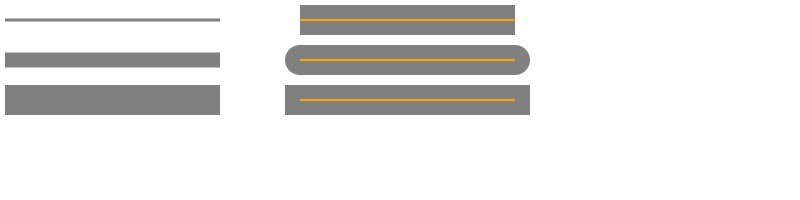
当线条有明显的 stroke-width 时,效果最容易看清。下面的示例展示 stroke-width 和 stroke-linecap 如何定义描边粗细与端点形状(
lines.svg)。
 1<svg height="200" width="800" xmlns="http://www.w3.org/2000/svg">
 2  <g stroke="grey">
 3    <path stroke-width="3" d="M 5 20 l 215 0" />
 4    <path stroke-width="15" d="M 5 60 l 215 0" />
 5    <path stroke-width="30" d="M 5 100 l 215 0" />
 6  </g>
 7 <g stroke="grey" stroke-width="30">
 8    <path stroke-linecap="butt" d="M 300 20 l 215 0" />
 9    <path stroke-linecap="round" d="M 300 60 l 215 0" />
10    <path stroke-linecap="square" d="M 300 100 l 215 0" />
11  </g>
12  <g stroke="orange" stroke-width="2">
13    <line x1="300" y1="20" x2="515" y2="20" />
14    <path d="M 300 60 l 215 0" />
15    <path d="M 300 100 l 215 0" />
16  </g>
17</svg>在示例中,<g> 元素为多个子 path 设置共享 properties,例如 stroke 和 stroke-width。
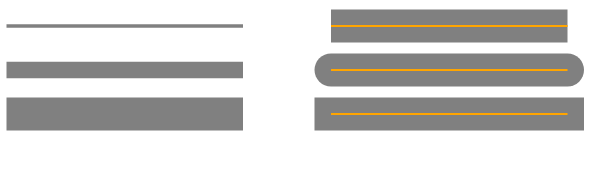
橙色辅助线显示原始 paths,灰色描边显示 stroke width 和 line caps 如何改变最终渲染效果。
stroke-linejoin 的值stroke-linejoin property 控制两个描边线段相交处的拐角形状。它有三个常用值:
| 值 | 说明 |
|---|---|
miter | 外边缘延伸成尖角,默认值。 |
round | 用半个 stroke width 半径圆滑拐角。 |
bevel | 切掉尖角,形成平边。 |
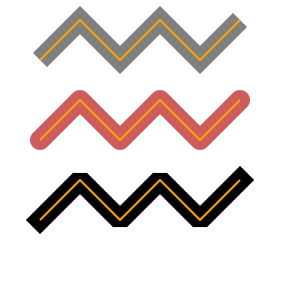
下一个示例展示 stroke-linejoin 的效果(
linejoin.svg):
 1<svg width="300" height="300" xmlns="http://www.w3.org/2000/svg">
 2    <g stroke-width="20" fill="none">
 3        <polyline points="40 60 80 20 120 60 160 20 200 60 240 20" stroke="grey" stroke-linecap="butt"  stroke-linejoin="miter" />
 4        <polyline points="40 140 80 100 120 140 160 100 200 140 240 100" stroke="#CD5C5C" stroke-linecap="round" stroke-linejoin="round" />
 5        <polyline points="40 220 80 180 120 220 160 180 200 220 240 180" stroke="black"  stroke-linecap="square" stroke-linejoin="bevel" />
 6    </g>
 7    <g fill="none" stroke="orange" stroke-width="2">
 8        <polyline points="40 60 80 20 120 60 160 20 200 60 240 20" />
 9        <polyline points="40 140 80 100 120 140 160 100 200 140 240 100" />
10        <polyline points="40 220 80 180 120 220 160 180 200 220 240 180" />
11    </g>
12</svg>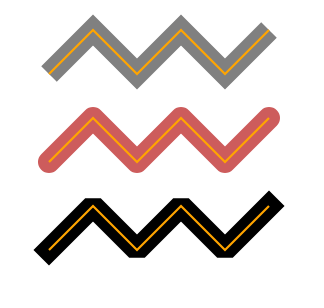
橙色线显示原始 polyline path,较粗的彩色轮廓显示围绕它渲染出的 stroke。
stroke-dasharraySVG stroke properties 可以应用到各种线条、文本以及圆、矩形等元素的轮廓。stroke-dasharray property 把实线变成“短线-间隔”的重复模式。属性接受一组数字,依次定义 dash 和 gap 的长度,单位为用户单位,通常近似像素。
1stroke-dasharray="10 5"   /* dash 10, gap 5 */
2stroke-dasharray="20 10 5"/* dash 20, gap 10, dash 5, then repeats */| Property | 说明 |
|---|---|
stroke-dasharray | 定义 dash 和 gap 模式 |
stroke-dashoffset | 移动虚线模式的起点 |
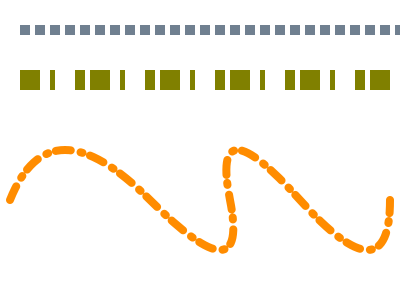
下面是使用 stroke-dasharray 的示例(
dasharray.svg):
1<svg width="400" height="300" xmlns="http://www.w3.org/2000/svg">
2    <line x1="20" y1="30" x2="400" y2="30" style="stroke:rgb(112, 128, 144); fill:none; stroke-width:10; stroke-dasharray:10 5;" />
3    <line x1="20" y1="80" x2="400" y2="80" style="stroke:olive; fill:none; stroke-width: 20; stroke-dasharray: 20 10 5;" />
4    <path d="M 10 200 Q 50 100 150 200 T 230 200 T 300 200 T 390 200" stroke="#FF8C00" stroke-width="8" fill="none" stroke-linecap="round" stroke-dasharray="15 10 2 8" />
5</svg>
灰色线和橙色 path 使用偶数个值:每一对表示 dash 长度和 gap 长度。如果列表包含奇数个值,SVG 会重复该列表以形成偶数模式。例如 20 10 5 会变成 20 10 5 20 10 5,橄榄色线展示了这一点。
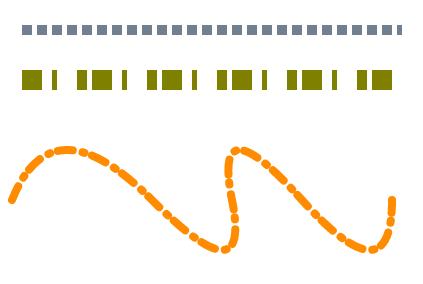
你可以继续尝试 stroke-dasharray 属性。SVG strokes 与简单 SVG 形状结合,可以得到很丰富的效果(
dasharray-example.svg):
 1<svg height="600" width="600" xmlns="http://www.w3.org/2000/svg">
 2    <g fill="none">
 3        <circle cx="100" cy="100" r="40" stroke="red" stroke-width="55" stroke-dasharray="4,2" />
 4        <circle cx="100" cy="100" r="30" stroke="grey" stroke-width="45" stroke-dasharray="5,2" transform="translate(120,40)" />
 5        <circle cx="100" cy="100" r="35" stroke="orange" stroke-width="45" stroke-dasharray="9,3" transform="translate(30,130)" />
 6        <circle cx="100" cy="100" r="20" stroke="pink" stroke-linecap="round" stroke-width="20" stroke-dasharray="10,15" transform="translate(380,120)" />
 7        <rect x="320" y="100" width="100" height="100" stroke="DarkCyan" stroke-width="55" stroke-dasharray="7 7 3 2" />
 8        <text x="200" y="300" font-family="arial" font-size="60" stroke="#000080" stroke-width="3" stroke-dasharray="2 1">I love SVG!</text>
 9    </g>
10</svg>
| 属性 | 用途 | 示例 |
|---|---|---|
fill-opacity | 从 0(透明)到 1(不透明) | fill-opacity="0.6" |
fill-rule | 决定复杂形状如何填充,可选 nonzero(默认)或 evenodd | fill-rule="evenodd" |
stroke-opacity | 从 0(透明)到 1(不透明) | stroke-opacity="0.6" |
stroke-miterlimit | 控制 miter join 的最大长度,值应大于 1 | stroke-miterlimit="4" |
stroke-dashoffset | 沿 path 移动虚线模式的起点 | stroke-dashoffset="5" |
这些属性可以与上文中的属性组合,获得更精确的视觉控制。
设置 fill="none"。这会移除内部绘制,同时保留可见的 stroke。使用 stroke 和 stroke-width 控制轮廓。
fill 绘制形状、path 或文本的内部。stroke 沿元素边界或 path 绘制轮廓。同一个形状可以同时使用两者。
虚线长度沿 path 的长度计算。曲线可能让 dash 段在视觉上显得不均匀。可以调整 dash 与 gap 的值,或使用 stroke-dashoffset 微调模式。
stroke-linecap 影响开放 sub-path 的端点;stroke-linejoin 影响两个线段相交处的拐角。端点和拐角都需要柔和时,两者都可以使用 round。
可以。使用 fill="url(#id)" 或 stroke="url(#id)",其中 id 指向渐变或图案定义。
| 问题 | 原因 | 解决方法 |
|---|---|---|
形状虽然有 fill 但仍显示为黑色 | fill 属性缺失或使用默认值 | 添加 fill="none" 或有效颜色,如 fill="#00ff00" |
| 曲线上的虚线缺失 | stroke-dasharray 值相对曲线长度太小 | 增大 dash 和 gap 长度,或用 stroke-dashoffset 重新定位 |
| 粗描边端点看起来被裁切 | 使用粗描边但未设置 stroke-linecap | 设置 stroke-linecap="square" 或 round |
| miter 拐角出现过长尖刺 | 锐角使用 stroke-linejoin="miter" 且 miter limit 较高 | 降低 stroke-miterlimit,或使用 stroke-linejoin="round" / bevel |
| 透明度意外作用于 fill 和 stroke | 使用 opacity 而不是 fill-opacity / stroke-opacity | 改用 fill-opacity 和/或 stroke-opacity |
| 目标 | SVG 代码 |
|---|---|
| 禁用填充 | fill="none" |
| 纯色填充 | fill="orange" |
| 半透明填充 | fill-opacity="0.5" |
| 启用描边 | stroke="black" |
| 更粗轮廓 | stroke-width="4" |
| 虚线描边 | stroke-dasharray="10 5" |
| 圆形线端 | stroke-linecap="round" |
1. 简单纯色填充和描边
1<svg width="120" height="120" xmlns="http://www.w3.org/2000/svg">
2  <circle cx="60" cy="60" r="50" fill="#4CAF50" stroke="#026802" stroke-width="4"/>
3</svg>
2. 带 offset 的虚线
1<svg width="200" height="40" xmlns="http://www.w3.org/2000/svg">
2  <line x1="10" y1="20" x2="190" y2="20" stroke="#ff6600" stroke-width="8" stroke-dasharray="15 5" stroke-dashoffset="7"/>
3</svg>
带圆形端点的虚线描边
1<line x1="10" y1="40" x2="140" y2="40"
2      stroke="black"
3      stroke-width="4"
4      stroke-dasharray="10 6"
5 stroke-linecap="round" />fill 和 stroke 等样式 property 如何直接写成 SVG attributes。red、orange、DarkCyan 等命名颜色。fill、stroke 和 stroke-width 如何应用到基本 SVG 形状。fill、stroke、inline styles 和 gradient stops 的示例。
Analyzing your prompt, please hold on...
An error occurred while retrieving the results. Please refresh the page and try again.