
Analyzing your prompt, please hold on...
An error occurred while retrieving the results. Please refresh the page and try again.
SVG 颜色控制形状、paths、线条和文本的绘制方式。你可以通过 fill、stroke、不透明度属性、CSS styles、命名颜色、HEX、RGB、HSL、渐变和图案来设置颜色。本教程解释核心 SVG 颜色规则,并展示相同颜色值在常见 SVG 元素上的行为。
快速回答: 在 SVG 中,使用 fill 设置形状、paths 和文本的内部颜色,使用 stroke 设置轮廓和线条颜色,使用 opacity、fill-opacity 或 stroke-opacity 设置透明度。颜色值可以是命名颜色、HEX、RGB/RGBA、HSL/HSLA,或指向渐变和图案的 url(#id) 引用。
1<circle cx="50" cy="50" r="40" fill="#3498db" stroke="#1f4f72" stroke-width="4" />本文将学习: 使用 fill 和 stroke 设置 SVG 颜色,选择颜色代码格式,为形状、paths 和文本着色,并避免常见 SVG 颜色错误。
在 SVG 中,给元素上色称为 painting。Paint 决定元素如何渲染,可以应用 fill、stroke 或两者。它们分别控制形状、paths 和文本的内部区域与轮廓。
SVG 支持两种常见颜色定义方式:
fill="red" 或 stroke="#00ff00"。style 属性,例如 style="fill:#ff0000; stroke:green; stroke-width:2",它使用标准 CSS 语法。两种方式都参与 CSS cascade 和 inheritance 规则,但优先级不同。fill="red" 这样的 presentation attribute 易读易改,而 inline style declaration 通常会覆盖同一 property 的 presentation attribute。更深入的 C# 与 SVG 样式指南,请参见
SVG CSS vs Inline Styles vs Presentation Attributes。
SVG 使用两个核心 properties 应用颜色:
| Property | 影响对象 | 默认行为 |
|---|---|---|
fill | 形状或闭合 path 的内部区域 | 默认为 black |
stroke | 形状、线条或文本的轮廓 | 默认不渲染 |
一个形状可以单独使用其中任意一个,也可以同时使用。例如,圆可以有彩色填充和可见描边,而 <line> 元素只能通过 stroke 绘制。闭合形状如 <circle>、<rect> 和 <polygon> 同时支持 fill 和 stroke。
SVG 解析颜色值时有几个重要规则:
fill,形状默认填充黑色。fill="none" 或 fill="transparent" 会让内部完全透明。stroke,即使定义了 stroke-width,也不会绘制轮廓。fill 和 stroke 都接受多种颜色格式,包括命名颜色、HEX、RGB/RGBA 和 HSL/HSLA。fill 或 stroke 值。下面的示例包括文本渐变填充,相关资源部分链接到专门的渐变教程。快速摘要
颜色可以用多种方式表达。最佳格式取决于颜色是否需要可读、紧凑、便于从代码生成,或包含部分透明度。
| 颜色格式 | 最适合 | 示例 |
|---|---|---|
| Named color | 简单可读的示例和原型 | fill="green" |
| HEX | 图标和插图中的紧凑稳定颜色 | fill="#00FF00" |
| RGB | 来自红、绿、蓝通道的程序化颜色值 | fill="rgb(0,255,0)" |
| RGBA | 颜色和透明度在同一个值中 | fill="rgba(0,255,0,0.6)" |
| HSL | 适合按 hue、saturation、lightness 调整设计颜色 | fill="hsl(120,100%,50%)" |
| HSLA | HSL 颜色加透明度 | fill="hsla(120,100%,50%,0.6)" |
url(#id) | <defs> 中定义的渐变和图案 | fill="url(#grad1)" |
下面的示例使用同一个圆,仅比较颜色语法。每一行都用不同颜色格式设置绿色 fill 和红色 stroke。
1<circle cx="50" cy="50" r="40" fill="green" stroke="red" />
2<circle cx="50" cy="50" r="40" fill="#00FF00" stroke="#FF0000" />
3<circle cx="50" cy="50" r="40" fill="rgb(0,255,0)" stroke="rgb(255,0,0)" />
4<circle cx="50" cy="50" r="40" fill="rgba(0,255,0,0.6)" stroke="rgba(255,0,0,0.8)" />
5<circle cx="50" cy="50" r="40" fill="hsl(120,100%,50%)" stroke="hsl(0,100%,50%)" />
6<circle cx="50" cy="50" r="40" fill="hsla(120,100%,50%,0.6)" stroke="hsla(0,100%,50%,0.8)" />
提示:
fill-opacity 和 stroke-opacity 属性。<circle>、<path>、<line>、<polygon> 或 <text>。fill 设置闭合形状、paths 和文本的内部颜色。stroke 和 stroke-width 设置轮廓和线条颜色。url(#id)。fill-opacity、stroke-opacity、RGBA 或 HSLA。fill 会变成黑色,缺少 stroke 则不会绘制轮廓。当你需要在 SVG fill、stroke、style 或 gradient stop 中放入精确颜色值时,可以使用在线颜色转换器。例如,可以把品牌 RGB 颜色转换为更紧凑的 HEX 标记,或把 HEX 转换为 HSL,以便更可预测地调整 hue、saturation 或 lightness。转换器不会直接编辑 SVG 文件;你需要把转换后的值复制到相应的 SVG 属性或 CSS declaration 中。
圆是最简单的 SVG 形状之一,非常适合演示颜色。通过修改 fill 和 stroke properties,可以控制圆的内部颜色、轮廓颜色,或同时控制两者。
下面的示例绘制多个圆,展示从默认版本到自定义 fill 与 stroke 组合的不同颜色配置。
1<svg height="200" width="700" xmlns="http://www.w3.org/2000/svg">
2  <circle cx="70"  cy="70" r="50" />
3  <circle cx="200" cy="70" r="50" fill="#79C99E" />
4  <circle cx="330" cy="70" r="50" fill="#79C99E" stroke="#508484" stroke-width="10" />
5  <circle cx="460" cy="70" r="50" fill="#79C99E" stroke-width="10" />
6  <circle cx="590" cy="70" r="50" fill="none" stroke="#508484" stroke-width="10" />
7</svg>
在这个示例中:
fill 颜色。fill 和可见 stroke。stroke-width,但没有 stroke 颜色,因此轮廓不可见。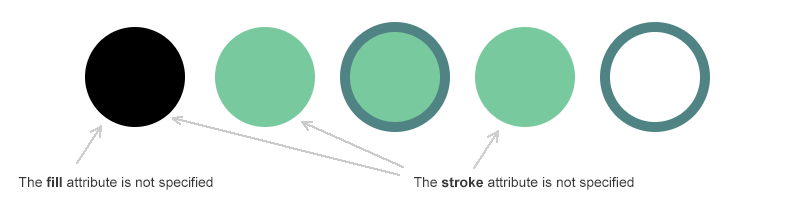
与闭合形状不同,SVG 中的线和折线主要由轮廓定义。因此它们特别适合演示 stroke property 如何控制颜色、粗细和可见性。
下面的示例比较简单 <line> 元素和 <polyline> 元素,展示 stroke color、stroke weight 和 fill 在不同场景下的行为。
1<svg height="400" width="700" xmlns="http://www.w3.org/2000/svg">
2    <line x1="30" y1="30" x2="30" y2="300" style="stroke:#4387be; stroke-width:10" />
3    <line x1="55" y1="27" x2="130" y2="300" style="stroke:#c4456d; stroke-width:10" />
4    <line x1="80" y1="20" x2="250" y2="300" style="stroke:#77bec1; stroke-width:10" />
5    <polyline points="300,100 360,50 420,100 480,50 540,100 600,50 660,100" style="fill:none; stroke:#fb6796; stroke-width:5" />
6    <polyline points="300,200 360,150 420,200 480,150 540,200 600,150 660,200" style="fill:#c9d7e1; stroke:#fb6796; stroke-width:5" />
7    <polyline points="300,300 360,250 420,300 480,250 540,300 600,250 660,300" style="stroke:#fb6796; stroke-width:5" />
8</svg>
在这个示例中:
<line> 元素使用不同 stroke 颜色,线条完全依靠 stroke 可见,因为 line 不支持 fill。fill="none",确保只显示轮廓。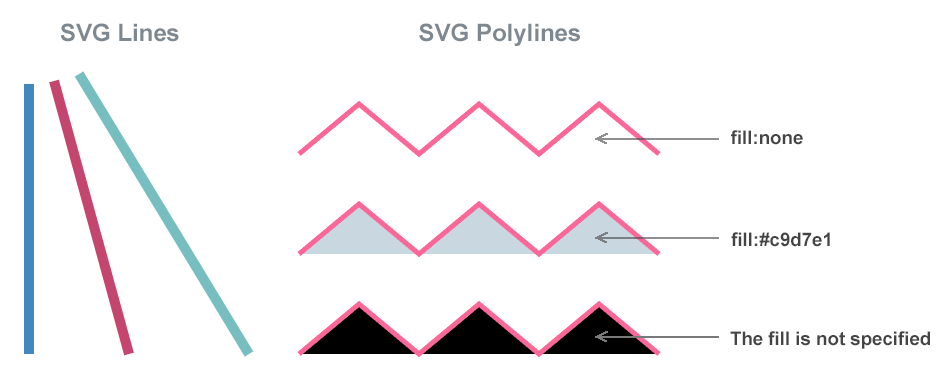
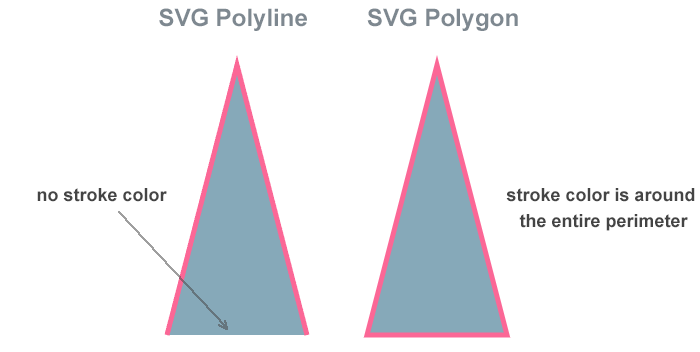
Polyline 和 polygon 看起来相似,但着色行为不同。关键区别是 polyline 是开放形状,而 polygon 始终闭合。
下面的示例使用相同的 fill 和 stroke 值,清楚展示 SVG 如何处理开放和闭合形状的颜色。
1<svg height="400" width="500" xmlns="http://www.w3.org/2000/svg">
2    <polyline points="60,290 130,20 200,290" style="fill:#86a9b9; stroke-width:5; stroke:#fb6796" />
3    <polygon points="260,290 330,20 400,290" style="fill:#86a9b9; stroke-width:5; stroke:#fb6796" />
4</svg>
两个形状使用相同的 fill 和 stroke 值,因此更容易看出它们的差异:
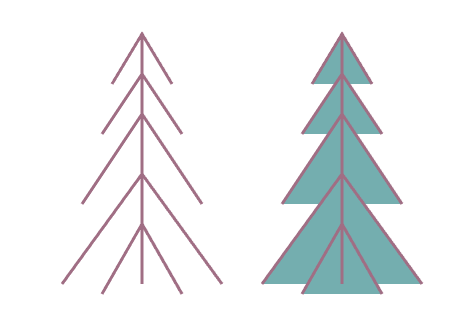
Paths 是 SVG 中最灵活的元素,可以描述开放轮廓,也可以描述闭合形状。因此它们的颜色行为取决于 path 是否形成闭合区域。
下面的示例两次使用相同 path data,展示显式禁用 fill 与应用 fill 时的差异。
 1<svg height="400" width="600" xmlns="http://www.w3.org/2000/svg">
 2  <!-- Unfilled path -->
 3  <path d="M150,50 L150,300 M120,100 L150,50 L180,100
 4           M110,150 L150,90 L190,150 M90,220 L150,130 L210,220
 5           M70,300 L150,190 L230,300 M110,310 L150,240 L190,310"
 6        stroke="#a06e84" stroke-width="3" fill="none" />
 7  <!-- Filled path -->
 8  <path d="M150,50 L150,300 M120,100 L150,50 L180,100
 9           M110,150 L150,90 L190,150 M90,220 L150,130 L210,220
10           M70,300 L150,190 L230,300 M110,310 L150,240 L190,310"
11        stroke="#a06e84" stroke-width="3" fill="#74aeaf" transform="translate(200)" />
12</svg>
下图展示 fill="none" 和 fill="#74aeaf" 的显示差异:
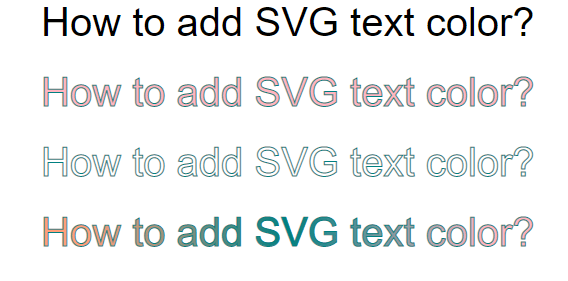
与其他 SVG 形状一样,文本也可以同时设置 stroke 和 fill。下面的代码示例展示如何设置文本的 fill color、stroke color,并使用渐变作为 fill。如果未指定 fill 属性,SVG 文本默认显示为黑色:
 1<svg height="300" width="600" xmlns="http://www.w3.org/2000/svg">
 2    <defs>
 3        <linearGradient id="grad1" x1="0%" y1="0%" x2="100%" y2="0%">
 4            <stop offset="10%" style="stop-color:lightsalmon" />
 5            <stop offset="50%" style="stop-color:teal" />
 6            <stop offset="90%" style="stop-color:lightpink" />
 7        </linearGradient>
 8    </defs>
 9    <text x="50" y="50" font-family="arial" font-size="40" >How to add SVG text color?</text>
10    <text x="50" y="130" font-family="arial" font-size="40" fill="lightpink" stroke="teal" stroke-width="1" >How to add SVG text color?</text>
11    <text x="50" y="210" font-family="arial" font-size="40" fill="none" stroke="teal" stroke-width="1" >How to add SVG text color?</text>
12    <text x="50" y="290" font-family="arial" font-size="40" fill="url(#grad1)" stroke="teal" stroke-width="1" >How to add SVG text color?</text>
13</svg>
下图展示为文本添加颜色时 fill 和 stroke 的不同情况:
你可以在 SVG 中的填充和描边 和 SVG 渐变 中进一步了解如何设置文本样式。
不透明度决定 SVG 元素的透明程度,以及它如何与后方元素视觉混合。在 SVG 中,透明度可以直接写在颜色值中,也可以使用专门的透明度 properties。下面的示例比较三种常见透明度方式,并展示它们对最终显示的影响。
 1<svg height="200" width="1250" xmlns="http://www.w3.org/2000/svg">
 2  <rect x="310" y="30" width="100" height="100" fill="rgba(0,50,255,0.8)" />
 3  <rect x="250" y="50" width="110" height="100" fill="rgba(0,50,255,0.7)" />
 4  <rect x="170" y="90" width="110" height="100" fill="rgba(0,50,255,0.6)" />
 5  <rect x="100" y="50" width="110" height="100" fill="rgba(0,50,255,0.4)" />
 6  <rect x="50"  y="30" width="110" height="100" fill="rgba(0,50,255,0.2)" />
 7
 8  <rect x="710" y="30" width="100" height="100" fill="hsla(0,100%,50%,0.8)" />
 9  <rect x="650" y="50" width="110" height="100" fill="hsla(0,100%,50%,0.7)" />
10  <rect x="570" y="90" width="110" height="100" fill="hsla(0,100%,50%,0.6)" />
11  <rect x="500" y="50" width="110" height="100" fill="hsla(0,100%,50%,0.4)" />
12  <rect x="450" y="30" width="110" height="100" fill="hsla(0,100%,50%,0.2)" />
13
14  <rect x="1110" y="30" width="100" height="100" fill="#C1B900" fill-opacity="0.8" />
15  <rect x="1050" y="50" width="110" height="100" fill="#C1B900" fill-opacity="0.7" />
16  <rect x="970"  y="90" width="110" height="100" fill="#C1B900" fill-opacity="0.6" />
17  <rect x="900"  y="50" width="110" height="100" fill="#C1B900" fill-opacity="0.4" />
18  <rect x="850"  y="30" width="110" height="100" fill="#C1B900" fill-opacity="0.2" />
19</svg>
在这个示例中:
fill-opacity property 结合,使颜色和透明度独立定义。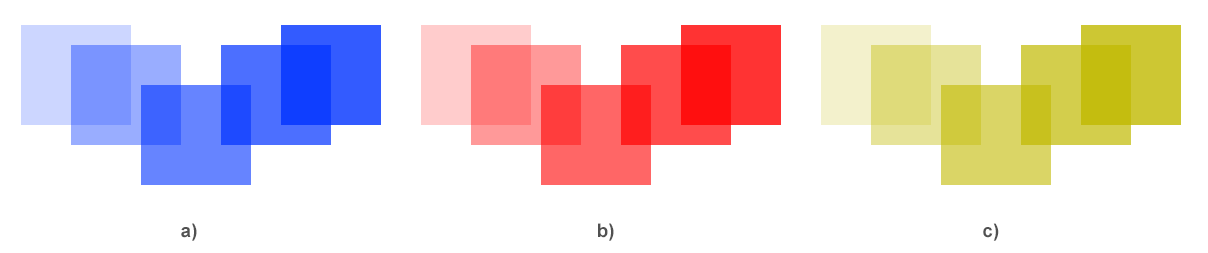
下面这些问题是 SVG 颜色行为异常的常见原因。
| 问题 | 原因 | 修复方法 |
|---|---|---|
| Stroke 不可见 | 设置了 stroke-width,但缺少 stroke 颜色 | 添加 stroke 值,例如 stroke="#d80539" stroke-width="4" |
| 形状显示为黑色而不是透明 | 省略 fill,SVG 使用默认黑色 fill | 只需要轮廓时使用 fill="none" |
| 颜色值被忽略 | 颜色字符串格式错误或不受支持 | 使用有效的命名颜色、3 位或 6 位 HEX、RGB/RGBA 或 HSL/HSLA |
| 不透明度无效 | HEX 颜色本身不包含透明度 | 使用 RGBA、HSLA、fill-opacity 或 stroke-opacity |
| CSS 颜色没有应用 | Inline style 或更具体的 CSS rule 覆盖它 | 检查 computed styles,并移除或更新冲突的 style、fill、stroke 或 CSS rule |
提示: 如果颜色没有按预期渲染,请在浏览器开发者工具中打开 SVG。缺少命名空间 (xmlns) 或小的语法错误,常常会阻止颜色正确显示。
| 目标 | 代码片段 |
|---|---|
| 为形状着色 | <circle cx="50" cy="50" r="40" fill="#E74C3C" /> |
| 让形状半透明 | <rect width="100" height="100" fill="rgba(0,155,0,0.5)" /> |
| 同时使用 fill 和 stroke | <polygon points="30,90 90,90 60,20" fill="#3498DB" stroke="#1B4F72" stroke-width="4" /> |
| 只应用 stroke | <line x1="0" y1="0" x2="100" y2="0" stroke="#ff6600" stroke-width="2" /> |
静态图形优先使用 HEX;颜色来自代码或需要 alpha 透明度时使用 RGB/RGBA;需要调整 hue、saturation 或 lightness 时使用 HSL/HSLA。命名颜色适合简单示例,但在生产 SVG 中,HEX 或 RGB 通常更明确。
使用 rgba() 或 hsla() 颜色值,或者保持颜色值独立并添加 fill-opacity 或 stroke-opacity。只有当整个元素都需要透明时才使用 opacity。
可以。可以通过 inline styles、style blocks 或 external CSS,使用 fill、stroke 及相关 properties 设置 SVG 颜色。Inline style 和 presentation attributes 可能覆盖更广泛的 CSS rules。
如果未指定 fill,SVG 会默认把闭合形状填充为黑色。只需要轮廓时添加 fill="none",或设置明确的填充颜色。
可以。SVG 接受命名颜色、HEX、RGB/RGBA、HSL/HSLA,以及 url(#gradient-id) 等 paint references。需要透明色时使用 RGBA、HSLA 或透明度属性。
<line> 元素没有内部区域,因此 fill 不会让它可见。SVG 线条、折线、轮廓和开放 paths 应使用 stroke。
可以。使用 fill="url(#gradient-id)" 或 stroke="url(#gradient-id)",应用在 SVG <defs> 部分定义的渐变。
使用 SVG DOM 工作流:加载文件,选择目标元素,更新 fill、stroke、style 或 gradient stop 值,然后保存文档。请参见
How to Change SVG Color 获取聚焦颜色示例;当颜色由 inline styles、CSS rules 或更广泛的样式规范化控制时,参见
Modify SVG Styles Programmatically in C#。Python via .NET 示例请参见
Change SVG Colors in Python。
red、green 或 DarkCyan 等命名颜色。stroke 和 fill 值的 .NET API 示例。fill、stroke、inline styles 和 gradient stops 的示例。需要混合两种颜色并预览结果时,可以使用免费的在线 Color Mixer。

Analyzing your prompt, please hold on...
An error occurred while retrieving the results. Please refresh the page and try again.