
Analyzing your prompt, please hold on...
An error occurred while retrieving the results. Please refresh the page and try again.
SVG 可以渲染三类主要图形内容:矢量形状、图像和文本。SVG text 不只是 canvas 上的普通字母。它可以用坐标定位,用 CSS 或 presentation attributes 设置样式,进行变换、裁剪,并沿 path 排列。本文解释文本如何在 SVG 标记中书写和布局。
本文将学习:
<text> 把 SVG 文本放在指定 baseline 位置。<tspan> 创建多行 SVG 文本和 inline styling。<textPath> 让文本沿 path curve 排列。textLength 和 glyph spacing。Glyph – 字符在字体中的视觉表示。一个 glyph 通常由一个或多个形状定义,常见为 paths,并可能包含渲染提示。
Font – 共享同一设计的一组 glyphs。矢量字体把 glyph outlines 存储为可缩放几何,因此文本放大后仍保持清晰。
Character – 抽象代码点(例如 Unicode),程序会把它映射到字体中的 glyph。Characters 沿一条想象的 baseline 排列,该 baseline 可根据书写系统水平或垂直。
当你需要精确控制 SVG 文本渲染时,理解 characters、glyphs 和 fonts 的关系非常重要。
SVG 定义三个生成可见文本的内容元素:
| 元素 | 用途 |
|---|---|
<text> | 定义一段文本。 |
<tspan> | 在 <text> 内提供细粒度定位和样式。 |
<textPath> | 沿 <path> 曲线排列文本。 |
<svg> 文档内创建 <text> 元素。x 和 y 属性定位文本 baseline。font-family、font-size、fill 或 stroke。<tspan> 元素。<textPath>。<text> 元素<text> 元素创建一段文本。x 和 y 属性定位文本 baseline 的起点,而不是文本框的左上角。由于 baseline 位于字母底部附近,较小的 y 值可能让部分文本落在 viewport 上方。实际使用时,应根据所选 font-size 设置足够大的 y 值。
下面的示例展示为什么 baseline 位置很重要。第一段文本使用很小的 y 值,因此字母被裁剪;第二段文本把 baseline 下移后完全可见(
svg-text-position.svg)。
1<svg height="100" width="200" xmlns="http://www.w3.org/2000/svg">
2    <text x="10" y="6" fill="red">The text is not fully visible </text>
3    <text x="10" y="30" fill="green">The text is fully visible </text>
4</svg>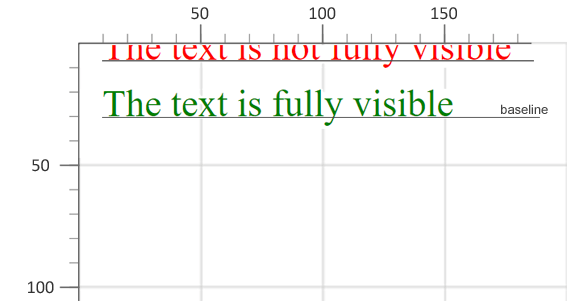
<text> 和 <tspan> 的属性控制书写方向、对齐、字体、间距和字符定位。最常用的属性包括:
x, y – baseline 起点的绝对坐标。dx, dy – 单个字符的相对位移。rotate – 应用于每个字符的旋转角度。textLength – 强制渲染文本占据指定长度。lengthAdjust – 控制 spacing 和 glyph scaling 如何适应 textLength(spacing, spacingAndGlyphs)。text-anchor – 文本相对于 x 坐标的对齐方式(start, middle, end)。writing-mode – 设置文本流方向(lr, rl, tb, bt)。这些属性可以组合出复杂布局,例如拉伸文本、从右到左脚本或垂直书写。
1<svg height="300" width="400" xmlns="http://www.w3.org/2000/svg">
2    <text x="180" y="30" fill="red">Aspose.SVG</text>
3    <text x="180" y="60" fill="blue" textLength="140">Aspose.SVG</text>
4    <text x="180" y="90" fill="grey" textLength="160" lengthAdjust="spacingAndGlyphs"
5          style="direction: rtl; unicode-bidi: bidi-override">Aspose.SVG</text>
6    <text x="180" y="120" fill="green" style="text-anchor: middle">Aspose.SVG</text>
7    <text x="260" y="90" style="writing-mode: tb">Aspose.SVG</text>
8</svg>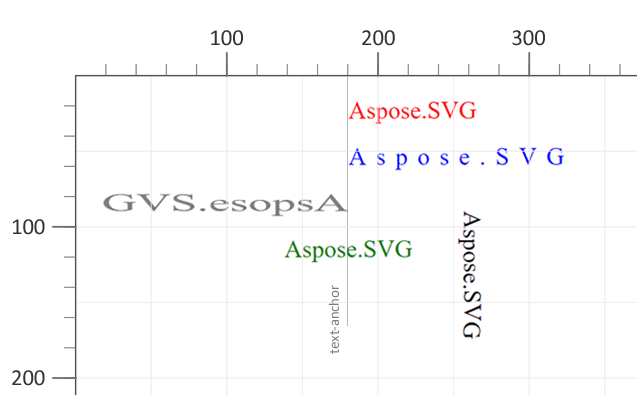
text-anchor:start。text-anchor:middle 居中。direction:rtl 展示从右到左方向。textLength 和 lengthAdjust 如何拉伸 glyphs。writing-mode:tb(从上到下)。<tspan> – Inline Styling 和换行<tspan> 可以嵌套在 <text> 或另一个 <tspan> 内。作为子元素,<tspan> 在文本显示和格式化中有两个重要作用:
<tspan> 元素创建独立行,并给每一行自己的位置。<tspan>。1<svg height="300" width="600" xmlns="http://www.w3.org/2000/svg">
2 <text x="20" y="60" style="font-family:arial">
3 <tspan style="font-weight:bold; font-size:55px">ASPOSE</tspan>
4 <tspan x="50" y="90" style="font-size:20px; fill:grey">Your File Format APIs </tspan>
5 </text>
6</svg>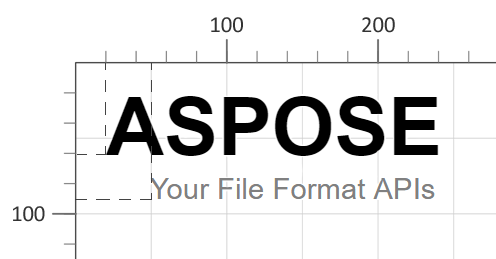
<tspan> 上的 x 和 y 会在指定坐标开始新行。style properties,如 font-weight、font-size 和 fill,只影响该 <tspan>。<textPath> – 沿曲线排列文本<textPath> 把文本附着到 <path> 元素,使字符沿任意矢量曲线排列。path 可以通过两种方式引用:
href 或 xlink:href – 通过 id 指向一个 <path>。path – 直接在属性中提供 SVG path data。 1<svg height="300" width="800" xmlns="http://www.w3.org/2000/svg">
2 <path id="my_path1" d="M 50 100 Q 25 10 180 100 T 350 100 T 520 100 T 690 100"
3 fill="transparent" />
4 <path id="my_path2" d="M 50 100 Q 25 10 180 100 T 350 100"
5 transform="translate(0,75)" fill="transparent" />
6 <text>
7 <textPath href="#my_path1">
8 Aspose.SVG for .NET is a flexible library for SVG file processing and is fully compatible with its specifications.
9 </textPath>
10 <textPath href="#my_path2">
11 Aspose.SVG for .NET is a flexible library for SVG file processing and is fully compatible with its specifications.
12 </textPath>
13 </text>
14</svg>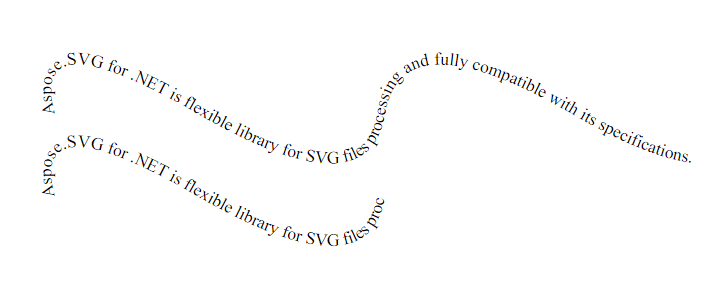
如果 path 短于文本,溢出部分会在 path 末端被裁剪。样式设置与普通文本相同:可以应用 font-weight、font-style、text-decoration、text-transform 等 CSS properties。
图中两段文本分别附着在两条不同 paths 上。第一行沿较长的波浪路径排列,第二行因为引用的 path 较短而更早停止。
| 问题 | 原因 | 解决方法 |
|---|---|---|
| 文本在 viewport 顶部被裁剪 | y 值小于 font size | 将 y 设置得大于 font size,例如 24 px 文本可用 y="30" |
| 文本没有按预期沿曲线排列 | href 指向不存在的 <path> ID | 检查 <path> 的 id,确保 href 值完全匹配 |
| Glyphs 看起来变形 | 使用 textLength 时 lengthAdjust 设置为 spacing | 使用 lengthAdjust="spacingAndGlyphs" 同时缩放 spacing 和 glyphs |
| 从右到左文本仍按从左到右显示 | 缺少 unicode-bidi:bidi-override | 在 <text> 或 <tspan> 上添加 style="direction: rtl; unicode-bidi: bidi-override" |
| 文本没有换到新行 | 依赖自动换行 | 为每一行插入带独立 x/y 坐标的新 <tspan> |
| 目标 | SVG 片段 |
|---|---|
| 水平居中文本 | <text x="50%" y="50%" text-anchor="middle" dominant-baseline="middle">Centered</text> |
| 垂直文本 | <text x="20" y="20" writing-mode="tb">Vertical</text> |
| 将文本拉伸到指定宽度 | <text x="10" y="40" textLength="200" lengthAdjust="spacingAndGlyphs">Stretch me</text> |
| 把文本放到曲线上 | <path id="curve" d="M10,80 C40,10 65,10 95,80" fill="none"/> <text><textPath href="#curve">On a curve</textPath></text> |
| 应用下划线和上划线 | <text x="10" y="40" style="text-decoration: underline overline;">Styled</text> |
在 <text> 元素上设置 x 和 y 属性。y 值定位 baseline,因此通常需要大于 font size,避免文本在 viewport 顶部被裁剪。
在一个 <text> 元素中使用多个 <tspan> 元素。给每一行自己的 x 和 y 值,或使用 dy 让每一行相对于上一行移动。
可以。定义带 id 的 <path>,然后在 <textPath href="#path-id"> 中引用它。文本会沿 path geometry 排列,并仍可使用文本相关 CSS properties 设置样式。
可以。当需要不依赖字体的输出时,可以把文本转换为 vector paths。参见 Text Vectorization & Text Security – .NET 和 Convert SVG Text to Vector in Python。
<text>、<tspan> 和 <textPath> 的行为。<textPath> 使用的 path 时,打开
SVG Path Data。<text> 元素并以编程方式设置 SVG 文本样式的示例。
Analyzing your prompt, please hold on...
An error occurred while retrieving the results. Please refresh the page and try again.