
Analyzing your prompt, please hold on...
An error occurred while retrieving the results. Please refresh the page and try again.
SVG transformation matrix 用一个 matrix(a,b,c,d,e,f) transform 表达平移、缩放、旋转和倾斜。当多个变换需要组合、计算或从图形工具导出时,它很有用。如果你只需要简单移动、调整大小或旋转,
SVG Transformations 中的单独 transform functions 通常更易读。
本文将学习:
matrix(a,b,c,d,e,f) 中的六个值。SVG transformation matrix 是一个 3 × 3 矩阵,用于组合平移、缩放、旋转和倾斜。但在 SVG matrix(a,b,c,d,e,f) 语法中只写前六个值:
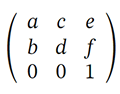
| 参数 | 典型用途 | SVG 符号 |
|---|---|---|
| a | X 轴缩放因子,或旋转角的余弦值 | sx / cos(α) |
| b | Y 轴 skew 因子,或旋转角的正弦值 | tan(α) / sin(α) |
| c | X 轴 skew 因子,或旋转角的负正弦值 | tan(α) / -sin(α) |
| d | Y 轴缩放因子,或旋转角的余弦值 | sy / cos(α) |
| e | X 轴平移 | tx |
| f | Y 轴平移 | ty |
矩阵把点 (x prev, y prev) 转换为 (x new, y new):
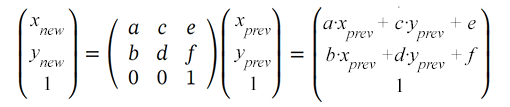
SVG 元素通过 transform 属性使用矩阵语法。因此,你向 matrix transformation function 提供 6 个值,用于设置平移、缩放、旋转和 skewing:
transform="matrix(a,b,c,d,e,f)"
matrix(1 0 0 1 0 0)。e 和 f,按 tx 和 ty 平移元素。a 和 d,沿 x 轴和 y 轴缩放。a、b、c、d 中使用 sine 和 cosine 值进行旋转。b 或 c 进行 skewing。(0,0) 以外的 pivot point 缩放或旋转时,调整 e 和 f。translation 是 SVG 中把对象所有点沿平行线移动相同距离的变换。它会平移元素坐标系统的原点。translation matrix 如下:
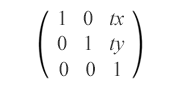
matrix(1,0,0,1,tx,ty)
translation matrix 结合 tx 和 ty,使元素水平和垂直移动。它让对象沿 x 轴移动 tx,沿 y 轴移动 ty。
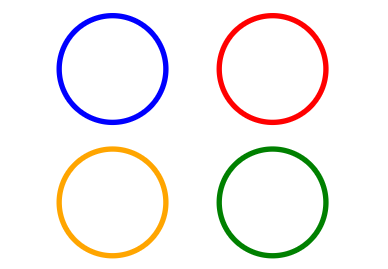
下面示例展示原始蓝色圆沿 x 轴平移(红色)、沿 y 轴平移(橙色)以及同时沿两个轴平移(绿色):
 1<svg viewBox="0 0 200 200" xmlns="http://www.w3.org/2000/svg">
 2    <g fill="none">
 3        <!-- no translation -->
 4        <circle cx="15" cy="15" r="10" stroke="blue" />
 5        <!-- horizontal translation (tx = 30) -->
 6        <circle cx="15" cy="15" r="10" stroke="red" transform="matrix(1 0 0 1 30 0)" />
 7        <!-- vertical translation (ty = 25) -->
 8        <circle cx="15" cy="15" r="10" stroke="orange" transform="matrix(1 0 0 1 0 25)" />
 9        <!-- both horizontal and vertical translation (tx = 30, ty = 25) -->
10        <circle cx="15" cy="15" r="10" stroke="green" transform="matrix(1 0 0 1 30 25)" />
11    </g>
12</svg>
属性 transform="matrix(1,0,0,1,tx,ty)" 的作用是按下面公式改变对象坐标:
x(new) = a·x(prev) + c·y(prev) + e = x(prev) + txy(new) = b·x(prev) + d·y(prev) + f = y(prev) + ty
代码中,<g> 元素组合圆形,fill="none" 应用于 group 内每个圆。下图显示原始圆和三个平移副本:
Scaling 是使用缩放因子放大或缩小对象的 SVG transformation。scaling matrix 可沿坐标轴进行等比或非等比缩放。sx 和 sy 是 x 和 y 轴缩放因子。如果 sx 与 sy 大于 1,对象会放大;如果在 0 和 1 之间,对象会缩小。如果两个缩放因子不同,对象会产生拉伸或压缩效果。scaling matrix 如下:
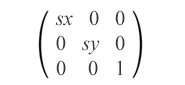
matrix(sx,0,0,sy,0,0)
下面示例展示原始蓝色矩形相对于原点 (0,0) 的等比缩放和非等比缩放(图 a 和 b),以及相对于点 (10,10) 的等比缩放(图 c):
1<svg viewBox="0 0 400 300" xmlns="http://www.w3.org/2000/svg">
2    <!-- uniform scale is shown in fig.a -->
3    <g fill="none">
4        <rect x="10" y="10" width="20" height="20" stroke="blue" />
5        <rect x="10" y="10" width="20" height="20" stroke="red" transform="matrix(1.5,0,0,1.5,0,0)" />
6        <rect x="10" y="10" width="20" height="20" stroke="orange" transform="matrix(2,0,0,2,0,0)" />
7        <rect x="10" y="10" width="20" height="20" stroke="green" transform="matrix(0.7,0,0,0.7,0,0)" />
8    </g>
9</svg>
结果如下:
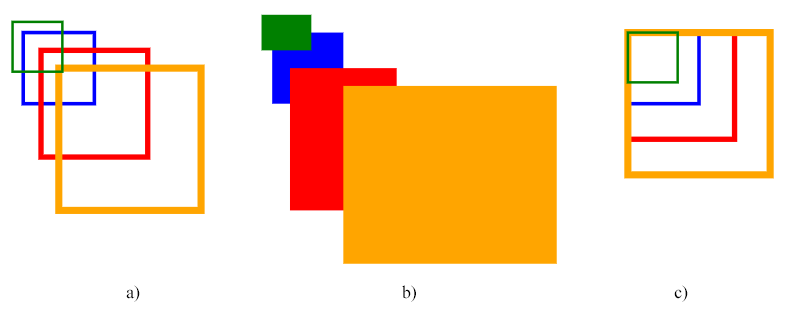
上面的代码使用 scaling matrix。第一组显示等比缩放(fig. a),第二组显示非等比缩放(fig. b),第三组显示围绕点 (10, 10) 的等比缩放(fig. c)。
注意: 缩放相对于坐标系统原点 (0,0) 执行。如果 SVG 对象不在原点,缩放也会改变它的可见位置。这就是图 a 和图 b 中矩形看起来移动的原因。
要围绕特定 pivot point (cx, cy) 缩放,需要给缩放后的形状加入额外移动,使它回到 pivot point(fig. c)。组合 translation 和 scaling 的完整矩阵为:
matrix(sx,0,0,sy,cx·(1-sx),cy·(1-sy))
该矩阵会围绕 pivot point (cx, cy) 正确缩放对象,而不会产生额外位移。cx·(1-sx) 和 cy·(1-sy) 系数提供必要的平移补偿,确保对象缩放后保持在原位置。以图 c 中的红色矩形为例,pivot point (cx, cy) 为 (10,10),即蓝色初始矩形的左上角:
cx·(1-sx)=10·(1-1.5)=10·(-0.5)=-5cy·(1-sy)=10·(1-1.5)=10·(-0.5)=-5
rotation matrix 使用旋转角的 sine 和 cosine:
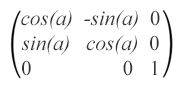
matrix(cos(α),sin(α),-sin(α),cos(α),0,0),其中 α 是围绕初始坐标系统中 (0,0) 点的角度。
下面示例展示初始蓝色矩形旋转 90°(绿色)、180°(灰色)、270°(teal)、-45°(红色)和 135°(橙色):
 1<svg viewBox="-50 -50 200 200" xmlns="http://www.w3.org/2000/svg">
 2    <g>
 3      <rect x="0" y="0" width="20" height="20" fill="blue" />
 4      <rect x="0" y="0" width="20" height="20" fill="green" transform="matrix(0,1,-1,0,0,0)" />
 5      <rect x="0" y="0" width="20" height="20" fill="grey" transform="matrix(-1,0,0,-1,0,0)" />
 6      <rect x="0" y="0" width="20" height="20" fill="teal" transform="matrix(0,-1,1,0,0,0)" />
 7      <rect x="0" y="0" width="20" height="20" fill="red" transform="matrix(0.7071,-0.7071,0.7071,0.7071,0,0)" />
 8      <rect x="0" y="0" width="20" height="20" fill="orange" transform="matrix(-0.7071,0.7071,-0.7071,-0.7071,0,0)" />
 9    </g>
10</svg>
注意: 正角度表示顺时针旋转,负角度表示逆时针旋转。
SVG rotation 的结果如下图:
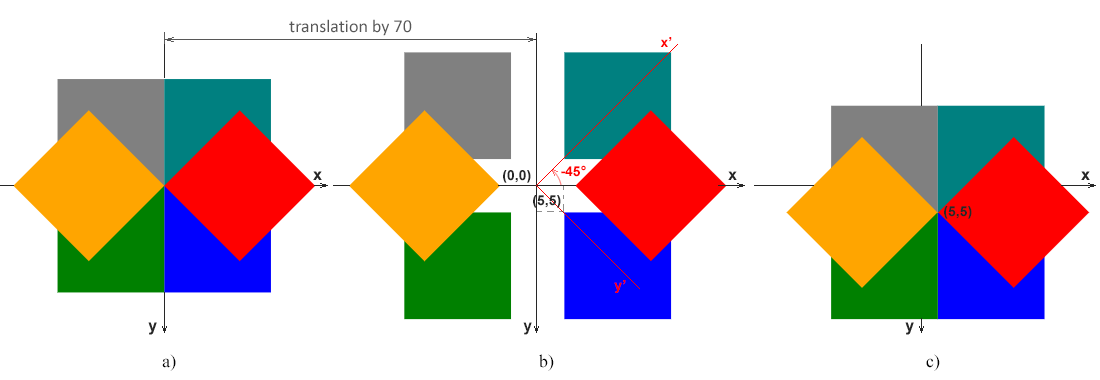
(0,0) 与坐标系统原点 (0,0) 重合的情况。(5,5) 开始,远离原点的情况。全局 x-y 轴适用于三个图,红色 x’-y’ 轴显示 45 度逆时针旋转(α=-45°)后的坐标系统。(5,5) 旋转,因此 pivot 跟随矩形,而不是全局原点。注意: 下面的矩阵会围绕 pivot point (cx, cy) 旋转对象:
matrix(cos(α), sin(α), -sin(α), cos(α), cx·(1-cos(α))+cy·sin(α), cy·(1-cos(α))-cx·sin(α))
cx·(1-cos(α))+cy·sin(α) 和 cy·(1-cos(α))-cx·sin(α) 系数提供围绕 pivot point 旋转所需的平移补偿。以图 c 中红色矩形为例,pivot point (cx, cy) 是 (5,5),即蓝色初始矩形的左上角,红色矩形的角度为 -45°:
cos(-45°)=0.7071, sin(-45°)=-0.7071
cx·(1-cos(α))+cy·sin(α)=5·(1-0.7071)+5·(-0.7071)=-2cy·(1-cos(α))-cx·sin(α)=5·(1-0.7071)-5·(-0.7071)=5
Skewing 是让元素坐标系统的某个轴按角度 α 顺时针或逆时针倾斜的变换。SVG 元素可以通过 skewing matrix 倾斜:
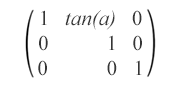
matrix(1,0,tan(α),1,0,0) – 该 skew matrix 表示沿 x 轴按 α 度倾斜。
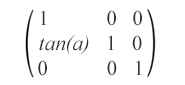
matrix(1,tan(α),0,1,0,0) – 该 skew matrix 表示沿 y 轴按 α 度倾斜。
下面展示带 skew transformations 的圆示例:
 1<svg viewBox="0 0 200 200" xmlns="http://www.w3.org/2000/svg">
 2    <g fill="none">
 3        <circle cx="20" cy="20" r="10" stroke="blue" />
 4        <!-- skew transformation along the x-axis by α=45° -->
 5        <circle cx="20" cy="20" r="10" stroke="red" transform="matrix(1,0,1,1,0,0)" />
 6    </g>
 7    <g fill="none" transform="translate(70)">
 8        <circle cx="20" cy="20" r="10" stroke="blue" />
 9        <!-- skew transformation along the y-axis by α=45° -->
10        <circle cx="20" cy="20" r="10" stroke="orange" transform="matrix(1,1,0,1,0,0)" />
11    </g>
12</svg>
渲染结果如下:
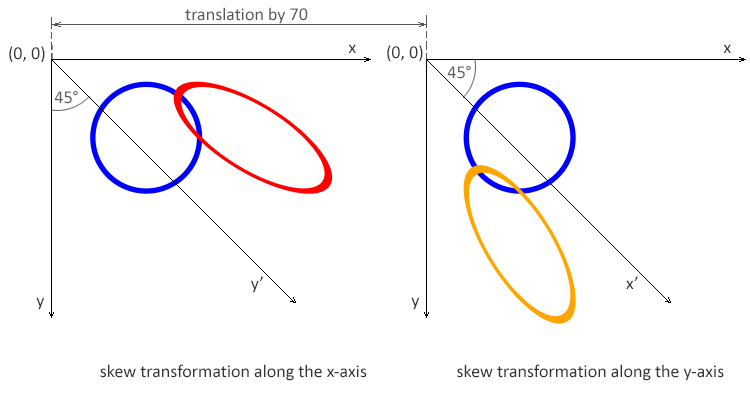
注意: 角度 α 表示以度为单位的 skew transformation。使用 x-axis skew matrix 时,x 坐标改变而 y 坐标保持不变。使用 y-axis skew matrix 时,y 坐标改变而 x 坐标保持不变。
| 问题 | 原因 | 解决方法 |
|---|---|---|
| 变换生效但对象意外移动 | 变换相对于原点 (0,0) 应用 | 在缩放或旋转前,把对象平移到目标 pivot point |
| 围绕错误点旋转 | rotation matrix 没有补偿平移 | 在一个矩阵中组合 translation → rotation → reverse translation |
| 缩放改变了位置 | 缩放时未调整平移值 | 调整 e 和 f,或围绕特定点缩放 |
| Matrix 没有可见效果 | matrix 值错误或等于 identity matrix | 确认 matrix 值不同于 1 0 0 1 0 0 |
| 多个 transforms 相互覆盖 | matrix 替换了之前的 transform 操作 | 把变换组合成单个 matrix,或按正确顺序应用 |
| Skewing 异常 | b 或 c 值错误 | 确认 skew 值是有意设置,并匹配目标角度 |
| 变换难以调试 | matrix 值难以理解 | 从简单变换(translate、scale)开始,逐步构建 |
| 目标 | Matrix | 说明 |
|---|---|---|
| 无变换(identity) | matrix(1 0 0 1 0 0) | 重置所有变换 |
| 平移 (tx, ty) | matrix(1 0 0 1 tx ty) | 移动对象,不缩放或旋转 |
| 等比缩放 s | matrix(s 0 0 s 0 0) | 相对于原点缩放 |
| 按 (sx, sy) 缩放 | matrix(sx 0 0 sy 0 0) | 非等比缩放 |
| 围绕点 (cx, cy) 缩放 | matrix(s 0 0 s cx*(1-s) cy*(1-s)) | 保持中心点固定 |
| 围绕原点旋转 θ | matrix(cosθ sinθ -sinθ cosθ 0 0) | θ 以弧度计算 |
| 围绕点 (cx, cy) 旋转 | matrix(cosθ sinθ -sinθ cosθ cx-cx*cosθ+cy*sinθ cy-cx*sinθ-cy*cosθ) | 常见旋转场景 |
| 水平 skew θ | matrix(1 0 tanθ 1 0 0) | 沿 x 轴倾斜 |
| 垂直 skew θ | matrix(1 tanθ 0 1 0 0) | 沿 y 轴倾斜 |
六个 matrix 值作为一个 transform 一起工作,并在当前 SVG 坐标系统中解释。
按 (tx, ty) 平移对象
1<rect x="50" y="50" width="100" height="60" transform="matrix(1 0 0 1 40 30)" />等比放大 2 倍
1<rect x="50" y="50" width="80" height="40" transform="matrix(2 0 0 2 0 0)" />围绕中心缩放对象
1<rect x="50" y="50" width="100" height="60" transform="matrix(2 0 0 2 -100 -80)" />围绕原点旋转 45°
1<rect x="50" y="50" width="100" height="60" transform="matrix(0.707 0.707 -0.707 0.707 0 0)" />应用水平 skew
1<rect x="40" y="40" width="120" height="60" transform="matrix(1 0 0.5 1 0 0)" />matrix(a,b,c,d,e,f) 是 SVG transform function,用六个值存储缩放、skewing、旋转和平移。a、b、c、d 影响缩放、skew 和旋转;e 和 f 移动元素。
identity matrix 是 matrix(1 0 0 1 0 0)。它让元素保持不变,是逐步构建 transformation matrix 的有用起点。
Matrix transformations 相对于当前坐标系统原点应用。对远离 (0,0) 的对象缩放或旋转时,如果 e 和 f 没有补偿 pivot point,可见位置也会改变。
当希望 SVG 标记易读时,使用 translate()、scale() 和 rotate() 等单独函数。当值来自计算、由工具导出,或需要把多个变换合成一个 transform 时,使用 matrix()。
translate()、scale()、rotate()、skewX() 和 skewY() 示例。
Analyzing your prompt, please hold on...
An error occurred while retrieving the results. Please refresh the page and try again.