
外部ラテックスパッケージ| Java用のAspose.TeX
外部ラテックスパッケージ
JavaのAspose.TeXライブラリには、 一般的なラテックスパッケージが含まれています。したがって、これらのパッケージをライブラリのTexエンジンに提供する方法に注意する必要はありません。しかし、(おそらく)ラテックスファイルには、パッケージの「ネイティブにサポートされている「バンドル」を超えたパッケージが必要になる場合があります。この場合、 setRequiredInputDirectory() texoptionsクラスインスタンスのメソッドを使用して、必要な入力、つまり必要なパッケージのソースファイルを提供することを試みることができます。これが2つの例でどのように機能するかを確認します。
inputFile に対応する LaTeX 文書の完全なパスを、outputDirectory に既存の出力フォルダーを指定します。両方の変換例は 150 DPI の PNG を生成します。選択した例の Aspose.TeX クラス、com.aspose.tex.rendering.ImageDevice、com.aspose.tex.rendering.PngSaveOptions、ZIP 入力用の java.io.InputStream と java.nio.file.Files をインポートします。呼び出し元のメソッドは例外を処理するか宣言します。
ライセンスガイドに従ってライセンスを適用してください。
未解決の必要な入力(fancyboxパッケージ)
次の単純なラテックスファイルがあるとしましょう。
 1\documentclass{article}
 2\usepackage[a6paper,landscape]{geometry}
 3\usepackage{fancybox}
 4\begin{document}
 5Test: \fbox{
 6  \begin{Bitemize}[b]
 7  \item First item
 8  \item A second one\\ on two lines
 9  \item(2pt) A third with extra space
10  \end{Bitemize}
11}
12\par\bigskip
13Test: \fbox{
14  \begin{Beqnarray}
15  y & = & x^2 \\
16  a^2 + 2ab + b^2 & = & (a + b)^2 \\
17  \int_0^\infty e^{-ax} dx & = & \frac{1}{a}
18  \end{Beqnarray}
19}
20\end{document}
3 行目では外部パッケージ fancybox が必要です。packagesDirectory に fancybox.sty とその依存ファイルを含むローカルフォルダーを指定します。以下の完全な例はこのフォルダーを RequiredInputDirectory に設定し、PNG 画像を生成します。デバイスと作業ディレクトリはジョブ終了まで開いたままにし、その後に解放または閉じます。
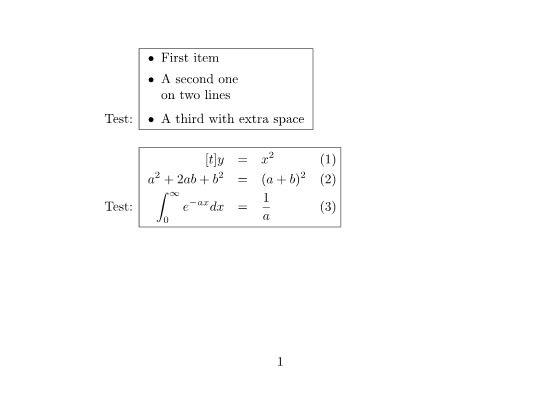
これが例の完全なソースコードです。
 1// Render the fancybox document using external package sources from a local folder.
 2// inputFile is the full TeX input path; packagesDirectory contains fancybox.sty.
 3// outputDirectory is an existing output folder.
 4TeXOptions options = TeXOptions.consoleAppOptions(TeXConfig.objectLaTeX());
 5OutputFileSystemDirectory output = new OutputFileSystemDirectory(outputDirectory);
 6InputFileSystemDirectory packages = new InputFileSystemDirectory(packagesDirectory);
 7options.setOutputWorkingDirectory(output);
 8options.setRequiredInputDirectory(packages);
 9PngSaveOptions saving = new PngSaveOptions();
10saving.setResolution(150);
11options.setSaveOptions(saving);
12options.setInteraction(Interaction.NonstopMode);
13options.setTerminalOut(new OutputMemoryTerminal());
14ImageDevice device = new ImageDevice();
15TeXJobResult result;
16int pages;
17try {
18    result = new TeXJob(inputFile, device, options).run();
19    pages = device.getPageCount();
20} finally {
21    device.dispose();
22    output.close();
23    packages.close();
24}必要な入力( pgfplotsパッケージ)アーカイブ
次に、次の非常に単純なLaTexファイルもあります。これは、required-input-zip.texです。
 1\documentclass{article}
 2\usepackage[margin=0.25in]{geometry}
 3\usepackage{pgfplots}
 4\pgfplotsset{width=10cm,compat=1.18}
 5\begin{document}
 6
 7First example is 2D and 3D math expressions plotted side-by-side.
 8
 9%Here begins the 2D plot
10\begin{tikzpicture}
11\begin{axis}
12\addplot[color=red]{exp(x)};
13\end{axis}
14\end{tikzpicture}
15%Here ends the 2D plot
16\hskip 5pt
17%Here begins the 3D plot
18\begin{tikzpicture}
19\begin{axis}
20\addplot3[
21    surf,
22]
23{exp(-x^2-y^2)*x};
24\end{axis}
25\end{tikzpicture}
26%Here ends the 3D plot
27
28\end{document}3行目では、このファイルがpgfplotsパッケージを必要としていることがわかりますが、これも「ネイティブ」サポートされていません。ここでも、pgfplots パッケージのソースファイルが存在することを前提としています。これは、LaTeX 組版アプリケーションのインストールディレクトリで見つけると、2つの場所に分かれた非常に大きなファイルセットです。pgfplots フォルダは、\tex\generic フォルダと \tex\latex フォルダの両方にあります。そして、これら両方のフォルダの内容は、Aspose.TeX ライブラリへの必須入力として提供する必要があります。これらのソースファイルを ZIP アーカイブにパッケージ化したいので、アーカイブのレイアウトは以下のようになります。
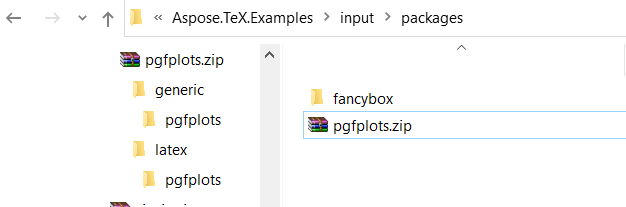
packagesZip に、パッケージの generic と LaTeX のソースを含むアーカイブへの java.nio.file.Path を指定します。以下の完全な Java 例は Files.newInputStream(...) で開き、InputZipDirectory を RequiredInputDirectory に設定します。空のベースパス引数はアーカイブ全体を選択します。TeX ジョブが終了するまで ZIP ストリームとディレクトリを開いたままにし、その後に閉じます。結果は 2 つのグラフを含む PNG 画像です。
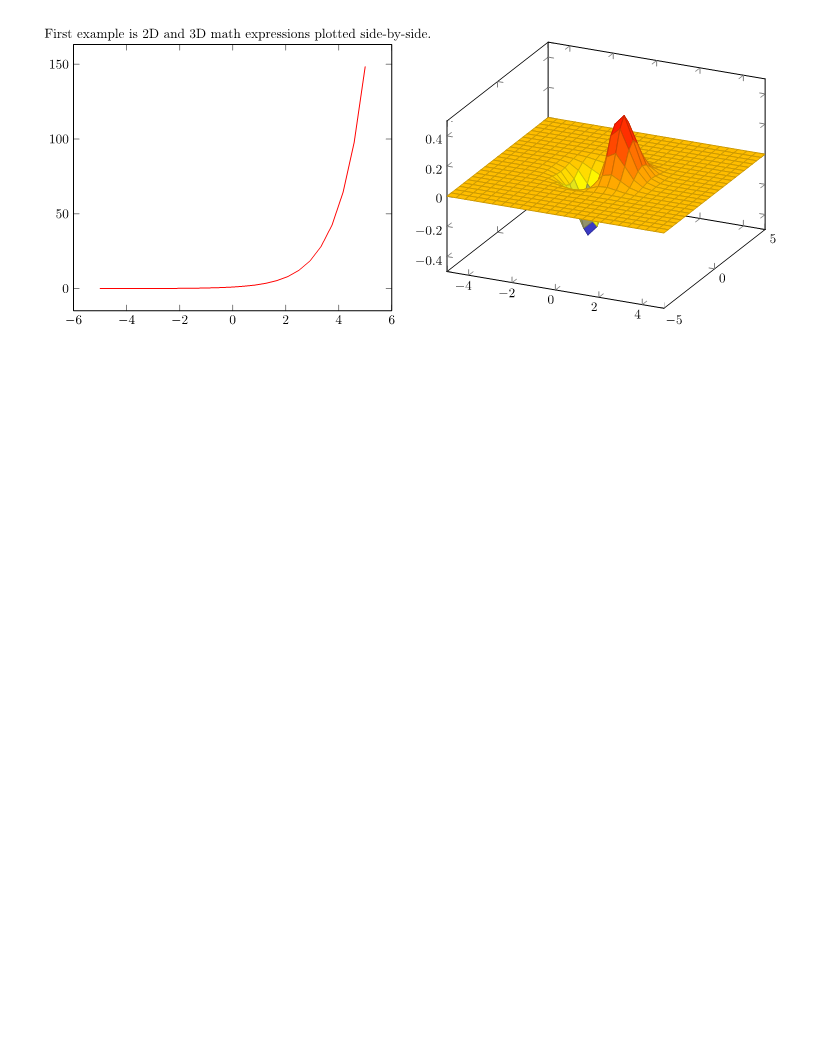
これが例の完全なソースコードです。
 1// Render the 2D/3D plots using pgfplots package sources from a ZIP archive.
 2// inputFile is the full TeX input path; packagesZip is a java.nio.file.Path.
 3// outputDirectory is an existing output folder; the ZIP includes generic and latex sources.
 4TeXJobResult result;
 5int pages;
 6try (InputStream zipStream = Files.newInputStream(packagesZip)) {
 7    TeXOptions options = TeXOptions.consoleAppOptions(TeXConfig.objectLaTeX());
 8    OutputFileSystemDirectory output = new OutputFileSystemDirectory(outputDirectory);
 9    InputZipDirectory packages = new InputZipDirectory(zipStream, "");
10    options.setOutputWorkingDirectory(output);
11    options.setRequiredInputDirectory(packages);
12    PngSaveOptions saving = new PngSaveOptions();
13    saving.setResolution(150);
14    options.setSaveOptions(saving);
15    options.setInteraction(Interaction.NonstopMode);
16    options.setTerminalOut(new OutputMemoryTerminal());
17    ImageDevice device = new ImageDevice();
18    try {
19        result = new TeXJob(inputFile, device, options).run();
20        pages = device.getPageCount();
21    } finally {
22        device.dispose();
23        output.close();
24        packages.close();
25    }
26}注意: この結果は
pgfplotsパッケージのバージョン 1.18.1 を使用して検証されました。Aspose.TeX ライブラリに含まれるpfgパッケージのバージョンは 3.1.9a です。
外部フォントパッケージを使用します
通常、LaTeXディストリビューションには、タイプセッティングに使用できるデフォルトのフォントがいくつか付属しています。これらのフォントに加えて、Aspose.TeX は amsfonts、eurosym、wasysym といった非標準フォントパッケージも提供しています。前述の通り、Aspose.TeX は外部パッケージの使用もサポートしていますが、ここでは主にフォントを含まないパッケージに焦点を当ててきました。
Aspose.TeX の Object TeX エンジン拡張機能には、フォント マップが必要です。フォント マップは、各 TeX の内部フォント名に対応する物理フォントを指定する、拡張子 .map を持つテキスト ファイルです。これらのフォント マップは、初期化フェーズで TeX のメモリに読み込む必要があり、パッケージ ファイルに含める必要があります。エンジンはすべてのフォント マップの名前を認識していないため、拡張子 .map を持つファイルを検索します。そのため、
RequiredInputDirectory オプションの値として使用される
IInputWorkingDirectory インターフェイスの実装では、拡張子に基づいてファイル名のコレクションにアクセスする方法を提供する必要があります。具体的には、この実装は
IFileCollectorインターフェースも実装する必要があります。標準実装である
InputFileSystemDirectoryと
InputZipDirectoryは既にこの要件を満たしています。
以下のカスタム RequiredInputDirectory は両方のインターフェースを実装し、明示的に登録されたローカルファイルを読み込みます。含まれる import とともに RequiredInputDirectory.java として保存します。各ファイルを storeFileName(...) で登録し、options.setRequiredInputDirectory(...) でインスタンスを設定して、ジョブ終了後に閉じます。階層を持たないレジストリなので、完全なパスを指定せずに要求するファイル名は一意である必要があります。拡張子の比較は大文字と小文字を区別せず、任意の収集パスでファイルシステムのディレクトリを選択できます。必要なパッケージ、フォントマップ、メトリック、実際のフォントファイルをすべて登録します。ファイル収集によりマップを検出できますが、不足するフォントデータは提供されません。
 1import com.aspose.tex.IInputWorkingDirectory;
 2import com.aspose.tex.IFileCollector;
 3import com.aspose.tex.TeXInputStream;
 4import java.io.IOException;
 5import java.io.UncheckedIOException;
 6import java.nio.file.Files;
 7import java.nio.file.Path;
 8import java.nio.file.Paths;
 9import java.util.ArrayList;
10import java.util.LinkedHashSet;
11import java.util.List;
12import java.util.Locale;
13import java.util.Set;
14
15// Register local package files explicitly, including font maps and their dependencies.
16// Save this class as RequiredInputDirectory.java and close it after the TeX job.
17public class RequiredInputDirectory implements IInputWorkingDirectory, IFileCollector {
18    private final Set<Path> files = new LinkedHashSet<Path>();
19    private final List<TeXInputStream> streams = new ArrayList<TeXInputStream>();
20
21    public void storeFileName(String fileName) {
22        Path file = Paths.get(fileName).toAbsolutePath().normalize();
23        if (!Files.isRegularFile(file)) {
24            throw new IllegalArgumentException("Package file does not exist: " + file);
25        }
26        files.add(file);
27    }
28
29    @Override
30    public TeXInputStream getFile(String fileName, boolean searchSubdirectories) {
31        // This registry is a flat virtual directory; only registered files are accessible.
32        for (Path file : files) {
33            if (file.toString().equals(fileName) || file.getFileName().toString().equals(fileName)) {
34                try {
35                    TeXInputStream stream = new TeXInputStream(Files.newInputStream(file), file.toString());
36                    streams.add(stream);
37                    return stream;
38                } catch (IOException exception) {
39                    throw new UncheckedIOException(exception);
40                }
41            }
42        }
43        return new TeXInputStream(null, fileName);
44    }
45
46    @Override
47    public String[] getFileNamesByExtension(String extension) {
48        return getFileNamesByExtension(extension, null);
49    }
50
51    @Override
52    public String[] getFileNamesByExtension(String extension, String path) {
53        String requested = extension.toLowerCase(Locale.ROOT);
54        if (!requested.isEmpty() && !requested.startsWith(".")) {
55            requested = "." + requested;
56        }
57        Path directory = path == null ? null : Paths.get(path).toAbsolutePath().normalize();
58        List<String> matches = new ArrayList<String>();
59        for (Path file : files) {
60            String name = file.getFileName().toString();
61            int dot = name.lastIndexOf('.');
62            String actual = dot < 0 ? "" : name.substring(dot).toLowerCase(Locale.ROOT);
63            if (actual.equals(requested) && (directory == null || file.getParent().equals(directory))) {
64                matches.add(file.toString());
65            }
66        }
67        return matches.toArray(new String[0]);
68    }
69
70    @Override
71    public void close() throws IOException {
72        IOException failure = null;
73        for (TeXInputStream stream : streams) {
74            try {
75                stream.close();
76            } catch (IOException exception) {
77                if (failure == null) { failure = exception; }
78                else { failure.addSuppressed(exception); }
79            }
80        }
81        streams.clear();
82        files.clear();
83        if (failure != null) { throw failure; }
84    }
85}制限
ラテックスファイルに必要なパッケージは、 LaTeX3eカーネルの下で開発できます。このようなパッケージは、Aspose.TeXライブラリで動作しない可能性が最も高くなります。後者はlatex2eカーネルに基づいているためです。
また、ラテックスファイルが必要とするパッケージは、Aspose.TeXライブラリのオブジェクトtexエンジンによってサポートされていないデバイス依存のプリミティブコマンドを直接呼び出すことができます。残念ながら、このようなパッケージは確かに機能しません。