
LaTeX ファイル修復 | Aspose.TeX for .NET
LaTeX ファイルのチェックと修復方法
テキストファイルが LaTeX ファイルだと思われ、組版したいが本当に LaTeX ファイルか確信が持てない(LaTeX の世界に不慣れな場合など)場合は、Aspose.TeX API for .NET が提供する LaTeX のチェックと修復機能を試すことができます。以下の例では、Aspose.TeX for .NET のサンプルプロジェクトに含まれる invalid-latex.tex というサンプルファイルをチェックし、修復します。
まず最初に、サンプルファイルは TeX 構文を使用しているように見えても、LaTeX が要求する構造を持っていないことを指摘しておきます。ご存知のとおり、LaTeX ファイルは \documentclass コマンドで始まるプレアンブルと、document 環境内の本文(\begin{document} と \end{document} の間)を持つ必要があります。
それでは C# のコードサンプルを見てみましょう。
 1// Repair invalid LaTeX file and guess missing packages
 2
 3// Create repair options.
 4LaTeXRepairerOptions options = new LaTeXRepairerOptions();
 5// Specify a file system working directory for the output.
 6options.OutputWorkingDirectory = new OutputFileSystemDirectory(OutputDir);
 7// Specify a file system working directory for the required input.
 8// The directory containing packages may be located anywhere.
 9options.RequiredInputDirectory = new InputFileSystemDirectory(Path.Combine(DataDir, "packages"));
10// Specify the callback class to externally guess packages required for undefined commands or environments.
11options.GuessPackageCallback = new PackageGuesser();
12// Run the repair process.
13new LaTeXRepairer(Path.Combine(DataDir, "invalid-latex.tex"), options).Run();通常の TeX ジョブと同様に、まずは実行したいプロセスのオプションを含むオブジェクトを作成します。ほとんどのオプションは通常の TeX ジョブの場合と同じです。たとえば、 InputWorkingDirectory は入力ファイルを読み取るべき場所を示します。ここでは、ファイルシステム上のメイン入力ファイルへのフルパスを指定しているため使用しません。また、 OutputWorkingDirectory は出力ファイルを書き込む場所です。 RequiredInputDirectory を設定すると、Aspose.TeX ライブラリに組み込まれていない LaTeX パッケージを保存できる場所を指します。 GuessPackageCallback プロパティについては後述します。
オプションを設定したら、単にプロセスを実行するだけです!
では、チェックと修復のプロセスはどのように行われるのでしょうか。まず API は入力ファイル内に \documentclass があるか検索します。見つからなければ、ファイルの先頭に \documentclass{article} を挿入したとみなします。この事実は修復レポートファイル(.log)に記録されます。
次に、調整された入力ファイルの先頭からスキャンを開始します。LaTeX 形式で動作する TeX エンジンは、途中で \begin{document} が見つからないことを示すエラーを出すことがあります。その場合、\begin{document} を挿入すべき位置が決定され、レポートに反映されます。
エンジンがファイルをさらに走査すると、未定義のコマンドや環境が見つかることがあります。API は、最も一般的なコマンドや環境に対して、
埋め込み必須パッケージ(これらのコマンドや環境を定義するパッケージ)を推測できます。ただし、外部から IGuessPackageCallback インターフェイスを実装してその推測ロジックを提供することも可能です。GuessPackageCallback オプションにそのクラスのインスタンスを割り当てます。
以下は、\head コマンドを fancyhdr パッケージにマッピングする非常にシンプルな例です。
 1// The callback class to externally guess packages required for undefined commands or environments.
 2public class PackageGuesser : IGuessPackageCallback
 3{
 4    private Dictionary<string, string> _map = new Dictionary<string, string>();
 5
 6    public PackageGuesser()
 7    {
 8        _map.Add("lhead", "fancyhdr"); // Defines the mapping between the \lhead command and the fancyhdr package.
 9    }
10
11    public string GuessPackage(string commandName, bool isEnvironment)
12    {
13        string packageName;
14        if (!isEnvironment)
15        {
16            _map.TryGetValue(commandName, out packageName);
17            return packageName ?? ""; // It's better to return an empty string to avoid consequent calls for the same command name.
18        }
19
20        // Some code for environments
21        // ...
22
23        return "";
24    }
25}サンプルファイルの場合、エンジンは最初に \chapter コマンドに遭遇します。これは article クラスには定義されていませんが、book クラスには定義されています。したがって API は文書クラスを \documentclass{book} に変更します。続いてエンジンは \lhead コマンドを見つけ、プレアンブルに \usepackage{fancyhdr} を挿入すべきと判断します。後に出現する \href と \includegraphics コマンドに対しては、プレアンブルにそれぞれ \usepackage{hyperref} と \usepackage{graphics} を挿入します。これらの判断は API の内部マッピングに基づいており、すべての修正はレポートファイルに記録されます。
最後に、LaTeX 文書の通常の終了が欠落しているためエンジンは異常終了します。このため Repairer はファイルの末尾に \end{document} を追加し、レポートにその事実を反映させます。
修正された元ファイルが生成されたら、Repairer は最終チェックのためにそのファイルで再度 TeX ジョブを実行します。この例では、致命的なエラーは見つからず、修正後のファイルはほぼ期待通りに組版できます。
以下は完全なレポートです。
 1Trying to repair the original file...
 2--------------------------------------------------------------------------------
 3\documentclass is missing in the original file. Inserted at the beginning.
 4\begin{document} is missing in the original file. Inserted at line 3, pos. 0.
 5The command \chapter at line 3, pos. 0 is undefined. Consider using \usepackage{package_name} in the preamble,
 6    where 'package_name' is the name of the package which defines this command.
 7The command \lhead at line 5, pos. 0 is undefined. \usepackage{fancyhdr} is inserted in the preamble
 8    since the 'fancyhdr' package supposedly defines the command.
 9The command \href at line 8, pos. 0 is undefined. \usepackage{hyperref} is inserted in the preamble
10    since the 'hyperref' package supposedly defines the command.
11The command \href at line 17, pos. 0 is undefined. \usepackage{hyperref} is inserted in the preamble
12    since the 'hyperref' package supposedly defines the command.
13The command \href at line 20, pos. 0 is undefined. \usepackage{hyperref} is inserted in the preamble
14    since the 'hyperref' package supposedly defines the command.
15The command \href at line 27, pos. 0 is undefined. \usepackage{hyperref} is inserted in the preamble
16    since the 'hyperref' package supposedly defines the command.
17The command \href at line 32, pos. 0 is undefined. \usepackage{hyperref} is inserted in the preamble
18    since the 'hyperref' package supposedly defines the command.
19The command \includegraphics at line 54, pos. 2 is undefined. \usepackage{graphicx} is inserted in the preamble
20    since the 'graphicx' package supposedly defines the command.
21The command \href at line 67, pos. 0 is undefined. \usepackage{hyperref} is inserted in the preamble
22    since the 'hyperref' package supposedly defines the command.
23The command \href at line 95, pos. 57 is undefined. \usepackage{hyperref} is inserted in the preamble
24    since the 'hyperref' package supposedly defines the command.
25The command \href at line 96, pos. 0 is undefined. \usepackage{hyperref} is inserted in the preamble
26    since the 'hyperref' package supposedly defines the command.
27The command \href at line 98, pos. 100 is undefined. \usepackage{hyperref} is inserted in the preamble
28    since the 'hyperref' package supposedly defines the command.
29\end{document} is missing in the original file. Inserted at the end.
30
31Checking the repaired file...
32--------------------------------------------------------------------------------
33There are no critical errors in the fixed file.
LaTeX数式修復AIエージェントの構築
このワークフローは、Aspose.TeXネイティブ修復APIの構造検証とLLMコアのコンテキスト推論を組み合わせることで、エラーのないレンダリングパイプラインを実現します。既存のLaTeXファイルのエラーをチェックして修正する独立したエージェントとして、または数式作成プロセスの一部として使用できます。
LaTeX構文を修復するAIエージェントのワークフローアーキテクチャ
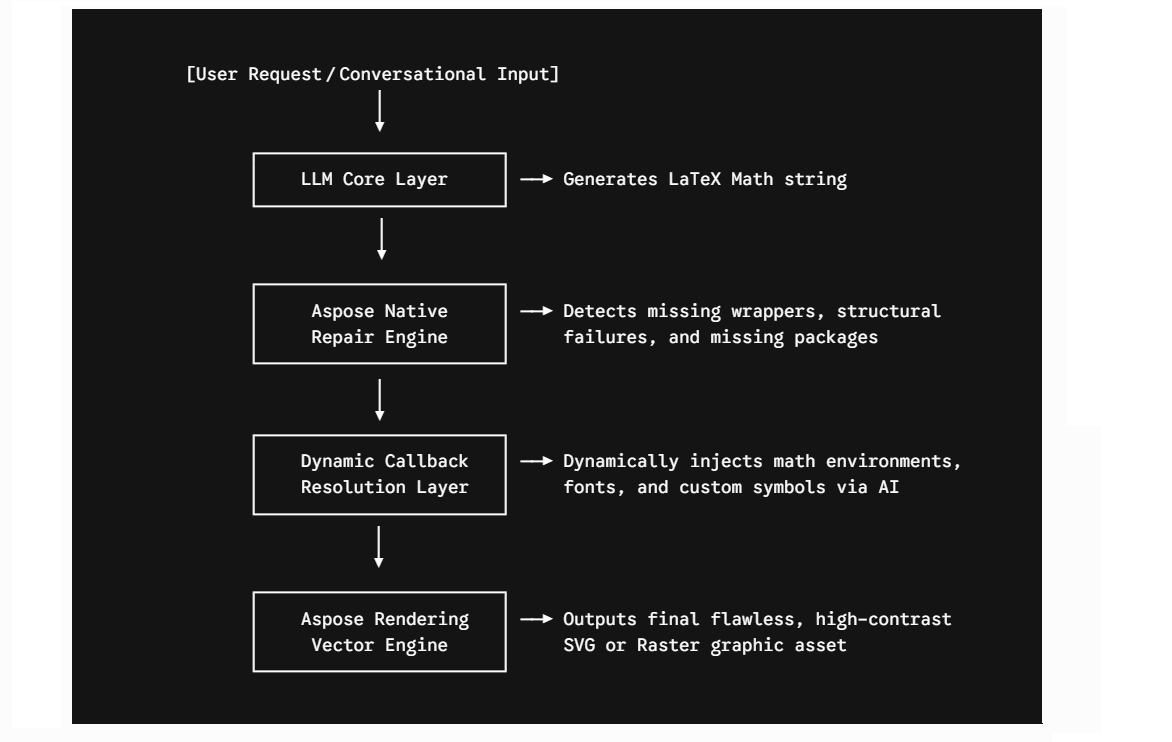
構文処理とインテント抽出(LLMレイヤー) ユーザーは、対話形式の指示、生のテキストスニペット、コピーした数式、または
.latexファイルを提供します。エージェントはLLMにコアとなる数式インテントを抽出するよう指示し、最適化されたLaTeX数式ブロックを出力します。ネイティブ構造の自動修正(Aspose.TeXリペアラー) 生成された数式断片は、ネイティブのAspose.TeX修復ライフサイクルを通して処理され、開発者が正規表現ラッパーをハードコーディングすることなく、標準的な構造境界が構築されます。
エージェントはバックグラウンドでLaTeXRepairerインスタンスを作成します。エンジンはデータストリームをスキャンし、エラーを検出し、コンパイルパイプラインの有効性を維持するために、数式文字列を\begin{document}と\end{document}で安全に囲みます。
- 実行とアセット/レポートの生成(レンダリングエンジン) 修復されパッケージ化されたスクリプト文字列が正常にコンパイルされると、エージェントはレポートを作成するか、クリーンなファイルシステム出力をターゲットのビジュアル形式に変換します。
無料の AI LaTeX Repairer ウェブアプリもぜひお試しください。このアプリは
Aspose.TeX for .NET API の機能を基に構築されており、IGuessPackageCallback インターフェイスの高度な実装を取り入れています。