LaTeX 図のレンダリング | Python via .NET
特定の状況では、LaTeX ファイルから特定のコンテンツを単独のレンダリングされた要素(一般に 図 と呼ばれます)として抽出する必要があるかもしれません。ページレイアウトとは無関係です。たとえばオンライン出版物のイラストを作成する際に役立ちます。当社の API を使用すればこれが可能です。図のレンダリング対象フォーマットは PNG と SVG で、LaTeX 数式レンダリング機能と同様です。LaTeX 図のレンダリング は、 LaTeX 数式レンダリング と比較して、より汎用的な機能であることに注意してください。
LaTeX 図を PNG にレンダリングする
必要に応じて、まずこのトピックの API リファレンス セクション をご覧ください。数式レンダリングと同様に、例から始めます。以下です:
 1from aspose.tex.features import *
 2from aspose.pydrawing import Color
 3from aspose.tex.io import *
 4from aspose.tex.presentation.xps import *
 5from util import Util
 6from io import BytesIO
 7from os import path
 8###############################################
 9###### Class and Method declaration here ######
10###############################################
11
12# Create rendering options setting the image resolution to 150 dpi.
13options = PngFigureRendererOptions()
14options.resolution = 150             # Specify the preamble.
15options.preamble = r"\usepackage{pict2e}"
16# Specify the scaling factor 300%.
17options.scale = 3000
18# Specify the background color.
19options.background_color = Color.white
20# Specify the output stream for the log file.
21options.log_stream = BytesIO()
22# Specify whether to show the terminal output on the console or not.
23options.show_terminal = True
24
25# Create the output stream for the figure image.
26with open(path.join(Util.output_directory, "text-and-formula.png"), "wb") as stream:
27    # Run rendering.
28    size = PngFigureRenderer().render(r"""\setlength{\unitlength}{0.8cm}
29\begin{picture}(6,5)
30\thicklines
31\put(1,0.5){\line(2,1){3}} \put(4,2){\line(-2,1){2}} \put(2,3){\line(-2,-5){1}} \put(0.7,0.3){$A$} \put(4.05,1.9){$B$} \put(1.7,2.95){$C$}
32\put(3.1,2.5){$a$} \put(1.3,1.7){$b$} \put(2.5,1.05){$c$} \put(0.3,4){$F=\sqrt{s(s-a)(s-b)(s-c)}$} \put(3.5,0.4){$\displaystyle s:=\frac{a+b+c}{2}$}
33\end{picture}""", stream, options)
34
35# Show other results.
36print(options.error_report)
37print()
38print(f"Size: {size.width}x{size.height}")最初に、 LaTeX 図レンダラーオプション クラスのインスタンスを作成し、同時に出力画像の解像度を指定します。
次に、プリアンブルを指定する必要があります。LaTeX 数式レンダリングとは異なり、LaTeX 図のレンダリングにはデフォルトのプリアンブルがありません。そのため、たとえば pict2e パッケージで作成されたグラフィックをレンダリングする場合は、プリアンブルにそれを指定する必要があります:
1\usepackage{pict2e}その後、レンダラーに出力を 300% に拡大するよう指示します。
次のオプションは背景色を決定します。数式レンダリングとは異なり、前景色を指定する必要はありません。色はすべて LaTeX コードで制御されていると想定しています。同様に背景色も LaTeX コードで制御されるため、このオプションは利便性のために用意されています。
例の次の行は特に意味があるわけではありません。ログ出力を特定のストリームに送るオプションがあることを示すためのものです。
最後のオプション ShowTerminal は、ターミナル出力をコンソールに表示するかどうかを制御できます。
図のレンダリングを担当するメソッドは FigureRenderer.render() です。ポイント単位で図のサイズを返します。
このメソッドは第2引数としてストリームを受け取ります。画像が書き込まれるストリームです。次の行でストリームを作成します。
最後に、FigureRenderer.render() メソッド自体を呼び出し、オプションを第3引数として渡します。図の LaTeX コードは第1引数として提供されます。
例の最後の数行は、図のサイズと簡単なエラーレポート(エラーがある場合)という、図のレンダリングに関する 2 つの情報を表示します。
以下はレンダリング結果です。
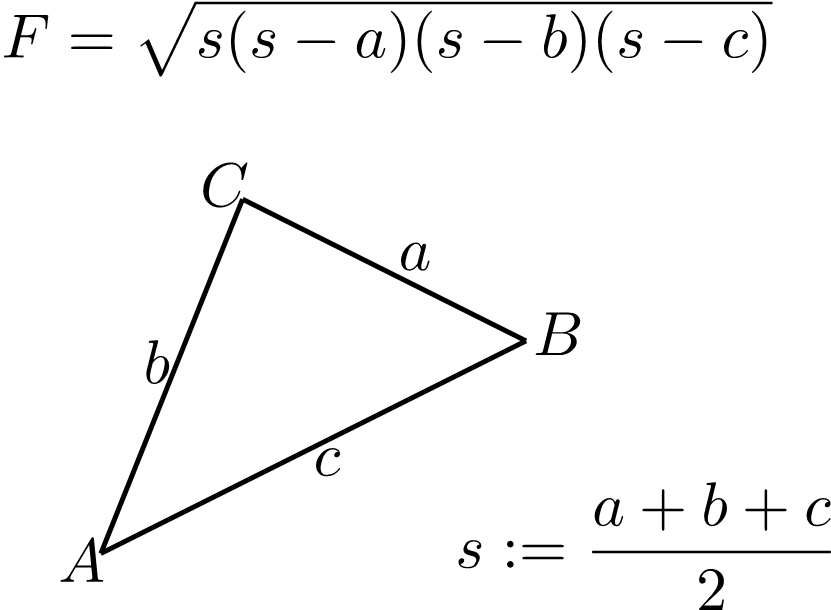
これは LaTeX 図のレンダリング 機能の最も一般的な使用例を表しています。
LaTeX 図を SVG にレンダリングする
同様に、LaTeX 図を SVG 形式でもレンダリングできます。
 1from aspose.tex.features import *
 2from aspose.pydrawing import Color
 3from util import Util
 4from io import BytesIO
 5from os import path
 6###############################################
 7###### Class and Method declaration here ######
 8###############################################
 9
10# Create rendering options.
11options = SvgFigureRendererOptions()
12# Specify the preamble.
13options.preamble = r"\usepackage{pict2e}"
14# Specify the scaling factor 300%.
15options.scale = 3000
16# Specify the background color.
17options.background_color = Color.white
18# Specify the output stream for the log file.
19options.log_stream = BytesIO()
20# Specify whether to show the terminal output on the console or not.
21options.show_terminal = True
22
23# Create the output stream for the figure image.
24with open(path.join(Util.output_directory, "text-and-formula.svg"), "wb") as stream:
25    # Run rendering.
26    size = SvgFigureRenderer().render(r"""\setlength{\unitlength}{0.8cm}
27\begin{picture}(6,5)
28\thicklines
29\put(1,0.5){\line(2,1){3}} \put(4,2){\line(-2,1){2}} \put(2,3){\line(-2,-5){1}} \put(0.7,0.3){$A$} \put(4.05,1.9){$B$} \put(1.7,2.95){$C$}
30\put(3.1,2.5){$a$} \put(1.3,1.7){$b$} \put(2.5,1.05){$c$} \put(0.3,4){$F=\sqrt{s(s-a)(s-b)(s-c)}$} \put(3.5,0.4){$\displaystyle s:=\frac{a+b+c}{2}$}
31\end{picture}""", stream, options)
32
33# Show other results.
34print(options.error_report)
35print()
36print(f"Size: {size.width}x{size.height}")違いは次のとおりです:
- PngFigureRendererOptions クラスの代わりに、 SvgFigureRendererOptions クラスを使用します。
- 解像度を指定する必要はありません。
- PngFigureRenderer クラスの代わりに、 SvgFigureRenderer クラスを使用します。
結果は以下です: