
外部乳胶软件包| Java的Aspose.TeX
外部乳胶软件包
Aspose.TeX库中包含许多 常见的乳胶软件包。因此,您不必关心如何将这些包装提供给图书馆的Tex引擎。但是有时(可能经常)您的乳胶文件可能需要一个包裹以外的包装包装。在这种情况下,您可以尝试使用 setRequiredInputDirectory() TexOptions类实例的方法提供所需的输入,即所需的软件包的源文件。我们将看到这两个示例如何工作。
将 inputFile 设置为对应 LaTeX 文档的完整路径,将 outputDirectory 设置为现有的输出文件夹。两个转换示例均生成 150 DPI 的 PNG。导入所选示例使用的 Aspose.TeX 类、com.aspose.tex.rendering.ImageDevice、com.aspose.tex.rendering.PngSaveOptions,以及 ZIP 输入所需的 java.io.InputStream 和 java.nio.file.Files。在调用方法中处理或声明异常。按照
许可指南应用许可证。
打开包装所需的输入(fancybox软件包)
假设我们有以下简单的乳胶文件,这是我们的 示例解决方案:
 1\documentclass{article}
 2\usepackage[a6paper,landscape]{geometry}
 3\usepackage{fancybox}
 4\begin{document}
 5Test: \fbox{
 6  \begin{Bitemize}[b]
 7  \item First item
 8  \item A second one\\ on two lines
 9  \item(2pt) A third with extra space
10  \end{Bitemize}
11}
12\par\bigskip
13Test: \fbox{
14  \begin{Beqnarray}
15  y & = & x^2 \\
16  a^2 + 2ab + b^2 & = & (a + b)^2 \\
17  \int_0^\infty e^{-ax} dx & = & \frac{1}{a}
18  \end{Beqnarray}
19}
20\end{document}
第三行需要外部软件包 fancybox。将 packagesDirectory 设置为包含 fancybox.sty 及其依赖文件的本地文件夹。下面的完整示例将此文件夹设置为 RequiredInputDirectory,并生成 PNG 图像。设备和工作目录在作业结束前保持打开,随后释放或关闭。
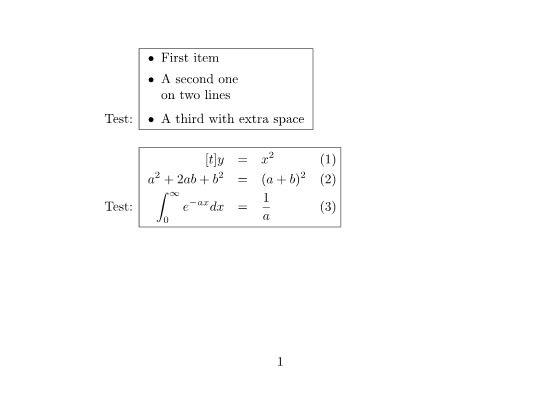
这是该示例的完整源代码:
 1// Render the fancybox document using external package sources from a local folder.
 2// inputFile is the full TeX input path; packagesDirectory contains fancybox.sty.
 3// outputDirectory is an existing output folder.
 4TeXOptions options = TeXOptions.consoleAppOptions(TeXConfig.objectLaTeX());
 5OutputFileSystemDirectory output = new OutputFileSystemDirectory(outputDirectory);
 6InputFileSystemDirectory packages = new InputFileSystemDirectory(packagesDirectory);
 7options.setOutputWorkingDirectory(output);
 8options.setRequiredInputDirectory(packages);
 9PngSaveOptions saving = new PngSaveOptions();
10saving.setResolution(150);
11options.setSaveOptions(saving);
12options.setInteraction(Interaction.NonstopMode);
13options.setTerminalOut(new OutputMemoryTerminal());
14ImageDevice device = new ImageDevice();
15TeXJobResult result;
16int pages;
17try {
18    result = new TeXJob(inputFile, device, options).run();
19    pages = device.getPageCount();
20} finally {
21    device.dispose();
22    output.close();
23    packages.close();
24}存档所需的输入(pgfplots软件包)
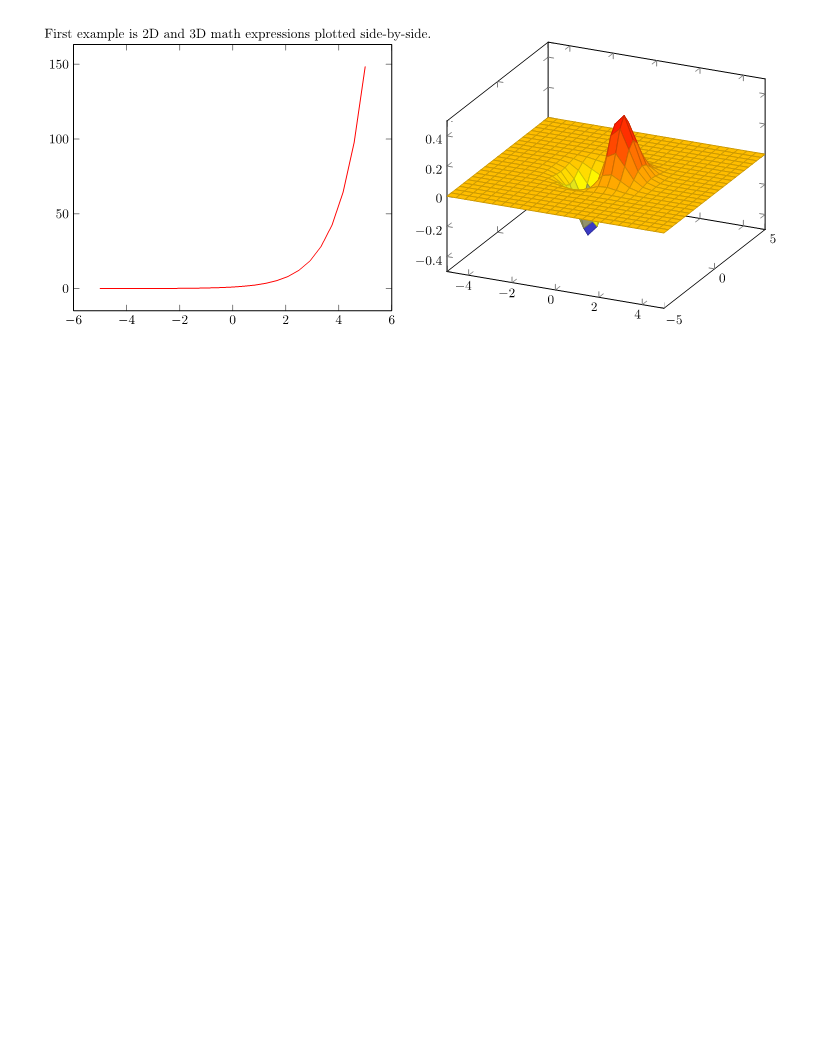
现在,让我们假设我们也有以下简单的乳胶文件,这是我们的示例解决方案中的“必需输入” zip.tex。
 1\documentclass{article}
 2\usepackage[margin=0.25in]{geometry}
 3\usepackage{pgfplots}
 4\pgfplotsset{width=10cm,compat=1.18}
 5\begin{document}
 6
 7First example is 2D and 3D math expressions plotted side-by-side.
 8
 9%Here begins the 2D plot
10\begin{tikzpicture}
11\begin{axis}
12\addplot[color=red]{exp(x)};
13\end{axis}
14\end{tikzpicture}
15%Here ends the 2D plot
16\hskip 5pt
17%Here begins the 3D plot
18\begin{tikzpicture}
19\begin{axis}
20\addplot3[
21    surf,
22]
23{exp(-x^2-y^2)*x};
24\end{axis}
25\end{tikzpicture}
26%Here ends the 3D plot
27
28\end{document}
在第三行上,我们看到该文件需要“ PGFPLOTS”软件包,这也不是“本地”支持的。同样,我们假设我们有“ PGFPLOTS”软件包源文件。如果您在任何乳胶排放应用程序的安装目录中找到两个位置,则在两个位置之间进行了大量文件。您可以在\ tex \ generic和\tex\latex文件夹上找到pgfplots文件夹。并且必须根据需要输入Aspose.TeX库提供两个文件夹的内容。我们希望将这些源文件包装在zip存档中,因此这是存档的布局:
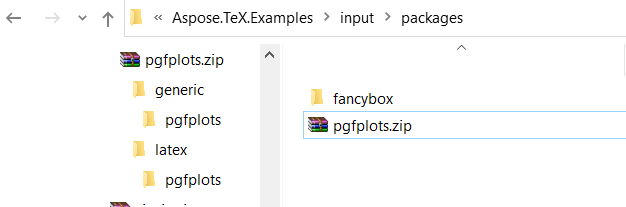
将 packagesZip 设置为指向包含软件包 generic 和 LaTeX 源文件的归档的 java.nio.file.Path。下面的完整 Java 示例使用 Files.newInputStream(...) 打开归档,并将 InputZipDirectory 设置为 RequiredInputDirectory。空的基本路径参数选择整个归档。在 TeX 作业结束前保持 ZIP 流和目录打开,随后关闭它们。结果是包含两个图表的 PNG 图像。
这是该示例的完整源代码:
 1// Render the 2D/3D plots using pgfplots package sources from a ZIP archive.
 2// inputFile is the full TeX input path; packagesZip is a java.nio.file.Path.
 3// outputDirectory is an existing output folder; the ZIP includes generic and latex sources.
 4TeXJobResult result;
 5int pages;
 6try (InputStream zipStream = Files.newInputStream(packagesZip)) {
 7    TeXOptions options = TeXOptions.consoleAppOptions(TeXConfig.objectLaTeX());
 8    OutputFileSystemDirectory output = new OutputFileSystemDirectory(outputDirectory);
 9    InputZipDirectory packages = new InputZipDirectory(zipStream, "");
10    options.setOutputWorkingDirectory(output);
11    options.setRequiredInputDirectory(packages);
12    PngSaveOptions saving = new PngSaveOptions();
13    saving.setResolution(150);
14    options.setSaveOptions(saving);
15    options.setInteraction(Interaction.NonstopMode);
16    options.setTerminalOut(new OutputMemoryTerminal());
17    ImageDevice device = new ImageDevice();
18    try {
19        result = new TeXJob(inputFile, device, options).run();
20        pages = device.getPageCount();
21    } finally {
22        device.dispose();
23        output.close();
24        packages.close();
25    }
26}注意: 结果是使用
pgfplots软件包版本 1.18.1 验证的。而 Aspose.TeX 库中包含的pfg软件包版本为 3.1.9a。
使用外部字体软件包
通常,乳胶发行版带有一系列可用于排版的默认字体。除了这些字体外,Aspose.TeX还提供几个非标准字体软件包,例如“ amsfonts”,“ eurosym”和“ wasysym”。如前所述,Aspose.TeX也支持使用外部软件包的使用,尽管我们的重点主要集中在不包括字体的软件包上。
Aspose.TeX中的对象Tex引擎扩展名需要字体映射,它是带有.map扩展名的文本文件,该文件指定了与每个Tex的内部字体名称相对应的物理字体。这些字体地图需要在初始化阶段加载到TEX的内存中,并且必须包含在软件包文件中。由于引擎不知道所有字体映射的名称,因此它搜索了具有`.map’扩展名的任何文件。因此,将
IinputWorkingDirectory用作
InsultInputDirectory选项的接口的实现必须提供一种基于其扩展名的访问文件名的收集的方法。具体而言,此实现还必须实现
IfileCollector接口。标准实现,
InputFileSystemDirectory和
InputzipDirectory,已经满足此要求。
下面的自定义 RequiredInputDirectory 实现两个接口,并读取显式注册的本地文件。将它连同所含的导入保存为 RequiredInputDirectory.java。使用 storeFileName(...) 注册每个文件,通过 options.setRequiredInputDirectory(...) 设置实例,并在作业结束后关闭它。这是一个扁平注册表:不使用完整路径请求文件时,文件名必须唯一。扩展名匹配不区分大小写;可选的收集路径选择文件系统目录。注册所有必要的软件包、字体映射、度量和实际字体文件。文件收集使映射可被发现,但不会提供缺失的字体数据。
 1import com.aspose.tex.IInputWorkingDirectory;
 2import com.aspose.tex.IFileCollector;
 3import com.aspose.tex.TeXInputStream;
 4import java.io.IOException;
 5import java.io.UncheckedIOException;
 6import java.nio.file.Files;
 7import java.nio.file.Path;
 8import java.nio.file.Paths;
 9import java.util.ArrayList;
10import java.util.LinkedHashSet;
11import java.util.List;
12import java.util.Locale;
13import java.util.Set;
14
15// Register local package files explicitly, including font maps and their dependencies.
16// Save this class as RequiredInputDirectory.java and close it after the TeX job.
17public class RequiredInputDirectory implements IInputWorkingDirectory, IFileCollector {
18    private final Set<Path> files = new LinkedHashSet<Path>();
19    private final List<TeXInputStream> streams = new ArrayList<TeXInputStream>();
20
21    public void storeFileName(String fileName) {
22        Path file = Paths.get(fileName).toAbsolutePath().normalize();
23        if (!Files.isRegularFile(file)) {
24            throw new IllegalArgumentException("Package file does not exist: " + file);
25        }
26        files.add(file);
27    }
28
29    @Override
30    public TeXInputStream getFile(String fileName, boolean searchSubdirectories) {
31        // This registry is a flat virtual directory; only registered files are accessible.
32        for (Path file : files) {
33            if (file.toString().equals(fileName) || file.getFileName().toString().equals(fileName)) {
34                try {
35                    TeXInputStream stream = new TeXInputStream(Files.newInputStream(file), file.toString());
36                    streams.add(stream);
37                    return stream;
38                } catch (IOException exception) {
39                    throw new UncheckedIOException(exception);
40                }
41            }
42        }
43        return new TeXInputStream(null, fileName);
44    }
45
46    @Override
47    public String[] getFileNamesByExtension(String extension) {
48        return getFileNamesByExtension(extension, null);
49    }
50
51    @Override
52    public String[] getFileNamesByExtension(String extension, String path) {
53        String requested = extension.toLowerCase(Locale.ROOT);
54        if (!requested.isEmpty() && !requested.startsWith(".")) {
55            requested = "." + requested;
56        }
57        Path directory = path == null ? null : Paths.get(path).toAbsolutePath().normalize();
58        List<String> matches = new ArrayList<String>();
59        for (Path file : files) {
60            String name = file.getFileName().toString();
61            int dot = name.lastIndexOf('.');
62            String actual = dot < 0 ? "" : name.substring(dot).toLowerCase(Locale.ROOT);
63            if (actual.equals(requested) && (directory == null || file.getParent().equals(directory))) {
64                matches.add(file.toString());
65            }
66        }
67        return matches.toArray(new String[0]);
68    }
69
70    @Override
71    public void close() throws IOException {
72        IOException failure = null;
73        for (TeXInputStream stream : streams) {
74            try {
75                stream.close();
76            } catch (IOException exception) {
77                if (failure == null) { failure = exception; }
78                else { failure.addSuppressed(exception); }
79            }
80        }
81        streams.clear();
82        files.clear();
83        if (failure != null) { throw failure; }
84    }
85}限制
您的乳胶文件要求的包装可以在 LaTeX3e内核下开发。这样的软件包很可能无法与Aspose.TeX库一起使用,因为后者基于LaTeX2e内核。
此外,您的乳胶文件要求的软件包可以直接调用Aspose.TeX库对象Tex引擎不支持的设备依赖的原始命令。不幸的是,这样的软件包无法确定。