
LaTeX 图形渲染 | Aspose.TeX for Java
有时您可能想要从 LaTeX 文件中提取某些内容(绘图、文字、图表等),作为单独渲染的片段,即*“figure”*,而不考虑它在输出文档页面上的位置。例如,为了在互联网上发布的插图。我们的 API 可以帮助您完成此任务。提供两种目标格式——PNG 和 SVG。就像 LaTeX 数学公式渲染一样。我们还需指出,LaTeX figure rendering 是 LaTeX math formula rendering 的推广。
如何将 LaTeX figure 渲染为 PNG
正如公式渲染一样,我们将从一个示例开始。示例如下:
 1// Create rendering options setting the image resolution to 150 dpi.
 2PngFigureRendererOptions options = new PngFigureRendererOptions();
 3options.setResolution(150);
 4// Specify the preamble.
 5options.setPreamble("\\usepackage{pict2e}");
 6// Specify the scaling factor 300%.
 7options.setScale(3000);
 8// Specify the background color.
 9options.setBackgroundColor(Color.WHITE);
10// Specify the output stream for the log file.
11options.setLogStream(new ByteArrayOutputStream());
12// Specify whether to show the terminal output on the console or not.
13options.showTerminal(true);
14
15// Create the output stream for the figure image.
16final OutputStream stream = new FileOutputStream(Utils.getOutputDirectory() + "text-and-formula.png");
17try {
18    // Run rendering.
19    com.aspose.tex.Size2D size = new PngFigureRenderer().render("\\setlength{\\unitlength}{0.8cm}\r\n" +
20    "\\begin{picture}(6,5)\r\n" +
21    "\\thicklines\r\n" +
22    "\\put(1,0.5){\\line(2,1){3}} \\put(4,2){\\line(-2,1){2}} \\put(2,3){\\line(-2,-5){1}} \\put(0.7,0.3){$A$} \\put(4.05,1.9){$B$} \\put(1.7,2.95){$C$}\r\n" +
23    "\\put(3.1,2.5){$a$} \\put(1.3,1.7){$b$} \\put(2.5,1.05){$c$} \\put(0.3,4){$F=\\sqrt{s(s-a)(s-b)(s-c)}$} \\put(3.5,0.4){$\\displaystyle s:=\\frac{a+b+c}{2}$}\r\n" +
24    "\\end{picture}", stream, options);
25
26    // Show other results.
27    System.out.println(options.getErrorReport());
28    System.out.println();
29    System.out.println("Size: " + size.getWidth() + "x" + size.getHeight()); // Dimensions of the resulting image.
30} finally {
31    if (stream != null)
32        stream.close();
33}首先,我们创建一个 渲染选项 实例。在这里同时指定输出图像的分辨率。
接下来,我们指定前导代码(preamble)。LaTeX figure rendering 没有默认的前导代码,因此如果您想渲染使用 pict2e LaTeX 包绘制的图形,需要在前导代码中声明它:
1\usepackage{pict2e}然后,我们指示渲染器将输出按 300% 缩放。
下一个选项定义背景颜色。与数学公式渲染不同,我们不指定前景色,因为我们假设颜色完全由 LaTeX 代码控制。事实上,背景色也是如此,这只是一个便利选项。
示例中的下一行并没有太大意义。它仅演示您可以将日志输出定向到某个流。
最后一个选项 ShowTerminal 允许您切换是否将终端输出写入控制台。
实际执行渲染的方法是 FigureRenderer.render()。它返回图形的点数大小。
方法的第二个参数接受用于写入图像的流。我们随后创建该流。
最后,我们调用 FigureRenderer.render() 方法本身,将选项作为第三个参数传入。图形的 LaTeX 代码作为第一个参数传入。
示例的最后几行打印了图形渲染的两个结果——图形大小以及简要的错误报告(如果有错误)。
以下是渲染结果。
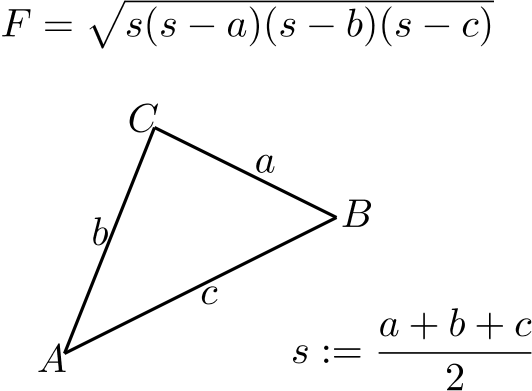
这是 LaTeX figure rendering 功能的最通用用例。
如何将 LaTeX figure 渲染为 SVG
以类似的方式,我们可以将 LaTeX figure 渲染为 SVG 格式。
 1// Create rendering options.
 2SvgFigureRendererOptions options = new SvgFigureRendererOptions();
 3// Specify the preamble.
 4options.setPreamble("\\usepackage{pict2e}");
 5// Specify the scaling factor 300%.
 6options.setScale(3000);
 7// Specify the background color.
 8options.setBackgroundColor(Color.WHITE);
 9// Specify the output stream for the log file.
10options.setLogStream(new ByteArrayOutputStream());
11// Specify whether to show the terminal output on the console or not.
12options.showTerminal(true);
13
14// Create the output stream for the figure image.
15final OutputStream stream = new FileOutputStream(Utils.getOutputDirectory() + "text-and-formula.svg");
16try {
17    // Run rendering.
18    com.aspose.tex.Size2D size = new SvgFigureRenderer().render("\\setlength{\\unitlength}{0.8cm}\r\n" +
19    "\\begin{picture}(6,5)\r\n" +
20    "\\thicklines\r\n" +
21    "\\put(1,0.5){\\line(2,1){3}} \\put(4,2){\\line(-2,1){2}} \\put(2,3){\\line(-2,-5){1}} \\put(0.7,0.3){$A$} \\put(4.05,1.9){$B$} \\put(1.7,2.95){$C$}\r\n" +
22    "\\put(3.1,2.5){$a$} \\put(1.3,1.7){$b$} \\put(2.5,1.05){$c$} \\put(0.3,4){$F=\\sqrt{s(s-a)(s-b)(s-c)}$} \\put(3.5,0.4){$\\displaystyle s:=\\frac{a+b+c}{2}$}\r\n" +
23    "\\end{picture}", stream, options);
24
25    // Show other results.
26    System.out.println(options.getErrorReport());
27    System.out.println();
28    System.out.println("Size: " + size.getWidth() + "x" + size.getHeight()); // Dimensions of the resulting image.
29} finally {
30    if (stream != null)
31        stream.close();
32}区别如下:
- 我们使用 SvgFigureRendererOptions 类,而不是 PngFigureRendererOptions。
- 我们不指定分辨率。
- 我们使用 SvgFigureRenderer 类,而不是 PngFigureRenderer。
以下是结果:
