
外部 LaTeX 包 | Aspose.TeX for .NET
外部 LaTeX 包
Aspose.TeX 库已经包含了许多 常用 LaTeX 包。因此您无需担心如何向库的 TeX 引擎提供这些包。但有时(甚至经常)您的 LaTeX 文件可能需要超出“原生”支持的“捆绑”包。如果出现这种情况,您可以尝试通过 TeXOptions 类实例的 RequiredInputDirectory 选项提供所需的输入,即所需包的源文件。下面我们将通过两个示例来演示其工作方式。
已解压的必需输入(fancybox 包)
假设我们有下面这个简单的 LaTeX 文件,它来自我们的
示例解决方案中的 required-input-fs.tex:
 1\documentclass{article}
 2\usepackage[a6paper,landscape]{geometry}
 3\usepackage{fancybox}
 4\begin{document}
 5Test: \fbox{
 6  \begin{Bitemize}[b]
 7  \item First item
 8  \item A second one\\ on two lines
 9  \item(2pt) A third with extra space
10  \end{Bitemize}
11}
12\par\bigskip
13Test: \fbox{
14  \begin{Beqnarray}[t]
15  y & = & x^2 \\
16  a^2 + 2ab + b^2 & = & (a + b)^2 \\
17  \int_0^\infty e^{-ax} dx & = & \frac{1}{a}
18  \end{Beqnarray}
19}
20\end{document}
在第 3 行可以看到文件需要 fancybox 包,而该包并未被“原生”支持。假设我们已经拥有 fancybox 包的源文件。它是一个简单的包,仅包含单个文件。我们可以将此文件放在文件系统的任意位置,并按如下方式指定目录路径:
1options.RequiredInputDirectory = new InputFileSystemDirectory("path-to-directory-where-fancybox.sty-located");使用此选项运行 TeX 作业后(别忘了根据需要调整其他选项),我们得到输出文档(即 PNG 图像)。
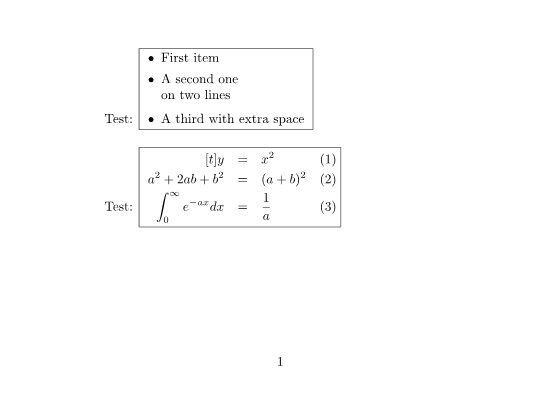
以下是该示例的完整源代码:
 1// External LaTeX packages from file system
 2
 3// Create conversion options for Object LaTeX format upon Object TeX engine extension.
 4TeXOptions options = TeXOptions.ConsoleAppOptions(TeXConfig.ObjectLaTeX);
 5// Specify a file system working directory for the output.
 6options.OutputWorkingDirectory = new OutputFileSystemDirectory(OutputDir);
 7// Specify a file system working directory for the required input.
 8// The directory containing packages may be located anywhere.
 9options.RequiredInputDirectory = new InputFileSystemDirectory(Path.Combine(DataDir, "packages"));
10// Initialize the options for saving in PNG format.
11options.SaveOptions = new PngSaveOptions();
12// Run LaTeX to PNG conversion.
13new TeXJob(Path.Combine(DataDir, "required-input-fs.tex"), new ImageDevice(), options).Run();已归档的必需输入(pgfplots 包)
现在假设我们还有下面这个同样相当简单的 LaTeX 文件,它来自示例解决方案中的 required-input-zip.tex:
 1\documentclass{article}
 2\usepackage[margin=0.25in]{geometry}
 3\usepackage{pgfplots}
 4\pgfplotsset{width=10cm,compat=1.18}
 5\begin{document}
 6
 7第一个示例是并排绘制的二维和三维数学表达式。
 8
 9%Here begins the 2D plot
10\begin{tikzpicture}
11\begin{axis}
12\addplot[color=red]{exp(x)};
13\end{axis}
14\end{tikzpicture}
15%Here ends the 2D plot
16\hskip 5pt
17%Here begins the 3D plot
18\begin{tikzpicture}
19\begin{axis}
20\addplot3[
21    surf,
22]
23{exp(-x^2-y^2)*x};
24\end{axis}
25\end{tikzpicture}
26%Here ends the 3D plot
27
28\end{document}
在第 3 行可以看到文件需要 pgfplots 包,同样未被“原生”支持。再次假设我们已经拥有 pgfplots 包的源文件。该包文件数量较多,分布在两个位置:\tex\generic 和 \tex\latex 文件夹中。必须将这两个文件夹的内容作为必需输入提供给 Aspose.TeX 库。我们希望将这些源文件打包成 ZIP 存档,存档的布局如下:
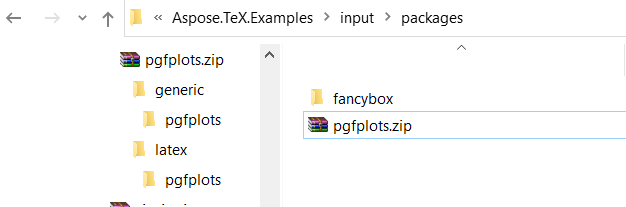
下面演示如何指定对这些源文件的访问方式:
1using (Stream zipStream = File.Open("path-to-zip-with-pgfplots-sources", FileMode.Open))
2{
3    ...
4    options.RequiredInputDirectory = new InputZipDirectory(zipStream);
5    ...
6}
使用此选项运行 TeX 作业后,我们得到输出文档:
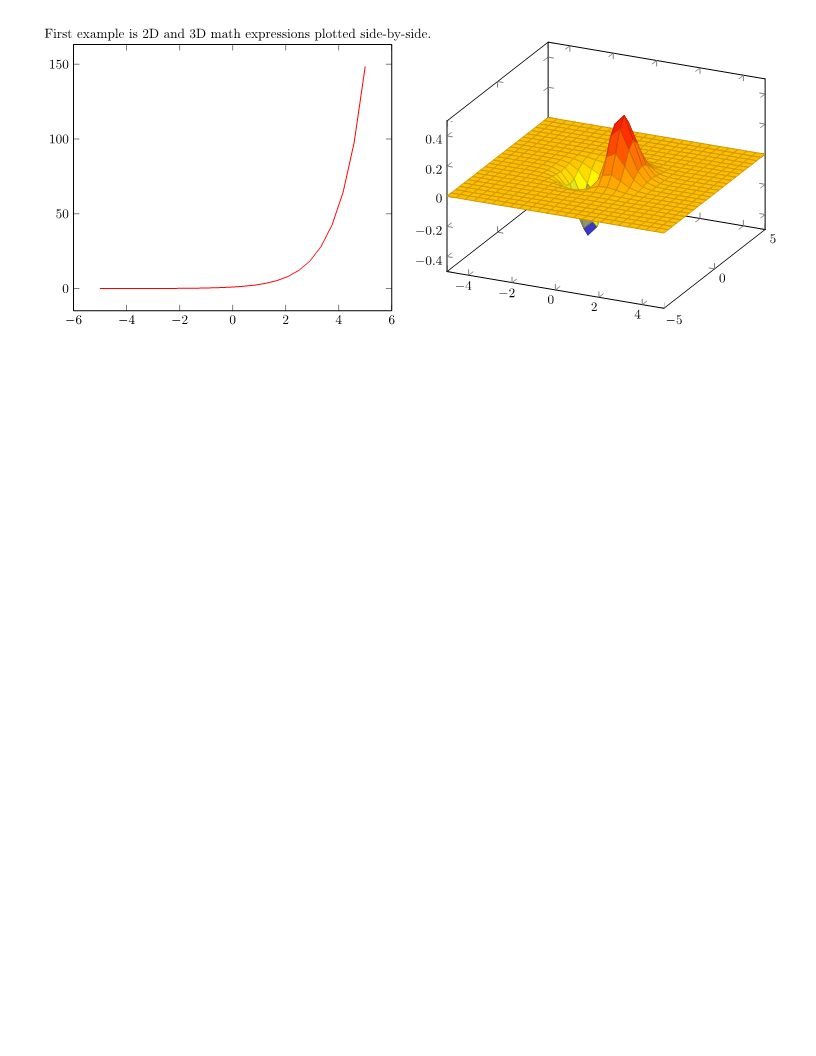
以下是该示例的完整源代码:
 1// External LaTeX packages from ZIP archive
 2
 3// Create conversion options for Object LaTeX format upon Object TeX engine extension.
 4TeXOptions options = TeXOptions.ConsoleAppOptions(TeXConfig.ObjectLaTeX);
 5// Specify a file system working directory for the output.
 6options.OutputWorkingDirectory = new OutputFileSystemDirectory(OutputDir);
 7// Initialize the options for saving in PNG format.
 8options.SaveOptions = new PngSaveOptions();
 9// Create a file stream for the ZIP archive containing the required package.
10// The ZIP archive may be located anywhere.
11using (Stream zipStream = File.Open(Path.Combine(DataDir, "packages\\pgfplots.zip"), FileMode.Open))
12{
13    // Specify a ZIP working directory for the required input.
14    options.RequiredInputDirectory = new InputZipDirectory(zipStream, "");
15
16    // Run LaTeX to PNG conversion.
17    new TeXJob(Path.Combine(DataDir, "required-input-zip.tex"), new ImageDevice(), options).Run();
18}注意: 结果已使用
pgfplots包版本 1.18.1 验证。Aspose.TeX 库中包含的pfg包版本为 3.1.9a。
使用外部字体包
通常,LaTeX 发行版会提供一套默认字体供排版使用。除这些字体外,Aspose.TeX 还包含若干非标准字体包,例如 amsfonts、eurosym 和 wasysym。正如前文所述,Aspose.TeX 也允许使用外部包,但大多数情况下我们讨论的是不包含字体的包。
Aspose.TeX 的 Object TeX 引擎扩展需要字体映射文件(即扩展名为 .map 的文本文件),以确定每个 TeX 内部字体名对应的实际字体。这些映射文件必须在初始化阶段加载到 TeX 的内存中,并且必须随您引入的包一起存在。由于引擎不知道所有字体映射的名称,它会搜索所有扩展名为 .map 的文件。因此,实现用于 RequiredInputDirectory 选项的
IInputWorkingDirectory 接口时,需要提供一种按扩展名访问文件名集合的方式。更具体地说,该实现还必须实现
IFileCollector 接口。标准实现——
InputFileSystemDirectory 和
InputZipDirectory——已经具备此功能。
下面提供一个自定义必需输入目录的示例,该示例同样实现了 IFileCollector 接口。示例侧重于按扩展名收集文件名,省略了文件存储和检索的细节。
 1// Custom implementation of IInputWorkingDirectory for external packages with fonts
 2
 3// This is an implementation of IInputWorkingDirectory that is suitable for the TeX job's RequiredInputDirectory option
 4// in case required input contains fonts provided by external packages.
 5// The class additionally implements IFileCollector, which provides access to file collections by extension.
 6// This is necessary to load external font maps, which are files (outside TeX syntax) that map TeX's
 7// internal font names to file names of physical fonts.
 8public class RequiredInputDirectory : IInputWorkingDirectory, IFileCollector
 9{
10    private Dictionary<string, Dictionary<string, string>> _fileNames =
11        new Dictionary<string, Dictionary<string, string>>();
12
13    public RequiredInputDirectory()
14    {
15    }
16
17    // This method should preliminarily be called for each file entry that is supposed to be located inside
18    // the required input directory. Inside is an example of how the dictionary of file names could be organized
19    // for easy collection of file names by extension.
20    // Here fileName is a full file name. This can be a file path on a file system, a URL, or whatever else (theoretically).
21    public void StoreFileName(string fileName)
22    {
23        string extension = Path.GetExtension(fileName);
24        string name = Path.GetFileNameWithoutExtension(fileName);
25
26        Dictionary<string, string> files;
27        if (!_fileNames.TryGetValue(extension, out files))
28            _fileNames.Add(extension, files = new Dictionary<string, string>());
29
30        files[name] = fileName;
31    }
32
33    // The IInputWorkingDirectory implementation.
34    public NamedStream GetFile(string fileName, bool searchSubdirectories = false)
35    {
36        // Try to find the file in our stored files
37        foreach (var extFiles in _fileNames.Values)
38        {
39            foreach (var file in extFiles.Values)
40            {
41                if (file.EndsWith(fileName) || Path.GetFileName(file) == fileName)
42                {
43                    return new NamedStream(File.OpenRead(file), fileName);
44                }
45            }
46        }
47        // If not found in stored files, return null (file not available)
48        return new NamedStream(null, fileName);
49    }
50
51    // Here is how we gather file collections by extension.
52    public string[] GetFileNamesByExtension(string extension, string path = null)
53    {
54        Dictionary<string, string> files;
55        if (!_fileNames.TryGetValue(extension, out files))
56            return new string[0];
57
58        return new List<string>(files.Values).ToArray();
59    }
60
61    public void Dispose()
62    {
63        _fileNames.Clear();
64    }
65}限制
如果您的 LaTeX 文件所需的包是基于 LaTeX3e 内核开发的,则该包很可能无法与 Aspose.TeX 库一起工作,因为后者基于 LaTeX2e 内核。
此外,如果您的 LaTeX 文件所需的包直接调用了 Aspose.TeX 的 Object TeX 引擎不支持的设备相关原语命令,则该包肯定无法工作。
构建 LaTeX 嵌入式宏包优化 AI 代理
如果您需要创建一个 AI 代理,在生成文档时无需进行缓慢的动态网络检索或文件系统搜索,即可针对内置宏包列表优化内容,您可以采用以下工作流程。
该代理不会让 LLM 猜测哪些宏包安全或高效,而是针对特定的预编译宏包列表,以确保文档 100% 可靠地生成。

- 版面意图提取(LLM 分析层)
用户提供非结构化的多格式数据或对话式指令。LLM 将请求直接映射到 Aspose 嵌入式宏包列表(colortbl 用于行阴影,geometry 用于页边距,hyperref 用于字距调整,tabularx 用于可变宽度列)。
- AST 隔离和导言注入
代理程序不会编写臃肿的包导入语句,而是会根据其预缓存的本地引擎清单检查代码需求。
它会将结构优化路径直接写入代码导言字符串。
- 流沙箱和执行(Aspose.TeX Engine Node)
编译后的标记流及其宏环境会被分派到沙箱化的工作节点中。系统使用优化的程序集配置文件(例如 TeXConfig.ObjectLaTeX)配置严格的 TeXOptions 应用程序运行时配置文件。它会在内存流缓冲区内安全地运行一个非阻塞的 TeXJob 执行管道。
1\usepackage[a4paper,margin=0.5in]{geometry}
2\usepackage{amsmath,tabularx,colortbl,hyperref}- 资源序列化(输出渲染层)
系统映射坐标目标并处理输出边界,利用矢量执行数组(PdfDevice 或 SvgDevice)将清晰的文档布局即时返回到客户端界面。