
LaTeX 文件修复 | Aspose.TeX for .NET
如何检查并修复 LaTeX 文件
如果您有一个文本文件,认为它是 LaTeX 文件并希望对其进行排版,但不确定它是否真的是 LaTeX 文件(也许您是 LaTeX 新手),可以尝试使用 Aspose.TeX API for .NET 提供的 LaTeX 检查和修复功能。在下面的示例中,我们将检查并修复 Aspose.TeX for .NET 示例项目中的示例文件 invalid-latex.tex。
首先,值得一提的是,尽管示例文件看起来使用了 TeX 语法,但它没有 LaTeX 所要求的结构。正如您所知,LaTeX 文件必须有以 \documentclass 命令开头的导言区,以及位于 document 环境中的正文,即介于 \begin{document} 和 \end{document} 之间。
现在让我们看看 C# 代码示例。
 1// Repair invalid LaTeX file and guess missing packages
 2
 3// Create repair options.
 4LaTeXRepairerOptions options = new LaTeXRepairerOptions();
 5// Specify a file system working directory for the output.
 6options.OutputWorkingDirectory = new OutputFileSystemDirectory(OutputDir);
 7// Specify a file system working directory for the required input.
 8// The directory containing packages may be located anywhere.
 9options.RequiredInputDirectory = new InputFileSystemDirectory(Path.Combine(DataDir, "packages"));
10// Specify the callback class to externally guess packages required for undefined commands or environments.
11options.GuessPackageCallback = new PackageGuesser();
12// Run the repair process.
13new LaTeXRepairer(Path.Combine(DataDir, "invalid-latex.tex"), options).Run();类似于普通的 TeX 作业,我们首先创建一个包含即将运行的进程选项的对象。大多数选项与普通 TeX 作业的选项相同。事实上, InputWorkingDirectory 是读取输入文件的目录。这里我们不使用它,因为我们在文件系统中提供了主输入文件的完整路径,并且主输入文件不应包含自定义文件。然后, OutputWorkingDirectory 是写入输出文件的目录。 RequiredInputDirectory,如果设置,则指向您可以存放未嵌入 Aspose.TeX 库的 LaTeX 包的目录。稍后将讨论 GuessPackageCallback 属性。
分配好选项后,我们只需运行该过程!
那么,检查和修复过程是怎样的呢?首先,API 在输入文件中搜索 \documentclass。如果未找到,它会假设需要在文件开头插入 \documentclass{article}。此事实会在修复报告文件(.log)中体现。
接着,它从文件开头开始扫描已调整的输入文件。负责 LaTeX 格式的 TeX 引擎可能在某处抛出错误,提示至今未找到 \begin{document},尽管它本应已经出现。于是确定并在报告中记录需要插入 \begin{document} 的位置。
当引擎进一步扫描文件时,可能会发现未定义的命令或环境。API 可以对
嵌入的必需包(即那些在包含这些包之前未定义的命令和环境)做出假设,针对一些最常见的命令和环境提供映射。然而,也可以通过实现
IGuessPackageCallback 接口在外部进行此类假设。应将此类类的实例分配给 GuessPackageCallback 选项。
下面是一个非常简单的示例,仅将 \head 命令映射到 fancyhdr 包:
 1// The callback class to externally guess packages required for undefined commands or environments.
 2public class PackageGuesser : IGuessPackageCallback
 3{
 4    private Dictionary<string, string> _map = new Dictionary<string, string>();
 5
 6    public PackageGuesser()
 7    {
 8        _map.Add("lhead", "fancyhdr"); // Defines the mapping between the \lhead command and the fancyhdr package.
 9    }
10
11    public string GuessPackage(string commandName, bool isEnvironment)
12    {
13        string packageName;
14        if (!isEnvironment)
15        {
16            _map.TryGetValue(commandName, out packageName);
17            return packageName ?? ""; // It's better to return an empty string to avoid consequent calls for the same command name.
18        }
19
20        // Some code for environments
21        // ...
22
23        return "";
24    }
25}对于示例文件,引擎首先遇到 \chapter 命令,该命令在 article 文档类中未定义,但在 book 文档类中定义。API 会调整文档类,使修复后的文件开头为 \documentclass{book}。随后,引擎发现前述的 \lhead 命令,并决定在导言区插入 \usepackage{fancyhdr}。随后出现的 \href 和 \includegraphics 命令分别导致 Repairer 在导言区插入 \usepackage{hyperref} 和 \usepackage{graphics}。这些决定基于 API 的内部映射。同样,所有此类修复都会记录在报告文件中。
最后,由于缺少 LaTeX 文档的正常结尾,引擎异常终止。这导致 Repairer 在文件末尾追加 \end{document} 并在报告中反映此情况。
构建出原文件的修复版本后,Repairer 对其运行 TeX 作业进行最终检查。在我们的示例中,此次运行未发现任何关键错误,因此修复后的版本基本可以按预期进行排版。
以下是完整的报告:
 1Trying to repair the original file...
 2--------------------------------------------------------------------------------
 3\documentclass is missing in the original file. Inserted at the beginning.
 4\begin{document} is missing in the original file. Inserted at line 3, pos. 0.
 5The command \chapter at line 3, pos. 0 is undefined. Consider using \usepackage{package_name} in the preamble,
 6    where 'package_name' is the name of the package which defines this command.
 7The command \lhead at line 5, pos. 0 is undefined. \usepackage{fancyhdr} is inserted in the preamble
 8    since the 'fancyhdr' package supposedly defines the command.
 9The command \href at line 8, pos. 0 is undefined. \usepackage{hyperref} is inserted in the preamble
10    since the 'hyperref' package supposedly defines the command.
11The command \href at line 17, pos. 0 is undefined. \usepackage{hyperref} is inserted in the preamble
12    since the 'hyperref' package supposedly defines the command.
13The command \href at line 20, pos. 0 is undefined. \usepackage{hyperref} is inserted in the preamble
14    since the 'hyperref' package supposedly defines the command.
15The command \href at line 27, pos. 0 is undefined. \usepackage{hyperref} is inserted in the preamble
16    since the 'hyperref' package supposedly defines the command.
17The command \href at line 32, pos. 0 is undefined. \usepackage{hyperref} is inserted in the preamble
18    since the 'hyperref' package supposedly defines the command.
19The command \includegraphics at line 54, pos. 2 is undefined. \usepackage{graphicx} is inserted in the preamble
20    since the 'graphicx' package supposedly defines the command.
21The command \href at line 67, pos. 0 is undefined. \usepackage{hyperref} is inserted in the preamble
22    since the 'hyperref' package supposedly defines the command.
23The command \href at line 95, pos. 57 is undefined. \usepackage{hyperref} is inserted in the preamble
24    since the 'hyperref' package supposedly defines the command.
25The command \href at line 96, pos. 0 is undefined. \usepackage{hyperref} is inserted in the preamble
26    since the 'hyperref' package supposedly defines the command.
27The command \href at line 98, pos. 100 is undefined. \usepackage{hyperref} is inserted in the preamble
28    since the 'hyperref' package supposedly defines the command.
29\end{document} is missing in the original file. Inserted at the end.
30
31Checking the repaired file...
32--------------------------------------------------------------------------------
33There are no critical errors in the fixed file.
构建 LaTeX 数学公式修复 AI 代理
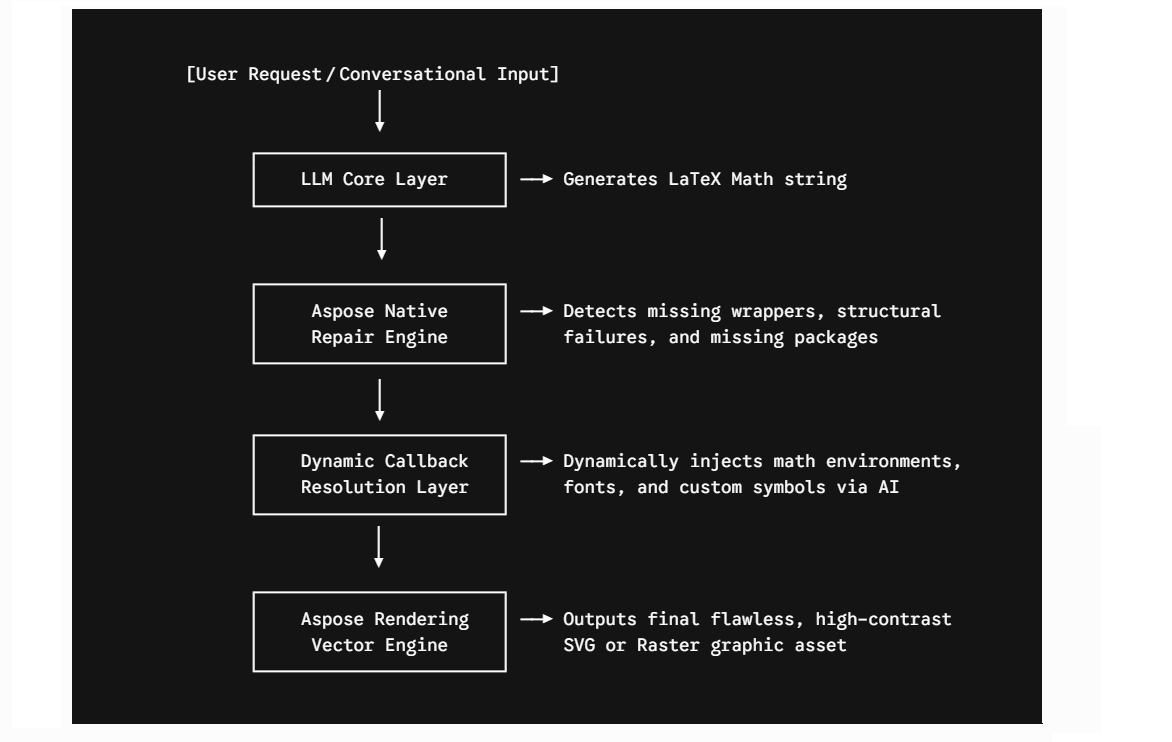
此工作流程结合了 Aspose.TeX 原生修复 API 的结构验证和 LLM Core 的上下文推理,从而实现无错渲染流程。它可以作为独立的代理来检查和修复现有 LaTeX 文件中的错误,也可以作为数学公式编写流程的一部分。
用于修复 LaTeX 语法的 AI 代理的工作流程架构
- 语法处理和意图提取(LLM 层)
用户提供对话式指令、原始文本片段、复制的公式或 .latex 文件。代理会引导 LLM 提取核心数学意图,并输出一个聚焦的 LaTeX 数学公式块。
- 原生结构自动纠错(Aspose.TeX 修复器)
生成的数学片段会通过 Aspose.TeX 原生修复生命周期进行处理,从而构建标准结构边界,无需开发者编写硬编码的正则表达式包装器。
代理程序会创建一个后台 LaTeXRepairer 实例。引擎会扫描数据流,拦截错误,并在数学字符串周围安全地写入 \begin{document} 和 \end{document} 包装器,以确保编译流程的有效性。
- 执行和资源/报告生成(渲染引擎)
修复并打包后的脚本字符串成功编译后,代理程序会生成报告或将清理后的文件系统输出转换为目标视觉格式。
您也可以查看我们的免费
AI LaTeX Repairer 网络应用程序,该应用基于在
Aspose.TeX for .NET API 中实现的功能,并涉及更高级的 IGuessPackageCallback 接口实现。