LaTeX 图形渲染 | Python via .NET
在某些情况下,您可能需要将 LaTeX 文件中的特定内容提取为一个独立渲染的部分,通常称为 图形,且不与页面布局关联。例如,这在为在线出版物创建插图时可能会很有用。我们的 API 允许您实现此功能。用于渲染图形的目标格式为 PNG 和 SVG,正如 LaTeX 数学公式渲染功能一样。值得注意的是,LaTeX 图形渲染是一个比 LaTeX 数学公式渲染 更通用的功能。
将 LaTeX 图形渲染为 PNG
如有需要,首先查看此主题的 API 参考章节。与公式渲染类似,我们将从一个示例开始。示例代码如下:
 1from aspose.tex.features import *
 2from aspose.pydrawing import Color
 3from aspose.tex.io import *
 4from aspose.tex.presentation.xps import *
 5from util import Util
 6from io import BytesIO
 7from os import path
 8###############################################
 9###### Class and Method declaration here ######
10###############################################
11
12# Create rendering options setting the image resolution to 150 dpi.
13options = PngFigureRendererOptions()
14options.resolution = 150             # Specify the preamble.
15options.preamble = r"\usepackage{pict2e}"
16# Specify the scaling factor 300%.
17options.scale = 3000
18# Specify the background color.
19options.background_color = Color.white
20# Specify the output stream for the log file.
21options.log_stream = BytesIO()
22# Specify whether to show the terminal output on the console or not.
23options.show_terminal = True
24
25# Create the output stream for the figure image.
26with open(path.join(Util.output_directory, "text-and-formula.png"), "wb") as stream:
27    # Run rendering.
28    size = PngFigureRenderer().render(r"""\setlength{\unitlength}{0.8cm}
29\begin{picture}(6,5)
30\thicklines
31\put(1,0.5){\line(2,1){3}} \put(4,2){\line(-2,1){2}} \put(2,3){\line(-2,-5){1}} \put(0.7,0.3){$A$} \put(4.05,1.9){$B$} \put(1.7,2.95){$C$}
32\put(3.1,2.5){$a$} \put(1.3,1.7){$b$} \put(2.5,1.05){$c$} \put(0.3,4){$F=\sqrt{s(s-a)(s-b)(s-c)}$} \put(3.5,0.4){$\displaystyle s:=\frac{a+b+c}{2}$}
33\end{picture}""", stream, options)
34
35# Show other results.
36print(options.error_report)
37print()
38print(f"Size: {size.width}x{size.height}")首先,我们创建 LaTeX 图形渲染器选项 类的实例,并同时指定输出图像的分辨率。
接下来,需要指定前导内容(preamble)。与 LaTeX 数学公式渲染不同,LaTeX 图形渲染没有默认的前导内容。因此,如果您计划渲染使用 pict2e LaTeX 包创建的图形,例如,需要在前导内容中指定该包:
1\usepackage{pict2e}然后我们指示渲染器将输出放大 300%。
下一个选项决定背景颜色。与公式渲染不同,我们不需要指定前景颜色,因为我们假设颜色完全由 LaTeX 代码控制。同样,背景颜色也由 LaTeX 代码控制,此选项仅为方便而提供。
示例中的下一行可能没有太大意义,它仅用于演示您可以将日志输出定向到特定流。
最后一个选项 ShowTerminal 允许您控制是否在控制台显示终端输出。
负责渲染图形的方法是 FigureRenderer.render()。该方法返回图形的点数大小。
该方法接受第二个参数作为流,即图像将被写入的流。我们在下一行创建该流。
最后,我们调用 FigureRenderer.render() 方法本身,将选项作为第三个参数传入。图形的 LaTeX 代码作为第一个参数提供。
示例的最后几行显示了与图形渲染相关的两条信息——图形的大小以及简要的错误报告(如果有错误)。
以下是渲染结果。
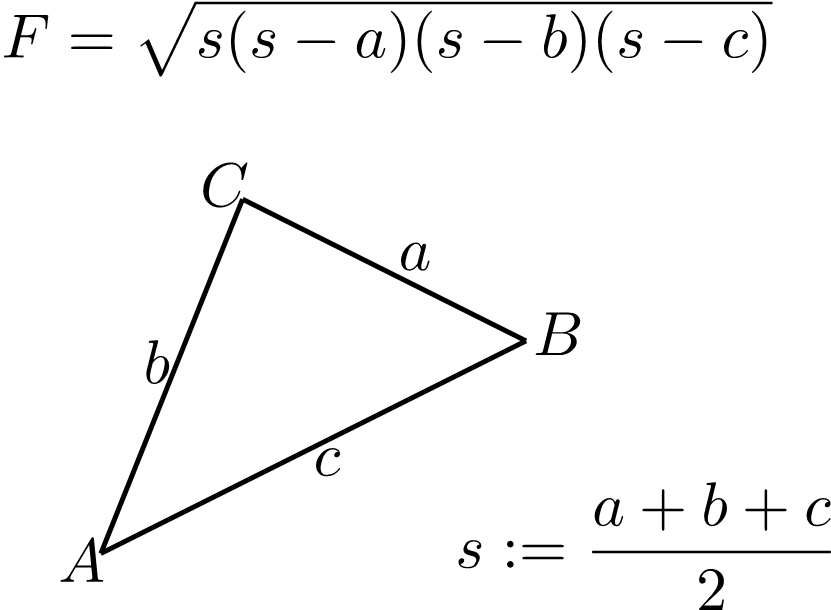
这代表了 LaTeX 图形渲染 功能的最通用使用场景。
将 LaTeX 图形渲染为 SVG
同样,我们也可以将 LaTeX 图形渲染为 SVG 格式。
 1from aspose.tex.features import *
 2from aspose.pydrawing import Color
 3from util import Util
 4from io import BytesIO
 5from os import path
 6###############################################
 7###### Class and Method declaration here ######
 8###############################################
 9
10# Create rendering options.
11options = SvgFigureRendererOptions()
12# Specify the preamble.
13options.preamble = r"\usepackage{pict2e}"
14# Specify the scaling factor 300%.
15options.scale = 3000
16# Specify the background color.
17options.background_color = Color.white
18# Specify the output stream for the log file.
19options.log_stream = BytesIO()
20# Specify whether to show the terminal output on the console or not.
21options.show_terminal = True
22
23# Create the output stream for the figure image.
24with open(path.join(Util.output_directory, "text-and-formula.svg"), "wb") as stream:
25    # Run rendering.
26    size = SvgFigureRenderer().render(r"""\setlength{\unitlength}{0.8cm}
27\begin{picture}(6,5)
28\thicklines
29\put(1,0.5){\line(2,1){3}} \put(4,2){\line(-2,1){2}} \put(2,3){\line(-2,-5){1}} \put(0.7,0.3){$A$} \put(4.05,1.9){$B$} \put(1.7,2.95){$C$}
30\put(3.1,2.5){$a$} \put(1.3,1.7){$b$} \put(2.5,1.05){$c$} \put(0.3,4){$F=\sqrt{s(s-a)(s-b)(s-c)}$} \put(3.5,0.4){$\displaystyle s:=\frac{a+b+c}{2}$}
31\end{picture}""", stream, options)
32
33# Show other results.
34print(options.error_report)
35print()
36print(f"Size: {size.width}x{size.height}")区别如下:
- 使用 SvgFigureRendererOptions 类,而不是 PngFigureRendererOptions 类。
- 不需要指定分辨率。
- 使用 SvgFigureRenderer 类,而不是 PngFigureRenderer 类。
以下是渲染结果: