---
title: "Nested Mail Merge with Regions in C++"
---
In some scenarios, you may need to use nested Mail Merge with regions. Nested merge is a feature that allows you to merge hierarchical data from your data source into your merge template to easily populate your document. Basically, the hierarchical data is represented as a set of data items, and hierarchical relationships describe how the data items are related to each other (one item of data is the parent of another one).
Aspose.Words enables you to perform a Mail Merge operation with nested regions. You can use this feature if you have a data source that is organized into a tree‑like structure and you want to execute a Mail Merge operation to populate a template with hierarchical data.
{{% alert color="primary" %}}
Nested Mail Merge is relevant only when performing a Mail Merge with regions.
{{% /alert %}}
## What is a Nested Mail Merge
The Mail Merge region is called nested if you have two or more Mail Merge regions where one of them is inside the other in a hierarchical form. Note that each region contains data from one table.
The most common example of a nested Mail Merge is an order that contains a few items where you need to link many data tables and present the information in a template.
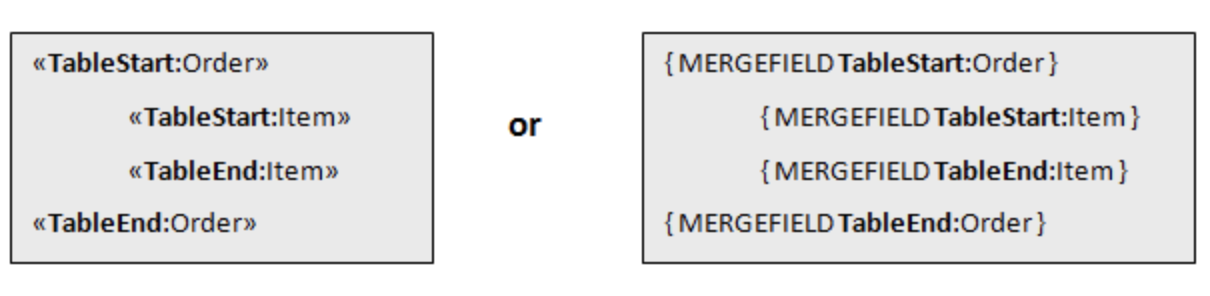
The picture below shows two nested regions where the *Order* Mail Merge region is the parent of the *Item* Mail Merge region.
 ## How to Process Mail Merge with Nested Regions
The data to be merged into a template can come from various sources, mainly relational databases or XML documents. In our example, we are going to use an [SQLite](https://www.sqlite.org/index.html) database to store our data and load it with custom data source implementation.
The image below demonstrates how the data from the *Order* table passed to the nested merge regions will be linked to the *Item* table, as well as the output generated during the merge operation.
## How to Process Mail Merge with Nested Regions
The data to be merged into a template can come from various sources, mainly relational databases or XML documents. In our example, we are going to use an [SQLite](https://www.sqlite.org/index.html) database to store our data and load it with custom data source implementation.
The image below demonstrates how the data from the *Order* table passed to the nested merge regions will be linked to the *Item* table, as well as the output generated during the merge operation.
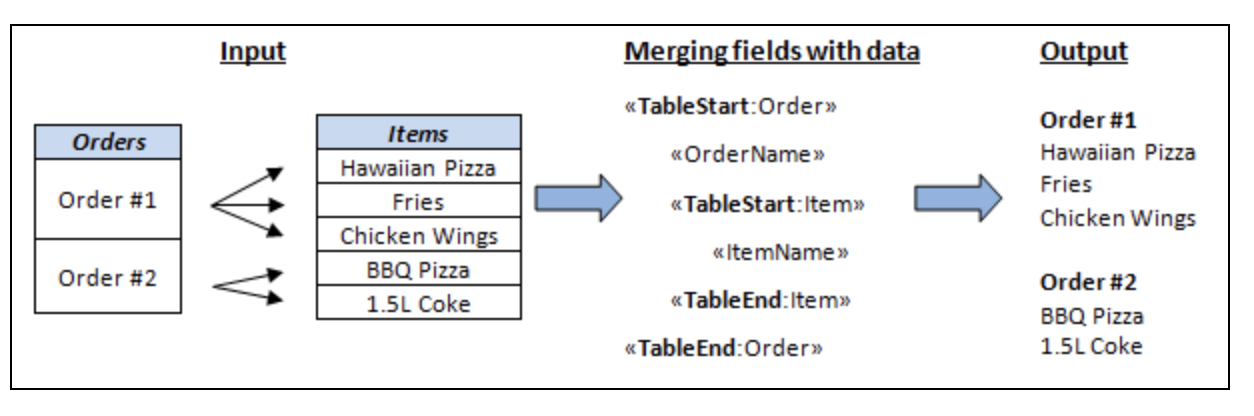 As you can see from the output document, each order from the **Order** table is inserted into the merge template with all order’s related items from the **Item** table. The next order will be inserted along with their items until all the orders and items are listed. The order of nesting Mail Merge with regions in the template must match the data relationships between the tables in the data source.
## How to Create Data Relations from a Custom Data Source
Implement the [IMailMergeDataSource](https://reference.aspose.com/words/cpp/aspose.words.mailmerging/imailmergedatasource/) interface to create relationships in the parent‑child structure of your custom data source. Use the [GetChildDataSource](https://reference.aspose.com/words/cpp/aspose.words.mailmerging/imailmergedatasource/getchilddatasource/) method to return the relevant child data of a current parent record.
The following code example demonstrates how to generate an invoice using nested Mail Merge with regions from [SQLite](https://www.sqlite.org/index.html) database with [SQLiteCpp](https://github.com/SRombauts/SQLiteCpp):
{{< gist "aspose-words-gists" "3435df005db9907ec9ba3a6b777ae6fb" "nested-mail-merge.h" >}}
------
## FAQ
1. **Q:** How do I implement `IMailMergeDataSource` for a parent table in C++?
**A:** Create a class that inherits from `Aspose::Words::MailMerging::IMailMergeDataSource`. Implement `GetValue`, `MoveNext`, `GetChildDataSource`, and `GetRecordCount`. In `GetChildDataSource`, return a new instance of a child‑data‑source class that represents the related table rows.
2. **Q:** How does `GetChildDataSource` link parent and child records?
**A:** When the mail‑merge engine finishes processing a parent record, it calls `GetChildDataSource` on the current `IMailMergeDataSource`. Your implementation should return a data source that enumerates only the child rows that belong to the current parent record, typically by filtering on a foreign‑key value.
3. **Q:** Can I use a `DataTable` or SQLite query directly without a custom data source?
**A:** Yes. Aspose.Words provides `DataTableMailMergeDataSource` for .NET, but in C++ you need to wrap the result set in a custom `IMailMergeDataSource`. Using SQLiteCpp, execute a query for the parent table, then for each parent row create a child data source that runs a second query filtered by the parent’s key.
4. **Q:** What are common errors when performing nested mail merge with regions in C++?
**A:** Typical problems include returning `nullptr` from `GetChildDataSource`, mismatched region names between the template and code, or not resetting the child data source for each parent record. Ensure region names are identical (case‑sensitive) and that `GetChildDataSource` always returns a fresh iterator for the current parent.
5. **Q:** How can I include images or other fields inside a nested region?
**A:** Treat the image field like any other merge field. In the child data source, provide the image data (e.g., as a `System::SharedPtr`). In the template, use an image merge field (`«ImageField»`). During mail merge, Aspose.Words will replace the field with the supplied image for each child record.
As you can see from the output document, each order from the **Order** table is inserted into the merge template with all order’s related items from the **Item** table. The next order will be inserted along with their items until all the orders and items are listed. The order of nesting Mail Merge with regions in the template must match the data relationships between the tables in the data source.
## How to Create Data Relations from a Custom Data Source
Implement the [IMailMergeDataSource](https://reference.aspose.com/words/cpp/aspose.words.mailmerging/imailmergedatasource/) interface to create relationships in the parent‑child structure of your custom data source. Use the [GetChildDataSource](https://reference.aspose.com/words/cpp/aspose.words.mailmerging/imailmergedatasource/getchilddatasource/) method to return the relevant child data of a current parent record.
The following code example demonstrates how to generate an invoice using nested Mail Merge with regions from [SQLite](https://www.sqlite.org/index.html) database with [SQLiteCpp](https://github.com/SRombauts/SQLiteCpp):
{{< gist "aspose-words-gists" "3435df005db9907ec9ba3a6b777ae6fb" "nested-mail-merge.h" >}}
------
## FAQ
1. **Q:** How do I implement `IMailMergeDataSource` for a parent table in C++?
**A:** Create a class that inherits from `Aspose::Words::MailMerging::IMailMergeDataSource`. Implement `GetValue`, `MoveNext`, `GetChildDataSource`, and `GetRecordCount`. In `GetChildDataSource`, return a new instance of a child‑data‑source class that represents the related table rows.
2. **Q:** How does `GetChildDataSource` link parent and child records?
**A:** When the mail‑merge engine finishes processing a parent record, it calls `GetChildDataSource` on the current `IMailMergeDataSource`. Your implementation should return a data source that enumerates only the child rows that belong to the current parent record, typically by filtering on a foreign‑key value.
3. **Q:** Can I use a `DataTable` or SQLite query directly without a custom data source?
**A:** Yes. Aspose.Words provides `DataTableMailMergeDataSource` for .NET, but in C++ you need to wrap the result set in a custom `IMailMergeDataSource`. Using SQLiteCpp, execute a query for the parent table, then for each parent row create a child data source that runs a second query filtered by the parent’s key.
4. **Q:** What are common errors when performing nested mail merge with regions in C++?
**A:** Typical problems include returning `nullptr` from `GetChildDataSource`, mismatched region names between the template and code, or not resetting the child data source for each parent record. Ensure region names are identical (case‑sensitive) and that `GetChildDataSource` always returns a fresh iterator for the current parent.
5. **Q:** How can I include images or other fields inside a nested region?
**A:** Treat the image field like any other merge field. In the child data source, provide the image data (e.g., as a `System::SharedPtr`). In the template, use an image merge field (`«ImageField»`). During mail merge, Aspose.Words will replace the field with the supplied image for each child record.