---
title: "Mail Merge with XML Data Source in Java"
---
{{% alert color="grey" %}}
## Purpose Summary
This page explains how to perform a mail merge using XML as the data source.
{{% /alert %}}
You can use a variety of data sources when performing a Mail Merge operation, including an XML file. The main advantage of using XML is the ability to define a hierarchy right in the document and then simply pass it to Aspose.Words.
This article will describe how to read data from an XML file rather than directly from a database and include XML as the data source to perform a Mail Merge operation.
## Advantages of XML As a Data Source
XML data sources are very handy for storing data without the overhead of a database. They are great for offline applications where users need to add, edit, and delete data when they cannot connect to a database.
XML data can be a good data source alternative to relational databases, especially if you work with web applications. Most web services use XML to exchange information. XML-oriented databases are actively used on the current market, and developers of relational databases are adding XML compatibility to their products to have a database return XML.
Since XML stores data in plain text format, the storage is platform-independent. Thus, data can be easily exported, imported, or simply moved. XML is popular as a data source because it offers a way to preserve the semantic meaning of data when communicating between different applications.
## Filling a Merge Template with Data from XML using DataSet
XML is the universal standard for data interchange, and Microsoft Word document formats are the most popular formats for Mail Merge templates. Therefore, the ability to run a Mail Merge from an XML file to a Word template document has become a common requirement.
Microsoft Word does not provide a direct method to work with XML data as a data source for a Mail Merge operation, while Aspose.Words allows you to perform a Mail Merge operation with data from an XML data source. Note that the structure of the XML document can also be varied and the data will still be read correctly. This allows different types of XML documents to be merged easily.
Use the `ReadXML` method to read the XML schema and data into the `DataSet` object. This object is then used as a data source for a mail merge.
{{% alert color="primary" %}}
You can use the same templates for different data sources.
{{% /alert %}}
The following XML contains the data that is needed to fill in a merge template:
{{< highlight xml >}}
{{< /highlight >}}
The following code example shows how to load XML data into DataSet and then use it as a data source:
{{< gist "aspose-words-gists" "c4826e8042bd86942cd060b5f3bec3d0" "xml-mail-merge.java" >}}
{{% alert color="primary" %}}
You can download the sample file of this example from [Aspose.Words GitHub](https://github.com/aspose-words/Aspose.Words-for-Java/blob/master/Examples/Data/Mail%20merge%20data%20-%20Customers.xml).
{{% /alert %}}
You can notice the difference between the template before executing the Mail Merge operation:
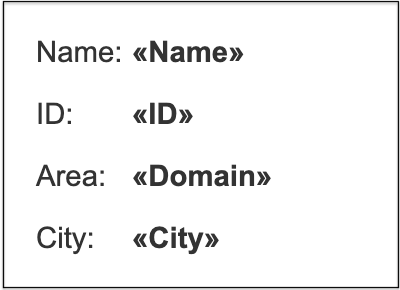 And after executing the Mail Merge operation:
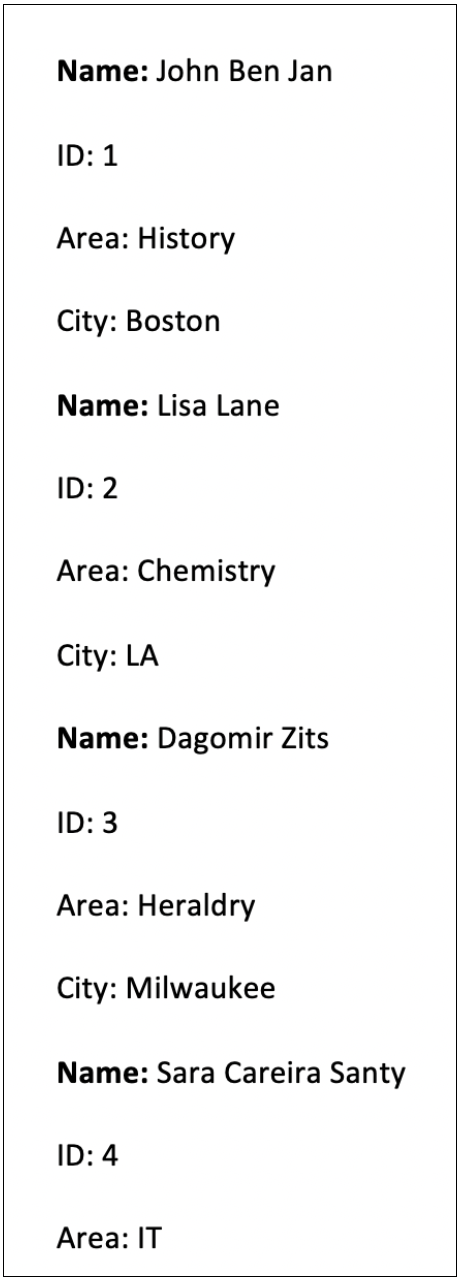 ------
## FAQ
1. **Q:** How do I use an XML file as a data source for Mail Merge in Aspose.Words for Java?
**A:** Load the XML into a `java.sql.DataSet` (or `java.sql.DataSet`‑compatible object) using `DataSet.readXml()`. Then pass the `DataSet` to `Document.getMailMerge().execute()` specifying the table name that matches the XML element. The fields in the template must have the same names as the XML attributes or child elements.
2. **Q:** Can I use `IMailMergeDataSource` instead of a `DataSet` for XML data?
**A:** Yes. Implement `com.aspose.words.IMailMergeDataSource` and `IMailMergeDataSourceRoot` to read the XML manually (e.g., with `javax.xml.parsers`). Return field names via `getFieldValue()` and record navigation via `moveNext()`. This gives you full control over hierarchical XML structures.
3. **Q:** What should I do if the Mail Merge fields are not populated after the merge?
**A:** Verify that the field names in the Word template exactly match the XML attribute or element names (case‑sensitive). Also ensure the `DataSet` contains a table with the same name as the root element you pass to `execute()`. Use `Document.getMailMerge().getFieldNames()` to debug which fields are expected.
4. **Q:** How can I handle special characters (e.g., &, <, >) in XML values during Mail Merge?
**A:** The XML parser automatically decodes entity references. If you encounter issues, make sure the XML is well‑formed and encoded in UTF‑8. You can also set `Document.getMailMerge().setUseNonMergeFields(true)` to treat unknown fields as plain text.
5. **Q:** Is there a limit to the size of the XML file that can be used for Mail Merge?
**A:** Aspose.Words does not impose a strict size limit, but very large XML files may increase memory consumption because the entire `DataSet` is loaded into memory. For huge data sets, consider streaming the XML and implementing a custom `IMailMergeDataSource` that reads records on demand.
------
## FAQ
1. **Q:** How do I use an XML file as a data source for Mail Merge in Aspose.Words for Java?
**A:** Load the XML into a `java.sql.DataSet` (or `java.sql.DataSet`‑compatible object) using `DataSet.readXml()`. Then pass the `DataSet` to `Document.getMailMerge().execute()` specifying the table name that matches the XML element. The fields in the template must have the same names as the XML attributes or child elements.
2. **Q:** Can I use `IMailMergeDataSource` instead of a `DataSet` for XML data?
**A:** Yes. Implement `com.aspose.words.IMailMergeDataSource` and `IMailMergeDataSourceRoot` to read the XML manually (e.g., with `javax.xml.parsers`). Return field names via `getFieldValue()` and record navigation via `moveNext()`. This gives you full control over hierarchical XML structures.
3. **Q:** What should I do if the Mail Merge fields are not populated after the merge?
**A:** Verify that the field names in the Word template exactly match the XML attribute or element names (case‑sensitive). Also ensure the `DataSet` contains a table with the same name as the root element you pass to `execute()`. Use `Document.getMailMerge().getFieldNames()` to debug which fields are expected.
4. **Q:** How can I handle special characters (e.g., &, <, >) in XML values during Mail Merge?
**A:** The XML parser automatically decodes entity references. If you encounter issues, make sure the XML is well‑formed and encoded in UTF‑8. You can also set `Document.getMailMerge().setUseNonMergeFields(true)` to treat unknown fields as plain text.
5. **Q:** Is there a limit to the size of the XML file that can be used for Mail Merge?
**A:** Aspose.Words does not impose a strict size limit, but very large XML files may increase memory consumption because the entire `DataSet` is loaded into memory. For huge data sets, consider streaming the XML and implementing a custom `IMailMergeDataSource` that reads records on demand.