---
title: "Working with Cross (Pivot) Tables in Java"
---


*A cross or pivot table* is a document table growing in the both directions – vertically and horizontally – depending on bound data. You can build a cross (pivot) table by nesting a table-column data band into a table-row data band as follows.

<table class="outputting-sequential-data">
	<tbody>
		<tr>
			<td>&lt;&lt;foreach ...>>&lt;&lt;foreach ... -horz>> ...</td>
      <td>...</td>
      <td>...</td>
		</tr>
    <tr>
			<td>...</td>
      <td>...</td>
      <td>...</td>
		</tr>
    <tr>
      <td>...</td>
      <td>...</td>
      <td>... &lt;&lt;/foreach>>&lt;&lt;/foreach>></td>
		</tr>
	</tbody>
</table>

**Note** – It is not necessary to start (or end) an outer table-row data band and a nested table-column one within the same cell, but this case is also supported.

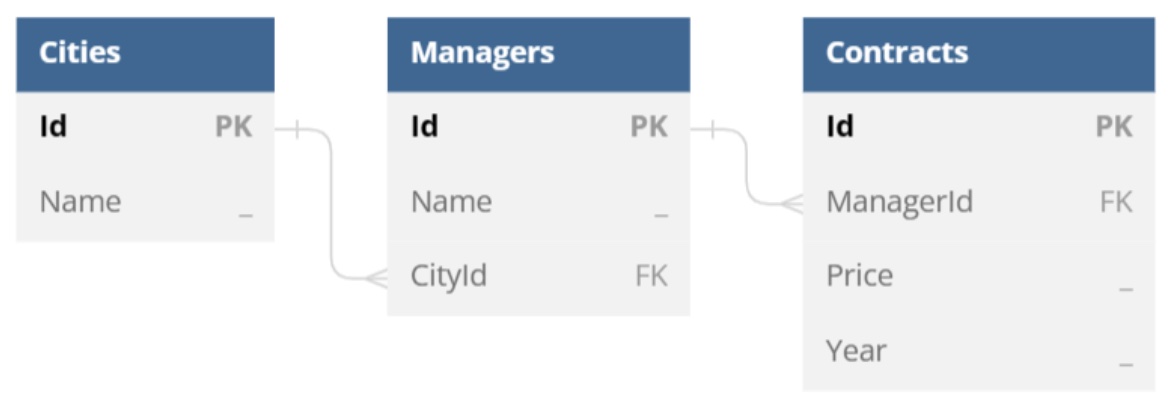
Let us consider concrete examples using years, an array of integers ranging from 2020 to 2023, and `ds`, a `DataSet` instance containing `DataTable` and `DataRelation` objects according to the following data model.

<img src="working-with-cross-pivot-tables.jpeg" alt="working-with-cross-pivot-tables" style="width:500px"/>

The most basic scenario is filling a document table with data in two directions. You can use a template like the following one to achieve this.

<table class="outputting-sequential-data">
	<tbody>
		<tr>
			<td><strong>Managers</strong></td>
			<td>&lt;&lt;foreach [y in years] -horz>>&lt;&lt;[y]>>&lt;&lt;/foreach>></td>
		</tr>
		<tr>
			<td>&lt;&lt;foreach [m in ds.Managers]>>&lt;&lt;[m.Name]>></td>
			<td>&lt;&lt;foreach [y in years] -horz>>&lt;&lt;[m.Contracts.where(c => c.Year == y).sum(c => c.Price)]>>&lt;&lt;/foreach>>&lt;&lt;/foreach>></td>
		</tr>
	</tbody>
</table>

**Note** – Table-row and table-column regions cannot cross, that is why two table-column data bands bound to the same enumeration are required here.

In this case, the engine produces a report as follows.

| **Managers**     | **2020**   | **2021**   | **2022**   | **2023**   |
| ---------------- | ---------- | ---------- | ---------- | ---------- |
| **James Atkins** | **545000** | **340000** | **620000** | **510000** |
| **John Lee**     | **120000** | **320000** | **565000** | **495000** |
| **Thelma Green** | **310000** | **290000** | **485000** | **530000** |
| **Ted LeMark**   | **0**      | **110000** | **345000** | **380000** |

It is quite typical for cross (pivot) tables to contain totals for every row and column. You can add the totals by altering the template as follows.

<table class="outputting-sequential-data">
	<tbody>
		<tr>
			<td><strong>Managers</strong></td>
			<td>&lt;&lt;foreach [y in years] -horz>>&lt;&lt;[y]>>&lt;&lt;/foreach>></td>
      <td><strong>Total</strong></td>
		</tr>
		<tr>
			<td>&lt;&lt;foreach [m in ds.Managers]>>&lt;&lt;[m.Name]>></td>
			<td>&lt;&lt;foreach [y in years] -horz>>&lt;&lt;[m.Contracts.where(c => c.Year == y).sum(c => c.Price)]>>&lt;&lt;/foreach>></td>
      <td>&lt;&lt;[m.Contracts.sum(c => c.Price)]>>&lt;&lt;/foreach>></td>
		</tr>
    <tr>
			<td><strong>Total</strong></td>
			<td>&lt;&lt;foreach [y in years] -horz>>&lt;&lt;[ds.Contracts.where(c => c.Year == y).sum(c => c.Price)]>>&lt;&lt;/foreach>></td>
      <td>&lt;&lt;[ds.Contracts.sum(c => c.Price)]>></td>
		</tr>
	</tbody>
</table>

In this case, the engine produces a report as follows.

| **Managers**     | **2020**   | **2021**    | **2022**    | **2023**    | **Total**   |
| ---------------- | ---------- | ----------- | ----------- | ----------- | ----------- |
| **James Atkins** | **545000** | **340000**  | **620000**  | **510000**  | **2015000** |
| **John Lee**     | **120000** | **320000**  | **565000**  | **495000**  | **1500000** |
| **Thelma Green** | **310000** | **290000**  | **485000**  | **530000**  | **1615000** |
| **Ted LeMark**   | **0**      | **110000**  | **345000**  | **380000**  | **835000**  |
| **Total**        | **975000** | **1060000** | **2015000** | **1915000** | **5965000** |

Since cross (pivot) tables can contain large amounts of data, it is quite usual to group parts of information within these tables using merged cells, in order to simplify further search of necessary information. For this purpose, you can apply cellMerge tags (see “Merging Table Cells Dynamically” for more information) as shown in the following template.

<table class="outputting-sequential-data">
	<tbody>
		<tr>
			<td rowspan="2" style="vertical-align: middle"><strong>Cites</strong></td>
      <td rowspan="2" style="vertical-align: middle"><strong>Managers</strong></td>
			<td>&lt;&lt;foreach [y in years] -horz>>Years&lt;&lt;cellMerge -horz>></td>
		</tr>
    <tr>
      <td>&lt;&lt;[y]>>&lt;&lt;/foreach>></td>
    </tr>
		<tr>
			<td>&lt;&lt;foreach [m in ds.Managers]>>&lt;&lt;[m.Cities.Name]>>&lt;&lt;cellMerge>></td>
			<td>&lt;&lt;[m.Name]>></td>
      <td>&lt;&lt;foreach [y in years] -horz>>&lt;&lt;[m.Contracts.where(c => c.Year == y).sum(c => c.Price)]>>&lt;&lt;/foreach>>&lt;&lt;/foreach>></td>
		</tr>
	</tbody>
</table>

In this case, the engine produces a report as follows.

| Cities | Managers         |            | Years |            |            |
| ----------- | ---------------- | ---------- | ---------- | ---------- | ---------- |
|             |                  | **2020**   | **2021**   | **2022**   | **2023**   |
| **Seattle** | **James Atkins** | **545000** | **340000** | **620000** | **510000** |
|             | **John Lee**     | **120000** | **320000** | **565000** | **495000** |
| **Ottawa**  | **Thelma Green** | **310000** | **290000** | **485000** | **530000** |
|             | **Ted LeMark**   | **0**      | **110000** | **345000** | **380000** |

Combining all the described approaches, you can create cross (pivot) tables of almost any complexity.

------ 

## FAQ

1. **Q:** How do I define a cross (pivot) table in a Word template?  
   **A:** Use a nested structure where a table‑row data band (`<<foreach [m in ds.Managers]>>`) contains a table‑column data band (`<<foreach [y in years] -horz>>`). The outer band iterates vertically (rows) and the inner band iterates horizontally (columns), producing a matrix of values.

2. **Q:** How can I add row and column totals to a cross table?  
   **A:** Add an extra row and/or column that use the same LINQ expressions but call `sum` on the collection. For example, `<<[m.Contracts.sum(c => c.Price)]>>` gives the total for a manager, and `<<[ds.Contracts.where(c => c.Year == y).sum(c => c.Price)]>>` gives the total for a year.

3. **Q:** What does the `-horz` modifier do in a `foreach` tag?  
   **A:** The `-horz` modifier tells the reporting engine to repeat the enclosed content horizontally, creating a new column for each iteration instead of a new row.

4. **Q:** How do I merge cells dynamically inside a cross table?  
   **A:** Insert the `cellMerge` tag (or `cellMerge -horz` for horizontal merging) in the template where you want cells to be combined. The engine will merge the cells of the current row or column based on the tag’s position.

5. **Q:** Why do I get the error “Table‑row and table‑column regions cannot cross”?  
   **A:** This occurs when a table‑row data band and a table‑column data band overlap inside the same cell. Each band must start and end in its own cell; move one of the bands to a separate cell to resolve the conflict.