---
title: "如何安装 Aspose.Words为C++"
---
确保您的机器符合 [系统要求](/words/zh/cpp/system-requirements/) 在你开始之前。
本文介绍如何安装 Aspose.Words为C++ 在你的电脑上。
## 安装或更新 Aspose.Words为C++ 使用管理NuGet包{#install-or-update-aspose-words-for-cpp-using-nuget}
NuGet是下载和安装最简单的方法 [Aspose.Words为C++](https://www.nuget.org/packages/Aspose.Words.Cpp) APIs. 为此,请按照以下步骤操作:
1. 从菜单中打开*Microsoft Visual Studio*和*Manage NuGet Packages*以打开包管理器
2. 搜索"aspose"或"aspose。单词"找到所需的AsposeAPI
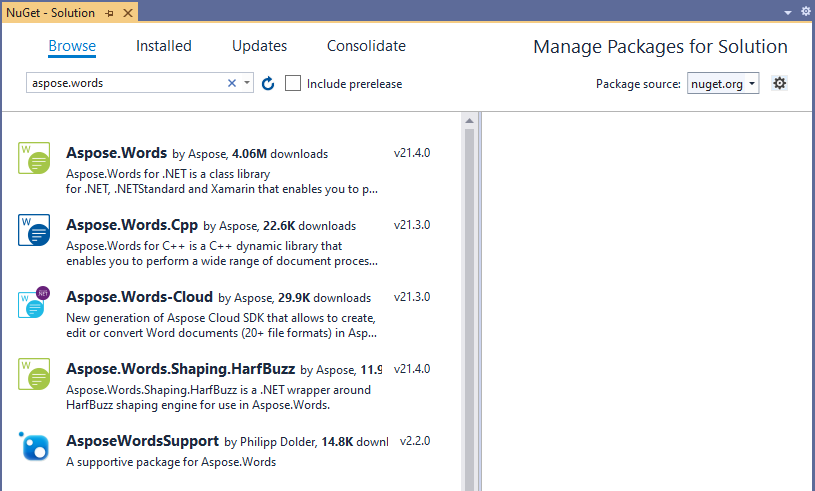 3. 选择所需的AsposeAPI并单击"安装"
选定的API将下载并在您的项目中引用。
您也可以更新 Aspose.Words为C++ 到所需的版本使用*Manage NuGet Packages*。
## 安装或更新 Aspose.Words为C++ 使用Package Manager Console
您也可以安装或更新 Aspose.Words为C++ APIs使用*Package Manager Console*。 为此,请按照以下步骤操作:
1. 从菜单中打开*Microsoft Visual Studio*和*Package Manager Console*以打开包管理器控制台
2. 键入命令`Install-Package Aspose.Words.Cpp -Version 21.3.0`并按Enter将最新的完整版本安装到您的应用程序中
3. 下载后,您将看到确认消息
3. 选择所需的AsposeAPI并单击"安装"
选定的API将下载并在您的项目中引用。
您也可以更新 Aspose.Words为C++ 到所需的版本使用*Manage NuGet Packages*。
## 安装或更新 Aspose.Words为C++ 使用Package Manager Console
您也可以安装或更新 Aspose.Words为C++ APIs使用*Package Manager Console*。 为此,请按照以下步骤操作:
1. 从菜单中打开*Microsoft Visual Studio*和*Package Manager Console*以打开包管理器控制台
2. 键入命令`Install-Package Aspose.Words.Cpp -Version 21.3.0`并按Enter将最新的完整版本安装到您的应用程序中
3. 下载后,您将看到确认消息
{{% alert color="primary" %}}If you are unfamiliar with the [Aspose EULA](https://about.aspose.com/legal/eula/), it is recommended to read the license referenced in the URL.{{% /alert %}}
4. 现在您可能会发现Aspose.Words已成功添加并在您的应用程序中引用
在*Package Manager Console*中,您还可以使用`Update-Package Aspose.Words.Cpp`命令检查Aspose.Words包的更新,如果存在,则安装它们。
## 安装/安装 Aspose.Words为C++ 手动操作
您可以下载 [Aspose.Words为C++ 来自NuGet画廊](https://www.nuget.org/packages/Aspose.Words.Cpp/) 通过单击信息部分中的"手动下载"链接。 离线API文档也可以在下载的ZIP包中找到。
要使用 Aspose.Words为C++ 在您的应用程序中,请按照以下步骤操作:
1. 下载最新档案
2. 将文件夹解压缩到生产环境中
3. 要使用 Aspose.Words为C++,参考项目中的Include和Lib文件夹