
Aspose.Email for SharePoint ライセンスのインストール
評価に満足したら、以下が可能です ライセンスを購入購入前に、ライセンス条件を理解し同意していることをご確認ください。
注文が支払われた後にライセンスがメールで送られます。ライセンスは通常の SharePoint ソリューションパッケージを含む ZIP アーカイブです。
ZIP アーカイブには以下が含まれます:
- Aspose.Email.SharePoint.License.wsp: SharePoint ソリューションパッケージファイル。Aspose.Email for SharePoint のライセンスは、サーバーファーム全体での展開/取り消しを容易にするために SharePoint ソリューションとしてパッケージ化されています。
- readme.txt: ライセンスインストール手順。ライセンスはサーバーコンソールから stsadm.exe ファイルを使用してインストールされます。ライセンスインストールに必要な手順は以下です。
WSP ソリューションからのライセンスインストール
以下の手順では、説明を簡潔にするためにパスは省略しています。実行時には stsadm.exe やソリューションファイルへの実際のパスを追加する必要がある場合があります。
Aspose.Email ライセンスをインストールするには:
- SharePoint 2010 Management Shell を実行します。
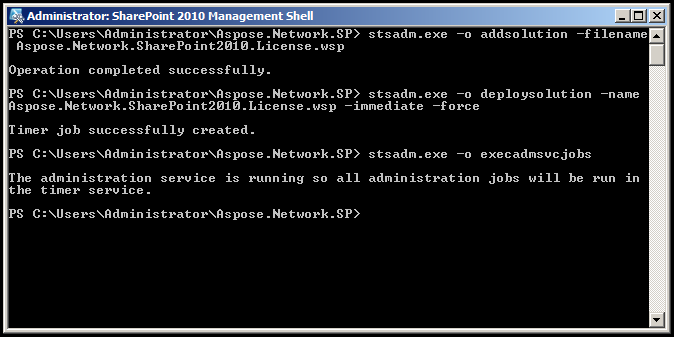
- stsadm を実行してソリューションを SharePoint ソリューションに追加します:
stsadm.exe \-o addsolution \-filename Aspose.Email.SharePoint.License.wsp
- ファーム内のすべてのサーバーにソリューションを展開します:
stsadm.exe \-o deploysolution \-name Aspose.Email.SharePoint.License.wsp \-immediate --force
- 管理タイマージョブを実行して、展開をすぐに完了させます:
stsadm.exe \-o execadmsvcjobs
ライセンスを展開する際に Windows SharePoint Services Administration サービスが開始されていないと、エラーが表示されます。stsadm.exe はこのサービスと Windows SharePoint Timer Service に依存して、ファーム全体にソリューションデータを複製します。これらのサービスがサーバーファームで実行されていない場合、各サーバーにライセンスを展開する必要があるかもしれません。
LIC ファイルからのライセンスインストール
Lic ファイルからライセンスをインストールするには、以下のように Aspose.Network.SharePoint.License フォルダーにライセンスファイルを配置する必要があります:
InstalledDrive\Program Files\Common Files\Microsoft Shared\Web Server Extensions\14\Template\Features\Aspose.Network.SharePoint.License
以下のライセンス名が Aspose.Email for Sharepoint API で認識されます:
- Aspose.Network Product Family.lic
- Aspose.Email.SharePoint.lic
- Aspose.Email Product Family.lic
- Aspose.Total for Sharepoint.lic
- Aspose.Total Product Family.lic