
Azure AD 설정 및 Microsoft Graph 인증
Aspose.Email for Java는 Microsoft Graph와 완전하게 통합되어 개발자가 Microsoft 365 계정의 메일, 연락처, 캘린더 및 작업을 관리할 수 있게 합니다. 이 가이드는 Azure AD 애플리케이션 생성 및 인증 구성 과정을 안내하여 Aspose.Email으로 코딩을 시작하도록 돕습니다. GraphClient.
Aspose.Email와 Microsoft Graph API를 사용하기 전에 Azure Active Directory(Azure AD)에 애플리케이션을 등록하고 인증을 구성해야 합니다. 이 페이지에서는 다음을 다룹니다:
-
Azure AD 애플리케이션(프로젝트) 만들기.
-
필요한 Microsoft Graph 권한 할당.
-
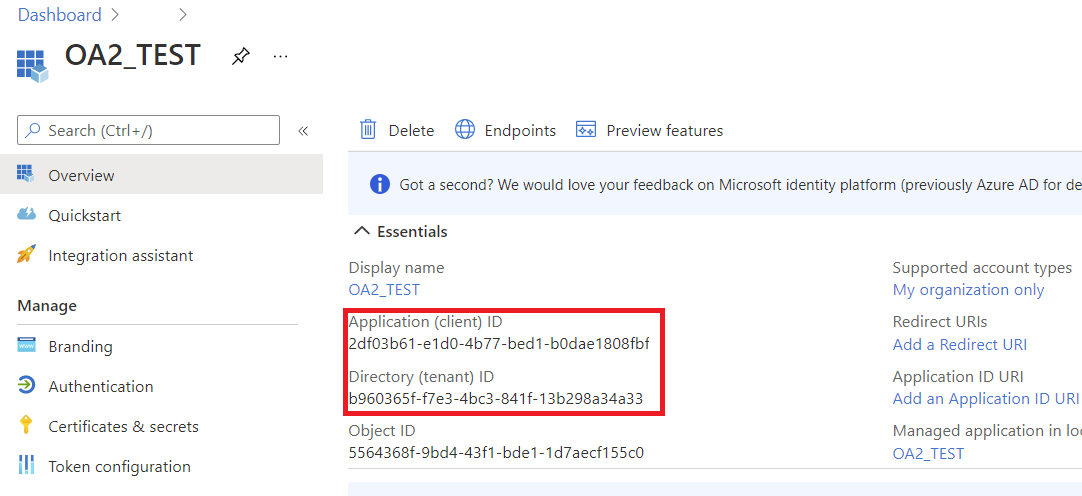
자격 증명 생성 (클라이언트 ID, 클라이언트 시크릿, 테넌트 ID).
-
Aspose.Email 토큰 공급자를 사용하여 Java에서 인증하기.
완료되면 Java 애플리케이션에서 Microsoft Graph와 상호 작용할 준비가 됩니다.
1. Azure AD 애플리케이션 만들기
Azure 포털에서 애플리케이션을 등록하려면 다음 단계를 따르십시오:
- 다음에 로그인하십시오 Azure 포털.
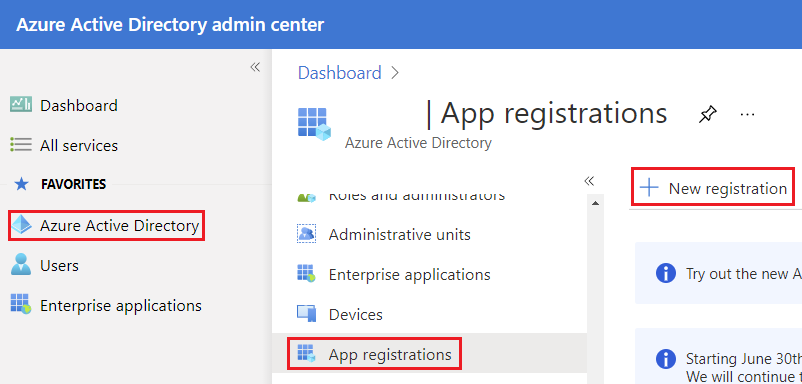
- Azure Active Directory → App Registrations → New Registration 로 이동하십시오.
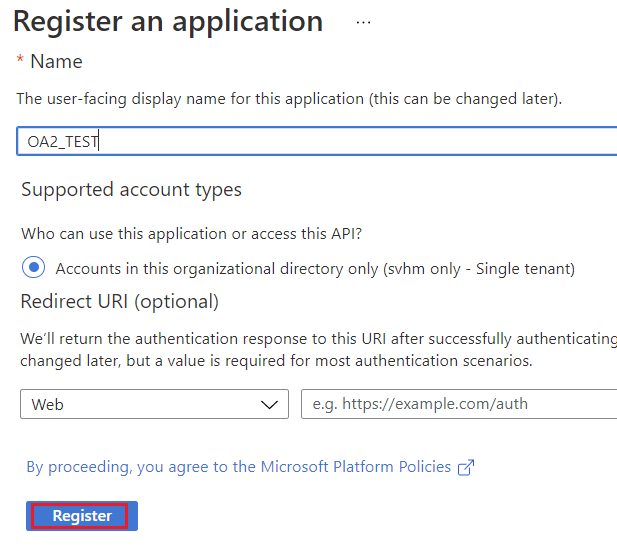
- 애플리케이션에 Name을 입력하십시오 (예: AsposeEmailGraphApp).
- 지원되는 계정 유형을 선택하십시오:
- 단일 테넌트 (귀사만 사용할 경우)
- 멀티테넌트 (여러 조직이 액세스 필요 시)
- 선택적으로 Redirect URI를 설정하십시오 (대화형 또는 웹 인증에 필요).
- Register를 클릭하십시오.
2. 클라이언트 시크릿 생성
- 등록 후 Certificates & Secrets → New Client Secret 로 이동하십시오.
- 설명 및 만료 기간을 추가하십시오.
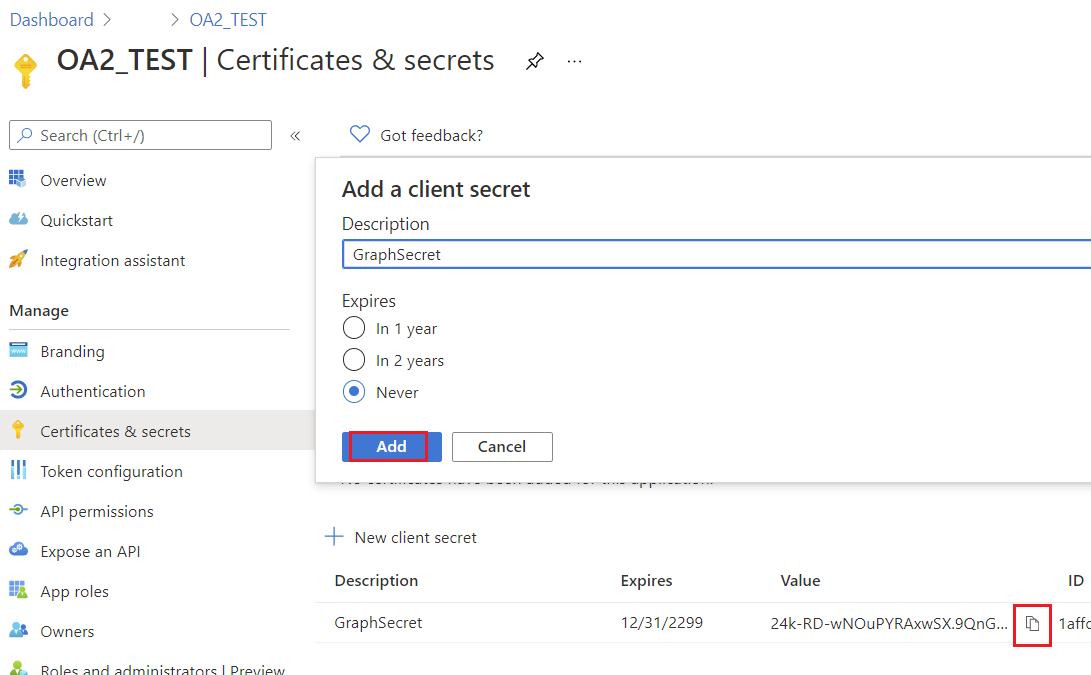
- 생성된 시크릿 값을 복사하십시오 - 다시는 볼 수 없습니다.
client secret을 안전하게 보관하십시오; 보안 클라이언트 인증에 필요합니다.
새로 등록된 애플리케이션 블레이드가 표시됩니다.
3. Microsoft Graph 권한 구성
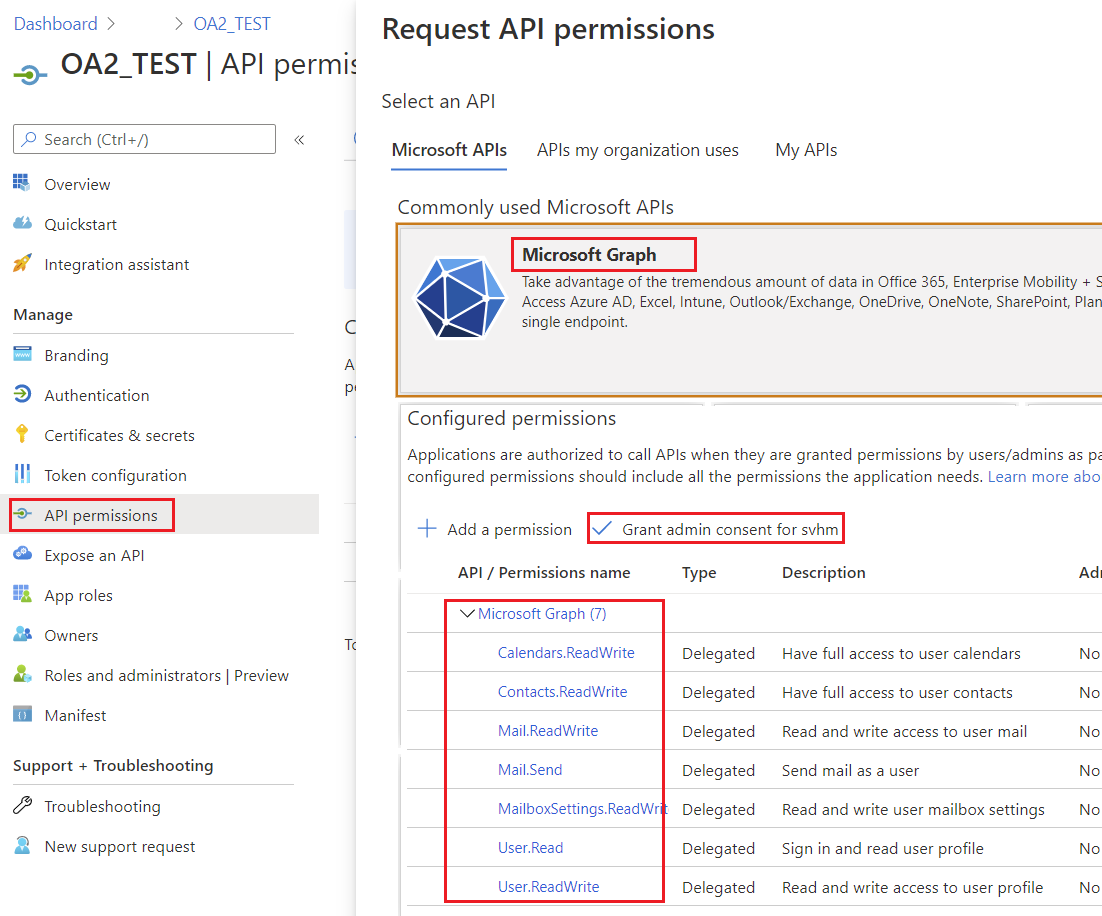
- API Permissions → Add a Permission → Microsoft Graph 로 이동하십시오.
- 시나리오에 따라 Delegated 또는 Application 권한 유형을 선택하십시오.
- Aspose.Email 작업에 필요한 권한을 추가하십시오:
- Contacts.ReadWrite – 연락처를 관리하기 위해
- Calendars.ReadWrite – 캘린더를 관리하기 위해
- Mail.ReadWrite – 메일을 읽고 보낼 수 있도록
- Tasks.ReadWrite – 작업을 관리하기 위해
- 필요한 경우 Grant Admin Consent를 클릭하십시오.
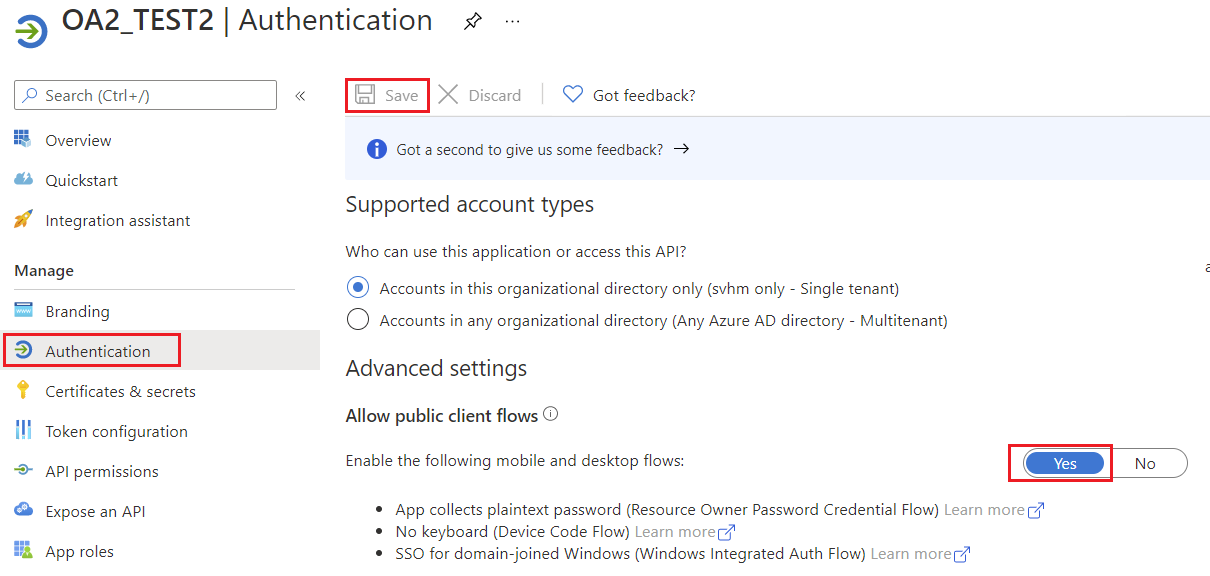
4. 퍼블릭 클라이언트 흐름 허용
앱이 퍼블릭 클라이언트인지 지정하십시오. 리디렉션 URI를 사용하지 않는 토큰 부여 흐름을 사용하는 앱에 적합합니다.
5. Microsoft Graph 인증
Aspose.Email에서 지원되는 인증 방법
| 토큰 공급자 | 사용 사례 | | ——————————– | ————————————————————————————— | | AzureConfidentialTokenProvider | 보안 클라이언트 (클라이언트 ID + 시크릿) 서버 측 앱용 | | AzureROPCConfiguration | 리소스 소유자 비밀번호 자격 증명 (사용자명 + 비밀번호) 비대화형 시나리오용 | | AzurePublicTokenProvider | 공개 클라이언트 (대화형 로그인) | | AzureTokenProviderBase | 사용자 지정 인증 구현을 위한 기본 클래스 |
보안 클라이언트 사용 인증
다음 사용 AzureConfidentialTokenProvider 클라이언트 ID, 클라이언트 시크릿 및 테넌트 ID가 있을 때 인증하려면:
AzureConfidentialTokenProvider provider = new AzureConfidentialTokenProvider(
    tenantId,
    clientId,
    clientSecret
);

IGraphClient client = GraphClient.getClient(provider, tenantId);
client.setResource(ResourceType.Users);
client.setResourceId(username);
client.setEndpoint("https://graph.microsoft.com");
이렇게 하면 Microsoft Graph와 상호 작용할 준비가 된 완전 인증된 IGraphClient가 설정됩니다.
ROPC(사용자 이름 및 비밀번호) 인증
사용자 이름과 비밀번호가 있는 경우, 다음을 사용하십시오 AzureROPCConfiguration:
AzureROPCConfiguration ropcConfig = new AzureROPCConfiguration(
    tenantId,
    clientId,
    clientSecret,
    username,
    password
);

IGraphClient client = GraphClient.getClient(ropcConfig, tenantId);
client.setResource(ResourceType.Users);
client.setResourceId(username);
client.setEndpoint("https://graph.microsoft.com");
Microsoft Graph용 사용자 지정 토큰 공급자
Aspose.Email for Java는 다음을 통해 Microsoft Graph와 통합됩니다. IGraphClient 인터페이스. 요청을 인증하려면, 다음 구현이 필요합니다. ITokenProvider 가 필요합니다. 대부분의 개발자는 기본 인증 제공자를 사용하지만, 예를 들어 Resource Owner Password Credentials (ROPC) 흐름을 사용할 때와 같이 자체 공급자를 만들고 싶을 수 있는 상황이 있습니다.
1. AzureROPCTokenProvider를 사용하여 ITokenProvider 구현
이 클래스는 다음에 대한 구현을 제공합니다. ITokenProvider Azure Resource Owner Password Credentials (ROPC) 흐름을 사용합니다. 다음 예제는 데모 용도이며, 실제 운영에서는 클라이언트 자격 증명이나 PKCE가 포함된 인증 코드와 같은 보다 안전한 흐름을 사용할 것을 권장합니다.
import java.io.BufferedReader;
import java.io.IOException;
import java.io.InputStream;
import java.io.InputStreamReader;
import java.io.OutputStream;
import java.io.UnsupportedEncodingException;
import java.net.HttpURLConnection;
import java.net.URL;
import java.net.URLDecoder;
import java.net.URLEncoder;
import java.nio.charset.StandardCharsets;
import java.util.HashMap;
import java.util.Map;

/**
 * <p>
 * Azure resource owner password credential (ROPC) token provider
 * https://docs.microsoft.com/en-us/azure/active-directory/develop/v2-oauth-ropc
 * https://docs.microsoft.com/en-us/exchange/client-developer/exchange-web-services/how-to-authenticate-an-ews-application-by-using-oauth
 * https://portal.azure.com
 * https://developer.microsoft.com/en-us/graph/graph-explorer/#
 * token parser https://jwt.io
 * </p>
 */
class AzureROPCTokenProvider implements ITokenProvider {

    private static final String GRANT_TYPE = "password";

    private final String clientId;
    private final String clientSecret;
    private final String userName;
    private final String password;
    private final String tenant;
    private final String scope;

    private OAuthToken token;

    public AzureROPCTokenProvider(String tenant, String clientId, String clientSecret,
                                  String userName, String password, String[] scopeAr) {
        this.tenant = tenant;
        this.clientId = clientId;
        this.clientSecret = clientSecret;
        this.userName = userName;
        this.password = password;
        this.scope = joinToStr(scopeAr, " ");
    }

    public synchronized OAuthToken getAccessToken(boolean ignoreExistingToken) {
        if (this.token != null && !this.token.getExpired() && !ignoreExistingToken)
            return this.token;
        token = null;

        Map<String, String> tokenArgs = getToken();

        java.util.Calendar c = java.util.Calendar.getInstance();
        c.add(java.util.Calendar.SECOND, Integer.parseInt(tokenArgs.get("expires_in")));
        token = new OAuthToken(tokenArgs.get("access_token"), TokenType.AccessToken, c.getTime());
        return token;
    }

    public final OAuthToken getAccessToken() {
        return getAccessToken(false);
    }

    public void dispose() {
    }

    private String getEncodedParameters() {
        return "client_id=" + urlEncode(clientId) + "&scope=" + urlEncode(scope) + "&username=" + urlEncode(userName)
                + "&password=" + urlEncode(password) + "&grant_type="
                + urlEncode(GRANT_TYPE);
    }

    private String getUri() {
        if (tenant == null || tenant.trim().isEmpty())
            return "https://login.microsoftonline.com/common/oauth2/v2.0/token";
        else
            return "https://login.microsoftonline.com/" + tenant + "/oauth2/v2.0/token";
    }

    private Map<String, String> getToken() {
        try {
            HttpURLConnection connection = (HttpURLConnection) new URL(getUri()).openConnection();
            connection.setRequestMethod("POST");

            byte[] requestData = getEncodedParameters().getBytes(StandardCharsets.UTF_8);

            connection.setUseCaches(false);
            connection.setDoInput(true);
            connection.setDoOutput(true);
            connection.setRequestProperty("Content-Type", "application/x-www-form-urlencoded");
            connection.setRequestProperty("Content-Length", "" + requestData.length);

            final OutputStream st = connection.getOutputStream();
            try {
                st.write(requestData, 0, requestData.length);
            } finally {
                st.flush();
                st.close();
            }

            connection.connect();

            if (connection.getResponseCode() >= HttpURLConnection.HTTP_BAD_REQUEST) {
                throw new IllegalAccessError("Operation failed: " + connection.getResponseCode() + "/" +
                        connection.getResponseMessage() + "\r\nDetails:\r\n{2}"
                        + readInputStream(connection.getErrorStream()));
            }

            String responseText = readInputStream(connection.getInputStream());

            Map<String, String> result = new HashMap<>();
            String[] fromJsonToKeyValue = responseText.replace("{", "").replace("}", "")
                    .replace("\"", "").replace("\r", "")
                    .replace("\n", "").split(",");
            for (String keyValue : fromJsonToKeyValue) {
                String[] pair = keyValue.split(":");
                String name = pair[0].trim().toLowerCase();
                String value = urlDecode(pair[1].trim());
                result.put(name, value);
            }

            return result;
        } catch (IOException e) {
            throw new IllegalAccessError(e.getMessage());
        }
    }

    static String urlEncode(String value) {
        try {
            return URLEncoder.encode(value, StandardCharsets.UTF_8.toString());
        } catch (UnsupportedEncodingException e) {
            throw new IllegalAccessError(e.getMessage());
        }
    }

    static String urlDecode(String value) {
        try {
            return URLDecoder.decode(value, StandardCharsets.UTF_8.toString());
        } catch (UnsupportedEncodingException e) {
            throw new IllegalAccessError(e.getMessage());
        }
    }

    static String readInputStream(InputStream is) {
        if (is == null)
            return "";

        BufferedReader reader = new BufferedReader(new InputStreamReader(is));
        StringBuilder result = new StringBuilder();
        String line;
        try {
            while ((line = reader.readLine()) != null) {
                result.append(line);
            }
        } catch (IOException e) {
            // ignore
        }
        return result.toString();
    }

    static String joinToStr(String[] arr, String sep) {
        StringBuilder sb = new StringBuilder();
        for (int i = 0; i < arr.length; i++) {
            if (i > 0)
                sb.append(sep);
            sb.append(arr[i]);
        }
        return sb.toString();
    }
}
2. ITokenProvider 객체 생성
다음은 IGraphClient 인터페이스는 요청을 구성하고 Microsoft Graph에 전송하며 응답을 처리하는 책임이 있습니다. 인스턴스를 만들려면 IGraphClient, 구현을 제공해야 합니다 ITokenProvider. 토큰 공급자는 유효한 OAuth 액세스 토큰을 제공하여 요청을 인증합니다.
다음 코드 샘플은 기본 인라인 구현을 만드는 방법을 보여줍니다. ITokenProvider 인터페이스이며, Microsoft Graph 요청 인증에 필요합니다:
ITokenProvider tokenProvider = new ITokenProvider() {
    Date expirationDate = null;

    @Override
    public void dispose() {
        // Clean up resources if necessary
    }

    @Override
    public OAuthToken getAccessToken(boolean ignoreExistingToken) {
        // Retrieve an OAuth access token.
        // If ignoreExistingToken is true, always request a new token.
        // Otherwise, return the existing token if it is valid, or request a new one.
        return null;
    }

    @Override
    public OAuthToken getAccessToken() {
        // Return a valid OAuth token.
        // If no valid token exists, request a new one.
        return new OAuthToken("token", expirationDate);
    }
};
3. 사용자 지정 토큰 공급자 사용
일단 ITokenProvider 설정이 완료되면, 다음을 생성할 수 있습니다. GraphClient 인스턴스. 이 클라이언트는 Microsoft Graph 호출 시 제공된 토큰 공급자를 사용하여 인증합니다.
ITokenProvider provider = new AzureROPCTokenProvider(
        tenantId,
        clientId,
        clientSecret,
        userName,
        password,
        new String[] {"https://graph.microsoft.com/.default"}
);

IGraphClient client = GraphClient.getClient(provider, tenantId);
client.setResource(ResourceType.Users);
client.setResourceId(userName);
client.setEndpoint("https://graph.microsoft.com");

// Now you can call Microsoft Graph APIs
var folders = client.listFolders(null);
for (GraphFolderInfo folder : folders) {
    System.out.println(folder.getDisplayName());
}
클라이언트를 생성하고 인증한 후에는 Microsoft Graph 서비스에 요청을 시작할 수 있습니다.