

Analyzing your prompt, please hold on...
An error occurred while retrieving the results. Please refresh the page and try again.
Aspose.PDF memungkinkan pembuatan dokumen Portofolio PDF menggunakan kelas Document. Tambahkan file ke objek Document.Collection setelah mendapatkannya dengan kelas FileSpecification. Setelah file ditambahkan, gunakan metode Save kelas Document untuk menyimpan dokumen portofolio.
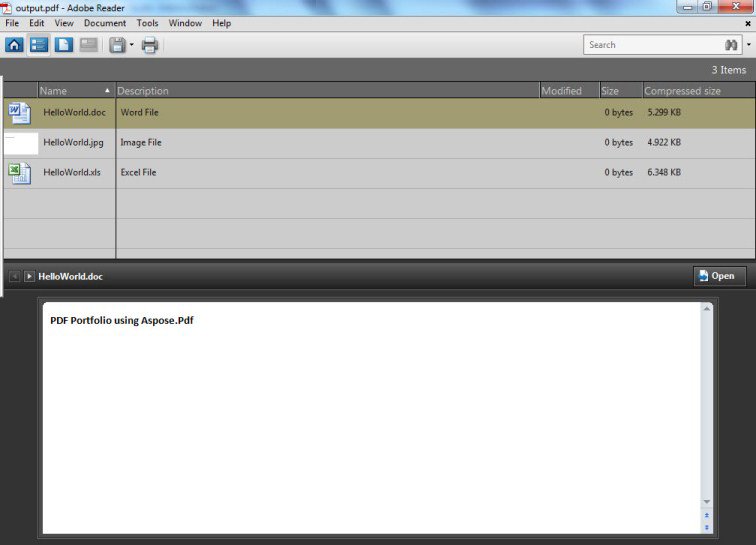
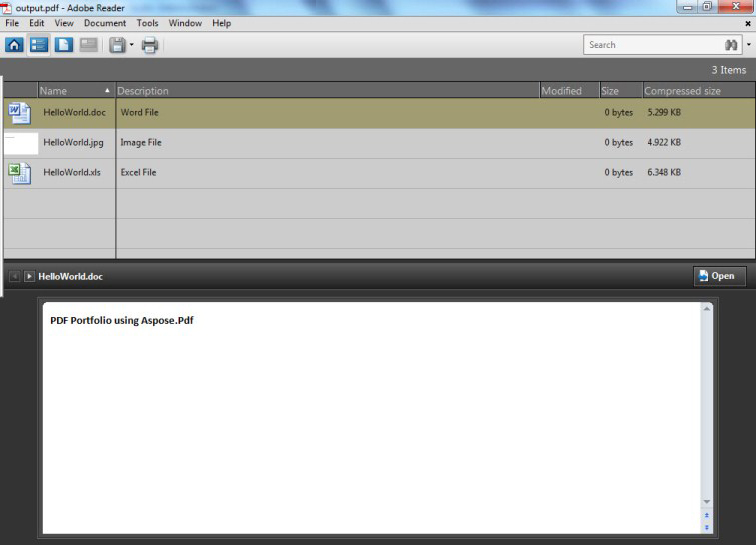
Contoh berikut menggunakan File Microsoft Excel, dokumen Word, dan file gambar untuk membuat Portofolio PDF.
Kode di bawah ini menghasilkan portofolio berikut.
Potongan kode berikut juga bekerja dengan pustaka Aspose.PDF.Drawing.
// For complete examples and data files, visit https://github.com/aspose-pdf/Aspose.PDF-for-.NET
private static void CreatePortfolio()
{
    // The path to the documents directory
    var dataDir = RunExamples.GetDataDir_AsposePdf_TechnicalArticles();

    // Create PDF document
    using (var document = new Aspose.Pdf.Document())
    {
        // Instantiate document Collection object
        document.Collection = new Aspose.Pdf.Collection();

        // Get Files to add to Portfolio
        var excel = new Aspose.Pdf.FileSpecification(dataDir + "HelloWorld.xlsx");
        var word = new Aspose.Pdf.FileSpecification(dataDir + "HelloWorld.docx");
        var image = new Aspose.Pdf.FileSpecification(dataDir + "aspose-logo.jpg");

        // Provide description of the files
        excel.Description = "Excel File";
        word.Description = "Word File";
        image.Description = "Image File";

        // Add files to document collection
        document.Collection.Add(excel);
        document.Collection.Add(word);
        document.Collection.Add(image);

        // Save PDF document
        document.Save(dataDir + "CreatePortfolio_out.pdf");
    }
}
Portofolio PDF memungkinkan Anda untuk menggabungkan konten dari berbagai sumber (misalnya, PDF, Word, Excel, file JPEG) ke dalam satu wadah terpadu. File asli mempertahankan identitas masing-masing tetapi disusun menjadi file Portofolio PDF. Pengguna dapat membuka, membaca, mengedit, dan memformat setiap file komponen secara independen dari file komponen lainnya.
Aspose.PDF memungkinkan pembuatan dokumen Portofolio PDF menggunakan kelas Document. Ini juga menawarkan kemampuan untuk mengekstrak file dari portofolio PDF.
Potongan kode berikut menunjukkan langkah-langkah untuk mengekstrak file dari portofolio PDF.
// For complete examples and data files, visit https://github.com/aspose-pdf/Aspose.PDF-for-.NET
private static void ExtractPortfolioFiles()
{
    // The path to the documents directory
    var dataDir = RunExamples.GetDataDir_AsposePdf_TechnicalArticles();

    // Open PDF document
    using (var document = new Aspose.Pdf.Document(dataDir + "PDFPortfolio.pdf"))
    {
        // Get collection of embedded files
        Aspose.Pdf.EmbeddedFileCollection embeddedFiles = document.EmbeddedFiles;
        // Iterate through individual file of Portfolio
        foreach (Aspose.Pdf.FileSpecification fileSpecification in embeddedFiles)
        {
            // Get the attachment and write to file or stream
            byte[] fileContent = new byte[fileSpecification.Contents.Length];
            fileSpecification.Contents.Read(fileContent, 0, fileContent.Length);
            string filename = Path.GetFileName(fileSpecification.Name);
            // Save the extracted file to some location
            using (FileStream fileStream = new FileStream(dataDir + filename + "_out", FileMode.Create))
            {
                fileStream.Write(fileContent, 0, fileContent.Length);
            }
        }
    }
}
Jika entri nama file Unicode tidak ada dalam PDF, FileSpecification.UnicodeName mengembalikan null. Gunakan GetFileName untuk mendapatkan nama file yang tidak bernilai null. Metode ini memeriksa nilai dalam urutan berikut: UnicodeName → Name → kunci file dalam koleksi file (jika tersedia) → fallbackName (jika diberikan) → GUID yang dihasilkan.
// For complete examples and data files, visit https://github.com/aspose-pdf/Aspose.PDF-for-.NET
private static void GetPortfolioFileNames()
{
    // The path to the documents directory
    var dataDir = RunExamples.GetDataDir_AsposePdf_TechnicalArticles();

    // Open PDF document
    using (var document = new Aspose.Pdf.Document(dataDir + "PDFPortfolio.pdf"))
    {
        // Iterate through individual file of Portfolio
        foreach (Aspose.Pdf.FileSpecification fileSpecification in document.Collection)
        {
            // Get the non-null attachment file name
            Console.WriteLine("Resolved Name: {0}", fileSpecification.GetFileName());
        }
    }
}
Secara default, nama kosong tidak dikembalikan. Jika allowEmptyName adalah true, string kosong hanya dapat dikembalikan jika tidak ada nama yang tidak kosong dan setidaknya satu sumber berisi string kosong.
Untuk menghapus/menghapus file dari portofolio PDF, coba gunakan baris kode berikut.
// For complete examples and data files, visit https://github.com/aspose-pdf/Aspose.PDF-for-.NET
private static void RemovePortfolioFiles()
{
    // The path to the documents directory
    var dataDir = RunExamples.GetDataDir_AsposePdf_TechnicalArticles();

    // Open PDF document
    using (var document = new Aspose.Pdf.Document(dataDir + "PDFPortfolio.pdf"))
    {
        document.Collection.Delete();
        // Save PDF document
        document.Save(dataDir + "NoPortFolio_out.pdf");
    }
}

Analyzing your prompt, please hold on...
An error occurred while retrieving the results. Please refresh the page and try again.