
Python で PDF ポートフォリオを作成する方法
Contents
[
Hide
]
PDF ポートフォリオを作成すると、さまざまな種類のファイルを 1 つの一貫した文書に統合してアーカイブできます。このような文書には、テキストファイル、画像、スプレッドシート、プレゼンテーション、その他の資料を含めることができ、すべての関連資料を 1 か所に保存して整理できます。
PDFポートフォリオは、どこで使用してもプレゼンテーションを高品質に表示するのに役立ちます。一般的に、PDF ポートフォリオの作成は最新かつ最新の作業です。
PDF ポートフォリオは、各ファイルを元の形式のまま 1 つの PDF コンテナにまとめて配布する場合に使用します。
PDF ポートフォリオの作成方法
.NET 経由の Python 用 Aspose.PDF では、を使用して PDF ポートフォリオドキュメントを作成できます 文書 クラス。を使用してファイルを取得した後、document.collection オブジェクトにファイルを追加します。 ファイル仕様 クラス。ファイルが追加されたら、「Document クラス」を使用してください。 保存 () ポートフォリオドキュメントを保存する方法。
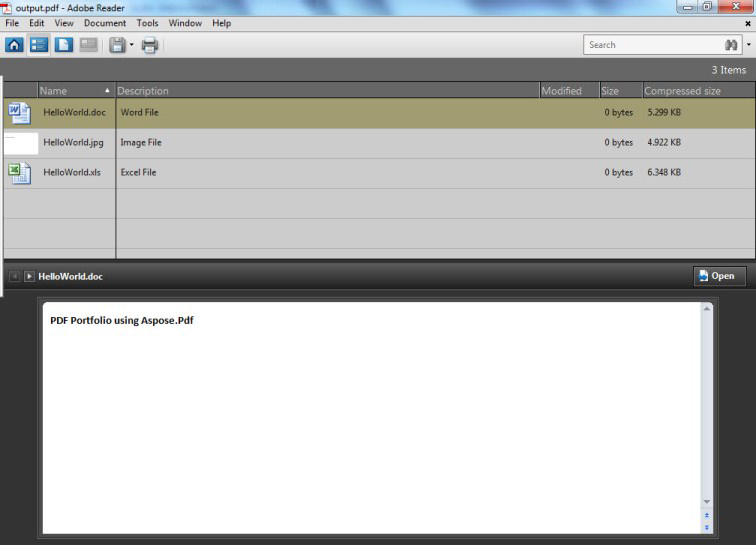
次の例では、Microsoft Excel ファイル、Word 文書、および画像ファイルを使用して PDF ポートフォリオを作成します。
以下のコードは次のポートフォリオになります。
Python 用 Aspose.PDF で作成された PDF ポートフォリオ
import aspose.pdf as ap

def create_pdf_portfolio(input_files, outfile):
    # Instantiate Document Object
    document = ap.Document()

    # Instantiate document Collection object
    document.collection = ap.Collection()

    # Get Files to add to Portfolio
    excel = ap.FileSpecification(input_files[0])
    word = ap.FileSpecification(input_files[1])
    image = ap.FileSpecification(input_files[2])

    # Provide description of the files
    excel.description = "Excel File"
    word.description = "Word File"
    image.description = "Image File"

    # Add files to document collection
    document.collection.append(excel)
    document.collection.append(word)
    document.collection.append(image)

    # Save Portfolio document
    document.save(outfile)
PDF ポートフォリオからのファイルの削除
PDF ポートフォリオからファイルを削除/削除するには、次のコード行を使用してみてください。
import aspose.pdf as ap

def remove_files_from_pdf_portfolio(infile, outfile):
    # Open document
    document = ap.Document(infile)
    document.collection.delete()

    # Save updated file
    document.save(outfile)