
Multiple Format Support
Contents
[
Hide
]
Note
With Aspose.Slides for SharePoint, you can convert PowerPoint presentations to many popular document formats from within a SharePoint document library.Supported Input Formats
Aspose.Slides for SharePoint converts the following input formats:
- PPT – Microsoft PowerPoint Presentation 97 - 2003
- PPTX – Office Open XML Presentation
Note
To convert documents, Aspose.Slides for SharePoint relies on a built-in version of Aspose.Slides for .NET.Supported Output Formats
The Convert to list on the conversion page offers the following output formats, in this order:
- PDF – Adobe Portable Document
- TIFF – Pictures package
- XPS – XML Paper Specification
- PPS – Slide show presentation
- PPSX – Microsoft PowerPoint Open XML Slide Show
- ODP – OpenDocument presentation
- PPTM – Microsoft PowerPoint Open XML Macro-Enabled Presentation
- PPSM – Microsoft PowerPoint Open XML Macro-Enabled Slide Show
- POTX – Microsoft PowerPoint Template
- POTM – PowerPoint Open XML Macro-Enabled Presentation Template
- PDFNotes – Presentation notes view in PDF format
- HTML – Presentation in HTML format
- TIFFNotes – Presentation notes view as multi-page TIFF image
- SWF – Shockwave Flash Movie
- SWFNotes – Presentation notes view as multi-page SWF
Selecting the output format on the Conversion Settings page
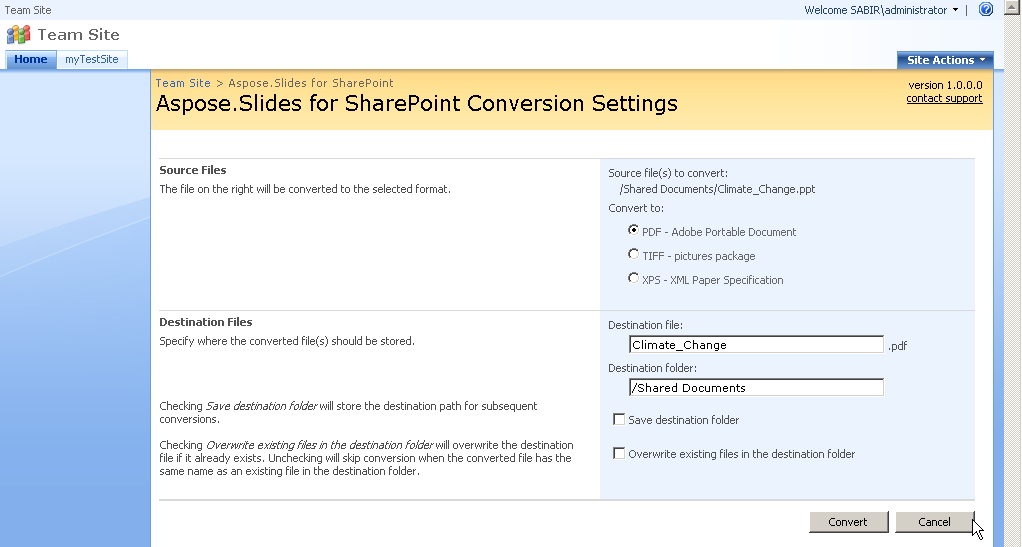
The screenshot was taken with an earlier version, which offered only the PDF, TIFF and XPS formats.