
Slide Master
Các slide master tạo thành cấp cao nhất của hệ thống kế thừa slide trong PowerPoint. Một master slide xác định các yếu tố thiết kế chung như nền, logo và định dạng văn bản. Layout slides kế thừa từ master slide, và normal slides kế thừa từ layout slide.
Bài viết này trình bày cách tạo, chỉnh sửa và quản lý master slide bằng Aspose.Slides for PHP via Java.
Add a Master Slide
Ví dụ này cho thấy cách tạo một master slide mới bằng cách sao chép (clone) master slide mặc định.
function addMasterSlide() {
    $presentation = new Presentation();
    try {
        // Sao chép slide master mặc định.
        $defaultMasterSlide = $presentation->getMasters()->get_Item(0);
        $newMasterSlide = $presentation->getMasters()->addClone($defaultMasterSlide);

        $presentation->save("master_slide.pptx", SaveFormat::Pptx);
    } finally {
        $presentation->dispose();
    }
}
💡 Tip 1: Master slide cung cấp cách áp dụng thương hiệu nhất quán hoặc các yếu tố thiết kế chung trên tất cả các slide. Bất kỳ thay đổi nào được thực hiện trên master sẽ tự động phản ánh trên các layout và slide thường phụ thuộc.
💡 Tip 2: Bất kỳ hình dạng hoặc định dạng nào được thêm vào master slide sẽ được kế thừa bởi layout slide và, do đó, bởi mọi slide thường sử dụng các layout đó.
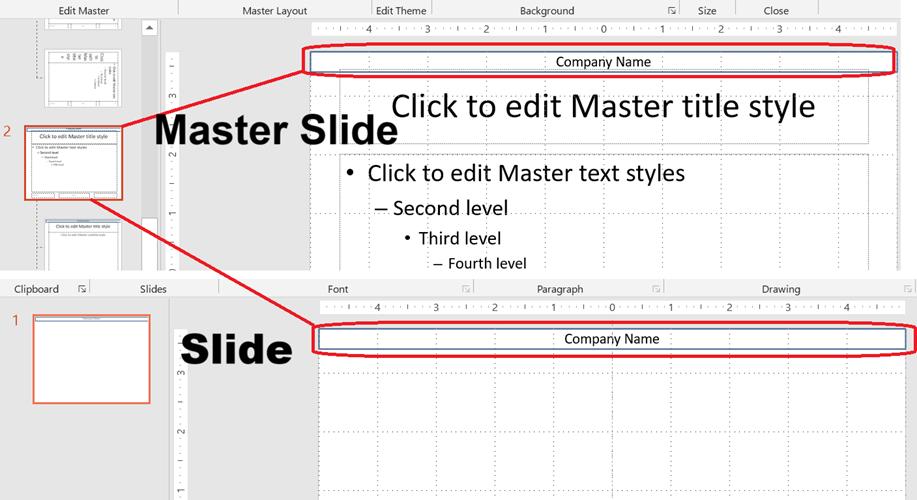
Hình ảnh dưới đây minh họa cách một hộp văn bản được thêm vào master slide sẽ tự động được hiển thị trên slide cuối cùng.
Access a Master Slide
Bạn có thể truy cập các master slide bằng phương thức Presentation::getMasters. Dưới đây là cách lấy và làm việc với chúng:
function accessMasterSlide() {
    $presentation = new Presentation("master_slide.pptx");
    try {
        // Truy cập slide master đầu tiên.
        $firstMasterSlide = $presentation->getMasters()->get_Item(0);
    } finally {
        $presentation->dispose();
    }
}
Remove a Master Slide
Các master slide có thể được xóa bằng chỉ mục hoặc bằng tham chiếu.
function removeMasterSlide() {
    $presentation = new Presentation("master_slide.pptx");
    try {
        // Xóa theo chỉ mục.
        $presentation->getMasters()->removeAt(0);

        // Hoặc xóa theo tham chiếu.
        $firstMasterSlide = $presentation->getMasters()->get_Item(0);
        $presentation->getMasters()->remove($firstMasterSlide);

        $presentation->save("master_slide_removed.pptx", SaveFormat::Pptx);
    } finally {
        $presentation->dispose();
    }
}
Remove Unused Master Slides
Một số bản trình bày có chứa các master slide không được sử dụng. Việc xóa các slide này có thể giúp giảm kích thước tệp.
function removeUnusedMasterSlide() {
    $presentation = new Presentation("master_slide.pptx");
    try {
        // Xóa tất cả các slide master không sử dụng (ngay cả những slide được đánh dấu Preserve).
        $presentation->getMasters()->removeUnused(true);

        $presentation->save("master_slides_removed.pptx", SaveFormat::Pptx);
    } finally {
        $presentation->dispose();
    }
}
⚙️ Tip: Sử dụng
removeUnused(true)để dọn dẹp các master slide không sử dụng và tối thiểu hoá kích thước bản trình bày.