
在 Java 中為簡報新增數位簽章
Contents
[
Hide
]
簡介
數位憑證 用於建立受密碼保護的 PowerPoint 簡報,並標示為由特定組織或個人建立。可透過聯繫授權機構(憑證頒發機構)取得數位憑證。將數位憑證安裝到系統後,可透過「檔案 -> 資訊 -> 保護簡報」將數位簽章加入簡報:
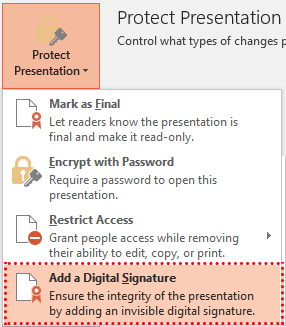
簡報可能包含多個數位簽章。將數位簽章加入簡報後,PowerPoint 會顯示一則特殊訊息:

若要簽署簡報或檢查簡報簽章的真偽,Aspose.Slides API 提供了 IDigitalSignature 介面、IDigitalSignatureCollection 介面以及 IPresentation.getDigitalSignatures 方法。目前,數位簽章僅支援 PPTX 格式。
從 PFX 憑證新增數位簽章
以下程式範例示範如何從 PFX 憑證新增數位簽章:
- 開啟 PFX 檔案並將 PFX 密碼傳遞給 DigitalSignature 物件。
- 將已建立的簽章加入簡報物件。
// 開啟簡報檔案
Presentation pres = new Presentation();
try {
    // 使用 PFX 檔案與 PFX 密碼建立 DigitalSignature 物件
    DigitalSignature signature = new DigitalSignature("testsignature1.pfx", "testpass1");

    // 為新數位簽章添加註解
    signature.setComments("Aspose.Slides digital signing test.");

    // 將數位簽章加入簡報
    pres.getDigitalSignatures().add(signature);

    // 儲存簡報
    pres.save("SomePresentationSigned.pptx", SaveFormat.Pptx);
} finally {
    pres.dispose();
}
現在可以檢查簡報是否已簽署數位簽章且未被修改:
// 開啟簡報
Presentation pres = new Presentation("SomePresentationSigned.pptx");
try {
    if (pres.getDigitalSignatures().size() > 0)
    {
        boolean allSignaturesAreValid = true;

        System.out.println("Signatures used to sign the presentation: ");

        // 檢查所有數位簽章是否有效
        for (IDigitalSignature signature : pres.getDigitalSignatures())
        {
            System.out.println(signature.getComments() + ", "
                    + signature.getSignTime().toString() + " -- " + (signature.isValid() ? "VALID" : "INVALID"));
            allSignaturesAreValid &= signature.isValid();
        }

        if (allSignaturesAreValid)
            System.out.println("Presentation is genuine, all signatures are valid.");
        else
            System.out.println("Presentation has been modified since signing.");
    }
} finally {
    if (pres != null) pres.dispose();
}
常見問題
Can I remove existing signatures from a file?
是。數位簽章集合支援移除個別項目與完全清除;儲存檔案後,簡報將不會保留任何簽章。
Does the file become “read-only” after signing?
否。簽章僅維持完整性與作者身份,並不阻止編輯。若需限制編輯,可搭配「[唯讀]或密碼](/slides/zh-hant/java/password-protected-presentation/)」。
Will the signature display correctly in different versions of PowerPoint?
簽章是針對 OOXML(PPTX)容器建立的。支援 OOXML 簽章的現代 PowerPoint 版本會正確顯示此類簽章的狀態。