

Analyzing your prompt, please hold on...
An error occurred while retrieving the results. Please refresh the page and try again.
更新切片器是指对切片器所连接的数据透视表或表格的数据进行筛选。在 Microsoft Excel 中选择或取消选择切片器项目时,所关联的数据透视表或表格会相应地重新计算。使用 Aspose.Cells for Node.js via C++,您无需手动遍历切片器缓存项并刷新切片器 —— Slicer.selectItems(labels, append) 方法会更新切片器,并直接根据筛选项重新计算所关联的数据透视表或表格:
Slicer.selectItems(labels, append) —— 选择指定的标签并重新计算所关联的数据透视表或表格。当 append 为 true 时,将保留原先选定的标签,并把指定的标签添加到选定内容中;当 append 为 false 时,将清除所有原选定内容,仅保留指定的标签处于选定状态。Slicer.unselectItems(labels) —— 取消选择当前选定项中的一部分。Slicer.clearFilter() —— 移除筛选并选择所有项目。SlicerCacheItem.Selected 属性变为只读,不再支持其 setter。请使用 Slicer.selectItems、Slicer.unselectItems 和 Slicer.clearFilter 方法,而不是逐项设置 SlicerCacheItem.Selected。
以下示例代码加载包含连接到数据透视表的现有切片器的示例 Excel 文件。它使用 Slicer.selectItems(labels, false) 仅选择切片器的 “Blue” 和 “Pink” 项目 —— 数据透视表直接根据筛选项重新计算,无需手动调用 Slicer.refresh()。然后,它将工作簿保存为输出 Excel 文件。以下屏幕截图显示了示例代码对示例 Excel 文件的效果。正如您在屏幕截图中看到的,数据透视表仅显示筛选后的项目。
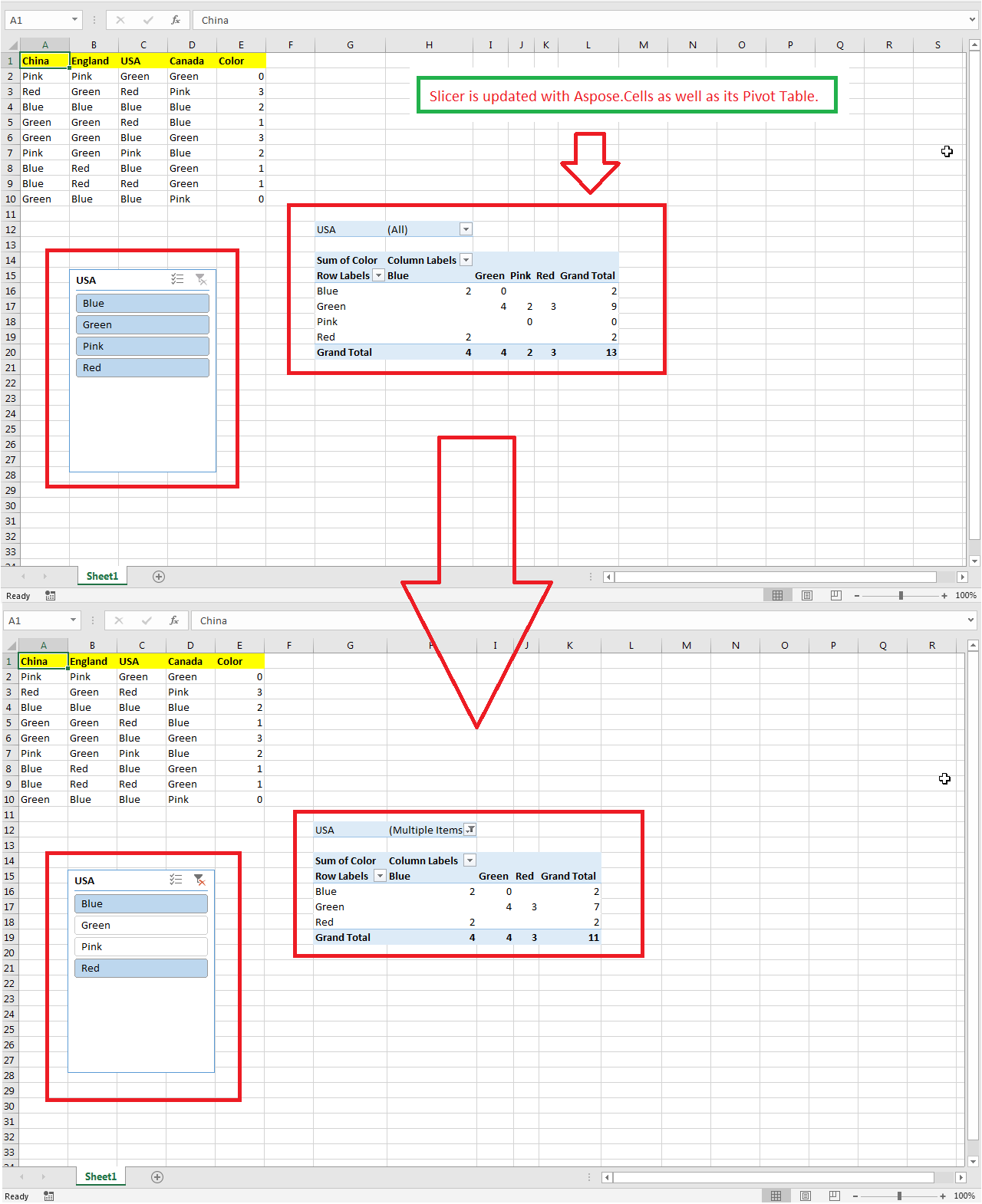
替换当前选定内容(仅保留指定的标签处于选定状态)并重新计算所关联的数据透视表或表格:
const AsposeCells = require("aspose.cells.node");
// Load sample Excel file containing slicer.
const wb = new AsposeCells.Workbook("sampleUpdatingSlicer.xlsx");
// Access the first worksheet.
const ws = wb.getWorksheets().get(0);
// Access the first slicer inside the slicer collection.
const slicer = ws.getSlicers().get(0);
// Select only "Blue" and "Pink"; the linked pivot table or table
// is recalculated directly from the filter items.
slicer.selectItems(["Blue", "Pink"], false);
// Save the modified workbook.
wb.save("out.xlsx");
保留当前选定的标签并额外选择更多项目:
const AsposeCells = require("aspose.cells.node");
// Load sample Excel file containing slicer.
const wb = new AsposeCells.Workbook("sampleUpdatingSlicer.xlsx");
// Access the first worksheet.
const ws = wb.getWorksheets().get(0);
// Access the first slicer inside the slicer collection.
const slicer = ws.getSlicers().get(0);
// Keep the current selection and add "Red" to it.
slicer.selectItems(["Red"], true);
取消选择部分已选定的项目:
const AsposeCells = require("aspose.cells.node");
// Load sample Excel file containing slicer.
const wb = new AsposeCells.Workbook("sampleUpdatingSlicer.xlsx");
// Access the first worksheet.
const ws = wb.getWorksheets().get(0);
// Access the first slicer inside the slicer collection.
const slicer = ws.getSlicers().get(0);
// Remove "Pink" from the current selection.
slicer.unselectItems(["Pink"]);
移除筛选(选择所有项目):
const AsposeCells = require("aspose.cells.node");
// Load sample Excel file containing slicer.
const wb = new AsposeCells.Workbook("sampleUpdatingSlicer.xlsx");
// Access the first worksheet.
const ws = wb.getWorksheets().get(0);
// Access the first slicer inside the slicer collection.
const slicer = ws.getSlicers().get(0);
// Clear the filter; all slicer items become selected again.
slicer.clearFilter();

Analyzing your prompt, please hold on...
An error occurred while retrieving the results. Please refresh the page and try again.