
שימוש ב-OAuth לגישה לשירותי דואר
תמיכת OAuth 2.0 נוספה ל‑Aspose.Email וניתן להשתמש בה לגישה לשרתים SMTP, POP3, IMAP ו‑EWS. באופן כללי, ניתן להשתמש בכל השרתים התומכים באסימוני נושא OAuth 2.0 עם Aspose.Email, אך לקוחות הדוא"ל שלנו נבדקו עם שרתי הדוא"ל של Google ושרתי Microsoft Office 365. גישה לשרת מ‑ SmtpClient, Pop3Client, ImapClient ו EWSClient עם OAuth ניתן לממש ב-2 דרכים.
- ספק אסימון גישה ישירות למבנה הבנאי של לקוח הדוא"ל. במקרה זה, המשתמש צריך להבין כי חיי האסימונים מוגבלים. כאשר האסימון פג, לקוח הדוא"ל אינו יכול לשמש לגישה לשרת.
- ספק מימוש מותאם אישית של ספק אסימונים המבוסס על ITokenProvider ממשק למבנה הבנאי של לקוח הדוא"ל. במקרה זה, הלקוח בודק את זמן תפוגת האסימונים ומבקש ITokenProvider לקבלת אסימון גישה חדש כאשר הקודם פג תוקף. בצורה זו, הלקוח מרענן אסימונים באופן מחזורי ויכול לעבוד עם השרת לזמן בלתי מוגבל. בדרך כלל שירותים תומכים בדרך פשוטה לחדש אסימוני גישה. לדוגמה, שימוש באסימוני רענון בשירותי Google או זרימת אימות ROPC בפלטפורמת הזהות של Microsoft עשויים לשמש למימוש ספק אסימונים.
הגדרת חשבון על השרת המתאים
המאמרים הבאים עוזרים לכם להגדיר חשבונות לגישה לשירותי דואר.
- ל Office 365
- ל Gmail
גישה לשירותי דואר עם אסימוני גישה
דוגמאות הקוד הבאות מראות כיצד להתחבר לשירותי דואר באמצעות אסימוני גישה.
// Connecting to SMTP server
try (SmtpClient client = new SmtpClient(
        "smtp.gmail.com",
        587,
        "user1@gmail.com",
        "accessToken",
        true,
        SecurityOptions.SSLExplicit)) {

}

// Connecting to IMAP server
try (ImapClient client = new ImapClient(
        "imap.gmail.com",
        993,
        "user1@gmail.com",
        "accessToken",
        true,
        SecurityOptions.SSLImplicit)) {

}

// Connecting to POP3 server
try (Pop3Client client = new Pop3Client(
        "pop.gmail.com",
        995,
        "user1@gmail.com",
        "accessToken",
        true,
        SecurityOptions.Auto)) {

}
גישה לשירותי דואר עם ספקי אסימונים
דוגמאות הקוד הבאות מראות כיצד להתחבר לשירותי דואר באמצעות ספק אסימונים.
ITokenProvider tokenProvider = TokenProvider.Google.getInstance(
        "ClientId",
        "ClientSecret",
        "RefreshToken");

// Connecting to SMTP server
try (SmtpClient client = new SmtpClient(
        "smtp.gmail.com",
        587,
        "user1@gmail.com",
        tokenProvider,
        SecurityOptions.SSLExplicit)) {

}

// Connecting to IMAP server
try (ImapClient client = new ImapClient(
        "imap.gmail.com",
        993,
        "user1@gmail.com",
        tokenProvider,
        SecurityOptions.SSLImplicit)) {

}

// Connecting to POP3 server
try (Pop3Client client = new Pop3Client(
        "pop.gmail.com",
        995,
        "user1@gmail.com",
        tokenProvider,
        SecurityOptions.Auto)) {

}
מימוש של ITokenProvider מותאם אישית עבור Office 365
ניתן להשתמש במימוש ספק האסימונים למטה לגישה לשירותי הדואר של Office 365.
import java.io.BufferedReader;
import java.io.IOException;
import java.io.InputStream;
import java.io.InputStreamReader;
import java.io.OutputStream;
import java.io.UnsupportedEncodingException;
import java.net.HttpURLConnection;
import java.net.URL;
import java.net.URLDecoder;
import java.net.URLEncoder;
import java.nio.charset.StandardCharsets;
import java.util.HashMap;
import java.util.Map;

/**
 * <p>
 * Azure resource owner password credential (ROPC) token provider
 * https://docs.microsoft.com/en-us/azure/active-directory/develop/v2-oauth-ropc
 * https://docs.microsoft.com/en-us/exchange/client-developer/exchange-web-services/how-to-authenticate-an-ews-application-by-using-oauth
 * https://portal.azure.com
 * https://developer.microsoft.com/en-us/graph/graph-explorer/#
 * token parser https://jwt.io
 * </p>
 */
class AzureROPCTokenProvider implements ITokenProvider {

    private static final String GRANT_TYPE = "password";

    private final String clientId;
    private final String clientSecret;
    private final String userName;
    private final String password;
    private final String tenant;
    private final String scope;

    private OAuthToken token;

    public AzureROPCTokenProvider(String tenant, String clientId, String clientSecret,
                                  String userName, String password, String[] scopeAr) {
        this.tenant = tenant;
        this.clientId = clientId;
        this.clientSecret = clientSecret;
        this.userName = userName;
        this.password = password;
        this.scope = joinToStr(scopeAr, " ");
    }

    public synchronized OAuthToken getAccessToken(boolean ignoreExistingToken) {
        if (this.token != null && !this.token.getExpired() && !ignoreExistingToken)
            return this.token;
        token = null;

        Map<String, String> tokenArgs = geToken();

        java.util.Calendar c = java.util.Calendar.getInstance();
        c.add(java.util.Calendar.SECOND, Integer.parseInt(tokenArgs.get("expires_in")));
        token = new OAuthToken(tokenArgs.get("access_token"), TokenType.AccessToken, c.getTime());
        return token;
    }

    public final OAuthToken getAccessToken() {
        return getAccessToken(false);
    }

    public void dispose() {
    }

    private String getEncodedParameters() {
        return "client_id=" + urlEncode(clientId) + "&scope=" + urlEncode(scope) + "&username=" + urlEncode(userName)
                + "&password=" + urlEncode(password) + "&grant_type="
                + urlEncode(GRANT_TYPE);
    }

    private String getUri() {
        if (tenant == null || tenant.trim().isEmpty())
            return "https://login.microsoftonline.com/common/oauth2/v2.0/token";
        else
            return "https://login.microsoftonline.com/" + tenant + "/oauth2/v2.0/token";
    }

    private Map<String, String> geToken() {
        try {
            HttpURLConnection connection = (HttpURLConnection) new URL(getUri()).openConnection();
            connection.setRequestMethod("POST");

            byte[] requestData = getEncodedParameters().getBytes(StandardCharsets.UTF_8);

            connection.setUseCaches(false);
            connection.setDoInput(true);
            connection.setDoOutput(true);
            connection.setRequestProperty("Content-Type", "application/x-www-form-urlencoded");
            connection.setRequestProperty("Content-Length", "" + requestData.length);

            final OutputStream st = connection.getOutputStream();
            try {
                st.write(requestData, 0, requestData.length);
            } finally {
                st.flush();
                st.close();
            }

            connection.connect();

            if (connection.getResponseCode() >= HttpURLConnection.HTTP_BAD_REQUEST) {
                throw new IllegalAccessError("Operation failed: " + connection.getResponseCode() + "/" +
                        connection.getResponseMessage() + "\r\nDetails:\r\n{2}"
                        + readInputStream(connection.getErrorStream()));
            }

            String responseText = readInputStream(connection.getInputStream());

            Map<String, String> result = new HashMap<>();
            String[] fromJsonToKeyValue = responseText.replace("{", "").replace("}", "")
                    .replace("\"", "").replace("\r", "")
                    .replace("\n", "").split(",");
            for (String keyValue : fromJsonToKeyValue) {
                String[] pair = keyValue.split(":");
                String name = pair[0].trim().toLowerCase();
                String value = urlDecode(pair[1].trim());
                result.put(name, value);
            }

            return result;
        } catch (IOException e) {
            throw new IllegalAccessError(e.getMessage());
        }
    }

    static String urlEncode(String value) {
        try {
            return URLEncoder.encode(value, StandardCharsets.UTF_8.toString());
        } catch (UnsupportedEncodingException e) {
            throw new IllegalAccessError(e.getMessage());
        }
    }

    static String urlDecode(String value) {
        try {
            return URLDecoder.decode(value, StandardCharsets.UTF_8.toString());
        } catch (UnsupportedEncodingException e) {
            throw new IllegalAccessError(e.getMessage());
        }
    }

    static String readInputStream(InputStream is) {
        if (is == null)
            return "";

        BufferedReader reader = new BufferedReader(new InputStreamReader(is));
        StringBuilder result = new StringBuilder();
        String line;
        try {
            while ((line = reader.readLine()) != null) {
                result.append(line);
            }
        } catch (IOException e) {
            // ignore
        }
        return result.toString();
    }

    static String joinToStr(String[] arr, String sep) {
        StringBuilder sb = new StringBuilder();
        for (int i = 0; i < arr.length; i++) {
            if (i > 0)
                sb.append(sep);
            sb.append(arr[i]);
        }
        return sb.toString();
    }
}
דוגמאות הקוד הבאות מראות כיצד להתחבר לשירותי Office 365 באמצעות ספק האסימונים המותאם אישית.
ITokenProvider tokenProvider = new AzureROPCTokenProvider(
        "Tenant",
        "ClientId",
        "ClientSecret",
        "EMail",
        "Password",
        scopes);

// Connecting to SMTP server
try (SmtpClient client = new SmtpClient(
        "smtp.office365.com",
        587,
        "Test1@test.onmicrosoft.com",
        tokenProvider,
        SecurityOptions.SSLExplicit)) {

}

// Connecting to IMAP server
try (ImapClient client = new ImapClient(
        "outlook.office365.com",
        993,
        "Test1@test.onmicrosoft.com",
        tokenProvider,
        SecurityOptions.SSLImplicit)) {

}

// Connecting to POP3 server
try (Pop3Client client = new Pop3Client(
        "outlook.office365.com",
        995,
        "Test1@test.onmicrosoft.com",
        tokenProvider,
        SecurityOptions.Auto)) {

}

// Connecting to EWS server
final String mailboxUri = "https://outlook.office365.com/ews/exchange.asmx";
ICredentials credentials = new OAuthNetworkCredential(tokenProvider);
try (IEWSClient ewsClient = EWSClient.getEWSClient(mailboxUri, credentials)) {

}
הרשאות לגישה ל-Office 365 דרך IMAP, POP3 או SMTP
אנו צריכים להחיל את הרשאות ה-API הנכונות ולהעניק את הסכמת המנהל לגישה לשירותי הדואר של Office 365:
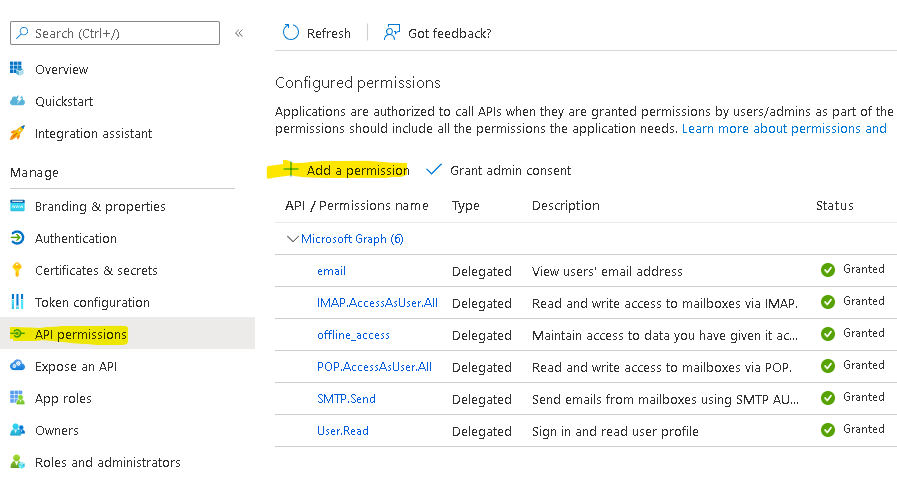
באשף הרשאות ה-API / הוספת הרשאה, בחרו ב-Microsoft Graph ולאחר מכן בהרשאות המוגבלות כדי למצוא את תחומי ההרשאות הבאים הרשומים:
offline_access
IMAP.AccessAsUser.All
POP.AccessAsUser.All
SMTP.Send
דוגמה לספק אסימון:
ITokenProvider tokenProvider = new AzureROPCTokenProvider(OAuth.Tenant, OAuth.ClientId, OAuth.ClientSecret, User.EMail, User.Password,
        new String[] {
                "offline_access",
                "https://outlook.office.com/IMAP.AccessAsUser.All", // IMAP scope
                "https://outlook.office.com/POP.AccessAsUser.All",  // POP3 scope
                "https://outlook.office.com/SMTP.Send"              // SMTP scope
        });