
Sử dụng OAuth để truy cập Dịch vụ Thư
Hỗ trợ OAuth 2.0 đã được thêm vào Aspose.Email và có thể được sử dụng để truy cập các máy chủ SMTP, POP3, IMAP và EWS. Nói chung, tất cả các máy chủ hỗ trợ token bearer OAuth 2.0 có thể được sử dụng với Aspose.Email, nhưng các client email của chúng tôi đã được kiểm tra với máy chủ thư của Google và Microsoft Office 365. Truy cập máy chủ từ SmtpClient, Pop3Client, ImapClient và EWSClient với OAuth có thể được triển khai theo 2 cách.
- Cung cấp token truy cập trực tiếp vào hàm khởi tạo của client email. Trong trường hợp này, người dùng phải hiểu rằng thời gian sống của token truy cập có giới hạn. Khi token hết hạn, client email không thể được sử dụng để truy cập máy chủ.
- Cung cấp một triển khai tùy chỉnh của nhà cung cấp token dựa trên ITokenProvider giao diện vào hàm khởi tạo của client email. Trong trường hợp này, client sẽ kiểm tra thời gian hết hạn token và yêu cầu ITokenProvider để lấy token truy cập mới khi token trước đó đã hết hạn. Bằng cách này, client sẽ làm mới token định kỳ và có thể làm việc với máy chủ vô thời hạn. Thông thường các dịch vụ hỗ trợ một cách đơn giản để làm mới token truy cập. Ví dụ, sử dụng refresh token trong các dịch vụ của Google hoặc luồng xác thực ROPC trong nền tảng nhận diện của Microsoft có thể được dùng cho việc triển khai nhà cung cấp token.
Cấu hình tài khoản trên máy chủ phù hợp
Các bài viết sau sẽ giúp bạn cấu hình tài khoản để truy cập dịch vụ thư.
- Cho Office 365
- Cho Gmail
Truy cập Dịch vụ Thư với Token Truy cập
Các ví dụ mã sau cho bạn thấy cách kết nối tới dịch vụ thư bằng token truy cập.
// Connecting to SMTP server
try (SmtpClient client = new SmtpClient(
        "smtp.gmail.com",
        587,
        "user1@gmail.com",
        "accessToken",
        true,
        SecurityOptions.SSLExplicit)) {

}

// Connecting to IMAP server
try (ImapClient client = new ImapClient(
        "imap.gmail.com",
        993,
        "user1@gmail.com",
        "accessToken",
        true,
        SecurityOptions.SSLImplicit)) {

}

// Connecting to POP3 server
try (Pop3Client client = new Pop3Client(
        "pop.gmail.com",
        995,
        "user1@gmail.com",
        "accessToken",
        true,
        SecurityOptions.Auto)) {

}
Truy cập Dịch vụ Thư với Các Nhà cung cấp Token
Các ví dụ mã sau cho bạn thấy cách kết nối tới dịch vụ thư bằng một nhà cung cấp token.
ITokenProvider tokenProvider = TokenProvider.Google.getInstance(
        "ClientId",
        "ClientSecret",
        "RefreshToken");

// Connecting to SMTP server
try (SmtpClient client = new SmtpClient(
        "smtp.gmail.com",
        587,
        "user1@gmail.com",
        tokenProvider,
        SecurityOptions.SSLExplicit)) {

}

// Connecting to IMAP server
try (ImapClient client = new ImapClient(
        "imap.gmail.com",
        993,
        "user1@gmail.com",
        tokenProvider,
        SecurityOptions.SSLImplicit)) {

}

// Connecting to POP3 server
try (Pop3Client client = new Pop3Client(
        "pop.gmail.com",
        995,
        "user1@gmail.com",
        tokenProvider,
        SecurityOptions.Auto)) {

}
Triển khai ITokenProvider tùy chỉnh cho Office 365
Bạn có thể sử dụng triển khai nhà cung cấp token dưới đây để truy cập các dịch vụ thư của Office 365.
import java.io.BufferedReader;
import java.io.IOException;
import java.io.InputStream;
import java.io.InputStreamReader;
import java.io.OutputStream;
import java.io.UnsupportedEncodingException;
import java.net.HttpURLConnection;
import java.net.URL;
import java.net.URLDecoder;
import java.net.URLEncoder;
import java.nio.charset.StandardCharsets;
import java.util.HashMap;
import java.util.Map;

/**
 * <p>
 * Azure resource owner password credential (ROPC) token provider
 * https://docs.microsoft.com/en-us/azure/active-directory/develop/v2-oauth-ropc
 * https://docs.microsoft.com/en-us/exchange/client-developer/exchange-web-services/how-to-authenticate-an-ews-application-by-using-oauth
 * https://portal.azure.com
 * https://developer.microsoft.com/en-us/graph/graph-explorer/#
 * token parser https://jwt.io
 * </p>
 */
class AzureROPCTokenProvider implements ITokenProvider {

    private static final String GRANT_TYPE = "password";

    private final String clientId;
    private final String clientSecret;
    private final String userName;
    private final String password;
    private final String tenant;
    private final String scope;

    private OAuthToken token;

    public AzureROPCTokenProvider(String tenant, String clientId, String clientSecret,
                                  String userName, String password, String[] scopeAr) {
        this.tenant = tenant;
        this.clientId = clientId;
        this.clientSecret = clientSecret;
        this.userName = userName;
        this.password = password;
        this.scope = joinToStr(scopeAr, " ");
    }

    public synchronized OAuthToken getAccessToken(boolean ignoreExistingToken) {
        if (this.token != null && !this.token.getExpired() && !ignoreExistingToken)
            return this.token;
        token = null;

        Map<String, String> tokenArgs = geToken();

        java.util.Calendar c = java.util.Calendar.getInstance();
        c.add(java.util.Calendar.SECOND, Integer.parseInt(tokenArgs.get("expires_in")));
        token = new OAuthToken(tokenArgs.get("access_token"), TokenType.AccessToken, c.getTime());
        return token;
    }

    public final OAuthToken getAccessToken() {
        return getAccessToken(false);
    }

    public void dispose() {
    }

    private String getEncodedParameters() {
        return "client_id=" + urlEncode(clientId) + "&scope=" + urlEncode(scope) + "&username=" + urlEncode(userName)
                + "&password=" + urlEncode(password) + "&grant_type="
                + urlEncode(GRANT_TYPE);
    }

    private String getUri() {
        if (tenant == null || tenant.trim().isEmpty())
            return "https://login.microsoftonline.com/common/oauth2/v2.0/token";
        else
            return "https://login.microsoftonline.com/" + tenant + "/oauth2/v2.0/token";
    }

    private Map<String, String> geToken() {
        try {
            HttpURLConnection connection = (HttpURLConnection) new URL(getUri()).openConnection();
            connection.setRequestMethod("POST");

            byte[] requestData = getEncodedParameters().getBytes(StandardCharsets.UTF_8);

            connection.setUseCaches(false);
            connection.setDoInput(true);
            connection.setDoOutput(true);
            connection.setRequestProperty("Content-Type", "application/x-www-form-urlencoded");
            connection.setRequestProperty("Content-Length", "" + requestData.length);

            final OutputStream st = connection.getOutputStream();
            try {
                st.write(requestData, 0, requestData.length);
            } finally {
                st.flush();
                st.close();
            }

            connection.connect();

            if (connection.getResponseCode() >= HttpURLConnection.HTTP_BAD_REQUEST) {
                throw new IllegalAccessError("Operation failed: " + connection.getResponseCode() + "/" +
                        connection.getResponseMessage() + "\r\nDetails:\r\n{2}"
                        + readInputStream(connection.getErrorStream()));
            }

            String responseText = readInputStream(connection.getInputStream());

            Map<String, String> result = new HashMap<>();
            String[] fromJsonToKeyValue = responseText.replace("{", "").replace("}", "")
                    .replace("\"", "").replace("\r", "")
                    .replace("\n", "").split(",");
            for (String keyValue : fromJsonToKeyValue) {
                String[] pair = keyValue.split(":");
                String name = pair[0].trim().toLowerCase();
                String value = urlDecode(pair[1].trim());
                result.put(name, value);
            }

            return result;
        } catch (IOException e) {
            throw new IllegalAccessError(e.getMessage());
        }
    }

    static String urlEncode(String value) {
        try {
            return URLEncoder.encode(value, StandardCharsets.UTF_8.toString());
        } catch (UnsupportedEncodingException e) {
            throw new IllegalAccessError(e.getMessage());
        }
    }

    static String urlDecode(String value) {
        try {
            return URLDecoder.decode(value, StandardCharsets.UTF_8.toString());
        } catch (UnsupportedEncodingException e) {
            throw new IllegalAccessError(e.getMessage());
        }
    }

    static String readInputStream(InputStream is) {
        if (is == null)
            return "";

        BufferedReader reader = new BufferedReader(new InputStreamReader(is));
        StringBuilder result = new StringBuilder();
        String line;
        try {
            while ((line = reader.readLine()) != null) {
                result.append(line);
            }
        } catch (IOException e) {
            // ignore
        }
        return result.toString();
    }

    static String joinToStr(String[] arr, String sep) {
        StringBuilder sb = new StringBuilder();
        for (int i = 0; i < arr.length; i++) {
            if (i > 0)
                sb.append(sep);
            sb.append(arr[i]);
        }
        return sb.toString();
    }
}
Các ví dụ mã sau sẽ cho bạn thấy cách kết nối tới các dịch vụ Office 365 bằng cách sử dụng nhà cung cấp token tùy chỉnh.
ITokenProvider tokenProvider = new AzureROPCTokenProvider(
        "Tenant",
        "ClientId",
        "ClientSecret",
        "EMail",
        "Password",
        scopes);

// Connecting to SMTP server
try (SmtpClient client = new SmtpClient(
        "smtp.office365.com",
        587,
        "Test1@test.onmicrosoft.com",
        tokenProvider,
        SecurityOptions.SSLExplicit)) {

}

// Connecting to IMAP server
try (ImapClient client = new ImapClient(
        "outlook.office365.com",
        993,
        "Test1@test.onmicrosoft.com",
        tokenProvider,
        SecurityOptions.SSLImplicit)) {

}

// Connecting to POP3 server
try (Pop3Client client = new Pop3Client(
        "outlook.office365.com",
        995,
        "Test1@test.onmicrosoft.com",
        tokenProvider,
        SecurityOptions.Auto)) {

}

// Connecting to EWS server
final String mailboxUri = "https://outlook.office365.com/ews/exchange.asmx";
ICredentials credentials = new OAuthNetworkCredential(tokenProvider);
try (IEWSClient ewsClient = EWSClient.getEWSClient(mailboxUri, credentials)) {

}
Quyền truy cập Office 365 qua IMAP, POP3 hoặc SMTP
Chúng ta cần áp dụng các quyền API đúng và cấp đồng ý của quản trị viên để truy cập các dịch vụ thư của Office 365:
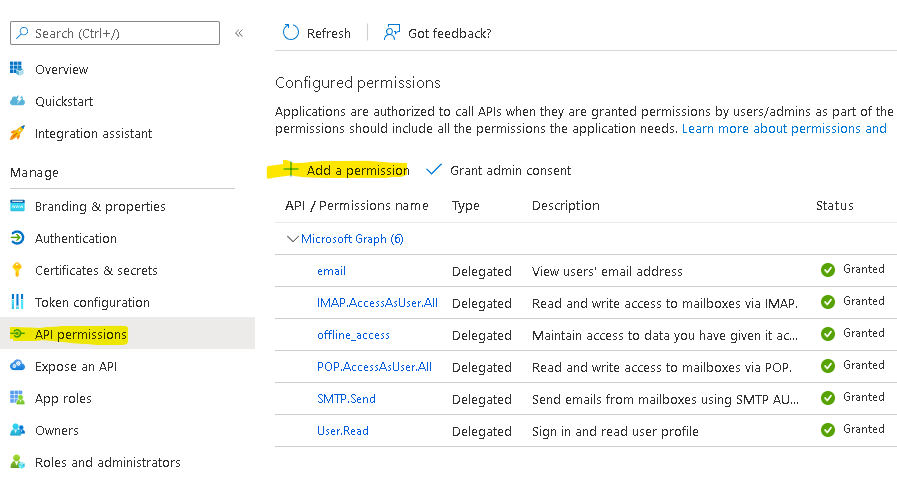
Trong trình hướng dẫn Quyền API / Thêm quyền, chọn Microsoft Graph và sau đó Quyền ủy thác để tìm các phạm vi quyền được liệt kê sau:
offline_access
IMAP.AccessAsUser.All
POP.AccessAsUser.All
SMTP.Send
Ví dụ về nhà cung cấp Token:
ITokenProvider tokenProvider = new AzureROPCTokenProvider(OAuth.Tenant, OAuth.ClientId, OAuth.ClientSecret, User.EMail, User.Password,
        new String[] {
                "offline_access",
                "https://outlook.office.com/IMAP.AccessAsUser.All", // IMAP scope
                "https://outlook.office.com/POP.AccessAsUser.All",  // POP3 scope
                "https://outlook.office.com/SMTP.Send"              // SMTP scope
        });