
ฟีเจอร์ยูทิลิตี้ของ Gmail
ทำงานกับ FreeBusy Query
Aspose.Email มีกลไกการสอบหาเพื่อเช็คว่านัดหมายบางรายการถึงกำหนดหรือไม่ตามเกณฑ์ FreebusyQuery มีคลาสที่จัดเตรียมไว้เพื่อวัตถุประสงค์นี้ซึ่งอนุญาตให้เตรียมการสอบหาสำหรับปฏิทินเฉพาะ
การสอบถามปฏิทิน
โค้ดตัวอย่างนี้แสดงคุณสมบัติของการสอบถามปฏิทิน งานต่อไปนี้ถูกดำเนินการในตัวอย่างนี้:
- สร้างและแทรกปฏิทิน
- สร้างนัดหมาย
- แทรกนัดหมาย
- เตรียม FreebusyQuery
- รับ FreebusyResponse
// Use the OAuthUser and GoogleOAuthHelper classes below to receive an access token
IGmailClient client = GmailClient.getInstance(accessToken, "user@domain.com");
try {
    Calendar newCalendar = new Calendar("summary", null, null, "Europe/Kiev");

    // Insert calendar and get back id of newly inserted calendar and Fetch the same calendar using calendar id
    String id = client.createCalendar(newCalendar);
    Calendar fetchedCalendar = client.fetchCalendar(id);
    String calendarId = fetchedCalendar.getId();
    try {
        // Get list of appointments in newly inserted calendar. It should be zero
        Appointment[] appointments = client.listAppointments(calendarId);

        // Create a new appointment and Calculate appointment start and finish time
        java.util.Calendar c = java.util.Calendar.getInstance();
        Date startDate = c.getTime();
        c.add(java.util.Calendar.HOUR_OF_DAY, 1);
        Date endDate = c.getTime();

        // Create attendees list for appointment
        MailAddressCollection attendees = new MailAddressCollection();
        attendees.add("user1@domain.com");
        attendees.add("user2@domain.com");

        // Create appointment
        Appointment app1 = new Appointment("Location", startDate, endDate, MailAddress.to_MailAddress("user2@domain.com"), attendees);
        app1.setSummary("Summary");
        app1.setDescription("Description");
        app1.setStartTimeZone("Europe/Kiev");
        app1.setEndTimeZone("Europe/Kiev");

        // Insert the newly created appointment and get back the same in case of successful insertion
        Appointment newAppointment = client.createAppointment(calendarId, app1);

        // Create Freebusy query by setting min/max timeand time zone
        FreebusyQuery query = new FreebusyQuery();
        c = java.util.Calendar.getInstance();
        c.add(java.util.Calendar.DATE, -1);
        query.setTimeMin(c.getTime());
        c.add(java.util.Calendar.DATE, 2);
        query.setTimeMax(c.getTime());
        query.setTimeZone("Europe/Kiev");

        // Set calendar item to search and Get the reponse of query containing
        query.getItems().add(calendarId);
        FreebusyResponse resp = client.getFreebusyInfo(query);

        client.deleteAppointment(calendarId, newAppointment.getUniqueId());
    } finally {
        client.deleteCalendar(calendarId);
    }
} finally {
    client.dispose();
}
การสร้างโครงการใน Google Developer Console
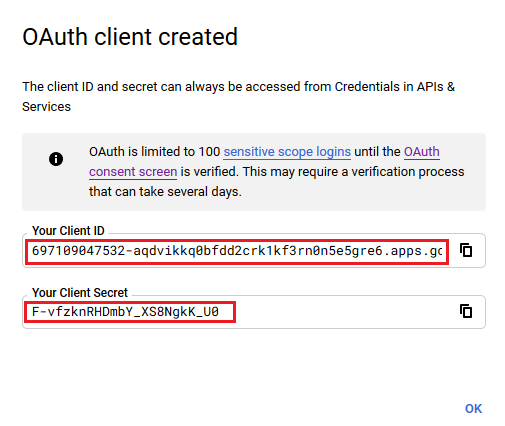
ต้องสร้างโครงการใน Google Developer Console สำหรับผู้ใช้ที่มีบัญชี Gmail ในหน้า API & auth -> Credentials ของโครงการ Google จะต้องบันทึกรายละเอียดเช่น Client ID และ Client Secret ข้อมูลเหล่านี้พร้อมกับชื่อผู้ใช้และรหัสผ่านบัญชี Gmail จะจำเป็นสำหรับการดำเนินการโค้ด เช่น Google Calendar, รายการควบคุมการเข้าถึง, นัดหมาย, รายชื่่อผู้ติดต่อ, การตั้งค่า ฯลฯ ในส่วนนี้.
ขั้นตอนการสร้างโครงการใน Google Developer Console
ต่อไปนี้เป็นบทแนะนำขั้นตอนต่อขั้นสำหรับการสร้างโครงการใน Google Developer Console.
-
ไปที่ลิงก์ https://console.cloud.google.com และเข้าสู่ระบบด้วยข้อมูลประจำตัว Gmail ของคุณ
-
เลือกช่องทำเครื่องหมาย "I have read and agree to all Terms of Service for the Google Cloud Platform products." แล้วกดปุ่ม NEW PROJECT
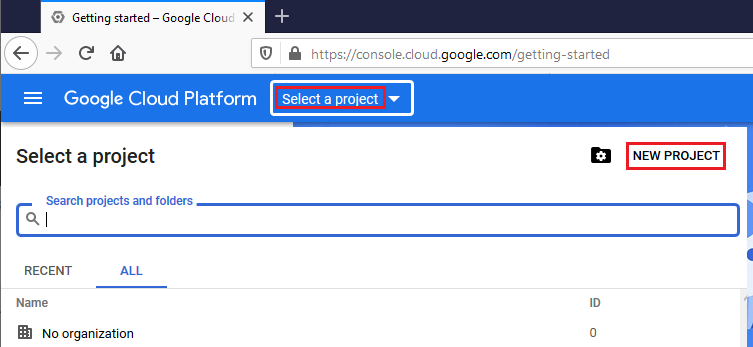
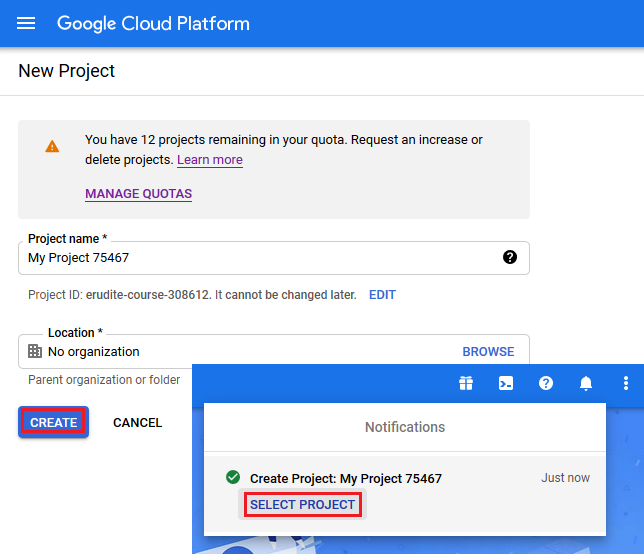
- Create และ Select โครงการใหม่
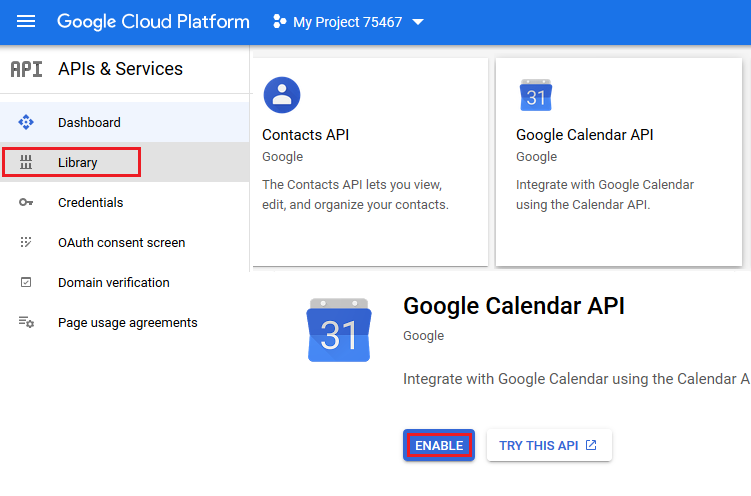
- เลือก Library แล้วเปิดใช้ Contact และ Calendar API
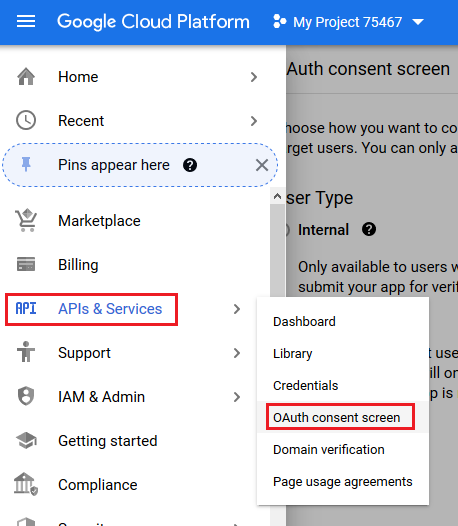
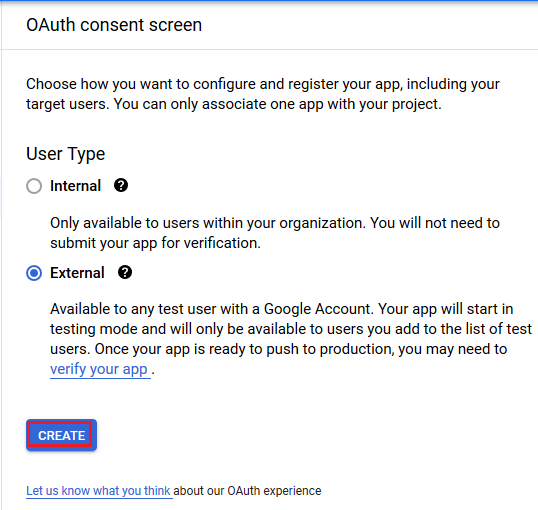
- เปิด OAuth consent screen
- เลือกช่องทำเครื่องหมาย External แล้วกดปุ่ม CREATE
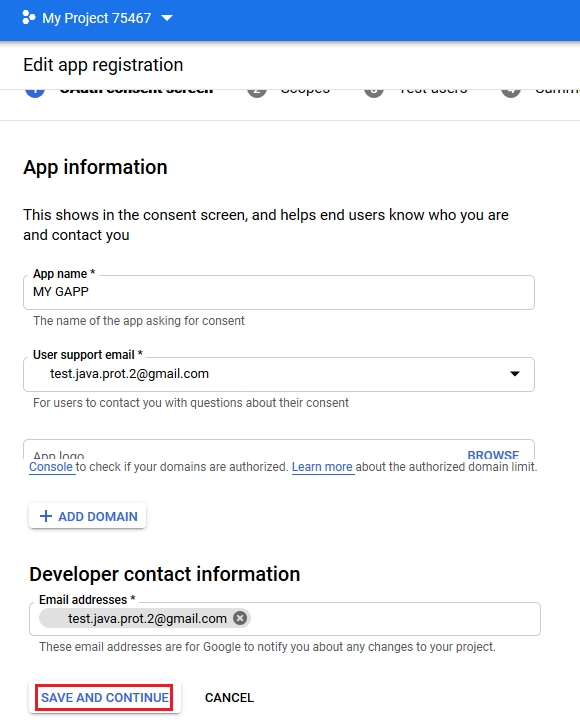
- แก้ไขการลงทะเบียนแอปและกดปุ่ม SAVE AND CONTINUE
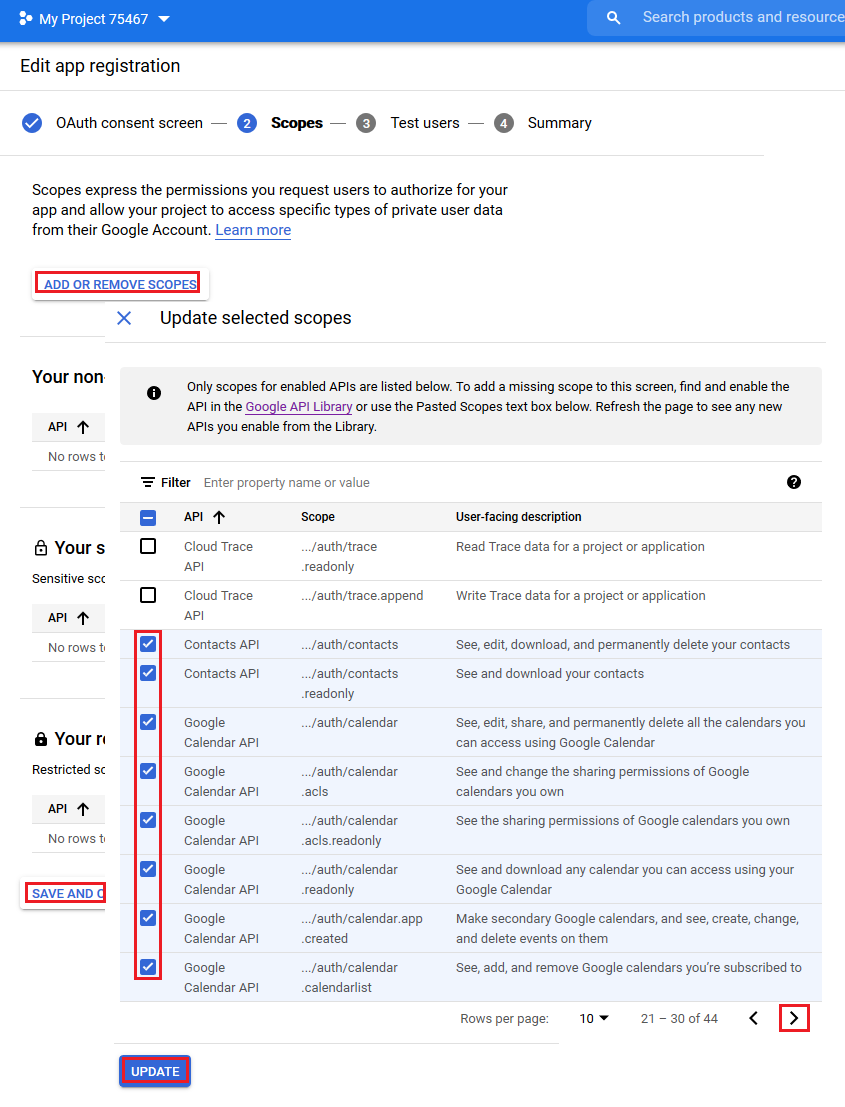
- เพิ่ม scopes และกดปุ่ม UPDATE
- สร้างข้อมูลประจำตัว OAuth
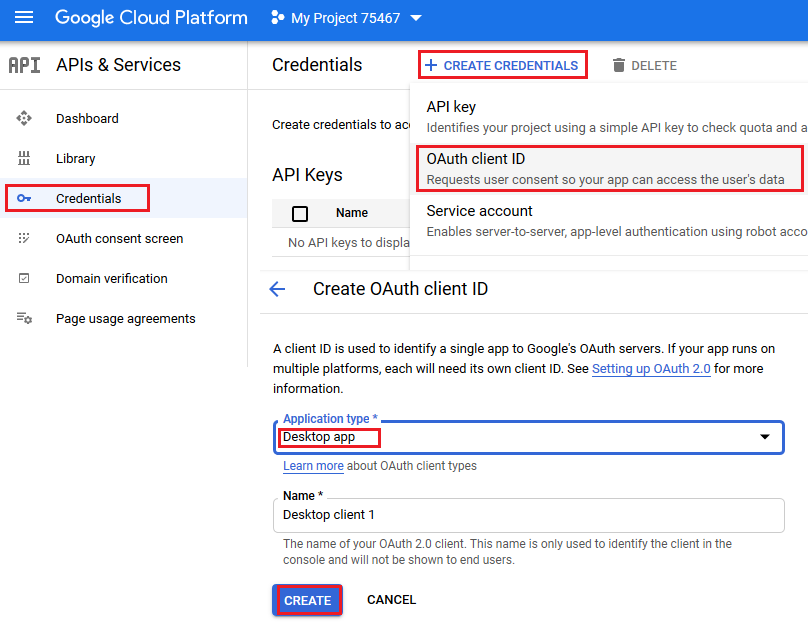
- Client ID และ Client Secret ที่นี่จะใช้ในโค้ดตัวอย่างในส่วนนี้.
คลาสช่วยเหลือ
คลาสช่วยเหลือต่อไปนี้จำเป็นต้องใช้เพื่อเรียกใช้ตัวอย่างโค้ดในส่วนนี้ คลาสเหล่านี้ GoogleOAuthHelper และ OAuthUser เป็นเพียงเพื่อความง่ายในการสาธิตเท่านั้น เมธอดในคลาสเหล่านี้ใช้โครงสร้างของเว็บเพจที่ไม่เป็นสาธารณะซึ่งอาจเปลี่ยนแปลงได้ตลอดเวลา
GoogleOAuthHelper Class
โค้ดตัวอย่างต่อไปนี้แสดงวิธีการนำไปใช้ GoogleOAuthHelper คลาส.
import java.io.BufferedReader;
import java.io.IOException;
import java.io.InputStream;
import java.io.InputStreamReader;
import java.io.OutputStream;
import java.io.UnsupportedEncodingException;
import java.net.HttpURLConnection;
import java.net.URL;
import java.net.URLDecoder;
import java.net.URLEncoder;
import java.nio.charset.StandardCharsets;
import java.security.MessageDigest;
import java.security.NoSuchAlgorithmException;
import java.util.HashMap;
import java.util.Map;
import java.util.UUID;

import javax.xml.bind.DatatypeConverter;

/**
 * <p>
 * Developers console https://console.developers.google.com/projectselector/apis/credentials?pli=1
 * Documentation https://developers.google.com/identity/protocols/OAuth2InstalledApp
 * </p>
 */
class GoogleOAuthHelper {
    public static final String AUTHORIZATION_URL = "https://accounts.google.com/o/oauth2/v2/auth";
    public static final String TOKEN_REQUEST_URL = "https://oauth2.googleapis.com/token";
    public static final String REDIRECT_URI = "urn:ietf:wg:oauth:2.0:oob";
    public static final String REDIRECT_TYPE = "code";
    public static final String SCOPE = "https%3A%2F%2Fwww.googleapis.com%2Fauth%2Fcalendar" // Calendar
            + "+https%3A%2F%2Fwww.google.com%2Fm8%2Ffeeds%2F" // Contacts
            + "+https%3A%2F%2Fmail.google.com%2F"; // IMAP & SMTP

    static class OAuthUser {
        String email;
        String clientId;
        String clientSecret;
        String refreshToken;
    }

    static String createCodeChalange() {
        String verifierStr = UUID.randomUUID().toString() + "-" + UUID.randomUUID().toString();
        System.out.println("Code Verifier: " + verifierStr);

        MessageDigest digest;
        try {
            digest = MessageDigest.getInstance("SHA-256");
        } catch (NoSuchAlgorithmException e) {
            throw new IllegalAccessError(e.getMessage());
        }
        byte[] hash = digest.digest(verifierStr.getBytes(StandardCharsets.UTF_8));
        String base64Hash = DatatypeConverter.printBase64Binary(hash);

        base64Hash = base64Hash.split("=")[0];
        base64Hash = base64Hash.replace('+', '-').replace('/', '_');
        return base64Hash;
    }

    static String getAuthorizationCodeUrl(OAuthUser acc) {
        return getAuthorizationCodeUrl(acc, SCOPE, REDIRECT_URI, REDIRECT_TYPE);
    }

    static String getAuthorizationCodeUrl(OAuthUser acc, String scope, String redirectUri, String responseType) {
        System.out.println("---------------------------------------------------------");
        System.out.println("------------- OAuth 2.0 AuthorizationCodeUrl -------------");
        System.out.println("---------------------------------------------------------");
        System.out.println("Login: " + acc.email);
        String codeChallenge = createCodeChalange();

        String state = urlEncode(UUID.randomUUID().toString());
        String approveUrl = AUTHORIZATION_URL + "?client_id=" + acc.clientId + "&redirect_uri=" + redirectUri + "&response_type=" + responseType + "&scope=" + scope
                + "&code_challenge=" + codeChallenge + "&code_challenge_method=S256&state=" + state;

        System.out.println("Approve Url: " + approveUrl);
        return approveUrl;
    }

    static String urlEncode(String value) {
        try {
            return URLEncoder.encode(value, StandardCharsets.UTF_8.toString());
        } catch (UnsupportedEncodingException e) {
            throw new IllegalAccessError(e.getMessage());
        }
    }

    static String urlDecode(String value) {
        try {
            return URLDecoder.decode(value, StandardCharsets.UTF_8.toString());
        } catch (UnsupportedEncodingException e) {
            throw new IllegalAccessError(e.getMessage());
        }
    }

    static String getAccessTokenByAuthCode(String authorizationCode, String codeVerifier, OAuthUser user) {
        String encodedParameters = "client_id=" + urlEncode(user.clientId) + "&client_secret=" + urlEncode(user.clientSecret) + "&code=" + urlEncode(authorizationCode)
                + "&code_verifier=" + codeVerifier + "&redirect_uri=" + urlEncode(REDIRECT_URI) + "&grant_type=authorization_code";
        System.out.println("---------------------------------------------------------");
        System.out.println("------------- OAuth 2.0 AccessTokenByAuthCode -------------");
        System.out.println("---------------------------------------------------------");
        System.out.println("Authorization code: " + authorizationCode);

        String result = "";
        Map<String, String> token = geToken(encodedParameters);
        for (String key : token.keySet()) {
            System.out.println(key + ": " + token.get(key));
            if (key.equals("refresh_token")) {
                result = token.get(key);
            }
        }

        System.out.println("---------------------------------------------------------");

        return result;
    }

    static String getAccessTokenByRefreshToken(OAuthUser user) {
        String encodedParameters = "client_id=" + urlEncode(user.clientId) + "&client_secret=" + urlEncode(user.clientSecret) + "&refresh_token=" + urlEncode(user.refreshToken)
                + "&grant_type=refresh_token";
        System.out.println("---------------------------------------------------------");
        System.out.println("----------- OAuth 2.0 AccessTokenByRefreshToken -----------");
        System.out.println("---------------------------------------------------------");
        System.out.println("Login: " + user.email);

        String result = "";
        Map<String, String> token = geToken(encodedParameters);
        for (String key : token.keySet()) {
            System.out.println(key + ": " + token.get(key));
            if (key.equals("access_token")) {
                result = token.get(key);
            }
        }

        System.out.println("---------------------------------------------------------");

        return result;
    }

    static Map<String, String> geToken(String encodedParameters) {
        try {
            HttpURLConnection connection = (HttpURLConnection) new URL(TOKEN_REQUEST_URL).openConnection();
            connection.setRequestMethod("POST");

            byte[] requestData = encodedParameters.getBytes(StandardCharsets.UTF_8);

            connection.setUseCaches(false);
            connection.setDoInput(true);
            connection.setDoOutput(true);
            connection.setRequestProperty("Content-Type", "application/x-www-form-urlencoded");
            connection.setRequestProperty("Content-Length", "" + requestData.length);

            final OutputStream st = connection.getOutputStream();
            try {
                st.write(requestData, 0, requestData.length);
            } finally {
                st.flush();
                st.close();
            }

            connection.connect();

            if (connection.getResponseCode() >= HttpURLConnection.HTTP_BAD_REQUEST) {
                throw new IllegalAccessError("Operation failed: " + connection.getResponseCode() + "/" + connection.getResponseMessage() + "\r\nDetails:\r\n{2}"
                        + readInputStream(connection.getErrorStream()));
            }

            String responseText = readInputStream(connection.getInputStream());

            Map<String, String> result = new HashMap<String, String>();
            System.out.println(responseText);
            String[] strs = responseText.replace("{", "").replace("}", "").replace("\"", "").replace("\r", "").replace("\n", "").split(",");
            for (String sPair : strs) {
                String[] pair = sPair.split(":");
                String name = pair[0].trim().toLowerCase();
                String value = urlDecode(pair[1].trim());
                result.put(name, value);
            }

            return result;
        } catch (IOException e) {
            throw new IllegalAccessError(e.getMessage());
        }
    }

    static String readInputStream(InputStream is) {
        if (is == null)
            return "";

        BufferedReader reader = new BufferedReader(new InputStreamReader(is));
        StringBuilder result = new StringBuilder();
        String line;
        try {
            while ((line = reader.readLine()) != null) {
                result.append(line);
            }
        } catch (IOException e) {
            // ignore
        }
        return result.toString();
    }
}
Google OAuth Helper ควรใช้ดังต่อไปนี้:
- ต้องสร้าง URL โค้ดการอนุญาตก่อน
- เปิด URL ในเบราว์เซอร์และทำทุกขั้นตอนให้เสร็จ สิ่งที่ได้คือโค้ดการอนุญาต
- ใช้โค้ดการอนุญาตเพื่อรับรีเฟรชโทเค็น
- เมื่อมีรีเฟรชโทเค็น คุณสามารถใช้มันเพื่อรับโทเค็นการเข้าถึง
static class OAuthUser {
    String email;
    String clientId;
    String clientSecret;
    String refreshToken;
}

static void getRefreshToken() {
    Scanner inputReader = new Scanner(System.in);
    OAuthUser user = new OAuthUser();

    // Set clientId, clientSecret and email
    System.out.println("Set clientId: ");
    user.clientId = inputReader.nextLine();
    System.out.println("Set clientSecret: ");
    user.clientSecret = inputReader.nextLine();
    System.out.println("Set email: ");
    user.email = inputReader.nextLine();

    // Generate AuthorizationCodeUrl
    String authorizationCodeUrl = GoogleOAuthHelper.getAuthorizationCodeUrl(user);

    System.out.println("You have to retrieve AuthorizationCode manually with generated AuthorizationCodeUrl");
    System.out.println("Set authorizationCode: ");
    String authorizationCode = inputReader.nextLine();
    System.out.println("Copy Code Verifier from the previous step output");
    System.out.println("Set codeVerifier: ");
    String codeVerifier = inputReader.nextLine();

    // Get "Refresh Token"
    String refreshToken = GoogleOAuthHelper.getAccessTokenByAuthCode(authorizationCode, codeVerifier, user);
    user.refreshToken = refreshToken;

    // Get "Access Token"
    String accessToken = GoogleOAuthHelper.getAccessTokenByRefreshToken(user);

    // Use "Access Token" in API
    IGmailClient client = GmailClient.getInstance(accessToken, user.email);
}