
Tính năng Tiện ích Gmail
Làm việc với Truy vấn FreeBusy
Aspose.Email cung cấp cơ chế truy vấn để kiểm tra xem một cuộc hẹn có đến hạn hay không theo tiêu chí. FreebusyQuery Một lớp được cung cấp cho mục đích này cho phép chuẩn bị truy vấn cho một lịch cụ thể.
Truy vấn lịch
Mẫu mã này minh họa tính năng truy vấn lịch. Các công việc sau được thực hiện trong mẫu này:
- Tạo và chèn một lịch
- Tạo một cuộc hẹn
- Chèn cuộc hẹn
- Chuẩn bị một FreebusyQuery
- Lấy FreebusyResponse
// Use the OAuthUser and GoogleOAuthHelper classes below to receive an access token
IGmailClient client = GmailClient.getInstance(accessToken, "user@domain.com");
try {
    Calendar newCalendar = new Calendar("summary", null, null, "Europe/Kiev");

    // Insert calendar and get back id of newly inserted calendar and Fetch the same calendar using calendar id
    String id = client.createCalendar(newCalendar);
    Calendar fetchedCalendar = client.fetchCalendar(id);
    String calendarId = fetchedCalendar.getId();
    try {
        // Get list of appointments in newly inserted calendar. It should be zero
        Appointment[] appointments = client.listAppointments(calendarId);

        // Create a new appointment and Calculate appointment start and finish time
        java.util.Calendar c = java.util.Calendar.getInstance();
        Date startDate = c.getTime();
        c.add(java.util.Calendar.HOUR_OF_DAY, 1);
        Date endDate = c.getTime();

        // Create attendees list for appointment
        MailAddressCollection attendees = new MailAddressCollection();
        attendees.add("user1@domain.com");
        attendees.add("user2@domain.com");

        // Create appointment
        Appointment app1 = new Appointment("Location", startDate, endDate, MailAddress.to_MailAddress("user2@domain.com"), attendees);
        app1.setSummary("Summary");
        app1.setDescription("Description");
        app1.setStartTimeZone("Europe/Kiev");
        app1.setEndTimeZone("Europe/Kiev");

        // Insert the newly created appointment and get back the same in case of successful insertion
        Appointment newAppointment = client.createAppointment(calendarId, app1);

        // Create Freebusy query by setting min/max timeand time zone
        FreebusyQuery query = new FreebusyQuery();
        c = java.util.Calendar.getInstance();
        c.add(java.util.Calendar.DATE, -1);
        query.setTimeMin(c.getTime());
        c.add(java.util.Calendar.DATE, 2);
        query.setTimeMax(c.getTime());
        query.setTimeZone("Europe/Kiev");

        // Set calendar item to search and Get the reponse of query containing
        query.getItems().add(calendarId);
        FreebusyResponse resp = client.getFreebusyInfo(query);

        client.deleteAppointment(calendarId, newAppointment.getUniqueId());
    } finally {
        client.deleteCalendar(calendarId);
    }
} finally {
    client.dispose();
}
Tạo dự án trong Google Developer Console
Một dự án cần được tạo trên Google Developer Console cho người dùng có tài khoản Gmail. Trong trang API & auth -> Credentials của dự án Google, cần ghi chú thông tin như Client ID và Client Secret. Thông tin này cùng với tên người dùng và mật khẩu tài khoản Gmail sẽ được yêu cầu để thực thi mã, ví dụ: Google Calendar, danh sách kiểm soát truy cập, cuộc hẹn, danh bạ, cài đặt, v.v. trong phần này.
Các bước tạo dự án trong Google Developer Console
Dưới đây là hướng dẫn từng bước để tạo dự án trong Google Developer Console.
-
Truy cập liên kết https://console.cloud.google.com và đăng nhập bằng thông tin Gmail của bạn
-
Chọn hộp kiểm "Tôi đã đọc và đồng ý với tất cả các Điều khoản Dịch vụ cho các sản phẩm của Google Cloud Platform." và Nhấn nút NEW PROJECT
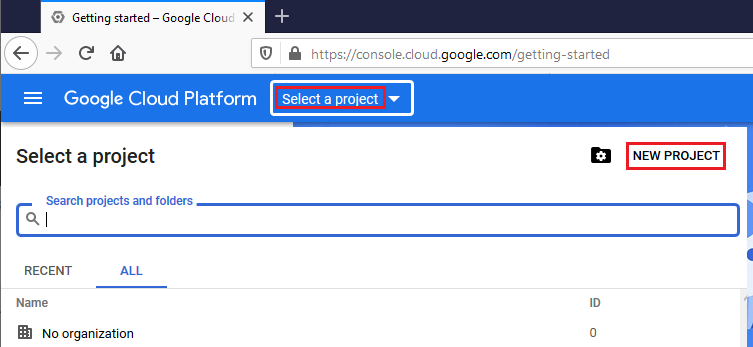
- Tạo và Chọn dự án mới
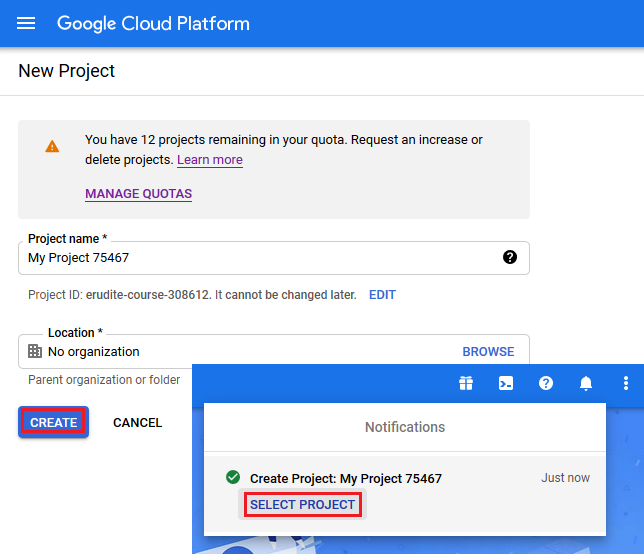
- Chọn Library và bật API Liên hệ và Lịch
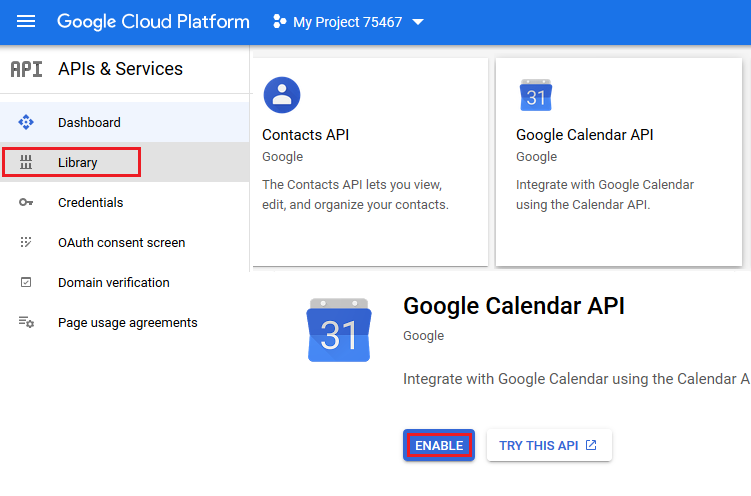
- Mở màn hình đồng ý OAuth
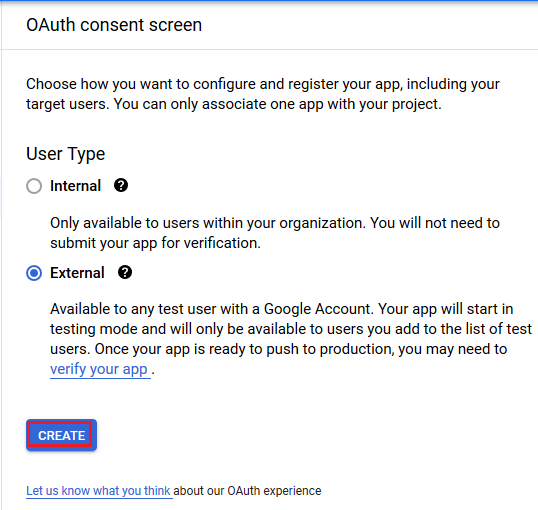
- Chọn hộp kiểm External và Nhấn nút CREATE
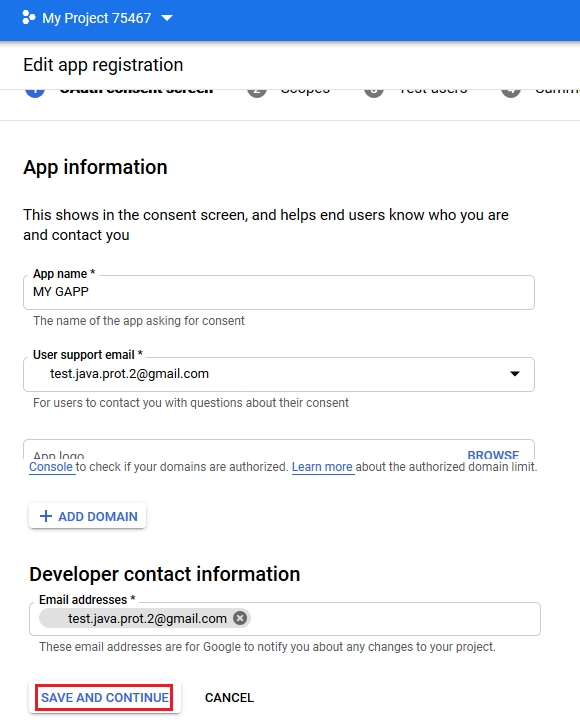
- Chỉnh sửa đăng ký ứng dụng và Nhấn nút LƯU VÀ TIẾP TỤC
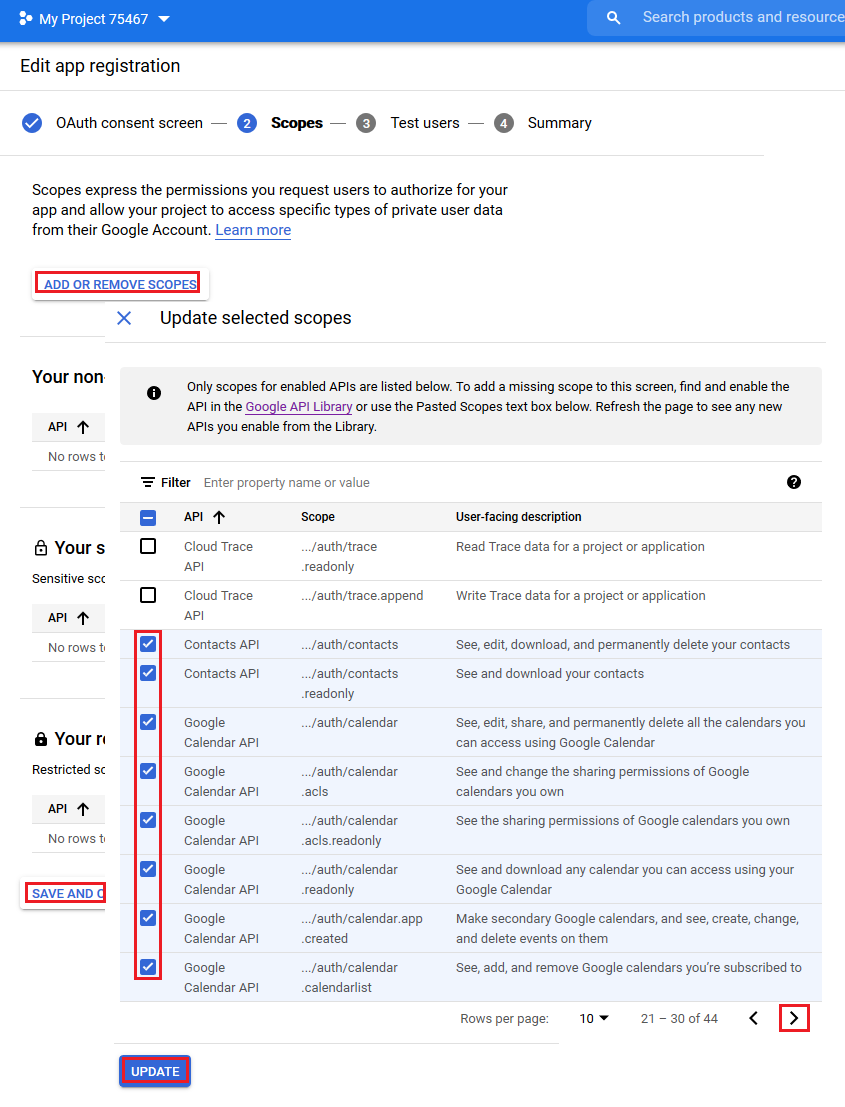
- Thêm phạm vi và Nhấn nút CẬP NHẬT
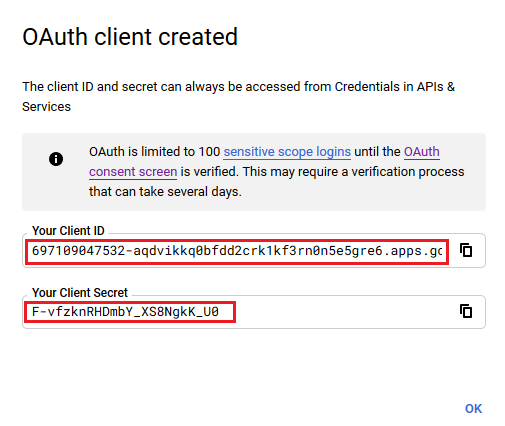
- Tạo thông tin xác thực OAuth
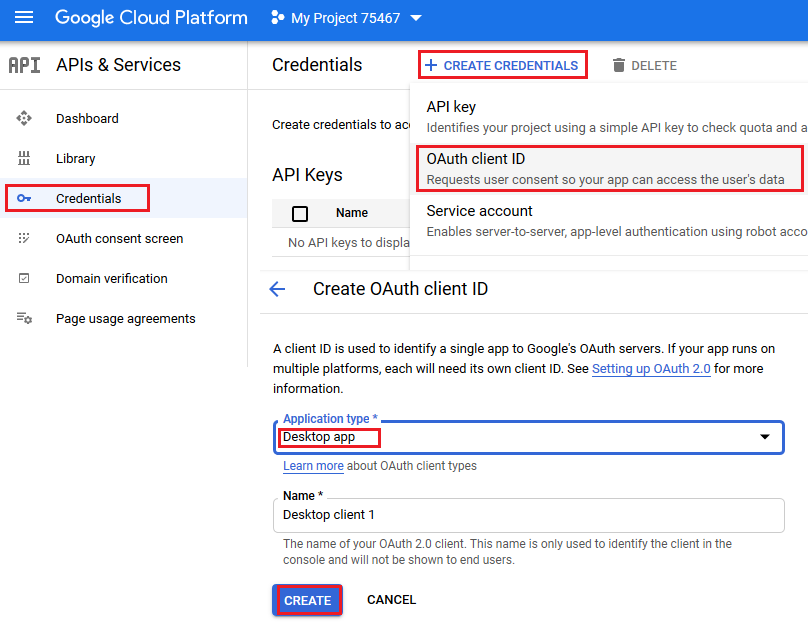
- Client ID và Client Secret ở đây sẽ được sử dụng trong các đoạn mã mẫu trong phần này.
Các Lớp Trợ Giúp
Các lớp trợ giúp sau đây là cần thiết để chạy các ví dụ mã trong phần này. Các lớp này GoogleOAuthHelper và OAuthUser chỉ để đơn giản hoá việc trình bày. Các phương thức trong những lớp này sử dụng cấu trúc không công khai của các trang web có thể thay đổi bất kỳ lúc nào.
Lớp GoogleOAuthHelper
Đoạn mã sau cho bạn thấy cách triển khai GoogleOAuthHelper lớp.
import java.io.BufferedReader;
import java.io.IOException;
import java.io.InputStream;
import java.io.InputStreamReader;
import java.io.OutputStream;
import java.io.UnsupportedEncodingException;
import java.net.HttpURLConnection;
import java.net.URL;
import java.net.URLDecoder;
import java.net.URLEncoder;
import java.nio.charset.StandardCharsets;
import java.security.MessageDigest;
import java.security.NoSuchAlgorithmException;
import java.util.HashMap;
import java.util.Map;
import java.util.UUID;

import javax.xml.bind.DatatypeConverter;

/**
 * <p>
 * Developers console https://console.developers.google.com/projectselector/apis/credentials?pli=1
 * Documentation https://developers.google.com/identity/protocols/OAuth2InstalledApp
 * </p>
 */
class GoogleOAuthHelper {
    public static final String AUTHORIZATION_URL = "https://accounts.google.com/o/oauth2/v2/auth";
    public static final String TOKEN_REQUEST_URL = "https://oauth2.googleapis.com/token";
    public static final String REDIRECT_URI = "urn:ietf:wg:oauth:2.0:oob";
    public static final String REDIRECT_TYPE = "code";
    public static final String SCOPE = "https%3A%2F%2Fwww.googleapis.com%2Fauth%2Fcalendar" // Calendar
            + "+https%3A%2F%2Fwww.google.com%2Fm8%2Ffeeds%2F" // Contacts
            + "+https%3A%2F%2Fmail.google.com%2F"; // IMAP & SMTP

    static class OAuthUser {
        String email;
        String clientId;
        String clientSecret;
        String refreshToken;
    }

    static String createCodeChalange() {
        String verifierStr = UUID.randomUUID().toString() + "-" + UUID.randomUUID().toString();
        System.out.println("Code Verifier: " + verifierStr);

        MessageDigest digest;
        try {
            digest = MessageDigest.getInstance("SHA-256");
        } catch (NoSuchAlgorithmException e) {
            throw new IllegalAccessError(e.getMessage());
        }
        byte[] hash = digest.digest(verifierStr.getBytes(StandardCharsets.UTF_8));
        String base64Hash = DatatypeConverter.printBase64Binary(hash);

        base64Hash = base64Hash.split("=")[0];
        base64Hash = base64Hash.replace('+', '-').replace('/', '_');
        return base64Hash;
    }

    static String getAuthorizationCodeUrl(OAuthUser acc) {
        return getAuthorizationCodeUrl(acc, SCOPE, REDIRECT_URI, REDIRECT_TYPE);
    }

    static String getAuthorizationCodeUrl(OAuthUser acc, String scope, String redirectUri, String responseType) {
        System.out.println("---------------------------------------------------------");
        System.out.println("------------- OAuth 2.0 AuthorizationCodeUrl -------------");
        System.out.println("---------------------------------------------------------");
        System.out.println("Login: " + acc.email);
        String codeChallenge = createCodeChalange();

        String state = urlEncode(UUID.randomUUID().toString());
        String approveUrl = AUTHORIZATION_URL + "?client_id=" + acc.clientId + "&redirect_uri=" + redirectUri + "&response_type=" + responseType + "&scope=" + scope
                + "&code_challenge=" + codeChallenge + "&code_challenge_method=S256&state=" + state;

        System.out.println("Approve Url: " + approveUrl);
        return approveUrl;
    }

    static String urlEncode(String value) {
        try {
            return URLEncoder.encode(value, StandardCharsets.UTF_8.toString());
        } catch (UnsupportedEncodingException e) {
            throw new IllegalAccessError(e.getMessage());
        }
    }

    static String urlDecode(String value) {
        try {
            return URLDecoder.decode(value, StandardCharsets.UTF_8.toString());
        } catch (UnsupportedEncodingException e) {
            throw new IllegalAccessError(e.getMessage());
        }
    }

    static String getAccessTokenByAuthCode(String authorizationCode, String codeVerifier, OAuthUser user) {
        String encodedParameters = "client_id=" + urlEncode(user.clientId) + "&client_secret=" + urlEncode(user.clientSecret) + "&code=" + urlEncode(authorizationCode)
                + "&code_verifier=" + codeVerifier + "&redirect_uri=" + urlEncode(REDIRECT_URI) + "&grant_type=authorization_code";
        System.out.println("---------------------------------------------------------");
        System.out.println("------------- OAuth 2.0 AccessTokenByAuthCode -------------");
        System.out.println("---------------------------------------------------------");
        System.out.println("Authorization code: " + authorizationCode);

        String result = "";
        Map<String, String> token = geToken(encodedParameters);
        for (String key : token.keySet()) {
            System.out.println(key + ": " + token.get(key));
            if (key.equals("refresh_token")) {
                result = token.get(key);
            }
        }

        System.out.println("---------------------------------------------------------");

        return result;
    }

    static String getAccessTokenByRefreshToken(OAuthUser user) {
        String encodedParameters = "client_id=" + urlEncode(user.clientId) + "&client_secret=" + urlEncode(user.clientSecret) + "&refresh_token=" + urlEncode(user.refreshToken)
                + "&grant_type=refresh_token";
        System.out.println("---------------------------------------------------------");
        System.out.println("----------- OAuth 2.0 AccessTokenByRefreshToken -----------");
        System.out.println("---------------------------------------------------------");
        System.out.println("Login: " + user.email);

        String result = "";
        Map<String, String> token = geToken(encodedParameters);
        for (String key : token.keySet()) {
            System.out.println(key + ": " + token.get(key));
            if (key.equals("access_token")) {
                result = token.get(key);
            }
        }

        System.out.println("---------------------------------------------------------");

        return result;
    }

    static Map<String, String> geToken(String encodedParameters) {
        try {
            HttpURLConnection connection = (HttpURLConnection) new URL(TOKEN_REQUEST_URL).openConnection();
            connection.setRequestMethod("POST");

            byte[] requestData = encodedParameters.getBytes(StandardCharsets.UTF_8);

            connection.setUseCaches(false);
            connection.setDoInput(true);
            connection.setDoOutput(true);
            connection.setRequestProperty("Content-Type", "application/x-www-form-urlencoded");
            connection.setRequestProperty("Content-Length", "" + requestData.length);

            final OutputStream st = connection.getOutputStream();
            try {
                st.write(requestData, 0, requestData.length);
            } finally {
                st.flush();
                st.close();
            }

            connection.connect();

            if (connection.getResponseCode() >= HttpURLConnection.HTTP_BAD_REQUEST) {
                throw new IllegalAccessError("Operation failed: " + connection.getResponseCode() + "/" + connection.getResponseMessage() + "\r\nDetails:\r\n{2}"
                        + readInputStream(connection.getErrorStream()));
            }

            String responseText = readInputStream(connection.getInputStream());

            Map<String, String> result = new HashMap<String, String>();
            System.out.println(responseText);
            String[] strs = responseText.replace("{", "").replace("}", "").replace("\"", "").replace("\r", "").replace("\n", "").split(",");
            for (String sPair : strs) {
                String[] pair = sPair.split(":");
                String name = pair[0].trim().toLowerCase();
                String value = urlDecode(pair[1].trim());
                result.put(name, value);
            }

            return result;
        } catch (IOException e) {
            throw new IllegalAccessError(e.getMessage());
        }
    }

    static String readInputStream(InputStream is) {
        if (is == null)
            return "";

        BufferedReader reader = new BufferedReader(new InputStreamReader(is));
        StringBuilder result = new StringBuilder();
        String line;
        try {
            while ((line = reader.readLine()) != null) {
                result.append(line);
            }
        } catch (IOException e) {
            // ignore
        }
        return result.toString();
    }
}
Google OAuth Helper nên được sử dụng như sau:
- Phải tạo URL mã ủy quyền trước.
- Mở URL trong trình duyệt và hoàn thành tất cả các thao tác. Kết quả, bạn sẽ nhận được mã ủy quyền.
- Sử dụng mã ủy quyền để nhận token làm mới.
- Khi token làm mới tồn tại, bạn có thể sử dụng nó để lấy token truy cập.
static class OAuthUser {
    String email;
    String clientId;
    String clientSecret;
    String refreshToken;
}

static void getRefreshToken() {
    Scanner inputReader = new Scanner(System.in);
    OAuthUser user = new OAuthUser();

    // Set clientId, clientSecret and email
    System.out.println("Set clientId: ");
    user.clientId = inputReader.nextLine();
    System.out.println("Set clientSecret: ");
    user.clientSecret = inputReader.nextLine();
    System.out.println("Set email: ");
    user.email = inputReader.nextLine();

    // Generate AuthorizationCodeUrl
    String authorizationCodeUrl = GoogleOAuthHelper.getAuthorizationCodeUrl(user);

    System.out.println("You have to retrieve AuthorizationCode manually with generated AuthorizationCodeUrl");
    System.out.println("Set authorizationCode: ");
    String authorizationCode = inputReader.nextLine();
    System.out.println("Copy Code Verifier from the previous step output");
    System.out.println("Set codeVerifier: ");
    String codeVerifier = inputReader.nextLine();

    // Get "Refresh Token"
    String refreshToken = GoogleOAuthHelper.getAccessTokenByAuthCode(authorizationCode, codeVerifier, user);
    user.refreshToken = refreshToken;

    // Get "Access Token"
    String accessToken = GoogleOAuthHelper.getAccessTokenByRefreshToken(user);

    // Use "Access Token" in API
    IGmailClient client = GmailClient.getInstance(accessToken, user.email);
}