Render animation frames
Overview
Use the animation rendering workflow to produce frames at a chosen frame rate. Those frames can show motion between slide states for supported effects. Your application can collect them for a preview or pass them to a separate encoder for a video workflow.
Usage example (C#)
Install Aspose.Slides for .NET before running this standalone example. Render intermediate PNG frames for a one-second fade at 10 frames per second. This produces image frames for a supported effect, not an encoded video. Frame count also depends on the timeline and default slide duration.
using System;
using Aspose.Slides;
using Aspose.Slides.Export;
using System.IO;
using Aspose.Slides.Animation;

using var presentation = new Presentation();
var shape = presentation.Slides[0].Shapes.AddAutoShape(ShapeType.Rectangle, 40, 40, 500, 140);
shape.AddTextFrame("Sample slide");
var effect = presentation.Slides[0].Timeline.MainSequence.AddEffect(shape, EffectType.Fade, EffectSubtype.None, EffectTriggerType.AfterPrevious);
effect.Timing.Duration = 1;
Directory.CreateDirectory("frames");
using var generator = new PresentationAnimationsGenerator(presentation);
using var player = new PresentationPlayer(generator, 10);
player.FrameTick += (sender, frame) =>
{
    using var image = frame.GetFrame();
    image.Save("frames/frame-" + sender.FrameIndex.ToString("D4") + ".png");
};
generator.Run(presentation.Slides);
presentation.Save("source.pptx", SaveFormat.Pptx);
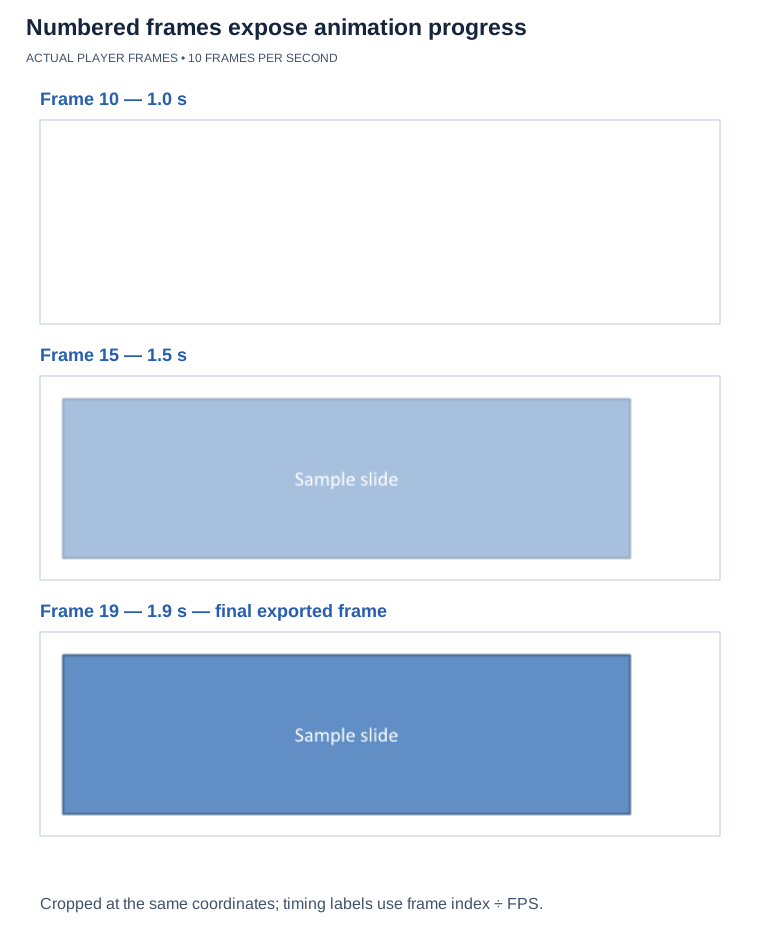
Three actual frames from the example’s 10-FPS export, cropped identically. The run emitted frames 0–19; frame 19 still contains a partly developed fade. It is the final exported frame, not a claim that the target has reached its fully opaque static state.
FAQ
Does every presentation effect produce full intermediate motion?
Effect coverage varies. Some effects may show only start and end states or remain static; ordinary PDF and image exports are also static views.
How does frame rate affect the number of generated images?
At a fixed timeline duration, a higher frame rate produces more images and finer time steps. Duration and effect timing also affect the count.
What additional component is needed to encode frames as MP4?
Use a separate video encoder to combine the frames and any audio into MP4. The frame-generation API is not a native video encoder.
Guides
Related feature: Export presentations as animated GIFs.