
在 PHP 中檢索與更新簡報資訊
Overview
Aspose.Slides 能夠辨識簡報的格式並在不建立完整簡報物件模型的情況下讀取其文件中繼資料。這在您需要對檔案進行分類、建立清單或在決定是否載入與處理簡報內容之前檢查屬性時非常有用。
本篇文章示範如何透過 PresentationFactory 與 PresentationInfo 進行輕量級檢查,以及如何透過 DocumentProperties 進行有目標的更新。
檢查簡報格式
如果您已經載入簡報,請參閱 確定原始簡報格式 以在載入後進行偵測,並了解舊版 PPT、PPS 與 POT 串流的限制。
使用 PresentationFactory::getPresentationInfo 來檢查檔案而不建立 Presentation 實例。PresentationInfo::getLoadFormat 方法會回報偵測到的格式,例如 PPTX、PPT 或 ODP。
use aspose\slides\LoadFormat;
use aspose\slides\PresentationFactory;

$fileNames = ["pres.pptx", "pres.ppt", "pres.odp"];

foreach ($fileNames as $fileName) {
    $presentationInfo = PresentationFactory::getInstance()->getPresentationInfo($fileName);
    $loadFormat = java_values($presentationInfo->getLoadFormat());
    $formatName = "Other (" . $loadFormat . ")";

    if ($loadFormat === LoadFormat::Pptx) {
        $formatName = "PPTX";
    } elseif ($loadFormat === LoadFormat::Ppt) {
        $formatName = "PPT";
    } elseif ($loadFormat === LoadFormat::Odp) {
        $formatName = "ODP";
    }

    echo $fileName . ": " . $formatName . PHP_EOL;
}
建立輕量級簡報清單
當您處理大量簡報檔案時,可能需要一個緊湊的清單來進行驗證、索引或文件管理系統。在此情境下,使用 PresentationFactory::getPresentationInfo 取得 PresentationInfo 物件,然後呼叫 PresentationInfo::readDocumentProperties 讀取文件中繼資料。此方法不會建立 Presentation 實例,也不需要遍歷完整的簡報物件模型。
DocumentProperties 所公開的擴充屬性提供以下清單值:
| Method | Inventory value |
|---|---|
| getSlides | 投影片總數。 |
| getHiddenSlides | 隱藏投影片的數量。 |
| getNotes | 包含註釋的投影片數量。 |
| getParagraphs | 段落總數(若有)。 |
| getWords | 字詞總數。 |
| getMultimediaClips | 音訊與視訊剪輯的總數。 |
以下範例在不建立 Presentation 物件的情況下讀取這些值,並列印緊湊的清單。它同時結合 DocumentProperties::getHeadingPairs 與 DocumentProperties::getTitlesOfParts 以顯示如字型、主題與投影片標題等內容群組。
use aspose\slides\LoadFormat;
use aspose\slides\PresentationFactory;

$filePath = "sample.pptx";
$presentationInfo = PresentationFactory::getInstance()->getPresentationInfo($filePath);
$documentProperties = $presentationInfo->readDocumentProperties();

$loadFormat = java_values($presentationInfo->getLoadFormat());
$formatName = "Other (" . $loadFormat . ")";

if ($loadFormat === LoadFormat::Pptx) {
    $formatName = "PPTX";
} elseif ($loadFormat === LoadFormat::Ppt) {
    $formatName = "PPT";
} elseif ($loadFormat === LoadFormat::Odp) {
    $formatName = "ODP";
}

echo "File: " . basename($filePath) . PHP_EOL;
echo "Format: " . $formatName . PHP_EOL;
echo "Title: " . java_values($documentProperties->getTitle()) . PHP_EOL;
echo "Author: " . java_values($documentProperties->getAuthor()) . PHP_EOL;
echo "Statistics:" . PHP_EOL;
echo "  Slides: " . java_values($documentProperties->getSlides()) . PHP_EOL;
echo "  Hidden slides: " . java_values($documentProperties->getHiddenSlides()) . PHP_EOL;
echo "  Slides with notes: " . java_values($documentProperties->getNotes()) . PHP_EOL;
echo "  Paragraphs: " . java_values($documentProperties->getParagraphs()) . PHP_EOL;
echo "  Words: " . java_values($documentProperties->getWords()) . PHP_EOL;
echo "  Multimedia clips: " . java_values($documentProperties->getMultimediaClips()) . PHP_EOL;

$headingPairs = $documentProperties->getHeadingPairs();
$titlesOfParts = $documentProperties->getTitlesOfParts();

if (java_is_null($headingPairs) || java_is_null($titlesOfParts)) {
    echo "Content groups: not available" . PHP_EOL;
} else {
    $headingPairs = java_values($headingPairs);
    $titlesOfParts = java_values($titlesOfParts);
    $partIndex = 0;

    if (count($headingPairs) === 0 || count($titlesOfParts) === 0) {
        echo "Content groups: not available" . PHP_EOL;
    } else {
        echo "Content groups:" . PHP_EOL;

        foreach ($headingPairs as $headingPair) {
            $partCount = java_values($headingPair->getCount());
            echo "  " . java_values($headingPair->getName()) . " (" . $partCount . ")" . PHP_EOL;

            for ($partOffset = 0; $partOffset < $partCount && $partIndex < count($titlesOfParts); $partOffset++) {
                echo "    - " . $titlesOfParts[$partIndex] . PHP_EOL;
                $partIndex++;
            }
        }

        if ($partIndex < count($titlesOfParts)) {
            echo "  Other parts:" . PHP_EOL;

            while ($partIndex < count($titlesOfParts)) {
                echo "    - " . $titlesOfParts[$partIndex] . PHP_EOL;
                $partIndex++;
            }
        }
    }
}
每個 HeadingPair 提供群組名稱與該群組的項目數量。DocumentProperties::getTitlesOfParts 回傳一個平坦且有序的陣列,因此請依每個 HeadingPair 指定的連續標題數量來取用。
已儲存的中繼資料與格式限制
由 PresentationInfo::readDocumentProperties 回傳的清單屬性反映來源文件中可用的中繼資料。Aspose.Slides 並不會載入並遍歷簡報物件模型以重新計算此呼叫的這些值。缺少的屬性會以預設值表示;若最後儲存檔案的應用程式未更新其文件屬性,已儲存的值可能已過時。
- PPTX: 此格式提供投影片、註解、隱藏投影片、段落、字詞與多媒體計數的擴充文件屬性,以及 heading pair 與 part title。其可用性取決於文件產生者寫入了哪些屬性。
- PPT: 此二進位格式可以儲存相應的文件摘要屬性。若屬性缺失或未由文件產生者重新整理,Aspose.Slides 會回傳其已儲存或預設值,而非從投影片計算。
- ODP: OpenDocument 中繼資料提供一般文件統計資訊,如頁面、段落與字詞計數,但這些值未必對應到每個 PowerPoint 專屬的擴充屬性。隱藏投影片、註解投影片、多媒體、heading‑pair 與 part‑title 中繼資料可能不存在,清單屬性可能回傳預設值。請勿將零值或空陣列視為對應內容不存在的權威證明。
在建立清單與初步檢查時請使用輕量級中繼資料方式。若結果必須反映記憶體中變更,或需要驗證實際簡報內容,則請載入簡報並檢查其即時物件模型。
更新簡報屬性
由 PresentationInfo::readDocumentProperties 回傳的屬性也可在不建立 Presentation 實例的情況下修改。使用 PresentationInfo::updateDocumentProperties 套用變更,然後以 PresentationInfo::writeBindedPresentation 寫入已綁定的簡報。
下圖顯示原始文件屬性。
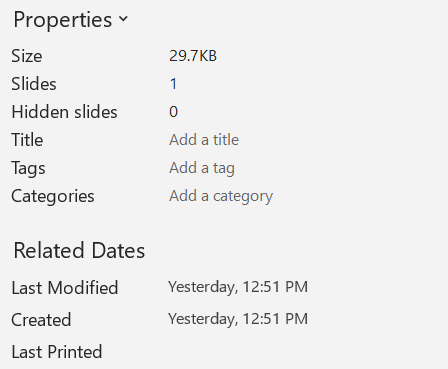
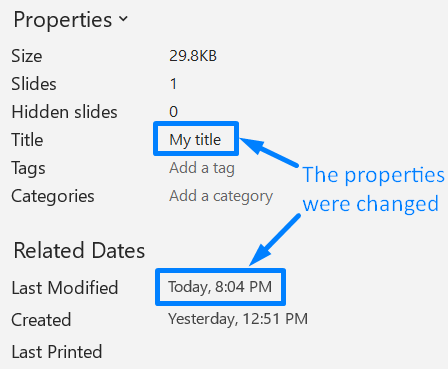
以下範例變更標題與最後存檔時間,並將結果寫入新檔案:
use aspose\slides\PresentationFactory;

$sourceFile = "sample.pptx";
$outputFile = "sample_with_updated_properties.pptx";
$presentationInfo = PresentationFactory::getInstance()->getPresentationInfo($sourceFile);
$documentProperties = $presentationInfo->readDocumentProperties();

$documentProperties->setTitle("Quarterly sales report");
$documentProperties->setLastSavedTime(new Java("java.util.Date"));

$presentationInfo->updateDocumentProperties($documentProperties);
$outputStream = new Java("java.io.FileOutputStream", $outputFile);
try {
    $presentationInfo->writeBindedPresentation($outputStream);
} finally {
    $outputStream->close();
}
下圖顯示變更後文件屬性。
實用連結
有關相關安全檢查與保護設定,請參閱以下文章:
常見問題
如何檢查字型是否已嵌入以及有哪些字型?
載入簡報並使用 Presentation::getFontsManager。呼叫 FontsManager::getEmbeddedFonts 以取得已嵌入的字型,並呼叫 FontsManager::getFonts 取得簡報使用的字型。比較兩個結果即可找出渲染所需但未嵌入的字型。
如何快速判斷檔案是否有隱藏投影片以及其數量?
當已儲存的文件中繼資料足夠時,透過 PresentationFactory::getPresentationInfo 與 PresentationInfo::readDocumentProperties 讀取 DocumentProperties::getHiddenSlides。此方式適用於輕量級清單。若簡報已在記憶體中被修改,已儲存的中繼資料可能缺失或過時,或需要驗證即時值,則需遍歷 Presentation::getSlides,並檢查每張投影片的 Slide::getHidden 方法。
我能偵測是否使用自訂投影片大小與方向,且是否與預設不同嗎?
可以。載入簡報並呼叫 Presentation::getSlideSize。使用 SlideSize::getType、SlideSize::getSize 與 SlideSize::getOrientation 來比較目前的設定與預設的預設值與尺寸。
是否有快速方式查看圖表是否引用外部資料來源?
可以。找出每個 Chart,並呼叫 ChartData::getDataSourceType。若為外部活頁簿,呼叫 ChartData::getExternalWorkbookPath。資料來源類型與路徑可辨識外部參考,但驗證目標是否可用需要另行的資源檢查。
如何評估可能拖慢渲染或 PDF 匯出的「沉重」投影片?
沒有單一的複雜度屬性。遍歷 Presentation::getSlides 以及每張投影片的 BaseSlide::getShapes 集合。利用形狀數量以及大型影像、效果、動畫或多媒體的存在作為篩選指標,並在將投影片視為確定的效能瓶頸之前,先測量具代表性的渲染或匯出時間。