
PHP에서 프레젠테이션 정보 가져오기 및 업데이트
개요
Aspose.Slides는 전체 프레젠테이션 개체 모델을 생성하지 않고도 프레젠테이션 형식을 식별하고 문서 메타데이터를 읽을 수 있습니다. 파일을 분류하거나 인벤토리를 구축하거나 프레젠테이션 내용을 로드하고 처리할지 결정하기 전에 속성을 검사해야 할 때 유용합니다.
이 문서는 PresentationFactory와 PresentationInfo를 통한 가벼운 검사와 DocumentProperties를 통한 대상 업데이트를 설명합니다.
프레젠테이션 형식 확인
이미 로드된 프레젠테이션이 있는 경우 로드 후 형식 감지를 위해 원본 프레젠테이션 형식 결정을 참조하고 레거시 PPT, PPS, POT 스트림의 제한 사항을 확인하십시오.
PresentationFactory::getPresentationInfo를 사용하면 Presentation 인스턴스를 만들지 않고 파일을 검사할 수 있습니다. PresentationInfo::getLoadFormat 메서드는 PPTX, PPT 또는 ODP와 같은 감지된 형식을 반환합니다.
use aspose\slides\LoadFormat;
use aspose\slides\PresentationFactory;

$fileNames = ["pres.pptx", "pres.ppt", "pres.odp"];

foreach ($fileNames as $fileName) {
    $presentationInfo = PresentationFactory::getInstance()->getPresentationInfo($fileName);
    $loadFormat = java_values($presentationInfo->getLoadFormat());
    $formatName = "Other (" . $loadFormat . ")";

    if ($loadFormat === LoadFormat::Pptx) {
        $formatName = "PPTX";
    } elseif ($loadFormat === LoadFormat::Ppt) {
        $formatName = "PPT";
    } elseif ($loadFormat === LoadFormat::Odp) {
        $formatName = "ODP";
    }

    echo $fileName . ": " . $formatName . PHP_EOL;
}
가벼운 프레젠테이션 인벤토리 구축
많은 프레젠테이션 파일을 처리할 때 검증, 색인화 또는 문서 관리 시스템을 위한 컴팩트한 인벤토리가 필요할 수 있습니다. 이 경우 PresentationFactory::getPresentationInfo를 사용하여 PresentationInfo 개체를 얻은 다음 PresentationInfo::readDocumentProperties을 호출해 문서 메타데이터를 읽습니다. 이 접근 방식은 Presentation 인스턴스를 만들지 않으며 전체 프레젠테이션 개체 모델을 탐색할 필요도 없습니다.
DocumentProperties가 제공하는 확장 속성은 다음과 같은 인벤토리 값을 포함합니다:
| 메서드 | 인벤토리 값 |
|---|---|
| getSlides | 전체 슬라이드 수. |
| getHiddenSlides | 숨겨진 슬라이드 수. |
| getNotes | 메모가 포함된 슬라이드 수. |
| getParagraphs | 사용 가능한 경우 전체 단락 수. |
| getWords | 전체 단어 수. |
| getMultimediaClips | 오디오 및 비디오 클립 총 수. |
다음 예제는 이러한 값을 Presentation 객체를 만들지 않고 읽어와 컴팩트한 인벤토리를 출력합니다. 또한 DocumentProperties::getHeadingPairs와 DocumentProperties::getTitlesOfParts를 결합해 글꼴, 테마, 슬라이드 제목 등과 같은 콘텐츠 그룹을 표시합니다.
use aspose\slides\LoadFormat;
use aspose\slides\PresentationFactory;

$filePath = "sample.pptx";
$presentationInfo = PresentationFactory::getInstance()->getPresentationInfo($filePath);
$documentProperties = $presentationInfo->readDocumentProperties();

$loadFormat = java_values($presentationInfo->getLoadFormat());
$formatName = "Other (" . $loadFormat . ")";

if ($loadFormat === LoadFormat::Pptx) {
    $formatName = "PPTX";
} elseif ($loadFormat === LoadFormat::Ppt) {
    $formatName = "PPT";
} elseif ($loadFormat === LoadFormat::Odp) {
    $formatName = "ODP";
}

echo "File: " . basename($filePath) . PHP_EOL;
echo "Format: " . $formatName . PHP_EOL;
echo "Title: " . java_values($documentProperties->getTitle()) . PHP_EOL;
echo "Author: " . java_values($documentProperties->getAuthor()) . PHP_EOL;
echo "Statistics:" . PHP_EOL;
echo "  Slides: " . java_values($documentProperties->getSlides()) . PHP_EOL;
echo "  Hidden slides: " . java_values($documentProperties->getHiddenSlides()) . PHP_EOL;
echo "  Slides with notes: " . java_values($documentProperties->getNotes()) . PHP_EOL;
echo "  Paragraphs: " . java_values($documentProperties->getParagraphs()) . PHP_EOL;
echo "  Words: " . java_values($documentProperties->getWords()) . PHP_EOL;
echo "  Multimedia clips: " . java_values($documentProperties->getMultimediaClips()) . PHP_EOL;

$headingPairs = $documentProperties->getHeadingPairs();
$titlesOfParts = $documentProperties->getTitlesOfParts();

if (java_is_null($headingPairs) || java_is_null($titlesOfParts)) {
    echo "Content groups: not available" . PHP_EOL;
} else {
    $headingPairs = java_values($headingPairs);
    $titlesOfParts = java_values($titlesOfParts);
    $partIndex = 0;

    if (count($headingPairs) === 0 || count($titlesOfParts) === 0) {
        echo "Content groups: not available" . PHP_EOL;
    } else {
        echo "Content groups:" . PHP_EOL;

        foreach ($headingPairs as $headingPair) {
            $partCount = java_values($headingPair->getCount());
            echo "  " . java_values($headingPair->getName()) . " (" . $partCount . ")" . PHP_EOL;

            for ($partOffset = 0; $partOffset < $partCount && $partIndex < count($titlesOfParts); $partOffset++) {
                echo "    - " . $titlesOfParts[$partIndex] . PHP_EOL;
                $partIndex++;
            }
        }

        if ($partIndex < count($titlesOfParts)) {
            echo "  Other parts:" . PHP_EOL;

            while ($partIndex < count($titlesOfParts)) {
                echo "    - " . $titlesOfParts[$partIndex] . PHP_EOL;
                $partIndex++;
            }
        }
    }
}
각 HeadingPair은 그룹 이름과 해당 그룹의 항목 수를 제공합니다. DocumentProperties::getTitlesOfParts는 평면이고 순서가 유지된 배열을 반환하므로 각 heading pair가 지정한 연속적인 제목 수만큼 사용합니다.
저장된 메타데이터 및 형식 제한 사항
PresentationInfo::readDocumentProperties에서 반환되는 인벤토리 속성은 소스 문서에 존재하는 메타데이터를 반영합니다. Aspose.Slides는 이 호출을 위해 프레젠테이션 개체 모델을 로드하고 탐색하지 않으므로 해당 값을 재계산하지 않습니다. 누락된 속성은 기본값으로 표시되며, 마지막 저장 시 애플리케이션이 문서 속성을 업데이트하지 않았다면 저장된 값이 오래될 수 있습니다.
- PPTX: 이 형식은 슬라이드, 메모, 숨김 슬라이드, 단락, 단어 및 멀티미디어 수와 함께 heading pair와 part title에 대한 확장 문서 속성을 제공합니다. 가용성은 문서 작성자가 어떤 속성을 기록했는지에 따라 다릅니다.
- PPT: 바이너리 형식은 해당하는 문서 요약 속성을 저장할 수 있습니다. 속성이 없거나 문서 작성자가 최신화하지 않은 경우 Aspose.Slides는 슬라이드에서 계산하지 않고 저장된 값 또는 기본값을 반환합니다.
- ODP: OpenDocument 메타데이터는 페이지, 단락, 단어 수와 같은 일반 문서 통계를 제공하지만 이러한 값이 PowerPoint 고유의 확장 속성에 모두 매핑되지는 않습니다. 숨김 슬라이드, 메모 슬라이드, 멀티미디어, heading‑pair 및 part‑title 메타데이터는 없을 수 있으며 인벤토리 속성은 기본값을 반환할 수 있습니다. 0 값이나 빈 배열을 해당 콘텐츠가 존재하지 않는다는 절대적인 증거로 여기지 마십시오.
가벼운 메타데이터 접근 방식을 사용해 인벤토리와 예비 검사를 수행하십시오. 결과가 메모리 내 변경을 반영해야 하거나 실제 프레젠테이션 내용을 검증해야 할 경우 프레젠테이션을 로드하고 실시간 개체 모델을 검사하십시오.
프레젠테이션 속성 업데이트
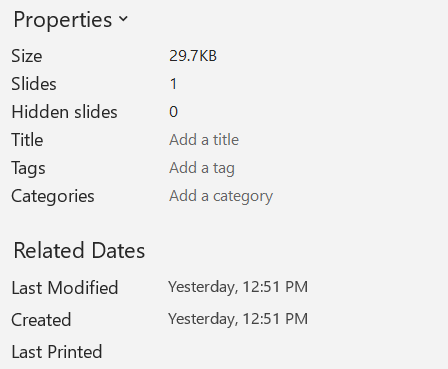
PresentationInfo::readDocumentProperties에서 반환된 속성은 Presentation 인스턴스를 만들지 않고도 변경할 수 있습니다. 변경 사항은 PresentationInfo::updateDocumentProperties로 적용한 뒤, PresentationInfo::writeBindedPresentation으로 바인드된 프레젠테이션을 저장하십시오.
다음 이미지에는 원본 문서 속성이 표시되어 있습니다.
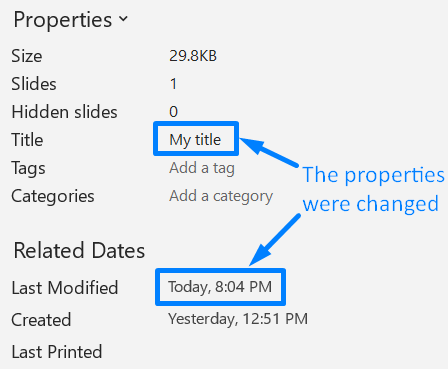
다음 예제는 제목과 마지막 저장 시간을 변경하고 결과를 새 파일에 기록합니다:
use aspose\slides\PresentationFactory;

$sourceFile = "sample.pptx";
$outputFile = "sample_with_updated_properties.pptx";
$presentationInfo = PresentationFactory::getInstance()->getPresentationInfo($sourceFile);
$documentProperties = $presentationInfo->readDocumentProperties();

$documentProperties->setTitle("Quarterly sales report");
$documentProperties->setLastSavedTime(new Java("java.util.Date"));

$presentationInfo->updateDocumentProperties($documentProperties);
$outputStream = new Java("java.io.FileOutputStream", $outputFile);
try {
    $presentationInfo->writeBindedPresentation($outputStream);
} finally {
    $outputStream->close();
}
다음 이미지에는 업데이트된 문서 속성이 표시되어 있습니다.
유용한 링크
관련 보안 검사 및 보호 설정에 대해서는 다음 문서를 참조하십시오:
FAQ
폰트가 포함되어 있는지, 어떤 폰트가 포함되어 있는지 어떻게 확인할 수 있나요?
프레젠테이션을 로드한 뒤 Presentation::getFontsManager를 사용하십시오. FontsManager::getEmbeddedFonts로 포함된 폰트를 가져오고, FontsManager::getFonts으로 프레젠테이션에서 사용된 폰트를 가져와 두 결과를 비교하면 렌더링에 필요하지만 포함되지 않은 폰트를 찾을 수 있습니다.
파일에 숨김 슬라이드가 있는지, 몇 개 있는지 빠르게 확인하려면 어떻게 해야 하나요?
저장된 문서 메타데이터가 충분할 때는 PresentationFactory::getPresentationInfo와 PresentationInfo::readDocumentProperties를 통해 DocumentProperties::getHiddenSlides를 읽습니다. 이는 가벼운 인벤토리에 적합합니다. 메모리에서 프레젠테이션이 수정되었거나 실시간 값을 확인해야 하는 경우 Presentation::getSlides를 순회하고 각 슬라이드의 Slide::getHidden 메서드를 검사하십시오.
사용자 정의 슬라이드 크기와 방향이 사용 중인지, 기본값과 다른지 감지할 수 있나요?
예. 프레젠테이션을 로드한 뒤 Presentation::getSlideSize를 호출하십시오. SlideSize::getType, SlideSize::getSize, SlideSize::getOrientation을 사용해 현재 설정을 기대 프리셋 및 차원과 비교하십시오.
차트가 외부 데이터 소스를 참조하고 있는지 빠르게 확인할 방법이 있나요?
예. 각 Chart를 찾아 ChartData::getDataSourceType를 호출하십시오. 외부 워크북인 경우 ChartData::getExternalWorkbookPath를 호출하면 데이터 소스 유형과 경로를 통해 외부 참조 여부를 식별할 수 있습니다. 대상이 실제로 사용 가능한지는 별도의 리소스 검사가 필요합니다.
렌더링이나 PDF 내보내기를 늦출 수 있는 ‘무거운’ 슬라이드를 어떻게 평가할 수 있나요?
단일 복잡성 속성은 없습니다. Presentation::getSlides와 각 슬라이드의 BaseSlide::getShapes 컬렉션을 순회하십시오. 도형 수, 대용량 이미지, 이펙트, 애니메이션 또는 멀티미디어 존재 여부를 신호로 사용하고, 대표적인 렌더링 또는 내보내기 시간을 측정해 슬라이드가 실제 성능 병목인지 판단하십시오.