
版面投影片
Contents
[
Hide
]
本文示範如何在 Aspose.Slides for Python via .NET 中使用 Layout Slides。版面投影片定義了一般投影片所繼承的設計與格式。您可以新增、存取、複製和移除版面投影片,亦可清理未使用的版面以縮小簡報的大小。
新增版面投影片
您可以建立自訂版面投影片,以定義可重複使用的格式。
def add_layout_slide():
    with slides.Presentation() as presentation:
        master_slide = presentation.masters[0]
        layout_type = slides.SlideLayoutType.CUSTOM
        layout_name = "Main layout"

        # 建立具有指定類型和名稱的版面投影片。
        layout_slide = presentation.layout_slides.add(master_slide, layout_type, layout_name)

        presentation.save("layout_slide.pptx", slides.export.SaveFormat.PPTX)
💡 提示 1: 版面投影片充當個別投影片的範本。您可以一次定義共用元素,並在多張投影片中重複使用。
💡 提示 2: 當您在版面投影片上加入形狀或文字時,所有基於該版面的投影片都會自動顯示此共用內容。
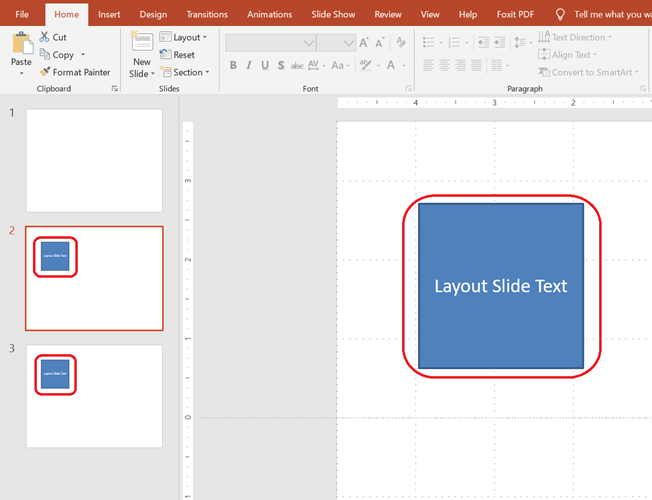
下方螢幕截圖顯示兩張投影片,各自從相同的版面投影片繼承文字方塊。
存取版面投影片
def access_layout_slide():
    with slides.Presentation("layout_slide.pptx") as presentation:

        # 依索引存取。
        first_layout_slide = presentation.layout_slides[0]

        # 依版面類型存取。
        blank_layout_slide = presentation.layout_slides.get_by_type(slides.SlideLayoutType.BLANK)
移除版面投影片
def remove_layout_slide():
    with slides.Presentation("layout_slide.pptx") as presentation:

        # 依類型取得版面投影片並將其移除。
        layout_slide = presentation.layout_slides.get_by_type(slides.SlideLayoutType.CUSTOM)
        presentation.layout_slides.remove(layout_slide)

        presentation.save("layout_slide_removed.pptx", slides.export.SaveFormat.PPTX)
移除未使用的版面投影片
def remove_unused_layout_slides():
    with slides.Presentation("layout_slide.pptx") as presentation:

        # 自動移除所有未被任何投影片參照的版面投影片。
        presentation.layout_slides.remove_unused()

        presentation.save("layout_slides_removed.pptx", slides.export.SaveFormat.PPTX)
複製版面投影片
def clone_layout_slides():
    with slides.Presentation("layout_slide.pptx") as presentation:

        # 依類型取得現有的版面投影片。
        layout_slide = presentation.layout_slides.get_by_type(slides.SlideLayoutType.BLANK)

        # 複製版面投影片至版面投影片集合的末端。
        cloned_layout_slide = presentation.layout_slides.add_clone(layout_slide)

        presentation.save("layout_slide_cloned.pptx", slides.export.SaveFormat.PPTX)
✅ 摘要: 版面投影片是管理投影片間一致格式的強大工具。Aspose.Slides 提供完整的控制,讓您能建立、管理與最佳化版面投影片。