How to filter worksheet data
Introduction
GridJs includes a toolbar autofilter toggle and a header filter popup for worksheet ranges.
When autofilter is active, clicking the filter arrow area in a header cell opens a popup where you can search values, check or uncheck values, and confirm with OK. Applying the filter updates visible rows through exceptRowSet and refreshes the sheet.
How to use
-
Select the header range you want to filter.
The toolbar autofilter button works on the current selected range (
selector.range). -
Click the Autofilter toolbar button.
GridJs handles the
autofiltertoolbar action insheet.js, then callsdata.autofilter()indata_proxy.js.

-
Click the filter arrow area in a header cell.
In
overlayerMousedown, when the click is inside the header arrow region, GridJs callsautoFilter.items(...)and opensSortFilter.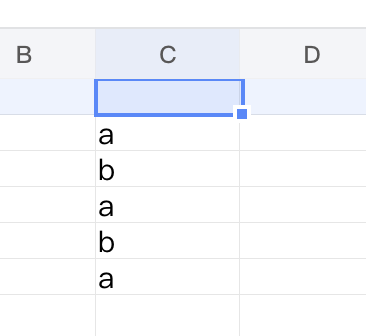
-
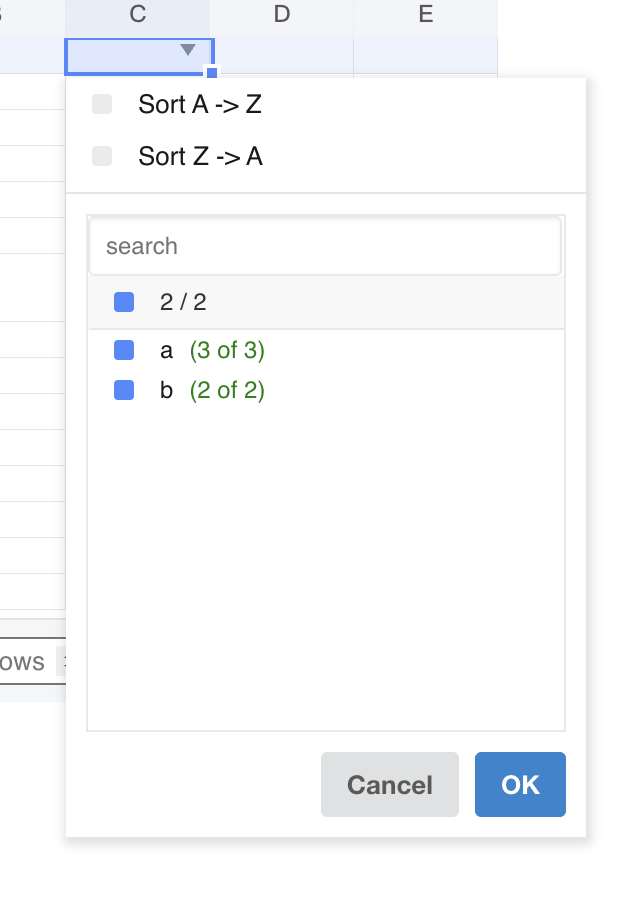
Use Sort A to Z or Sort Z to A at the top of the popup.
These actions are handled by
itemClick('asc' | 'desc')and passed with filter apply on OK. -
Use the search box to filter visible candidate items.
searchFilter()filters item rows by key text and updates the header counter tochecked / visible. -
Use the header checkbox row to check or uncheck values in bulk.
Without search text,
filterClick('all')toggles all values. With search text,filterClickAllWithSearch()only toggles currently visible matched values. -
Use individual item rows to include or exclude specific values.
Each row shows
(cnt of total). Empty values are rendered witht('filter.empty'). Clicking a row toggles checked state and updatesfilterValues,unfilterValues, andunfilterRecheck. -
Click OK to apply the current sort and filter state.
SortFilter.btnClick('ok')passes selected values tookActToApplyFilter, andsheet.jscallsdata.setAutoFilter(...). -
Click Cancel or click outside to close the popup without applying new changes.
hide() restores temporarily unhidden rows when OK was not clicked.
- Review the filtered result.
resetAutoFilter recomputes filtered rows (filteredRows) and updates exceptRowSet, which controls hidden rows in the rendered sheet.
- Click Autofilter again to clear filtering for the active worksheet autofilter.
When autofilter is already active, data.autofilter() clears filter state and resets exceptRowSet.
JavaScript API
The inspected code applies filtering through internal GridJs data and sheet methods.
Relevant functions
| Function / Location | Description | Parameters | Returns |
|---|---|---|---|
autofilter() (component/sheet.js) |
Handles toolbar autofilter action and calls the data-layer autofilter toggle. |
None | void |
canAutofilter() (core/data_proxy.js) |
Returns whether worksheet autofilter can be enabled (!autoFilter.active()). |
None | boolean |
autofilter() (core/data_proxy.js) |
Toggles worksheet autofilter on selected range; clears filter state when already active. | None | void |
SortFilter.set(...) (component/sort_filter.js) |
Initializes popup state from current filter items and sort state. | ci, items, filter, sort, autoFilter, data |
void |
SortFilter.itemClick(...) (component/sort_filter.js) |
Sets sort direction (asc or desc) in the popup. |
it |
void |
SortFilter.searchFilter() (component/sort_filter.js) |
Filters visible item rows by search text and updates header counts. | None | void |
SortFilter.filterClick(...) (component/sort_filter.js) |
Handles select-all and individual include/exclude toggles. | index, it |
void |
SortFilter.toggleFilterMeOnly() (component/sort_filter.js) |
Toggles collaborative “visible to me only” mode. | None | void |
SortFilter.btnClick('ok') (component/sort_filter.js) |
Collects selected values and triggers okActToApplyFilter. |
it |
void |
SortFilter.hide() (component/sort_filter.js) |
Closes popup and restores temp state when user did not confirm with OK. | None | void |
sortFilterChange(...) (component/sheet.js) |
Applies filter change by calling data.setAutoFilter(...), then resets sheet view. |
ci, order, operator, value, unfilterValueSet, unfilterRecheck, showFilterResultForMeOnly, isCheckAll, isChanged, isFiltered |
void |
setAutoFilter(...) (core/data_proxy.js) |
Stores filter and sort settings, recalculates filtered rows, and optionally syncs collaborative filter ops to server. | ci, order, operator, values, unfilterValueSet, unfilterRecheck, showFilterResultForMeOnly, isCheckAll, isChanged, isFiltered |
void |
resetAutoFilter(ci) (core/data_proxy.js) |
Recomputes filtered rows and updates exceptRowSet; applies sort operation when sort is set. |
ci |
void |
items(ci, getCell) (core/auto_filter.js) |
Builds popup value list with visible count (cnt) and total count (total) for each key. |
ci, getCell |
Object |
Common Questions
Q: How is the filter popup opened?
A: It opens from header cells inside an active autofilter range when the click hits the filter-arrow area handled in overlayerMousedown.
Q: What happens if I click Cancel or click outside without pressing OK?
A: SortFilter.hide() restores temporarily unhidden rows by calling autoFilter.restoreTempUnhiddenRows() when the user did not confirm with OK.
Q: Can filtered results be visible only to me?
A: The popup includes filterMeOnlyCheckbox, and it is shown only when data.settings.isCollaborative is enabled.
Q: What does (cnt of total) mean in each filter item row?
A: items(...) computes cnt as currently visible count and total as total occurrences for that key in the filter range.
Q: Why is OK sometimes disabled?
A: resetFilterHeader() disables OK when no item is selected in the current mode (full list or current search scope).
Q: How does GridJs hide rows after filtering?
A: AutoFilter.filteredRows computes excluded row indexes, and resetAutoFilter writes them into exceptRowSet through updateExceptRowSet.