
메시지 보내기 및 전달 - Java 프로그램을 사용하여 Outlook 이메일 전송
다음은 SmtpClient class를 통해 애플리케이션은 간단 메일 전송 프로토콜(SMTP)을 사용해 이메일을 보낼 수 있습니다.
- 다음은 SmtpClient class는 개발자가 메일 메시지를 전송할 때 사용하는 유일한 주요 진입점입니다.
- 다음은 SmtpClient class는 파일 시스템에 이메일을 쓰기, 메시지 큐 등과 같은 기타 일반적인 이메일 전송 방법도 제공합니다.
- 다음은 SmtpClient class는 이 두 프로그래밍 모델을 완전히 지원합니다:
- 다음은 SmtpClient class는 또한 지원합니다 TNEF 형식으로 메시지 전송
이메일을 전송하고 SMTP 서버로 전송되는 동안 대기하도록 차단하려면 동기 Send 메서드 중 하나를 사용하십시오. 이메일 전송 중에도 프로그램 메인 스레드가 계속 실행되도록 하려면 다음을 사용합니다 beginSend 메서드.
동기 이메일 전송
이메일 메시지는 다음을 사용해 동기적으로 전송할 수 있습니다 SmtpClient 클래스 전송 method. 지정된 이메일 메시지를 SMTP 서버를 통해 전송합니다. 메시지 발신자, 수신자, 제목 및 본문은 String 객체를 사용해 지정합니다. 이메일을 동기적으로 보내려면 아래 단계에 따라 진행하십시오:
- 다음의 인스턴스를 생성합니다 MailMessage class를 사용하고 해당 속성을 설정합니다.
- 다음의 인스턴스를 생성합니다 SmtpClient class에 호스트, 포트, 사용자명 및 비밀번호를 지정합니다.
- 다음을 사용하여 메시지를 전송합니다 SmtpClient 클래스 전송 method에 전달하고 MailMessage 인스턴스.
다음 Java 코드 스니펫은 Outlook 이메일을 동기적으로 전송하는 방법을 보여줍니다.
// For complete examples and data files, please go to https://github.com/aspose-email/Aspose.Email-for-Java

// Declare msg as MailMessage instance
MailMessage msg = new MailMessage();

// Create an instance of SmtpClient class
SmtpClient client = new SmtpClient();

// Specify your mailing host server, Username, Password, Port # and Security option
client.setHost("mail.server.com");
client.setUsername("username");
client.setPassword("password");
client.setPort(587);
client.setSecurityOptions(SecurityOptions.SSLExplicit);

try {
    // Client.Send will send this message
    client.send(msg);
    System.out.println("Message sent");
} catch (Exception ex) {
    System.err.println(ex);
}
비동기 이메일 전송
때때로 메일을 비동기적으로 보내고 싶을 수 있습니다. 예를 들어 애플리케이션에서 대량의 메일을 보낼 경우 동기식 접근 방식이 작동하지 않을 수 있습니다. 이러한 상황에서는 다음을 사용할 수 있습니다 beginSend. The beginSend 메서드 SmtpClient class는 이메일 메시지를 SMTP 서버로 전송하여 배달합니다. 이 메서드는 호출 스레드를 차단하지 않으며, 작업이 완료될 때 호출되는 객체를 메서드에 전달할 수 있습니다. Java에서 Outlook 이메일을 비동기적으로 보내려면 다음 단계에 따라 진행하십시오:
- 다음의 인스턴스를 생성합니다 MailMessage class를 사용하고 다양한 속성을 활용합니다.
- 다음의 인스턴스를 생성합니다 SmtpClient class에 호스트, 포트, 사용자명 및 비밀번호를 지정합니다.
- 비동기 작업이 완료될 때 메서드에 전달되어 호출되는 사용자 정의 인스턴스를 생성합니다.
- 다음을 사용하여 메시지를 전송합니다 beginSend 메서드 SmtpClient class에 전달하고 MailMessage 인스턴스와 그 안에 사용자 정의 인스턴스를 포함하며, 작업이 완료되면 호출될 콜백 함수를 함께 제공합니다.
이메일이 전송되었거나 작업이 취소될 때 알림을 받으려면 해당 메서드에 전달된 콜백 함수를 사용합니다. beginSend method이 호출됩니다. 호출한 후 SmtpClient 클래스 beginSend method 이메일 메시지가 완전히 전송될 때까지 기다릴 필요가 없습니다. 우리는 다른 메서드를 호출할 수 있습니다. beginSend 동시에. 이메일이 다음을 사용해 전송될 때 beginSend 메서드에서 코드 스니펫은 메시지("Message Sent")를 출력합니다. 다음 Java 프로그램 또는 코드 스니펫은 비동기적으로 이메일을 보내는 방법을 보여줍니다.
// For complete examples and data files, please go to https://github.com/aspose-email/Aspose.Email-for-Java

public static void run() {
    sendMail();
}

static SmtpClient getSmtpClient() {
    SmtpClient client = new SmtpClient();
    client.setHost("mail.server.com");
    // Specify your mail Username, Password, Port # and security option
    client.setUsername("username");
    client.setPassword("password");
    client.setPort(587);
    client.setSecurityOptions(SecurityOptions.SSLExplicit);
    return client;
}

static void sendMail() {
    try {

        // Declare msg as MailMessage instance
        MailMessage msg = new MailMessage("sender@gmail.com", "receiver@gmail.com", "Test subject", "Test body");
        SmtpClient client = getSmtpClient();
        Object state = new Object();
        IAsyncResult ar = client.beginSend(msg, callback, state);
        // If the user canceled the send, and mail hasn't been sent yet,
        client.cancelAsyncOperation(ar);

        msg.dispose();
        System.out.println("Goodbye.");
    } catch (Exception ex) {
        System.err.println(ex);
    }
}

static AsyncCallback callback = new AsyncCallback() {
    public void invoke(IAsyncResult ar) {
        IAsyncResultExt task = null;
        if (ar instanceof IAsyncResult)
            task = (IAsyncResultExt) ar;

        if (task != null && task.isCanceled()) {
            System.out.println("Send canceled.");
        }

        if (task != null && task.getErrorInfo() != null) {
            System.out.println(task.getErrorInfo());
        } else {
            System.out.println("Message Sent.");
        }
    }
};
디스크에 저장된 메시지 전송
EML 파일(Outlook Express 전자 메일 파일)은 이메일 헤더, 메시지 본문 및 첨부 파일을 포함합니다. Aspose.Email는 개발자가 EML 파일을 다양한 방식으로 작업할 수 있게 합니다. 이 문서에서는 디스크에서 EML 파일을 로드하고 SMTP를 사용해 이메일로 전송하는 방법을 보여줍니다. .eml 파일을 디스크나 스트림에서 로드하여 MailMessage 클래스를 사용하여 이메일 메시지를 전송합니다. SmtpClient 클래스. MailMessage 클래스는 새로운 이메일 메시지를 생성하고, 디스크 또는 스트림에서 이메일 메시지 파일을 로드하며, 메시지를 저장하는 주요 클래스입니다. 다음 Java 코드 스니펫은 디스크에 저장된 메시지를 전송하는 방법을 보여줍니다.
// For complete examples and data files, please go to https://github.com/aspose-email/Aspose.Email-for-Java

// Load an EML file in MailMessage class
MailMessage message = MailMessage.load(dataDir + "test.eml");

// Send this message using SmtpClient
SmtpClient client = new SmtpClient("host", "username", "password");

try {
    client.send(message);
} catch (Exception ex) {
    System.out.println(ex.getMessage());
}
일반 텍스트 이메일 전송
아래 프로그래밍 샘플은 일반 텍스트 이메일 메시지를 보내는 방법을 보여줍니다. 본문 속성, 클래스의 속성 MailMessage 클래스는 메시지 본문의 일반 텍스트 콘텐츠를 지정하는 데 사용됩니다. 일반 텍스트 이메일 메시지를 보내려면 다음 단계를 따르세요:
- 다음의 인스턴스를 생성합니다. MailMessage 클래스.
- 발신자와 수신자 이메일 주소를 지정하십시오. MailMessage 인스턴스.
- 지정하세요 본문 콘텐츠는 일반 텍스트 메시지에 사용됩니다.
- 다음의 인스턴스를 생성합니다. SmtpClient 클래스를 사용하여 이메일을 보내십시오.
다음 코드 스니펫은 일반 텍스트 이메일을 보내는 방법을 보여줍니다.
// For complete examples and data files, please go to https://github.com/aspose-email/Aspose.Email-for-Java

// Create an instance of the MailMessage class
MailMessage message = new MailMessage();

// Set From field, To field and Plain text body
message.setFrom(MailAddress.to_MailAddress("sender@sender.com"));
message.getTo().add("receiver@receiver.com");
message.setBody("This is Plain Text Body");

// Create an instance of the SmtpClient class
SmtpClient client = new SmtpClient();

// And Specify your mailing host server, Username, Password and Port
client.setHost("smtp.server.com");
client.setUsername("Username");
client.setPassword("Password");
client.setPort(25);

try {
    // Client.Send will send this message
    client.send(message);
    System.out.println("Message sent");
} catch (Exception ex) {
    System.err.println(ex);
}
HTML 본문이 있는 이메일 전송
아래 프로그래밍 샘플은 간단한 HTML 이메일 메시지를 보낼 수 있는 방법을 보여줍니다. HtmlBody, 클래스의 속성 MailMessage 클래스는 메시지 본문의 HTML 콘텐츠를 지정하는 데 사용됩니다. 간단한 HTML 이메일을 보내려면 다음 단계를 따르세요:
- 다음의 인스턴스를 생성합니다. MailMessage 클래스.
- 발신자 및 수신자 이메일 주소를 지정하십시오. MailMessage 인스턴스.
- 지정하세요 HtmlBody 콘텐츠.
- 다음의 인스턴스를 생성합니다. SmtpClient 클래스를 사용하여 이메일을 전송합니다. 전송 메서드.
이 문서의 목적을 위해 이메일의 HTML 콘텐츠는 기본적인 수준입니다:
This is the HTML body 대부분의 HTML 이메일은 더 복잡합니다. 다음 Java 프로그램 스니펫은 HTML 본문이 있는 이메일을 보내는 방법을 보여줍니다.public static void run() {
// Declare msg as MailMessage instance
MailMessage msg = new MailMessage();
// Use MailMessage properties like specify sender, recipient, message and HtmlBody
msg.setFrom(MailAddress.to_MailAddress("newcustomeronnet@gmail.com"));
msg.setTo(MailAddressCollection.to_MailAddressCollection("asposetest123@gmail.com"));
msg.setSubject("Test subject");
msg.setHtmlBody("<html><body>This is the HTML body</body></html>");
SmtpClient client = getSmtpClient();
try {
// Client will send this message
client.send(msg);
System.out.println("Message sent");
} catch (Exception ex) {
System.err.println(ex);
}
System.out.println("Email sent with HTML body.");
}
private static SmtpClient getSmtpClient() {
SmtpClient client = new SmtpClient("smtp.gmail.com", 587, "your.email@gmail.com", "your.password");
client.setSecurityOptions(SecurityOptions.Auto);
return client;
}
대체 메시지 텍스트가 있는 이메일 전송
아래 프로그래밍 샘플은 대체 콘텐츠가 있는 간단한 HTML 이메일 메시지를 보내는 방법을 보여줍니다. 다음을 사용하십시오. AlternateView 클래스는 이메일 메시지를 다양한 형식으로 복사본을 지정합니다. 예를 들어, HTML로 메시지를 보낼 경우 HTML을 표시할 수 없는 이메일 리더를 사용하는 수신자를 위해 일반 텍스트 버전을 제공하고 싶을 수 있습니다. 또는 뉴스레터를 보낼 경우 일반 텍스트 버전을 선택한 수신자를 위해 텍스트의 일반 텍스트 복사본을 제공하고 싶을 수 있습니다. 대체 텍스트가 있는 이메일을 보내려면 다음 단계를 따르세요:
- 다음의 인스턴스를 생성합니다. MailMessage 클래스.
- 발신자 및 수신자 이메일 주소를 지정하십시오. MailMessage 인스턴스.
- 다음의 인스턴스를 생성합니다. AlternateView 클래스.
이것은 문자열에 지정된 내용을 사용하여 이메일 메시지에 대한 대체 뷰를 생성합니다.
- 인스턴스를 추가하십시오. AlternateView 클래스를 MailMessage 객체.
- 다음의 인스턴스를 생성합니다. SmtpClient 클래스를 사용하여 이메일을 전송합니다. 전송 메서드.
다음 코드 스니펫은 대체 텍스트가 있는 이메일을 보내는 방법을 보여줍니다.
// For complete examples and data files, please go to https://github.com/aspose-email/Aspose.Email-for-Java

// Declare message as MailMessage instance
MailMessage message = new MailMessage();

// Creates AlternateView to view an email message using the content specified in the //String
AlternateView alternate = AlternateView.createAlternateViewFromString("Alternate Text");

// Adding alternate text
message.getAlternateViews().addItem(alternate);
대량 이메일 전송
대량 이메일 전송은 하나의 메시지에 여러 이메일을 보내는 것을 의미합니다. 우리는 다음을 사용하여 이메일 배치를 보낼 수 있습니다. SmtpClient 클래스 전송 다음과 같은 매개변수를 받는 메서드 오버로드 MailMessageCollection 클래스:
- 다음의 인스턴스를 생성합니다 SmtpClient 클래스.
- 지정하세요 SmtpClient 클래스 속성.
- 다음의 인스턴스를 생성합니다. MailMessage 클래스.
- 인스턴스에 발신자, 수신자, 메일 제목 및 메시지를 지정하십시오. MailMessage 클래스.
- 다른 사람에게 이메일을 보내려면 위의 두 단계를 다시 반복하십시오.
- 다음의 인스턴스를 생성합니다 MailMessageCollection 클래스.
- 인스턴스를 추가하십시오. MailMessage 클래스는 객체의 MailMessageCollection 클래스.
- 이제 다음을 사용하여 이메일을 전송하세요. SmtpClient 클래스 전송 인스턴스를 전달하는 메서드 MailMessageCollection 그 안의 클래스.
다음 코드 스니펫은 대량 이메일을 전송하는 방법을 보여줍니다.
// For complete examples and data files, please go to https://github.com/aspose-email/Aspose.Email-for-Java

// Create SmtpClient as client and specify server, port, user name and password
SmtpClient client = new SmtpClient("mail.server.com", 25, "Username", "Password");

// Create instances of MailMessage class and Specify To, From, Subject and Message
MailMessage message1 = new MailMessage("msg1@from.com", "msg1@to.com", "Subject1", "message1, how are you?");
MailMessage message2 = new MailMessage("msg1@from.com", "msg2@to.com", "Subject2", "message2, how are you?");
MailMessage message3 = new MailMessage("msg1@from.com", "msg3@to.com", "Subject3", "message3, how are you?");

// Create an instance of MailMessageCollection class
MailMessageCollection manyMsg = new MailMessageCollection();
manyMsg.addItem(message1);
manyMsg.addItem(message2);
manyMsg.addItem(message3);

// Use client.BulkSend function to complete the bulk send task
try {
    // Send Message using BulkSend method
    client.send(manyMsg);
    System.out.println("Message sent");
} catch (Exception ex) {
    System.err.println(ex);
}
대량 전송된 메시지 정보 얻기
대량으로 메시지를 보낼 때, 성공적으로 전송된 메시지 수와 해당 메시지 목록에 대한 정보를 얻을 수 있습니다. SucceededSending 이벤트는 이 목적을 위해 사용됩니다.
아래 코드 샘플은 성공적으로 전송된 메시지 수에 대한 정보를 얻는 방법을 보여줍니다:
try (SmtpClient client = new SmtpClient(host, SecurityOptions.Auto)) {
    final AtomicInteger messageCount = new AtomicInteger(0);

    client.setSucceededSending(new EventHandler<MailMessageEventArgs>() {
        public void invoke(Object sender, MailMessageEventArgs eventArgs) {
            System.out.println("The message " + eventArgs.getMessage().getSubject() + " was successfully sent.");
            messageCount.incrementAndGet();
        }
    });

    client.send(messages);

    System.out.println(messageCount + " messages were successfully sent.");
}
멀티연결을 사용한 이메일 전송
SmtpClient 를 제공합니다. UseMultiConnection 무거운 작업을 위해 다중 연결을 생성하는 데 사용할 수 있는 속성입니다. 멀티연결 모드에서 사용할 연결 수는 다음을 사용하여 설정할 수 있습니다. SmtpClient.ConnectionsQuantity. 다음 코드 스니펫은 여러 메시지를 전송하기 위한 멀티연결 모드 사용을 보여줍니다.
// For complete examples and data files, please go to https://github.com/aspose-email/Aspose.Email-for-Java

SmtpClient smtpClient = new SmtpClient();
smtpClient.setHost("<HOST>");
smtpClient.setUsername("<USERNAME>");
smtpClient.setPassword("<PASSWORD>");
smtpClient.setPort(587);
smtpClient.setSupportedEncryption(EncryptionProtocols.Tls);
smtpClient.setSecurityOptions(SecurityOptions.SSLExplicit);

List<MailMessage> messages = new ArrayList<MailMessage>();
for (int i = 0; i < 20; i++) {
    MailMessage message = new MailMessage("<EMAIL ADDRESS>", "<EMAIL ADDRESS>", "Test Message - " + UUID.randomUUID().toString(),
            "SMTP Send Messages with MultiConnection");
    messages.add(message);
}

smtpClient.setConnectionsQuantity(5);
smtpClient.setUseMultiConnection(MultiConnectionMode.Enable);
smtpClient.send(messages);
TNEF 형식으로 메시지 전송
TNEF 이메일은 특수 형식이 있으며, 표준 API로 전송하면 손실될 수 있습니다. Aspose.Email은 이메일을 TNEF 형식으로 전송하는 기능을 제공하여 형식을 보존합니다. 해당 SmtpClient 클래스 UseTnef 속성을 설정하면 이메일을 TNEF 형식으로 보낼 수 있습니다. 다음 코드 스니펫은 메시지를 TNEF로 보내는 방법을 보여줍니다.
// For complete examples and data files, please go to https://github.com/aspose-email/Aspose.Email-for-Java

String emlFileName = dataDir + "Message.eml"; // A TNEF Email

// Load from eml
MailMessage eml1 = MailMessage.load(emlFileName, new EmlLoadOptions());
eml1.setFrom(MailAddress.to_MailAddress("somename@gmail.com"));
eml1.getTo().clear();
eml1.getTo().addItem(new MailAddress("first.last@test.com"));
eml1.setSubject("With PreserveTnef flag during loading");
eml1.setDate(new Date());
SmtpClient client = new SmtpClient("smtp.gmail.com", 587, "somename", "password");
client.setSecurityOptions(SecurityOptions.Auto);
client.setUseTnef(true); // Use this flag to send as TNEF
client.send(eml1);
회의 요청 보내기
Microsoft Outlook는 캘린더 기능과 이메일 관리를 제공합니다. 사용자가 이벤트 초대가 포함된 이메일을 열면 Outlook은 수락 또는 거부를 요청합니다. Aspose.Email을 사용하면 개발자가 이메일에 캘린더 기능을 추가할 수 있습니다.
이메일을 통한 요청 전송
이메일로 회의 요청을 보내려면 다음 단계에 따라 진행하십시오:
- 다음의 인스턴스를 생성합니다. MailMessage 클래스.
- 인스턴스를 사용해 발신자와 수신자 주소를 지정합니다 MailMessage 클래스.
- 다음의 인스턴스를 초기화합니다 Appointment class에 값을 전달합니다.
- 요약 및 설명을 지정합니다 Calendar 인스턴스.
- 다음 추가 Calendar)를 MailMessage 인스턴스를 생성하고 이를 전달합니다 Appointment 인스턴스.
|이메일로 전송된 iCalendar 회의 요청| | :- | |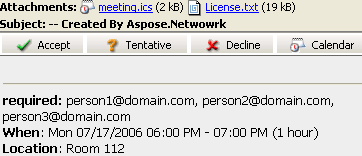 | 다음 코드 스니펫은 이메일을 통해 요청을 보내는 방법을 보여줍니다.
// For complete examples and data files, please go to https://github.com/aspose-email/Aspose.Email-for-Java

// Create an instance of the MailMessage class
MailMessage msg = new MailMessage();

// Set the sender, recipient, who will receive the meeting request. Basically, the recipient is the same as the meeting attendees
msg.setFrom(MailAddress.to_MailAddress("newcustomeronnet@gmail.com"));
msg.setTo(MailAddressCollection.to_MailAddressCollection("person1@domain.com, person2@domain.com, person3@domain.com, asposetest123@gmail.com"));

// Create Appointment instance
Calendar cal = Calendar.getInstance();
cal.set(2015, Calendar.JULY, 17, 13, 0, 0);
Date startDate = cal.getTime();
cal.set(2015, Calendar.JULY, 17, 14, 0, 0);
Date endDate = cal.getTime();
Appointment app = new Appointment("Room 112", startDate, endDate, msg.getFrom(), msg.getTo());
app.setSummary("Release Meetting");
app.setDescription("Discuss for the next release");

// Add appointment to the message and Create an instance of SmtpClient class
msg.addAlternateView(app.requestApointment());
SmtpClient client = getSmtpClient();

try {
    // Client.Send will send this message
    client.send(msg);
    System.out.println("Message sent");
} catch (Exception ex) {
    System.err.println(ex);
}
IBM Lotus Notes 지원 iCalendar
Aspose.Email 캘린더 기능은 iCalendar 표준(캘린더 데이터 교환 표준, RFC 2445 또는 RFC2445 구문 참조)을 기반으로 합니다. 따라서 Microsoft Outlook뿐만 아니라 IBM Lotus Notes도 지원합니다. Lotus Notes에서 회의 요청을 보내려면 위에서 언급한 동일한 단계를 따르십시오.
SMTP 클라이언트를 사용해 이메일 전달
SMTP 클라이언트를 이용한 이메일 전달
이메일 전달은 일상 디지털 커뮤니케이션에서 일반적인 관행입니다. 받은 이메일을 원본 발신자와 공유하지 않고 특정 수신자에게 전달할 수 있습니다. Aspose.Email API SmtpClient 특정 수신자에게 이메일을 전달하는 기능을 제공합니다. 해당 전달 method를 사용하면 이 문서에 표시된 대로 수신하거나 저장된 이메일을 원하는 수신자에게 전달할 수 있습니다. 다음 코드 스니펫은 SMTP 클라이언트를 사용해 이메일을 전달하는 방법을 보여줍니다.
// For complete examples and data files, please go to https://github.com/aspose-email/Aspose.Email-for-Java

// Create an instance of SmtpClient class
SmtpClient client = new SmtpClient();

// Specify your mailing host server, Username, Password, Port and SecurityOptions
client.setHost("mail.server.com");
client.setUsername("username");
client.setPassword("password");
client.setPort(587);
client.setSecurityOptions(SecurityOptions.SSLExplicit);
MailMessage message = MailMessage.load(dataDir + "Message.eml");
client.forward("Recipient1@domain.com", "Recipient2@domain.com", message);
MailMessage 사용 없이 이메일 전달
API는 먼저 로드하지 않고 EML 메시지를 전달하는 것도 지원합니다 MailMessage. 시스템 메모리가 제한된 경우에 유용합니다.
// For complete examples and data files, please go to https://github.com/aspose-email/Aspose.Email-for-Java

String host = "mail.server.com";
String username = "username";
String password = "password";
int smtpPort = 587;
String sender = "Sender@domain.com";
MailAddressCollection recipients = new MailAddressCollection();
recipients.add("recepient1@domain.com, recepient2@domain.com");

try (SmtpClient client = new SmtpClient(host, smtpPort, username, password, SecurityOptions.Auto)) {
    String fileName = "test.eml";
    try (FileInputStream fs = new FileInputStream(new File(dataDir + fileName))) {
        client.forward(sender, recipients, fs);
    }
}
메일 병합 수행
메일 병합을 사용하면 유사한 이메일 메시지를 일괄 생성 및 전송할 수 있습니다. 이메일 내용은 동일하지만, 받는 사람의 연락처 정보(이름, 성, 회사 등)를 활용해 개인화할 수 있습니다.
|메일 병합 작동 방식 예시:| | :- | |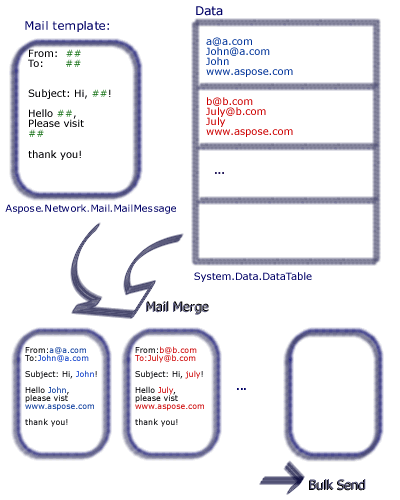 | Aspose.Email을 사용하면 개발자가 다양한 데이터 소스의 데이터를 포함하는 메일 병합을 설정할 수 있습니다.
Aspose.Email으로 메일 병합을 수행하려면 다음 단계를 따르세요:
- 다음 서명 이름을 가진 함수를 생성합니다
- 다음의 인스턴스를 생성합니다. MailMessage 클래스.
- 보낸 사람, 받는 사람, 제목 및 본문을 지정합니다.
- 이메일 끝에 서명을 생성합니다.
- 다음의 인스턴스를 생성합니다. TemplateEngine 클래스와 이를 전달합니다 MailMessage 인스턴스.
- 다음에서 서명을 가져옵니다 TemplateEngine 인스턴스.
- 다음의 인스턴스를 생성합니다. DataTable 클래스.
- 컬럼 Receipt, FirstName, LastName을 데이터 소스로 추가합니다 DataTable 클래스.
- 다음의 인스턴스를 생성합니다. DataRow 클래스.
- 영수증 주소와 이름(성, 이름)을 지정합니다 DataRow 객체.
- 다음의 인스턴스를 생성합니다. MailMessageCollection 클래스
- 지정하세요 TemplateEngine 및 DataTable 인스턴스는 MailMessageCollection 인스턴스.
- 다음의 인스턴스를 생성합니다. SmtpClient class에 서버, 포트, 사용자명 및 비밀번호를 지정합니다.
- 다음으로 이메일 전송: SmtpClient 클래스 전송 메서드.
아래 샘플에서 #FirstName#은 DataTable 컬럼이며, 값은 사용자가 설정합니다. 다음 코드 스니펫은 메일 병합을 수행하는 방법을 보여줍니다.
// For complete examples and data files, please go to https://github.com/aspose-email/Aspose.Email-for-Java
public static void run() {
// The path to the File directory.
String dstEmail = dataDir + "EmbeddedImage.msg";
// Create a new MailMessage instance
MailMessage msg = new MailMessage();
// Add subject and from address
msg.setSubject("Hello, #FirstName#");
msg.setFrom(MailAddress.to_MailAddress("sender@sender.com"));
// Add email address to send email also Add mesage field to HTML body
msg.getTo().add("your.email@gmail.com");
String htmlBody = "Your message here/r/n" + "Thank you for your interest in <STRONG>Aspose.Email</STRONG>.";
// Use GetSignment as the template routine, which will provide the same signature
htmlBody += "<br><br>Have fun with it.<br><br>#GetSignature()#";
msg.setHtmlBody(htmlBody);
// Create a new TemplateEngine with the MSG message, Register GetSignature routine. It will be used in MSG.
TemplateEngine engine = new TemplateEngine(msg);
engine.registerRoutine("GetSignature", new TemplateRoutine() {
public Object invoke(Object[] args) {
return getSignature(args);
}
});
// Create an instance of DataTable and Fill a DataTable as data source
DataTable dt = new DataTable();
dt.getColumns().add("Receipt");
dt.getColumns().add("FirstName");
dt.getColumns().add("LastName");
DataRow dr;
dr = dt.newRow();
dr.set("Receipt", "Nancy<Nancy@somedomain.com>");
dr.set("FirstName", "Nancy");
dr.set("LastName", "Doe");
dt.getRows().add(dr);
dr = dt.newRow();
dr.set("Receipt", "Andrew<Andrew@somedomain.com>");
dr.set("FirstName", "Andrew");
dr.set("LastName", "Doe");
dt.getRows().add(dr);
dr = dt.newRow();
dr.set("Receipt", "Janet<Janet@somedomain.com>");
dr.set("FirstName", "Janet");
dr.set("LastName", "Doe");
dt.getRows().add(dr);
MailMessageCollection messages;
try {
// Create messages from the message and datasource.
messages = engine.instantiate(dt);
// Create an instance of SmtpClient and specify server, port, username and password
SmtpClient client = new SmtpClient("smtp.gmail.com", 587, "your.email@gmail.com", "your.password");
client.setSecurityOptions(SecurityOptions.Auto);
// Send messages in bulk
client.send(messages);
} catch (MailException ex) {
System.err.println(ex);
}
catch (SmtpException ex) {
System.err.println(ex);
}
System.out.println("Message sent after performing mail merge.");
}
// Template routine to provide signature
static Object getSignature(Object[] args) {
return "Aspose.Email Team<br>Aspose Ltd.<br>" + new Date().toString();
}
행별 메일 병합 수행
사용자는 개별 데이터 행을 병합하여 완전하고 준비된 MailMessage object. 해당 TemplateEngine.merge method는 행별 메일 병합을 수행하는 데 사용할 수 있습니다.
// Create message from the data in current row.
MailMessage message = engine.merge(currentRow);