
PST 파일에서 캘린더 항목 작업
PST에 MapiCalendar 추가
새 PST 파일을 만들고 하위 폴더를 추가하기는 PST 파일을 생성하고 하위 폴더를 추가하는 방법을 보여줍니다. Aspose.Email을 사용하면 생성하거나 로드한 PST 파일의 캘린더 하위 폴더에 MapiCalendar를 추가할 수 있습니다. 아래는 PST에 MapiCalendar를 추가하는 단계입니다:
- MapiCalendar 객체를 생성합니다.
- 생성자와 메서드를 사용하여 MapiCalendar 속성을 설정합니다.
- PersonalStorage.create() 메서드를 사용하여 PST를 생성합니다.
- 루트 폴더에 접근한 후 add_mapi_message_item() 메서드를 호출하여 PST 파일 루트에 사전 정의된 폴더(캘린더)를 생성합니다.
다음 코드 스니펫은 MapiCalendar를 생성하고 새로 만든 PST 파일의 캘린더 폴더에 추가하는 방법을 보여줍니다.
PST에서 캘린더 항목을 ICS 형식으로 디스크에 저장
이 문서는 Outlook PST 파일에서 캘린더 항목에 접근하고 캘린더를 ICS 형식으로 디스크에 저장하는 방법을 보여줍니다. 캘린더 정보를 가져오기 위해 PersonalStorage 및 MapiCalendar 클래스를 사용합니다. 캘린더 항목을 저장하는 단계는 다음과 같습니다:
- PersonalStorage 클래스에서 PST 파일을 로드합니다.
- 캘린더 폴더 탐색.
- 캘린더 폴더의 내용을 가져와 메시지 컬렉션을 얻습니다.
- 메시지 컬렉션을 반복합니다.
- PersonalStorage.extract_message() 메서드를 호출하여 MapiCalendar 클래스의 연락처 정보를 가져옵니다.
- MapiCalendar.save() 메서드를 호출하여 캘린더 항목을 ICS 형식으로 디스크에 저장합니다.
아래 프로그램은 디스크에서 PST 파일을 로드하고 모든 캘린더 항목을 ICS 형식으로 저장합니다. ICS 파일은 표준 ICS 캘린더 파일을 로드할 수 있는 다른 프로그램에서도 사용할 수 있습니다. Microsoft Outlook에서 열면 아래 스크린샷과 같은 형태로 표시됩니다.
|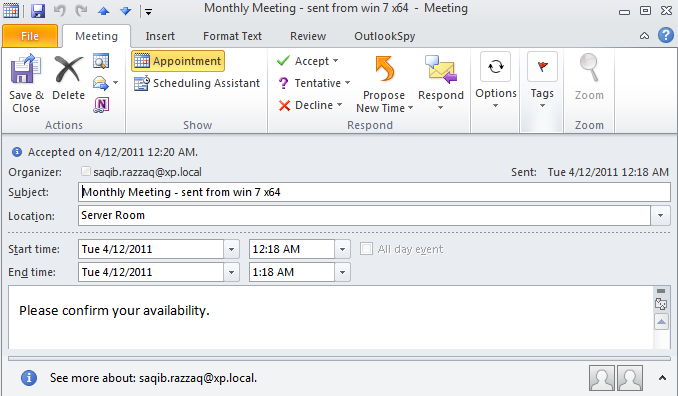 | | :- | 다음 코드 스니펫은 Outlook PST에서 캘린더 항목을 ICS 형식으로 내보내는 방법을 보여줍니다.
원본 타임스탬프와 함께 ICS로 저장
클래스의 keep_original_date_time_stamp 메서드 MapiCalendarIcsSaveOptions 클래스는 캘린더 항목을 ICS(iCalendar) 파일로 저장할 때 원본 날짜 및 시간 스탬프를 보존할 수 있게 합니다. 다음 코드 샘플은 이 메서드의 구현을 보여줍니다:
import aspose.email as ae

pst = ae.storage.pst.PersonalStorage.from_file("my.pst")

calendar_folder = pst.get_predefined_folder(ae.storage.pst.StandardIpmFolder.APPOINTMENTS)

for msg_info in calendar_folder.enumerate_messages():
    cal = pst.extract_message(msg_info).to_mapi_message_item()

    save_options = ae.mapi.MapiCalendarIcsSaveOptions()
    save_options.keep_original_date_time_stamp = True

    if not (cal is None):
      cal.save("cal.ics", save_options)
반복 항목에서 발생 인스턴스 수정/삭제
Aspose.Email for .NET API를 사용하여 기존 반복에 예외를 추가할 수 있습니다. 다음 코드 샘플은 이 기능의 사용법을 보여줍니다.
from datetime import datetime, timedelta
from aspose.email.storage.pst import PersonalStorage, StandardIpmFolder, FileFormatVersion
from aspose.email.mapi import MapiCalendar, MapiCalendarEventRecurrence, \
    MapiCalendarDailyRecurrencePattern, MapiCalendarRecurrenceEndType, \
    MapiCalendarExceptionInfo, MapiCalendarRecurrencePatternType, \
    MapiRecipientCollection, MapiRecipientType

start_date = datetime.now().date()

recurrence = MapiCalendarEventRecurrence()
pattern = MapiCalendarDailyRecurrencePattern()
pattern.pattern_type = MapiCalendarRecurrencePatternType.DAY
pattern.period = 1
pattern.end_type = MapiCalendarRecurrenceEndType.NEVER_END
recurrence.recurrence_pattern = pattern

exception_date = start_date + timedelta(days=1)

# adding one exception
exception_info = MapiCalendarExceptionInfo()
exception_info.location = "London"
exception_info.subject = "Subj"
exception_info.original_start_date = exception_date
exception_info.start_date_time = exception_date
exception_info.end_date_time = exception_date + timedelta(hours=5)
pattern.exceptions.append(exception_info)
pattern.modified_instance_dates.append(exception_date)
# every modified instance also has to have an entry in the DeletedInstanceDates field with the original instance date.
pattern.deleted_instance_dates.append(exception_date)

# adding one deleted instance
pattern.deleted_instance_dates.append(exception_date + timedelta(days=2))

rec_coll = MapiRecipientCollection()
rec_coll.add("receiver@domain.com", "receiver", MapiRecipientType.TO)
new_cal = MapiCalendar(
    "This is Location",
    "This is Summary",
    "This is recurrence test",
    start_date,
    start_date + timedelta(hours=3),
    "organizer@domain.com",
    rec_coll
)
new_cal.recurrence = recurrence

with PersonalStorage.create("output.pst", FileFormatVersion.UNICODE) as pst:
    calendar_folder = pst.create_predefined_folder("Calendar", StandardIpmFolder.APPOINTMENTS)
    calendar_folder.add_message(new_cal)