
Làm việc với mục Lịch trong tệp PST
Thêm MapiCalendar vào PST
Tạo tệp PST mới và Thêm Thư mục con đã chỉ ra cách tạo một tệp PST và thêm một thư mục con vào đó. Với Aspose.Email, bạn có thể thêm MapiCalendar vào thư mục con Calendar của một tệp PST mà bạn đã tạo hoặc tải. Dưới đây là các bước để thêm MapiCalendar vào một PST:
- Tạo một đối tượng MapiCalendar.
- Đặt các thuộc tính của MapiCalendar bằng cách sử dụng một constructor và các phương thức.
- Tạo PST bằng phương thức PersonalStorage.create().
- Tạo một thư mục được định sẵn (Calendar) tại gốc của tệp PST bằng cách truy cập thư mục gốc và sau đó gọi phương thức add_mapi_message_item().
Đoạn mã sau cho bạn thấy cách tạo một MapiCalendar và sau đó thêm nó vào thư mục calendar của một tệp PST mới được tạo.
Lưu các mục lịch từ PST vào Đĩa ở Định dạng ICS
Bài viết này cho thấy cách truy cập các mục lịch từ tệp PST của Outlook và lưu lịch vào đĩa ở định dạng ICS. Sử dụng các lớp PersonalStorage và MapiCalendar để lấy thông tin lịch. Dưới đây là các bước để lưu các mục lịch:
- Tải tệp PST trong lớp PersonalStorage.
- Duyệt thư mục Calendar.
- Lấy nội dung của thư mục Calendar để có bộ sưu tập tin nhắn.
- Lặp qua bộ sưu tập tin nhắn.
- Gọi phương thức PersonalStorage.extract_message() để lấy thông tin liên hệ trong lớp MapiCalendar.
- Gọi phương thức MapiCalendar.save() để lưu mục lịch vào đĩa ở định dạng ICS.
Chương trình dưới đây tải một tệp PST từ đĩa và lưu tất cả các mục lịch ở định dạng ICS. Các tệp ICS sau đó có thể được sử dụng trong bất kỳ chương trình nào khác có thể tải tệp lịch tiêu chuẩn ICS. Khi được mở trong Microsoft Outlook, một tệp ICS trông giống như ảnh chụp màn hình dưới đây.
|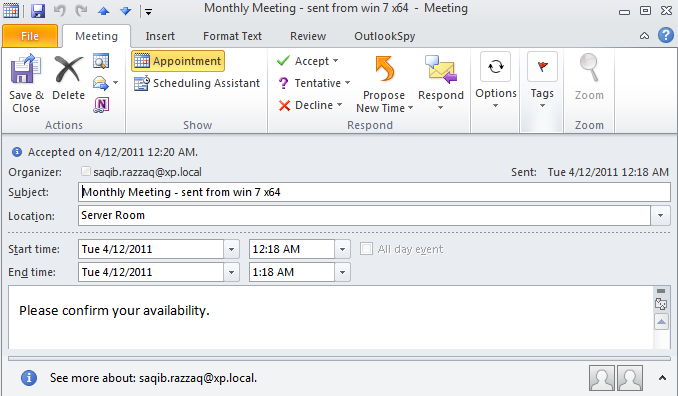 | | :- | Đoạn mã sau cho bạn thấy cách xuất các mục lịch từ Outlook PST sang định dạng ICS.
Lưu dưới dạng ICS với Dấu thời gian Gốc
Phương thức keep_original_date_time_stamp của MapiCalendarIcsSaveOptions lớp cho phép giữ nguyên dấu thời gian ngày giờ gốc của các mục lịch khi lưu chúng dưới dạng tệp ICS (iCalendar). Mẫu mã sau trình bày việc triển khai phương thức này:
import aspose.email as ae

pst = ae.storage.pst.PersonalStorage.from_file("my.pst")

calendar_folder = pst.get_predefined_folder(ae.storage.pst.StandardIpmFolder.APPOINTMENTS)

for msg_info in calendar_folder.enumerate_messages():
    cal = pst.extract_message(msg_info).to_mapi_message_item()

    save_options = ae.mapi.MapiCalendarIcsSaveOptions()
    save_options.keep_original_date_time_stamp = True

    if not (cal is None):
      cal.save("cal.ics", save_options)
Chỉnh sửa/Xóa các lần xuất hiện từ các chuỗi lặp
Các ngoại lệ có thể được thêm vào các chu kỳ lặp hiện có bằng cách sử dụng Aspose.Email cho .NET API. Mẫu mã sau minh họa cách sử dụng tính năng này.
from datetime import datetime, timedelta
from aspose.email.storage.pst import PersonalStorage, StandardIpmFolder, FileFormatVersion
from aspose.email.mapi import MapiCalendar, MapiCalendarEventRecurrence, \
    MapiCalendarDailyRecurrencePattern, MapiCalendarRecurrenceEndType, \
    MapiCalendarExceptionInfo, MapiCalendarRecurrencePatternType, \
    MapiRecipientCollection, MapiRecipientType

start_date = datetime.now().date()

recurrence = MapiCalendarEventRecurrence()
pattern = MapiCalendarDailyRecurrencePattern()
pattern.pattern_type = MapiCalendarRecurrencePatternType.DAY
pattern.period = 1
pattern.end_type = MapiCalendarRecurrenceEndType.NEVER_END
recurrence.recurrence_pattern = pattern

exception_date = start_date + timedelta(days=1)

# adding one exception
exception_info = MapiCalendarExceptionInfo()
exception_info.location = "London"
exception_info.subject = "Subj"
exception_info.original_start_date = exception_date
exception_info.start_date_time = exception_date
exception_info.end_date_time = exception_date + timedelta(hours=5)
pattern.exceptions.append(exception_info)
pattern.modified_instance_dates.append(exception_date)
# every modified instance also has to have an entry in the DeletedInstanceDates field with the original instance date.
pattern.deleted_instance_dates.append(exception_date)

# adding one deleted instance
pattern.deleted_instance_dates.append(exception_date + timedelta(days=2))

rec_coll = MapiRecipientCollection()
rec_coll.add("receiver@domain.com", "receiver", MapiRecipientType.TO)
new_cal = MapiCalendar(
    "This is Location",
    "This is Summary",
    "This is recurrence test",
    start_date,
    start_date + timedelta(hours=3),
    "organizer@domain.com",
    rec_coll
)
new_cal.recurrence = recurrence

with PersonalStorage.create("output.pst", FileFormatVersion.UNICODE) as pst:
    calendar_folder = pst.create_predefined_folder("Calendar", StandardIpmFolder.APPOINTMENTS)
    calendar_folder.add_message(new_cal)