
การทำงานกับรายการปฏิทินในไฟล์ PST
การเพิ่ม MapiCalendar ไปยัง PST
สร้างไฟล์ PST ใหม่และเพิ่มโฟลเดอร์ย่อยแสดงวิธีสร้างไฟล์ PST และเพิ่มโฟลเดอร์ย่อยลงในนั้น. ด้วย Aspose.Email คุณสามารถเพิ่ม MapiCalendar ไปยังโฟลเดอร์ย่อย Calendar ของไฟล์ PST ที่คุณสร้างหรือโหลดได้. ด้านล่างเป็นขั้นตอนการเพิ่ม MapiCalendar ไปยัง PST:
- สร้างอ็อบเจ็กต์ MapiCalendar.
- ตั้งค่าคุณสมบัติของ MapiCalendar โดยใช้คอนสตรัคเตอร์และเมธอดต่างๆ.
- สร้าง PST โดยใช้เมธอด PersonalStorage.create().
- สร้างโฟลเดอร์ที่กำหนดล่วงหน้า (Calendar) ที่รากของไฟล์ PST โดยเข้าถึงโฟลเดอร์รากและเรียกเมธอด add_mapi_message_item().
โค้ดตัวอย่างต่อไปนี้จะแสดงวิธีสร้าง MapiCalendar แล้วเพิ่มลงในโฟลเดอร์ calendar ของไฟล์ PST ที่สร้างใหม่.
บันทึกรายการปฏิทินจาก PST ลงดิสก์ในรูปแบบ ICS
บทความนี้แสดงวิธีเข้าถึงรายการปฏิทินจากไฟล์ Outlook PST และบันทึกปฏิทินลงดิสก์ในรูปแบบ ICS. ใช้คลาส PersonalStorage และ MapiCalendar เพื่อดึงข้อมูลปฏิทิน. ด้านล่างเป็นขั้นตอนการบันทึกรายการปฏิทิน:
- โหลดไฟล์ PST ในคลาส PersonalStorage.
- เรียกดูโฟลเดอร์ Calendar.
- รับเนื้อหาของโฟลเดอร์ Calendar เพื่อรับชุดข้อความ
- วนลูปผ่านชุดข้อความ.
- เรียกเมธอด PersonalStorage.extract_message() เพื่อรับข้อมูลผู้ติดต่อในคลาส MapiCalendar.
- เรียกเมธอด MapiCalendar.save() เพื่อบันทึกรายการปฏิทินลงดิสก์ในรูปแบบ ICS.
โปรแกรมข้างล่างโหลดไฟล์ PST จากดิสก์และบันทึกรายการปฏิทินทั้งหมดเป็นรูปแบบ ICS. ไฟล์ ICS นี้สามารถใช้ในโปรแกรมอื่นใดที่สามารถเปิดไฟล์ปฏิทินมาตรฐาน ICS ได้. เมื่อเปิดใน Microsoft Outlook ไฟล์ ICS จะมีลักษณะเช่นภาพหน้าจอด้านล่าง.
|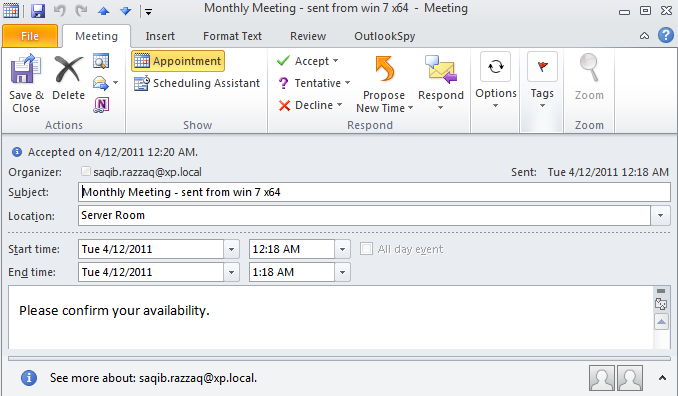 | | :- | โค้ดตัวอย่างต่อไปนี้จะแสดงวิธีส่งออกรายการปฏิทินจาก Outlook PST ไปยังรูปแบบ ICS.
บันทึกเป็น ICS พร้อมเวลาตราบต้นฉบับ
เมธอด keep_original_date_time_stamp ของ MapiCalendarIcsSaveOptions คลาสอนุญาตให้รักษาเวลาประทับวันที่และเวลาต้นฉบับของรายการปฏิทินเมื่อบันทึกเป็นไฟล์ ICS (iCalendar). ตัวอย่างโค้ดต่อไปนี้แสดงการนำเมธอดนี้ไปใช้:
import aspose.email as ae

pst = ae.storage.pst.PersonalStorage.from_file("my.pst")

calendar_folder = pst.get_predefined_folder(ae.storage.pst.StandardIpmFolder.APPOINTMENTS)

for msg_info in calendar_folder.enumerate_messages():
    cal = pst.extract_message(msg_info).to_mapi_message_item()

    save_options = ae.mapi.MapiCalendarIcsSaveOptions()
    save_options.keep_original_date_time_stamp = True

    if not (cal is None):
      cal.save("cal.ics", save_options)
แก้ไข/ลบเหตุการณ์จากการทำซ้ำ
สามารถเพิ่มข้อยกเว้นให้กับการเกิดซ้ำที่มีอยู่ได้โดยใช้ Aspose.Email for .NET API. ตัวอย่างโค้ดต่อไปนี้แสดงการใช้งานคุณลักษณะนี้.
from datetime import datetime, timedelta
from aspose.email.storage.pst import PersonalStorage, StandardIpmFolder, FileFormatVersion
from aspose.email.mapi import MapiCalendar, MapiCalendarEventRecurrence, \
    MapiCalendarDailyRecurrencePattern, MapiCalendarRecurrenceEndType, \
    MapiCalendarExceptionInfo, MapiCalendarRecurrencePatternType, \
    MapiRecipientCollection, MapiRecipientType

start_date = datetime.now().date()

recurrence = MapiCalendarEventRecurrence()
pattern = MapiCalendarDailyRecurrencePattern()
pattern.pattern_type = MapiCalendarRecurrencePatternType.DAY
pattern.period = 1
pattern.end_type = MapiCalendarRecurrenceEndType.NEVER_END
recurrence.recurrence_pattern = pattern

exception_date = start_date + timedelta(days=1)

# adding one exception
exception_info = MapiCalendarExceptionInfo()
exception_info.location = "London"
exception_info.subject = "Subj"
exception_info.original_start_date = exception_date
exception_info.start_date_time = exception_date
exception_info.end_date_time = exception_date + timedelta(hours=5)
pattern.exceptions.append(exception_info)
pattern.modified_instance_dates.append(exception_date)
# every modified instance also has to have an entry in the DeletedInstanceDates field with the original instance date.
pattern.deleted_instance_dates.append(exception_date)

# adding one deleted instance
pattern.deleted_instance_dates.append(exception_date + timedelta(days=2))

rec_coll = MapiRecipientCollection()
rec_coll.add("receiver@domain.com", "receiver", MapiRecipientType.TO)
new_cal = MapiCalendar(
    "This is Location",
    "This is Summary",
    "This is recurrence test",
    start_date,
    start_date + timedelta(hours=3),
    "organizer@domain.com",
    rec_coll
)
new_cal.recurrence = recurrence

with PersonalStorage.create("output.pst", FileFormatVersion.UNICODE) as pst:
    calendar_folder = pst.create_predefined_folder("Calendar", StandardIpmFolder.APPOINTMENTS)
    calendar_folder.add_message(new_cal)