
Java でプレゼンテーション情報を取得および更新する
概要
Aspose.Slidesは、プレゼンテーションの形式を識別し、完全なプレゼンテーション オブジェクト モデルを作成せずにドキュメント メタデータを読み取ることができます。これは、ファイルを分類したり、インベントリを作成したり、プレゼンテーションのコンテンツをロードして処理するかどうかを決定する前にプロパティを検査したりする場合に便利です。
この記事では、PresentationFactory と IPresentationInfo による軽量検査、および IDocumentProperties を使用した対象更新を示します。
プレゼンテーション形式のチェック
既にロード済みのプレゼンテーションがある場合は、ロード後の検出およびレガシー PPT、PPS、POT ストリームの制限については、Determine the Original Presentation Format を参照してください。
ファイルを検査する際に Presentation インスタンスを作成せずに、PresentationFactory.getPresentationInfo を使用します。IPresentationInfo.getLoadFormat メソッドは、PPTX、PPT、ODP などの検出された形式を報告します。
import com.aspose.slides.IPresentationInfo;
import com.aspose.slides.LoadFormat;
import com.aspose.slides.PresentationFactory;

String[] fileNames = { "pres.pptx", "pres.ppt", "pres.odp" };

for (String fileName : fileNames) {
    IPresentationInfo presentationInfo = PresentationFactory.getInstance().getPresentationInfo(fileName);
    int loadFormat = presentationInfo.getLoadFormat();
    String formatName = "Other (" + loadFormat + ")";

    if (loadFormat == LoadFormat.Pptx) {
        formatName = "PPTX";
    } else if (loadFormat == LoadFormat.Ppt) {
        formatName = "PPT";
    } else if (loadFormat == LoadFormat.Odp) {
        formatName = "ODP";
    }

    System.out.println(fileName + ": " + formatName);
}
軽量プレゼンテーション インベントリの構築
多数のプレゼンテーション ファイルを処理する場合、検証、インデックス作成、または文書管理システム向けにコンパクトなインベントリが必要になることがあります。このシナリオでは、PresentationFactory.getPresentationInfo を使用して IPresentationInfo オブジェクトを取得し、続いて IPresentationInfo.readDocumentProperties を呼び出してドキュメント メタデータを読み取ります。このアプローチでは Presentation インスタンスを作成せず、完全なプレゼンテーション オブジェクト モデルを走査する必要もありません。
IDocumentProperties が提供する拡張プロパティは、以下のインベントリ値を提供します。
| メソッド | インベントリ値 |
|---|---|
| getSlides | スライドの総数。 |
| getHiddenSlides | 非表示スライドの数。 |
| getNotes | ノートを含むスライドの数。 |
| getParagraphs | 利用可能な場合の段落の総数。 |
| getWords | 単語の総数。 |
| getMultimediaClips | オーディオおよびビデオクリップの総数。 |
次の例は、Presentation オブジェクトを作成せずにこれらの値を読み取り、コンパクトなインベントリを出力します。また、getHeadingPairs と getTitlesOfParts を組み合わせて、フォント、テーマ、スライドタイトルなどのコンテンツ グループを表示します。
import com.aspose.slides.IDocumentProperties;
import com.aspose.slides.IHeadingPair;
import com.aspose.slides.IPresentationInfo;
import com.aspose.slides.LoadFormat;
import com.aspose.slides.PresentationFactory;
import java.nio.file.Paths;

String filePath = "sample.pptx";
IPresentationInfo presentationInfo = PresentationFactory.getInstance().getPresentationInfo(filePath);
IDocumentProperties documentProperties = presentationInfo.readDocumentProperties();

int loadFormat = presentationInfo.getLoadFormat();
String formatName = "Other (" + loadFormat + ")";

if (loadFormat == LoadFormat.Pptx) {
    formatName = "PPTX";
} else if (loadFormat == LoadFormat.Ppt) {
    formatName = "PPT";
} else if (loadFormat == LoadFormat.Odp) {
    formatName = "ODP";
}

System.out.println("File: " + Paths.get(filePath).getFileName());
System.out.println("Format: " + formatName);
System.out.println("Title: " + documentProperties.getTitle());
System.out.println("Author: " + documentProperties.getAuthor());
System.out.println("Statistics:");
System.out.println("  Slides: " + documentProperties.getSlides());
System.out.println("  Hidden slides: " + documentProperties.getHiddenSlides());
System.out.println("  Slides with notes: " + documentProperties.getNotes());
System.out.println("  Paragraphs: " + documentProperties.getParagraphs());
System.out.println("  Words: " + documentProperties.getWords());
System.out.println("  Multimedia clips: " + documentProperties.getMultimediaClips());

IHeadingPair[] headingPairs = documentProperties.getHeadingPairs();
String[] titlesOfParts = documentProperties.getTitlesOfParts();
headingPairs = headingPairs != null ? headingPairs : new IHeadingPair[0];
titlesOfParts = titlesOfParts != null ? titlesOfParts : new String[0];
int partIndex = 0;

if (headingPairs.length == 0 || titlesOfParts.length == 0) {
    System.out.println("Content groups: not available");
} else {
    System.out.println("Content groups:");

    for (IHeadingPair headingPair : headingPairs) {
        System.out.println("  " + headingPair.getName() + " (" + headingPair.getCount() + ")");

        for (int partOffset = 0; partOffset < headingPair.getCount() && partIndex < titlesOfParts.length; partOffset++) {
            System.out.println("    - " + titlesOfParts[partIndex]);
            partIndex++;
        }
    }

    if (partIndex < titlesOfParts.length) {
        System.out.println("  Other parts:");

        while (partIndex < titlesOfParts.length) {
            System.out.println("    - " + titlesOfParts[partIndex]);
            partIndex++;
        }
    }
}
各IHeadingPair はグループ名とそのグループ内の項目数を提供します。IDocumentProperties.getTitlesOfParts はフラットで順序付けされた配列を返すため、各見出しペアで指定された連続したタイトル数を消費します。
保存されたメタデータと形式の制限
IPresentationInfo.readDocumentProperties が返すインベントリ プロパティは、ソース ドキュメントで利用可能なメタデータを反映します。Aspose.Slides はこの呼び出しのためにプレゼンテーション オブジェクト モデルをロードおよび走査してこれらの値を再計算しません。欠落しているプロパティはデフォルト値で表され、最後にファイルを保存したアプリケーションがドキュメント プロパティを更新していない場合、保存された値は古くなっている可能性があります。
- PPTX: この形式は、スライド、ノート、非表示スライド、段落、単語、マルチメディアのカウント、および見出しペアとパートタイトルの拡張ドキュメント プロパティを提供します。利用可能性は、ドキュメント作成者が書き込んだプロパティに依存します。
- PPT: バイナリ形式は、対応するドキュメントサマリープロパティを格納できます。プロパティが存在しない、またはドキュメント作成者によって更新されていない場合、Aspose.Slides はスライドから計算せずに格納されたまたはデフォルトの値を返します。
- ODP: OpenDocument メタデータは、ページ、段落、単語数などの一般的なドキュメント統計を提供しますが、これらの値は PowerPoint 固有の拡張プロパティすべてにマップされません。非表示スライド、ノートスライド、マルチメディア、見出しペア、パートタイトルのメタデータは利用できない可能性があり、インベントリ プロパティはデフォルト値を返すことがあります。ゼロ値や空配列を、該当コンテンツが存在しない決定的な証拠として扱わないでください。
インベントリや予備的チェックには軽量メタデータ アプローチを使用してください。結果がメモリ内の変更を反映する必要がある場合や、実際のプレゼンテーション コンテンツを検証する必要がある場合は、プレゼンテーションをロードしライブ オブジェクト モデルを検査してください。
プレゼンテーション プロパティの更新
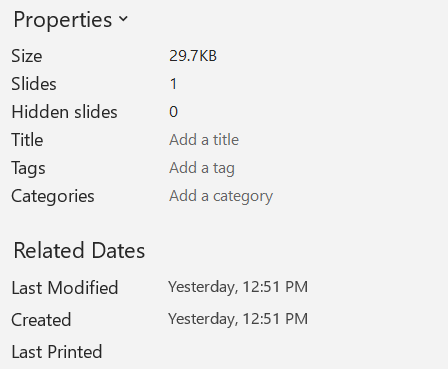
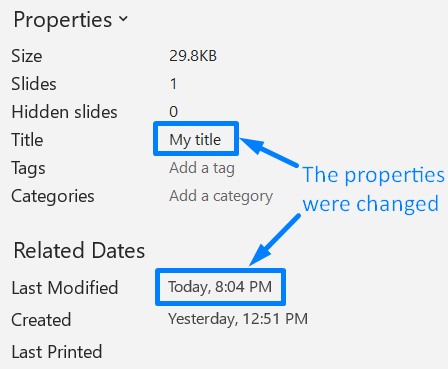
IPresentationInfo.readDocumentProperties が返すプロパティは、Presentation インスタンスを作成せずに変更することもできます。変更は IPresentationInfo.updateDocumentProperties で適用し、続いて IPresentationInfo.writeBindedPresentation でバインドされたプレゼンテーションを書き出します。
以下の画像は元のドキュメント プロパティを示しています。
以下の例はタイトルと最終保存時刻を変更し、結果を新しいファイルに書き出します:
import com.aspose.slides.IDocumentProperties;
import com.aspose.slides.IPresentationInfo;
import com.aspose.slides.PresentationFactory;
import java.io.FileOutputStream;
import java.io.OutputStream;
import java.util.Date;

String sourceFile = "sample.pptx";
String outputFile = "sample_with_updated_properties.pptx";
IPresentationInfo presentationInfo = PresentationFactory.getInstance().getPresentationInfo(sourceFile);
IDocumentProperties documentProperties = presentationInfo.readDocumentProperties();

documentProperties.setTitle("Quarterly sales report");
documentProperties.setLastSavedTime(new Date());

presentationInfo.updateDocumentProperties(documentProperties);
try (OutputStream outputStream = new FileOutputStream(outputFile)) {
    presentationInfo.writeBindedPresentation(outputStream);
}
以下の画像は変更後のドキュメント プロパティを示しています。
便利なリンク
関連するセキュリティチェックや保護設定については、以下の記事をご覧ください:
FAQ
フォントが埋め込まれているか、どのフォントが埋め込まれているかをどのように確認できますか?
プレゼンテーションをロードし、Presentation.getFontsManager を使用します。IFontsManager.getEmbeddedFonts を呼び出して埋め込まれたフォントを取得し、IFontsManager.getFonts を呼び出してプレゼンテーションで使用されているフォントを取得します。2 つの結果を比較して、レンダリングに必要だが埋め込まれていないフォントを特定します。
ファイルに非表示スライドがあるか、またその数をすばやく確認するにはどうすればよいですか?
保存されたドキュメント メタデータで十分な場合は、PresentationFactory.getPresentationInfo と IPresentationInfo.readDocumentProperties を介して IDocumentProperties.getHiddenSlides を読み取ります。これは軽量インベントリに適しています。プレゼンテーションがメモリ上で変更されている場合、保存されたメタデータが欠落または古い可能性があるため、ライブ値を確認する必要がある場合は、Presentation.getSlides を反復し、各スライドの ISlide.getHidden メソッドを検査します。
カスタム スライドサイズと方向が使用されていて、デフォルトと異なるかどうかを検出できますか?
はい。プレゼンテーションをロードし、Presentation.getSlideSize を呼び出します。ISlideSize.getType、ISlideSize.getSize、ISlideSize.getOrientation を使用して、現在の設定を期待されるプリセットや寸法と比較します。
チャートが外部データ ソースを参照しているかどうかをすばやく確認する方法はありますか?
はい。各 Chart を見つけ、IChartData.getDataSourceType を呼び出します。外部のワークブックの場合は、IChartData.getExternalWorkbookPath を呼び出します。データ ソース タイプとパスから外部参照が判別できますが、対象が利用可能かどうかは別途リソースチェックが必要です。
レンダリングや PDF エクスポートを遅くする可能性のある「重い」スライドをどのように評価できますか?
単一の複雑度プロパティは存在しません。Presentation.getSlides と各スライドの IBaseSlide.getShapes コレクションを走査します。シェイプの数や大きな画像、エフェクト、アニメーション、マルチメディアの有無を指標として使用し、代表的なレンダリングやエクスポートを測定して、スライドを実際のパフォーマンス ボトルネックとして確定する前に評価します。