
ดึงและอัปเดตข้อมูลงานนำเสนอใน Java
ภาพรวม
Aspose.Slides สามารถระบุรูปแบบของงานนำเสนอและอ่านเมตาดาต้าเอกสารโดยไม่ต้องสร้างโมเดลอ็อบเจกต์ของงานนำเสนอทั้งหมด ซึ่งมีประโยชน์เมื่อคุณต้องการจัดประเภทไฟล์, สร้างรายการสินค้าคงคลัง, หรือ ตรวจสอบคุณสมบัติก่อนที่จะตัดสินใจว่าจะโหลดและประมวลผลเนื้อหาของงานนำเสนอหรือไม่.
บทความนี้แสดงการตรวจสอบโดยใช้ทรัพยากรเบา ๆ ผ่าน PresentationFactory และ IPresentationInfo, รวมถึงการอัพเดตแบบระบุเป้าหมายผ่าน IDocumentProperties.
ตรวจสอบรูปแบบของงานนำเสนอ
หากคุณมีงานนำเสนอที่โหลดแล้ว, ดู Determine the Original Presentation Format สำหรับการตรวจจับหลังการโหลดและข้อจำกัดของสตรีม PPT, PPS, และ POT รุ่นเก่า.
ใช้ PresentationFactory.getPresentationInfo เพื่อตรวจสอบไฟล์โดยไม่ต้องสร้างอินสแตนซ์ของ Presentation วิธีการ IPresentationInfo.getLoadFormat จะรายงานรูปแบบที่ตรวจพบ เช่น PPTX, PPT หรือ ODP.
import com.aspose.slides.IPresentationInfo;
import com.aspose.slides.LoadFormat;
import com.aspose.slides.PresentationFactory;

String[] fileNames = { "pres.pptx", "pres.ppt", "pres.odp" };

for (String fileName : fileNames) {
    IPresentationInfo presentationInfo = PresentationFactory.getInstance().getPresentationInfo(fileName);
    int loadFormat = presentationInfo.getLoadFormat();
    String formatName = "Other (" + loadFormat + ")";

    if (loadFormat == LoadFormat.Pptx) {
        formatName = "PPTX";
    } else if (loadFormat == LoadFormat.Ppt) {
        formatName = "PPT";
    } else if (loadFormat == LoadFormat.Odp) {
        formatName = "ODP";
    }

    System.out.println(fileName + ": " + formatName);
}
สร้างรายการสินค้าคงคลังของงานนำเสนอแบบเบา
เมื่อคุณประมวลผลไฟล์งานนำเสนอจำนวนมาก, คุณอาจต้องการรายการสินค้าคงคลังที่กะทัดรัดสำหรับการตรวจสอบ, การทำดัชนี, หรือระบบการจัดการเอกสาร ในสถานการณ์นี้ให้ใช้ PresentationFactory.getPresentationInfo เพื่อรับอ็อบเจกต์ IPresentationInfo จากนั้นเรียก IPresentationInfo.readDocumentProperties เพื่ออ่านเมตาดาต้าเอกสาร วิธีนี้ไม่ได้สร้างอินสแตนซ์ของ Presentation หรือจำเป็นต้องเดินทางผ่านโมเดลอ็อบเจกต์ของงานนำเสนอทั้งหมด.
คุณสมบัติเพิ่มเติมที่เปิดเผยโดย IDocumentProperties ให้ค่าดังต่อไปนี้สำหรับรายการสินค้าคงคลัง:
| วิธีการ | ค่ารายการสินค้าคงคลัง |
|---|---|
| getSlides | จำนวนสไลด์ทั้งหมด. |
| getHiddenSlides | จำนวนสไลด์ที่ซ่อนอยู่. |
| getNotes | จำนวนสไลด์ที่มีโน๊ต. |
| getParagraphs | จำนวนย่อหน้าทั้งหมด, หากมี. |
| getWords | จำนวนคำทั้งหมด. |
| getMultimediaClips | จำนวนคลิปเสียงและวิดีโอทั้งหมด. |
ตัวอย่างต่อไปนี้อ่านค่าดังกล่าวโดยไม่สร้างอ็อบเจกต์ของ Presentation แล้วพิมพ์รายการสินค้าคงคลังที่กะทัดรัด นอกจากนี้ยังรวม getHeadingPairs กับ getTitlesOfParts เพื่อแสดงกลุ่มเนื้อหาเช่น ฟอนต์, ธีม, และชื่อสไลด์.
import com.aspose.slides.IDocumentProperties;
import com.aspose.slides.IHeadingPair;
import com.aspose.slides.IPresentationInfo;
import com.aspose.slides.LoadFormat;
import com.aspose.slides.PresentationFactory;
import java.nio.file.Paths;

String filePath = "sample.pptx";
IPresentationInfo presentationInfo = PresentationFactory.getInstance().getPresentationInfo(filePath);
IDocumentProperties documentProperties = presentationInfo.readDocumentProperties();

int loadFormat = presentationInfo.getLoadFormat();
String formatName = "Other (" + loadFormat + ")";

if (loadFormat == LoadFormat.Pptx) {
    formatName = "PPTX";
} else if (loadFormat == LoadFormat.Ppt) {
    formatName = "PPT";
} else if (loadFormat == LoadFormat.Odp) {
    formatName = "ODP";
}

System.out.println("File: " + Paths.get(filePath).getFileName());
System.out.println("Format: " + formatName);
System.out.println("Title: " + documentProperties.getTitle());
System.out.println("Author: " + documentProperties.getAuthor());
System.out.println("Statistics:");
System.out.println("  Slides: " + documentProperties.getSlides());
System.out.println("  Hidden slides: " + documentProperties.getHiddenSlides());
System.out.println("  Slides with notes: " + documentProperties.getNotes());
System.out.println("  Paragraphs: " + documentProperties.getParagraphs());
System.out.println("  Words: " + documentProperties.getWords());
System.out.println("  Multimedia clips: " + documentProperties.getMultimediaClips());

IHeadingPair[] headingPairs = documentProperties.getHeadingPairs();
String[] titlesOfParts = documentProperties.getTitlesOfParts();
headingPairs = headingPairs != null ? headingPairs : new IHeadingPair[0];
titlesOfParts = titlesOfParts != null ? titlesOfParts : new String[0];
int partIndex = 0;

if (headingPairs.length == 0 || titlesOfParts.length == 0) {
    System.out.println("Content groups: not available");
} else {
    System.out.println("Content groups:");

    for (IHeadingPair headingPair : headingPairs) {
        System.out.println("  " + headingPair.getName() + " (" + headingPair.getCount() + ")");

        for (int partOffset = 0; partOffset < headingPair.getCount() && partIndex < titlesOfParts.length; partOffset++) {
            System.out.println("    - " + titlesOfParts[partIndex]);
            partIndex++;
        }
    }

    if (partIndex < titlesOfParts.length) {
        System.out.println("  Other parts:");

        while (partIndex < titlesOfParts.length) {
            System.out.println("    - " + titlesOfParts[partIndex]);
            partIndex++;
        }
    }
}
แต่ละ IHeadingPair ให้ชื่อกลุ่มและจำนวนรายการในกลุ่มนั้น IDocumentProperties.getTitlesOfParts คืนค่าเป็นอาร์เรย์แบบแบนและเรียงลำดับ ดังนั้นให้ดึงจำนวนหัวข้อที่ต่อเนื่องตามที่แต่ละ heading pair ระบุ.
เมตาดาต้าที่จัดเก็บและข้อจำกัดของรูปแบบ
คุณสมบัติของรายการสินค้าคงคลังที่ส่งคืนโดย IPresentationInfo.readDocumentProperties สะท้อนเมตาดาต้าที่มีในเอกสารต้นทาง Aspose.Slides ไม่ได้โหลดและเดินทางผ่านโมเดลอ็อบเจกต์ของงานนำเสนอเพื่อคำนวณค่าต่าง ๆ ใหม่สำหรับการเรียกนี้ คุณสมบัติที่ขาดหายจะถูกแทนที่ด้วยค่าปริยาย และค่าที่จัดเก็บอาจไม่อัปเดตหากแอปพลิเคชันที่บันทึกไฟล์ครั้งสุดท้ายไม่ได้อัปเดตคุณสมบัติเ�เอกสาร
- PPTX: รูปแบบนี้ให้คุณสมบัติเพิ่มเติมของเอกสารสำหรับจำนวนสไลด์, โน๊ต, สไลด์ที่ซ่อน, ย่อหน้า, คำ, และมัลติมีเดีย รวมถึง heading pairs และ part titles ความพร้อมใช้งานขึ้นอยู่กับคุณสมบัติที่ผู้สร้างเอกสารได้เขียนไว้.
- PPT: รูปแบบไบนารีสามารถเก็บคุณสมบัติสรุปเอกสารที่สอดคล้องกัน หากคุณสมบัติบางอย่างไม่มีหรือไม่ได้รับการรีเฟรชโดยผู้สร้างเอกสาร Aspose.Slides จะส่งคืนค่าที่จัดเก็บหรือค่าปริยายแทนการคำนวณจากสไลด์.
- ODP: เมตาดาต้า OpenDocument ให้สถิติทั่วไปของเอกสาร เช่น จำนวนหน้า, ย่อหน้า, และคำ แต่ค่าต่าง ๆ นี้ไม่สอดคล้องกับคุณสมบัติเพิ่มเติมเฉพาะของ PowerPoint รายการเมตาดาต้าเกี่ยวกับสไลด์ที่ซ่อน, สไลด์โน๊ต, มัลติมีเดีย, heading-pair, และ part-title อาจไม่พร้อมใช้งานและคุณสมบัติรายการอาจคืนค่าปริยาย อย่าใช้ค่าเป็นศูนย์หรืออาร์เรย์ว่างเป็นหลักฐานที่แน่นอนว่าข้อมูลที่สอดคล้องไม่มีอยู่.
ใช้วิธีเมตาดาต้าแบบเบาสำหรับการสร้างรายการสินค้าคงคลังและการตรวจสอบขั้นต้น โหลดงานนำเสนอและตรวจสอบโมเดลอ็อบเจกต์ขณะทำงานเมื่อผลลัพธ์ต้องสะท้อนการเปลี่ยนแปลงในหน่วยความจำหรือเมื่อคุณต้องการตรวจสอบเนื้อจริ
อัปเดตคุณสมบัติงานนำเสนอ
คุณสมบัติที่ส่งคืนโดย IPresentationInfo.readDocumentProperties สามารถเปลี่ยนแปลงได้เช่นกันโดยไม่ต้องสร้างอินสแตนซ์ของ Presentation ใช้การเปลี่ยนแปลงด้วย IPresentationInfo.updateDocumentProperties, แล้วเขียนงานนำเสนอที่ผูกไว้ด้วย IPresentationInfo.writeBindedPresentation.
ภาพต่อไปนี้แสดงคุณสมบัติเ�เอกสารต้นฉบับของงานนำเสนอ PowerPoint:
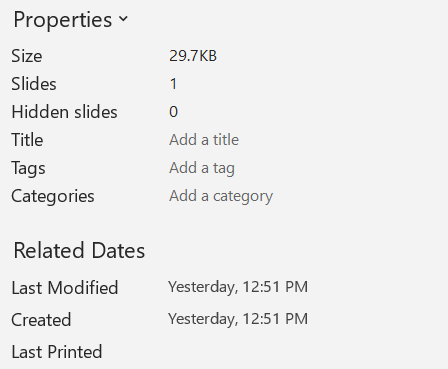
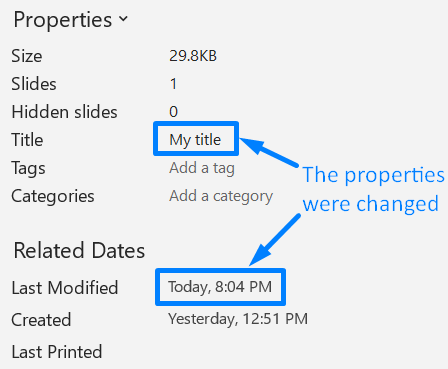
ตัวอย่างต่อไปนี้เปลี่ยนชื่อและเวลาบันทึกล่าสุด แล้วเขียนผลลัพธ์ไปยังไฟล์ใหม่:
import com.aspose.slides.IDocumentProperties;
import com.aspose.slides.IPresentationInfo;
import com.aspose.slides.PresentationFactory;
import java.io.FileOutputStream;
import java.io.OutputStream;
import java.util.Date;

String sourceFile = "sample.pptx";
String outputFile = "sample_with_updated_properties.pptx";
IPresentationInfo presentationInfo = PresentationFactory.getInstance().getPresentationInfo(sourceFile);
IDocumentProperties documentProperties = presentationInfo.readDocumentProperties();

documentProperties.setTitle("Quarterly sales report");
documentProperties.setLastSavedTime(new Date());

presentationInfo.updateDocumentProperties(documentProperties);
try (OutputStream outputStream = new FileOutputStream(outputFile)) {
    presentationInfo.writeBindedPresentation(outputStream);
}
ภาพต่อไปนี้แสดงคุณสมบัติเอกสารที่อัปเดต:
ลิงก์ที่เป็นประโยชน์
สำหรับการตรวจสอบด้านความปลอดภัยและการตั้งค่าการป้องกันที่เกี่ยวข้อง ดูบทความต่อไปนี้:
คำถามที่พบบ่อย
ฉันจะตรวจสอบได้อย่างไรว่าแบบอักษรถูกฝังอยู่หรือไม่และแบบอักษรใดบ้าง?
โหลดงานนำเสนอและใช้ Presentation.getFontsManager เรียก IFontsManager.getEmbeddedFonts เพื่อรับแบบอักษรที่ฝังอยู่และ IFontsManager.getFonts เพื่อรับแบบอักษรที่งานนำใช้ เปรียบเทียบผลลัพธ์สองชุดเพื่อค้นหาแบบอักษรที่จำเป็นสำหรับการแสดงผลแต่ไม่ได้ฝังอยู่.
ฉันจะบอกได้อย่างรวดเร็วว่าไฟล์มีสไลด์ที่ซ่อนอยู่หรือไม่และจำนวนเท่าไหร่?
เม็ตาดาต้าเอกสารที่จัดเก็บเพียงพอ ให้อ่าน IDocumentProperties.getHiddenSlides ผ่าน PresentationFactory.getPresentationInfo และ IPresentationInfo.readDocumentProperties วิธีนี้เหมาะกับการสร้างรายการสินค้าคงคลังแบบเบา หากงานนำเสนอถูกแก้ไขในหน่วยความจำ เม็ตาดาต้าที่จัดเก็บอาจหายหรือไม่อัปเดต หรือคุณต้องการตรวจสอบค่าจริง ให้วนผ่าน Presentation.getSlides และตรวจสอบเมธอด ISlide.getHidden ของแต่ละสไลด์แทน.
ฉันสามารถตรวจจับได้หรือไม่ว่ามีการใช้ขนาดและการวางแนวสไลด์ที่กำหนดเองหรือไม่ และว่ามันแตกต่างจากค่าเริ่มต้นหรือไม่?
ใช่ โหลดงานนำเสนอและเรียก Presentation.getSlideSize ใช้ ISlideSize.getType, ISlideSize.getSize และ ISlideSize.getOrientation เพื่อตรวจสอบการตั้งค่าปัจจุบันเทียบกับค่าตั้งต้นและขนาดที่คาดไว้.
มีวิธีรวดเร็วที่จะดูว่ากราฟอ้างอิงแหล่งข้อมูลภายนอกหรือไม่?
ใช่ ค้นหาแต่ละ Chart และเรียก IChartData.getDataSourceType สำหรับเวิร์กบุ๊กภายนอก ให้เรียก IChartData.getExternalWorkbookPath ประเภทและเส้นทางของแหล่งข้อมูลบ่งชี้ถึงการอ้างอิงภายนอก แต่การตรวจสอบว่าเป้าหมายพร้อมใช้งานหรือไม่ต้องทำการตรวจสอบแหล่งข้อมูลแยกต่างหาก.
ฉันจะประเมินสไลด์ ‘หนัก’ ที่อาจทำให้การเรนเดอร์หรือการส่งออกเป็น PDF ช้าได้อย่างไร?
ไม่มีคุณสมบัติเฉพาะที่บ่งบอกความซับซ้อน เพียงเดินผ่าน Presentation.getSlides และคอลเลกชัน IBaseSlide.getShapes ของแต่ละสไลด์ ใช้จำนวนรูปร่างและการมีอยู่ของภาพขนาดใหญ่, เอฟเฟกต์, การเคลื่อนไหว หรือมัลติมีเดียเป็นสัญญาณคัดกรอง และทำการวัดการเรนเดอร์หรือการส่งออกที่เป็นตัวแทนก่อนพิจารณาสไลด์เป็นคอขวดด้านประสิทธิภาพที่ยืนยันได้.