
Android에서 프레젠테이션 정보 검색 및 업데이트
개요
Aspose.Slides는 프레젠테이션의 형식을 식별하고 전체 프레젠테이션 개체 모델을 생성하지 않고도 문서 메타데이터를 읽을 수 있습니다. 파일을 분류하거나 인벤토리를 구축하거나 콘텐츠를 로드하고 처리하기 전에 속성을 검사해야 할 때 유용합니다.
이 문서에서는 PresentationFactory와 IPresentationInfo를 통한 가벼운 검사와 IDocumentProperties를 통한 대상 업데이트 방법을 보여줍니다.
프레젠테이션 형식 확인
이미 로드된 프레젠테이션이 있는 경우 로드 후 형식을 감지하고 레거시 PPT, PPS, POT 스트림의 제한 사항을 확인하려면 원본 프레젠테이션 형식 결정을 참조하십시오.
PresentationFactory.getPresentationInfo를 사용하면 Presentation 인스턴스를 만들지 않고 파일을 검사할 수 있습니다. IPresentationInfo.getLoadFormat 메서드는 PPTX, PPT 또는 ODP와 같은 감지된 형식을 보고합니다.
import com.aspose.slides.IPresentationInfo;
import com.aspose.slides.LoadFormat;
import com.aspose.slides.PresentationFactory;

String[] fileNames = { "pres.pptx", "pres.ppt", "pres.odp" };

for (String fileName : fileNames) {
    IPresentationInfo presentationInfo = PresentationFactory.getInstance().getPresentationInfo(fileName);
    int loadFormat = presentationInfo.getLoadFormat();
    String formatName = "Other (" + loadFormat + ")";

    if (loadFormat == LoadFormat.Pptx) {
        formatName = "PPTX";
    } else if (loadFormat == LoadFormat.Ppt) {
        formatName = "PPT";
    } else if (loadFormat == LoadFormat.Odp) {
        formatName = "ODP";
    }

    System.out.println(fileName + ": " + formatName);
}
경량 프레젠테이션 인벤토리 구축
많은 프레젠테이션 파일을 처리할 때 검증, 인덱싱 또는 문서 관리 시스템을 위한 콤팩트한 인벤토리가 필요할 수 있습니다. 이 경우 PresentationFactory.getPresentationInfo를 사용하여 IPresentationInfo 객체를 얻은 다음 IPresentationInfo.readDocumentProperties를 호출해 문서 메타데이터를 읽습니다. 이 접근 방식은 Presentation 인스턴스를 만들지 않으며 전체 프레젠테이션 개체 모델을 탐색할 필요도 없습니다.
IDocumentProperties가 노출하는 확장 속성은 다음과 같은 인벤토리 값을 제공합니다:
| Method | Inventory value |
|---|---|
| getSlides | 전체 슬라이드 수. |
| getHiddenSlides | 숨겨진 슬라이드 수. |
| getNotes | 노트가 포함된 슬라이드 수. |
| getParagraphs | 사용 가능한 경우 전체 단락 수. |
| getWords | 전체 단어 수. |
| getMultimediaClips | 전체 오디오 및 비디오 클립 수. |
다음 예제는 Presentation 객체를 만들지 않고 이러한 값을 읽어 콤팩트한 인벤토리를 출력합니다. 또한 getHeadingPairs와 getTitlesOfParts를 결합해 폰트, 테마, 슬라이드 제목과 같은 콘텐츠 그룹을 표시합니다.
import com.aspose.slides.IDocumentProperties;
import com.aspose.slides.IHeadingPair;
import com.aspose.slides.IPresentationInfo;
import com.aspose.slides.LoadFormat;
import com.aspose.slides.PresentationFactory;
import java.nio.file.Paths;

String filePath = "sample.pptx";
IPresentationInfo presentationInfo = PresentationFactory.getInstance().getPresentationInfo(filePath);
IDocumentProperties documentProperties = presentationInfo.readDocumentProperties();

int loadFormat = presentationInfo.getLoadFormat();
String formatName = "Other (" + loadFormat + ")";

if (loadFormat == LoadFormat.Pptx) {
    formatName = "PPTX";
} else if (loadFormat == LoadFormat.Ppt) {
    formatName = "PPT";
} else if (loadFormat == LoadFormat.Odp) {
    formatName = "ODP";
}

System.out.println("File: " + Paths.get(filePath).getFileName());
System.out.println("Format: " + formatName);
System.out.println("Title: " + documentProperties.getTitle());
System.out.println("Author: " + documentProperties.getAuthor());
System.out.println("Statistics:");
System.out.println("  Slides: " + documentProperties.getSlides());
System.out.println("  Hidden slides: " + documentProperties.getHiddenSlides());
System.out.println("  Slides with notes: " + documentProperties.getNotes());
System.out.println("  Paragraphs: " + documentProperties.getParagraphs());
System.out.println("  Words: " + documentProperties.getWords());
System.out.println("  Multimedia clips: " + documentProperties.getMultimediaClips());

IHeadingPair[] headingPairs = documentProperties.getHeadingPairs();
String[] titlesOfParts = documentProperties.getTitlesOfParts();
headingPairs = headingPairs != null ? headingPairs : new IHeadingPair[0];
titlesOfParts = titlesOfParts != null ? titlesOfParts : new String[0];
int partIndex = 0;

if (headingPairs.length == 0 || titlesOfParts.length == 0) {
    System.out.println("Content groups: not available");
} else {
    System.out.println("Content groups:");

    for (IHeadingPair headingPair : headingPairs) {
        System.out.println("  " + headingPair.getName() + " (" + headingPair.getCount() + ")");

        for (int partOffset = 0; partOffset < headingPair.getCount() && partIndex < titlesOfParts.length; partOffset++) {
            System.out.println("    - " + titlesOfParts[partIndex]);
            partIndex++;
        }
    }

    if (partIndex < titlesOfParts.length) {
        System.out.println("  Other parts:");

        while (partIndex < titlesOfParts.length) {
            System.out.println("    - " + titlesOfParts[partIndex]);
            partIndex++;
        }
    }
}
각 IHeadingPair은 그룹 이름과 해당 그룹 내 항목 수를 제공합니다. IDocumentProperties.getTitlesOfParts는 평면 순서 배열을 반환하므로 각 헤딩 페어가 지정한 연속된 제목 개수만큼 사용합니다.
저장된 메타데이터 및 형식 제한 사항
IPresentationInfo.readDocumentProperties가 반환하는 인벤토리 속성은 소스 문서에 포함된 메타데이터를 반영합니다. Aspose.Slides는 이 호출을 위해 프레젠테이션 개체 모델을 로드하거나 탐색하지 않으며, 누락된 속성은 기본값으로 표시되고, 마지막 저장한 애플리케이션이 문서 속성을 업데이트하지 않은 경우 저장된 값이 오래될 수 있습니다.
- PPTX: 슬라이드, 노트, 숨김 슬라이드, 단락, 단어 및 멀티미디어 개수와 헤딩 페어, 파트 제목에 대한 확장 문서 속성을 제공합니다. 이용 가능성은 문서 제작자가 어떤 속성을 기록했는지에 따라 달라집니다.
- PPT: 바이너리 형식은 해당 문서 요약 속성을 저장할 수 있습니다. 속성이 없거나 문서 제작자가 갱신하지 않은 경우 Aspose.Slides는 슬라이드에서 계산하지 않고 저장된 값 또는 기본값을 반환합니다.
- ODP: OpenDocument 메타데이터는 페이지, 단락, 단어 수와 같은 일반 문서 통계를 제공하지만 이러한 값은 모든 PowerPoint‑특화 확장 속성과 매핑되지 않을 수 있습니다. 숨김 슬라이드, 노트 슬라이드, 멀티미디어, 헤딩‑페어, 파트‑제목 메타데이터는 제공되지 않을 수 있으며, 인벤토리 속성은 기본값을 반환할 수 있습니다. 0값이나 빈 배열이 해당 콘텐츠가 존재하지 않는다는 절대적인 증거로 판단하지 마십시오.
경량 메타데이터 방식을 사용해 인벤토리 및 사전 검사를 수행하십시오. 결과가 메모리 내 변경을 반영해야 하거나 실제 프레젠테이션 콘텐츠를 확인해야 할 경우 프레젠테이션을 로드하고 실시간 개체 모델을 검사하십시오.
프레젠테이션 속성 업데이트
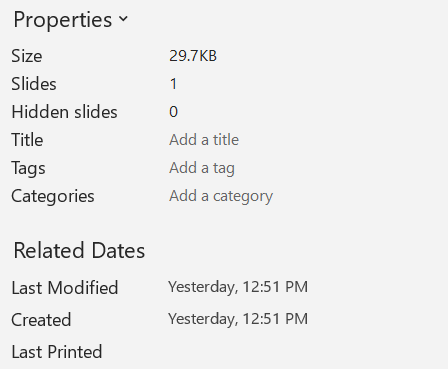
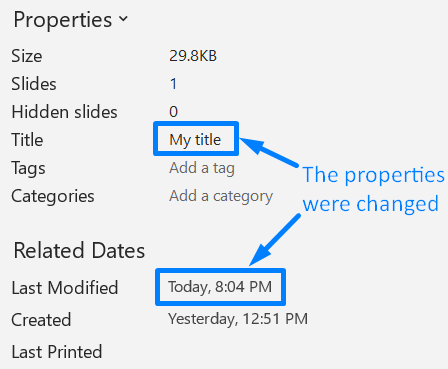
IPresentationInfo.readDocumentProperties가 반환하는 속성은 Presentation 인스턴스를 만들지 않고도 변경할 수 있습니다. 변경 사항은 IPresentationInfo.updateDocumentProperties를 사용해 적용한 후, IPresentationInfo.writeBindedPresentation으로 바인딩된 프레젠테이션을 작성하십시오.
다음 이미지에는 원본 문서 속성이 표시됩니다.
다음 예제는 제목과 마지막 저장 시간을 변경하고 결과를 새 파일에 기록합니다:
import com.aspose.slides.IDocumentProperties;
import com.aspose.slides.IPresentationInfo;
import com.aspose.slides.PresentationFactory;
import java.io.FileOutputStream;
import java.io.OutputStream;
import java.util.Date;

String sourceFile = "sample.pptx";
String outputFile = "sample_with_updated_properties.pptx";
IPresentationInfo presentationInfo = PresentationFactory.getInstance().getPresentationInfo(sourceFile);
IDocumentProperties documentProperties = presentationInfo.readDocumentProperties();

documentProperties.setTitle("Quarterly sales report");
documentProperties.setLastSavedTime(new Date());

presentationInfo.updateDocumentProperties(documentProperties);
try (OutputStream outputStream = new FileOutputStream(outputFile)) {
    presentationInfo.writeBindedPresentation(outputStream);
}
다음 이미지에는 업데이트된 문서 속성이 표시됩니다.
유용한 링크
관련 보안 검사 및 보호 설정에 대해서는 다음 문서를 참고하십시오:
FAQ
폰트가 포함되어 있는지와 포함된 폰트를 어떻게 확인할 수 있나요?
프레젠테이션을 로드하고 Presentation.getFontsManager를 사용하십시오. IFontsManager.getEmbeddedFonts를 호출해 포함된 폰트를 얻고, IFontsManager.getFonts를 호출해 프레젠테이션에서 사용되는 폰트를 얻습니다. 두 결과를 비교해 렌더링에 필요하지만 포함되지 않은 폰트를 찾을 수 있습니다.
숨겨진 슬라이드가 있는지와 개수를 빠르게 확인하려면 어떻게 해야 하나요?
문서 메타데이터가 충분히 저장되어 있다면 PresentationFactory.getPresentationInfo와 IPresentationInfo.readDocumentProperties를 통해 IDocumentProperties.getHiddenSlides를 읽으십시오. 이는 가벼운 인벤토리에 적합합니다. 메모리에서 프레젠테이션이 수정된 경우 저장된 메타데이터가 없거나 오래됐을 수 있으므로, 실제 값을 확인하려면 Presentation.getSlides를 순회하고 각 슬라이드의 ISlide.getHidden 메서드를 검사하십시오.
사용자 정의 슬라이드 크기와 방향을 감지하고 기본값과 다른지 확인하려면 어떻게 하나요?
예, 프레젠테이션을 로드한 뒤 Presentation.getSlideSize를 호출하십시오. ISlideSize.getType, ISlideSize.getSize, ISlideSize.getOrientation를 사용해 현재 설정을 기대되는 프리셋 및 차원과 비교하십시오.
차트가 외부 데이터 소스를 참조하고 있는지 빠르게 확인할 수 있나요?
예. 각 Chart를 찾아 IChartData.getDataSourceType를 호출하십시오. 외부 워크북인 경우 IChartData.getExternalWorkbookPath를 호출합니다. 데이터 소스 유형과 경로가 외부 참조를 나타내지만, 대상이 실제로 이용 가능한지는 별도의 리소스 검사가 필요합니다.
렌더링이나 PDF 내보내기를 늦출 수 있는 ‘무거운’ 슬라이드를 어떻게 평가할 수 있나요?
단일 복잡도 속성은 없습니다. Presentation.getSlides와 각 슬라이드의 IBaseSlide.getShapes 컬렉션을 순회하십시오. 도형 수와 대용량 이미지, 효과, 애니메이션, 멀티미디어 존재 여부를 신호로 활용하고, 대표적인 렌더링 또는 내보내기 시간을 측정한 뒤 슬라이드를 성능 병목으로 판단하십시오.