
在 Android 上检索和更新演示文稿信息
概述
Aspose.Slides 可以在不创建完整演示文稿对象模型的情况下识别演示文稿的格式并读取其文档元数据。当您需要对文件进行分类、构建清单或在决定是否加载和处理演示文稿内容之前检查属性时,这非常有用。
本文演示了如何通过 PresentationFactory 和 IPresentationInfo 进行轻量检查,以及通过 IDocumentProperties 进行有针对性的更新。
检查演示文稿格式
如果您已经加载了演示文稿,请参阅 确定原始演示文稿格式 了解加载后的检测以及传统 PPT、PPS 和 POT 流的限制。
使用 PresentationFactory.getPresentationInfo 检查文件而无需创建 Presentation 实例。IPresentationInfo.getLoadFormat 方法报告检测到的格式,例如 PPTX、PPT 或 ODP。
import com.aspose.slides.IPresentationInfo;
import com.aspose.slides.LoadFormat;
import com.aspose.slides.PresentationFactory;

String[] fileNames = { "pres.pptx", "pres.ppt", "pres.odp" };

for (String fileName : fileNames) {
    IPresentationInfo presentationInfo = PresentationFactory.getInstance().getPresentationInfo(fileName);
    int loadFormat = presentationInfo.getLoadFormat();
    String formatName = "Other (" + loadFormat + ")";

    if (loadFormat == LoadFormat.Pptx) {
        formatName = "PPTX";
    } else if (loadFormat == LoadFormat.Ppt) {
        formatName = "PPT";
    } else if (loadFormat == LoadFormat.Odp) {
        formatName = "ODP";
    }

    System.out.println(fileName + ": " + formatName);
}
构建轻量演示文稿清单
当您处理大量演示文稿文件时,可能需要一个紧凑的清单用于验证、索引或文档管理系统。在这种情况下,使用 PresentationFactory.getPresentationInfo 获取一个 IPresentationInfo 对象,然后调用 IPresentationInfo.readDocumentProperties 读取文档元数据。此方法不会创建 Presentation 实例,也无需遍历完整的演示文稿对象模型。
由 IDocumentProperties 暴露的扩展属性提供以下清单值:
| 方法 | 库存值 |
|---|---|
| getSlides | 幻灯片总数。 |
| getHiddenSlides | 隐藏幻灯片的数量。 |
| getNotes | 包含批注的幻灯片数量。 |
| getParagraphs | 段落总数(如可用)。 |
| getWords | 词汇总数。 |
| getMultimediaClips | 音频和视频剪辑的总数。 |
以下示例在不创建 Presentation 对象的情况下读取这些值并打印紧凑的清单。它还结合了 getHeadingPairs 和 getTitlesOfParts 来显示内容组,例如字体、主题和幻灯片标题。
import com.aspose.slides.IDocumentProperties;
import com.aspose.slides.IHeadingPair;
import com.aspose.slides.IPresentationInfo;
import com.aspose.slides.LoadFormat;
import com.aspose.slides.PresentationFactory;
import java.nio.file.Paths;

String filePath = "sample.pptx";
IPresentationInfo presentationInfo = PresentationFactory.getInstance().getPresentationInfo(filePath);
IDocumentProperties documentProperties = presentationInfo.readDocumentProperties();

int loadFormat = presentationInfo.getLoadFormat();
String formatName = "Other (" + loadFormat + ")";

if (loadFormat == LoadFormat.Pptx) {
    formatName = "PPTX";
} else if (loadFormat == LoadFormat.Ppt) {
    formatName = "PPT";
} else if (loadFormat == LoadFormat.Odp) {
    formatName = "ODP";
}

System.out.println("File: " + Paths.get(filePath).getFileName());
System.out.println("Format: " + formatName);
System.out.println("Title: " + documentProperties.getTitle());
System.out.println("Author: " + documentProperties.getAuthor());
System.out.println("Statistics:");
System.out.println("  Slides: " + documentProperties.getSlides());
System.out.println("  Hidden slides: " + documentProperties.getHiddenSlides());
System.out.println("  Slides with notes: " + documentProperties.getNotes());
System.out.println("  Paragraphs: " + documentProperties.getParagraphs());
System.out.println("  Words: " + documentProperties.getWords());
System.out.println("  Multimedia clips: " + documentProperties.getMultimediaClips());

IHeadingPair[] headingPairs = documentProperties.getHeadingPairs();
String[] titlesOfParts = documentProperties.getTitlesOfParts();
headingPairs = headingPairs != null ? headingPairs : new IHeadingPair[0];
titlesOfParts = titlesOfParts != null ? titlesOfParts : new String[0];
int partIndex = 0;

if (headingPairs.length == 0 || titlesOfParts.length == 0) {
    System.out.println("Content groups: not available");
} else {
    System.out.println("Content groups:");

    for (IHeadingPair headingPair : headingPairs) {
        System.out.println("  " + headingPair.getName() + " (" + headingPair.getCount() + ")");

        for (int partOffset = 0; partOffset < headingPair.getCount() && partIndex < titlesOfParts.length; partOffset++) {
            System.out.println("    - " + titlesOfParts[partIndex]);
            partIndex++;
        }
    }

    if (partIndex < titlesOfParts.length) {
        System.out.println("  Other parts:");

        while (partIndex < titlesOfParts.length) {
            System.out.println("    - " + titlesOfParts[partIndex]);
            partIndex++;
        }
    }
}
每个 IHeadingPair 提供一个组名称以及该组中的项目数量。IDocumentProperties.getTitlesOfParts 返回一个平面、有序的数组,因此需要按每个标题对指定的连续标题数量进行消费。
存储的元数据和格式限制
IPresentationInfo.readDocumentProperties 返回的清单属性反映了源文档中可用的元数据。Aspose.Slides 不会加载并遍历演示文稿对象模型来重新计算这些值。缺失的属性将使用默认值表示,如果最后保存文件的应用程序未更新其文档属性,则存储的值可能已过时。
-
PPTX: 该格式提供幻灯片、批注、隐藏幻灯片、段落、词汇和多媒体计数的扩展文档属性,以及标题对和部件标题。可用性取决于文档创建者写入了哪些属性。
-
PPT: 二进制格式可以存储相应的文档摘要属性。如果属性缺失或未被文档创建者刷新,Aspose.Slides 将返回其存储的或默认的值,而不是根据幻灯片计算。
-
ODP: OpenDocument 元数据提供一般的文档统计信息,如页面、段落和词汇计数,但这些值并不映射到每个 PowerPoint 特有的扩展属性。隐藏幻灯片、批注幻灯片、多媒体、标题对和部件标题的元数据可能不可用,清单属性可能返回默认值。不要将零值或空数组视为对应内容缺失的权威证明。
在进行清单和初步检查时请使用轻量元数据方法。当结果必须反映内存中的更改或需要验证实际的演示文稿内容时,加载演示文稿并检查其实时对象模型。
更新演示文稿属性
IPresentationInfo.readDocumentProperties 返回的属性也可以在不创建 Presentation 实例的情况下进行更改。使用 IPresentationInfo.updateDocumentProperties 应用更改,然后使用 IPresentationInfo.writeBindedPresentation 写入绑定的演示文稿。
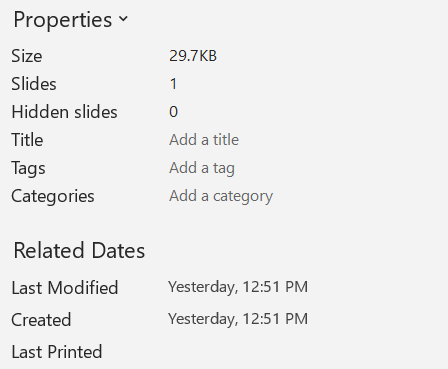
下图显示了原始文档属性。
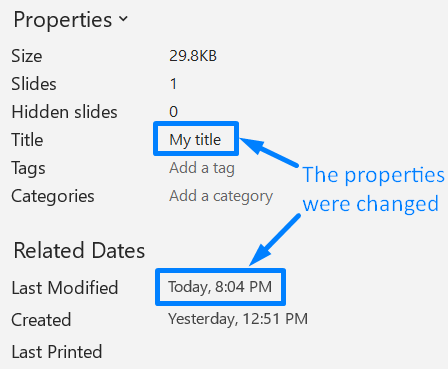
以下示例更改标题和最后保存时间并将结果写入新文件:
import com.aspose.slides.IDocumentProperties;
import com.aspose.slides.IPresentationInfo;
import com.aspose.slides.PresentationFactory;
import java.io.FileOutputStream;
import java.io.OutputStream;
import java.util.Date;

String sourceFile = "sample.pptx";
String outputFile = "sample_with_updated_properties.pptx";
IPresentationInfo presentationInfo = PresentationFactory.getInstance().getPresentationInfo(sourceFile);
IDocumentProperties documentProperties = presentationInfo.readDocumentProperties();

documentProperties.setTitle("Quarterly sales report");
documentProperties.setLastSavedTime(new Date());

presentationInfo.updateDocumentProperties(documentProperties);
try (OutputStream outputStream = new FileOutputStream(outputFile)) {
    presentationInfo.writeBindedPresentation(outputStream);
}
下图显示了更新后的文档属性。
有用的链接
有关相关的安全检查和保护设置,请参阅以下文章:
常见问题
如何检查字体是否已嵌入以及具体是哪一些?
加载演示文稿并使用 Presentation.getFontsManager。调用 IFontsManager.getEmbeddedFonts 获取已嵌入的字体,调用 IFontsManager.getFonts 获取演示文稿使用的字体。比较两者结果即可找出渲染所需但未嵌入的字体。
如何快速判断文件是否包含隐藏幻灯片以及数量?
当存储的文档元数据足够时,可通过 PresentationFactory.getPresentationInfo 和 IPresentationInfo.readDocumentProperties 读取 IDocumentProperties.getHiddenSlides。这适用于轻量清单。如果演示文稿在内存中已被修改,存储的元数据可能缺失或过时,或者需要验证实时值,则遍历 Presentation.getSlides 并检查每个幻灯片的 ISlide.getHidden 方法。
我能检测是否使用了自定义幻灯片尺寸和方向,以及它们是否不同于默认设置吗?
可以。加载演示文稿并调用 Presentation.getSlideSize。使用 ISlideSize.getType、ISlideSize.getSize 和 ISlideSize.getOrientation 将当前设置与预期的预设和尺寸进行比较。
有没有快速方法查看图表是否引用外部数据源?
可以。定位每个 Chart,调用 IChartData.getDataSourceType。对于外部工作簿,调用 IChartData.getExternalWorkbookPath。数据源类型和路径可识别外部引用,但要验证目标是否可用需要另行的资源检查。
我如何评估可能导致渲染或 PDF 导出变慢的“重”幻灯片?
没有单一的复杂度属性。遍历 Presentation.getSlides 以及每个幻灯片的 IBaseSlide.getShapes 集合。利用形状数量以及大图片、特效、动画或多媒体的出现作为筛选信号,并在将幻灯片视为确定的性能瓶颈之前进行代表性的渲染或导出测量。