
Retrieve and Update Presentation Information in JavaScript
Overview
Aspose.Slides can identify a presentation’s format and read its document metadata without creating a complete presentation object model. This is useful when you need to classify files, build an inventory, or inspect properties before deciding whether to load and process the presentation content.
This article demonstrates lightweight inspection through PresentationFactory and PresentationInfo, as well as targeted updates through DocumentProperties.
Check a Presentation Format
If you already have a loaded presentation, see Determine the Original Presentation Format for detection after loading and the limitations of legacy PPT, PPS, and POT streams.
Use PresentationFactory.getPresentationInfo to inspect a file without creating a Presentation instance. The PresentationInfo.getLoadFormat method reports the detected format, such as PPTX, PPT, or ODP.
const aspose = require("aspose.slides.via.java");

const fileNames = ["pres.pptx", "pres.ppt", "pres.odp"];

for (const fileName of fileNames) {
    const presentationInfo = aspose.PresentationFactory.getInstance().getPresentationInfo(fileName);
    const loadFormat = presentationInfo.getLoadFormat();
    let formatName = `Other (${loadFormat})`;

    if (loadFormat === aspose.LoadFormat.Pptx) {
        formatName = "PPTX";
    } else if (loadFormat === aspose.LoadFormat.Ppt) {
        formatName = "PPT";
    } else if (loadFormat === aspose.LoadFormat.Odp) {
        formatName = "ODP";
    }

    console.log(`${fileName}: ${formatName}`);
}
Build a Lightweight Presentation Inventory
When you process many presentation files, you may need a compact inventory for validation, indexing, or a document-management system. In this scenario, use PresentationFactory.getPresentationInfo to obtain a PresentationInfo object, and then call PresentationInfo.readDocumentProperties to read the document metadata. This approach does not create a Presentation instance or require you to traverse the complete presentation object model.
The extended properties exposed by DocumentProperties provide the following inventory values:
| Method | Inventory value |
|---|---|
| getSlides | Total number of slides. |
| getHiddenSlides | Number of hidden slides. |
| getNotes | Number of slides that contain notes. |
| getParagraphs | Total number of paragraphs, when available. |
| getWords | Total number of words. |
| getMultimediaClips | Total number of audio and video clips. |
The following example reads these values without creating a Presentation object and prints a compact inventory. It also combines DocumentProperties.getHeadingPairs with DocumentProperties.getTitlesOfParts to display content groups such as fonts, themes, and slide titles.
const path = require("path");
const aspose = require("aspose.slides.via.java");

const filePath = "sample.pptx";
const presentationInfo = aspose.PresentationFactory.getInstance().getPresentationInfo(filePath);
const documentProperties = presentationInfo.readDocumentProperties();

const loadFormat = presentationInfo.getLoadFormat();
let formatName = `Other (${loadFormat})`;

if (loadFormat === aspose.LoadFormat.Pptx) {
    formatName = "PPTX";
} else if (loadFormat === aspose.LoadFormat.Ppt) {
    formatName = "PPT";
} else if (loadFormat === aspose.LoadFormat.Odp) {
    formatName = "ODP";
}

console.log(`File: ${path.basename(filePath)}`);
console.log(`Format: ${formatName}`);
console.log(`Title: ${documentProperties.getTitle()}`);
console.log(`Author: ${documentProperties.getAuthor()}`);
console.log("Statistics:");
console.log(`  Slides: ${documentProperties.getSlides()}`);
console.log(`  Hidden slides: ${documentProperties.getHiddenSlides()}`);
console.log(`  Slides with notes: ${documentProperties.getNotes()}`);
console.log(`  Paragraphs: ${documentProperties.getParagraphs()}`);
console.log(`  Words: ${documentProperties.getWords()}`);
console.log(`  Multimedia clips: ${documentProperties.getMultimediaClips()}`);

const headingPairs = documentProperties.getHeadingPairs() || [];
const titlesOfParts = documentProperties.getTitlesOfParts() || [];
let partIndex = 0;

if (headingPairs.length === 0 || titlesOfParts.length === 0) {
    console.log("Content groups: not available");
} else {
    console.log("Content groups:");

    for (const headingPair of headingPairs) {
        const partCount = headingPair.getCount();
        console.log(`  ${headingPair.getName()} (${partCount})`);

        for (let partOffset = 0; partOffset < partCount && partIndex < titlesOfParts.length; partOffset++) {
            console.log(`    - ${titlesOfParts[partIndex]}`);
            partIndex++;
        }
    }

    if (partIndex < titlesOfParts.length) {
        console.log("  Other parts:");

        while (partIndex < titlesOfParts.length) {
            console.log(`    - ${titlesOfParts[partIndex]}`);
            partIndex++;
        }
    }
}
Each HeadingPair supplies a group name through HeadingPair.getName and the number of items in that group through HeadingPair.getCount. DocumentProperties.getTitlesOfParts returns a flat, ordered array, so consume the number of consecutive titles specified by each heading pair.
Stored Metadata and Format Limitations
The inventory properties returned by PresentationInfo.readDocumentProperties reflect metadata available in the source document. Aspose.Slides does not load and traverse the presentation object model to recalculate these values for this call. Missing properties are represented by default values, and stored values may be stale if the application that last saved the file did not update its document properties.
- PPTX: The format provides extended document properties for slide, note, hidden-slide, paragraph, word, and multimedia counts, as well as heading pairs and part titles. Availability depends on which properties were written by the document producer.
- PPT: The binary format can store corresponding document-summary properties. If a property is absent or was not refreshed by the document producer, Aspose.Slides returns its stored or default value rather than calculating it from the slides.
- ODP: OpenDocument metadata provides general document statistics, such as page, paragraph, and word counts, but these values do not map to every PowerPoint-specific extended property. Hidden-slide, notes-slide, multimedia, heading-pair, and part-title metadata may be unavailable, and the inventory properties may return default values. Do not treat a zero value or an empty array as authoritative proof that the corresponding content is absent.
Use the lightweight metadata approach for inventories and preliminary checks. Load the presentation and inspect its live object model when the result must reflect in-memory changes or when you need to verify the actual presentation content.
Update Presentation Properties
The properties returned by PresentationInfo.readDocumentProperties can also be changed without creating a Presentation instance. Apply the changes with PresentationInfo.updateDocumentProperties, and then write the bound presentation with PresentationInfo.writeBindedPresentation.
The following image shows the original document properties.
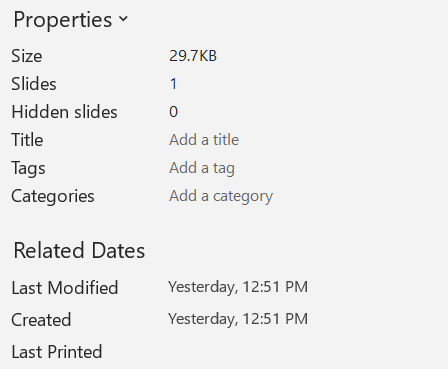
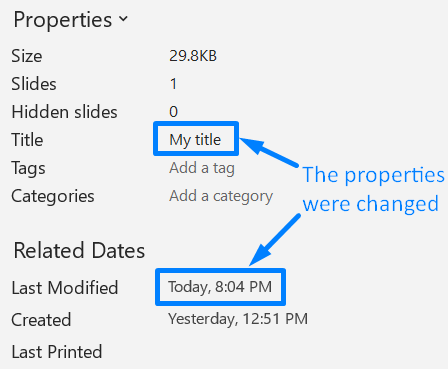
The following example changes the title and last-saved time and writes the result to a new file:
const aspose = require("aspose.slides.via.java");
const java = require("java");

const sourceFile = "sample.pptx";
const outputFile = "sample_with_updated_properties.pptx";
const presentationInfo = aspose.PresentationFactory.getInstance().getPresentationInfo(sourceFile);
const documentProperties = presentationInfo.readDocumentProperties();

documentProperties.setTitle("Quarterly sales report");
documentProperties.setLastSavedTime(java.newInstanceSync("java.util.Date"));

presentationInfo.updateDocumentProperties(documentProperties);
const outputStream = java.newInstanceSync("java.io.FileOutputStream", outputFile);
try {
    presentationInfo.writeBindedPresentation(outputStream);
} finally {
    outputStream.close();
}
The following image shows the updated document properties.
Useful Links
For related security checks and protection settings, see the following articles:
FAQ
How can I check whether fonts are embedded and which ones they are?
Load the presentation and use Presentation.getFontsManager. Call FontsManager.getEmbeddedFonts to obtain the embedded fonts and FontsManager.getFonts to obtain the fonts used by the presentation. Compare the two results to find fonts that are required for rendering but are not embedded.
How can I quickly tell if the file has hidden slides and how many?
When stored document metadata is sufficient, read DocumentProperties.getHiddenSlides through PresentationFactory.getPresentationInfo and PresentationInfo.readDocumentProperties. This is suitable for a lightweight inventory. If the presentation has been modified in memory, the stored metadata may be missing or stale, or you need to verify live values, iterate through Presentation.getSlides and inspect each slide’s Slide.getHidden method instead.
Can I detect whether custom slide size and orientation are used, and whether they differ from the defaults?
Yes. Load the presentation and call Presentation.getSlideSize. Use SlideSize.getType, SlideSize.getSize, and SlideSize.getOrientation to compare the current settings with the expected preset and dimensions.
Is there a quick way to see if charts reference external data sources?
Yes. Locate each Chart and call ChartData.getDataSourceType. For an external workbook, call ChartData.getExternalWorkbookPath. The data source type and path identify an external reference, but verifying whether the target is available requires a separate resource check.
How can I assess ‘heavy’ slides that may slow rendering or PDF export?
There is no single complexity property. Traverse Presentation.getSlides and each slide’s BaseSlide.getShapes collection. Use shape counts and the presence of large images, effects, animations, or multimedia as screening signals, and measure a representative render or export before treating a slide as a confirmed performance bottleneck.