
在 JavaScript 中擷取與更新簡報資訊
概觀
Aspose.Slides 能夠辨識簡報的格式,並在不建立完整簡報物件模型的情況下讀取其文件中繼資料。這在您需要對檔案進行分類、建立清單,或在決定是否載入與處理簡報內容之前檢查屬性時相當有用。
本篇文章說明如何透過PresentationFactory與PresentationInfo進行輕量檢查,以及如何透過DocumentProperties進行目標更新。
檢查簡報格式
如果您已有載入的簡報,請參閱確定原始簡報格式以了解載入後的偵測方式以及傳統 PPT、PPS、POT 串流的限制。
使用PresentationFactory.getPresentationInfo可在不建立Presentation實例的情況下檢查檔案。PresentationInfo.getLoadFormat方法會回報偵測到的格式,例如 PPTX、PPT 或 ODP。
const aspose = require("aspose.slides.via.java");

const fileNames = ["pres.pptx", "pres.ppt", "pres.odp"];

for (const fileName of fileNames) {
    const presentationInfo = aspose.PresentationFactory.getInstance().getPresentationInfo(fileName);
    const loadFormat = presentationInfo.getLoadFormat();
    let formatName = `Other (${loadFormat})`;

    if (loadFormat === aspose.LoadFormat.Pptx) {
        formatName = "PPTX";
    } else if (loadFormat === aspose.LoadFormat.Ppt) {
        formatName = "PPT";
    } else if (loadFormat === aspose.LoadFormat.Odp) {
        formatName = "ODP";
    }

    console.log(`${fileName}: ${formatName}`);
}
建立輕量簡報清單
當您處理大量簡報檔案時,可能需要一個緊湊的清單以供驗證、索引或文件管理系統使用。在此情況下,使用PresentationFactory.getPresentationInfo取得PresentationInfo物件,然後呼叫PresentationInfo.readDocumentProperties以讀取文件中繼資料。此方法不會建立Presentation實例,也不需要遍歷完整的簡報物件模型。
由[DocumentProperties]提供的擴充屬性可提供以下清單值:
| 方法 | 清單值 |
|---|---|
| getSlides | 總投影片數。 |
| getHiddenSlides | 隱藏投影片的數量。 |
| getNotes | 含備註的投影片數量。 |
| getParagraphs | 可用時的段落總數。 |
| getWords | 總字數。 |
| getMultimediaClips | 音訊與視訊剪輯的總數。 |
以下範例在不建立[Presentation]物件的情況下讀取這些值,並輸出緊湊的清單。它同時結合DocumentProperties.getHeadingPairs與DocumentProperties.getTitlesOfParts來顯示諸如字型、佈景主題與投影片標題等內容群組。
const path = require("path");
const aspose = require("aspose.slides.via.java");

const filePath = "sample.pptx";
const presentationInfo = aspose.PresentationFactory.getInstance().getPresentationInfo(filePath);
const documentProperties = presentationInfo.readDocumentProperties();

const loadFormat = presentationInfo.getLoadFormat();
let formatName = `Other (${loadFormat})`;

if (loadFormat === aspose.LoadFormat.Pptx) {
    formatName = "PPTX";
} else if (loadFormat === aspose.LoadFormat.Ppt) {
    formatName = "PPT";
} else if (loadFormat === aspose.LoadFormat.Odp) {
    formatName = "ODP";
}

console.log(`File: ${path.basename(filePath)}`);
console.log(`Format: ${formatName}`);
console.log(`Title: ${documentProperties.getTitle()}`);
console.log(`Author: ${documentProperties.getAuthor()}`);
console.log("Statistics:");
console.log(`  Slides: ${documentProperties.getSlides()}`);
console.log(`  Hidden slides: ${documentProperties.getHiddenSlides()}`);
console.log(`  Slides with notes: ${documentProperties.getNotes()}`);
console.log(`  Paragraphs: ${documentProperties.getParagraphs()}`);
console.log(`  Words: ${documentProperties.getWords()}`);
console.log(`  Multimedia clips: ${documentProperties.getMultimediaClips()}`);

const headingPairs = documentProperties.getHeadingPairs() || [];
const titlesOfParts = documentProperties.getTitlesOfParts() || [];
let partIndex = 0;

if (headingPairs.length === 0 || titlesOfParts.length === 0) {
    console.log("Content groups: not available");
} else {
    console.log("Content groups:");

    for (const headingPair of headingPairs) {
        const partCount = headingPair.getCount();
        console.log(`  ${headingPair.getName()} (${partCount})`);

        for (let partOffset = 0; partOffset < partCount && partIndex < titlesOfParts.length; partOffset++) {
            console.log(`    - ${titlesOfParts[partIndex]}`);
            partIndex++;
        }
    }

    if (partIndex < titlesOfParts.length) {
        console.log("  Other parts:");

        while (partIndex < titlesOfParts.length) {
            console.log(`    - ${titlesOfParts[partIndex]}`);
            partIndex++;
        }
    }
}
每個[HeadingPair]透過[HeadingPair.getName]提供群組名稱,並透過[HeadingPair.getCount]提供該群組的項目數量。[DocumentProperties.getTitlesOfParts]回傳一個平坦且有序的陣列,因此請依每個 heading pair 所指定的連續標題數量來消費。
儲存的中繼資料與格式限制
由PresentationInfo.readDocumentProperties回傳的清單屬性反映來源文件中可用的中繼資料。Aspose.Slides 不會載入並遍歷簡報物件模型以重新計算此呼叫的值。缺少的屬性會以預設值表示;如果最後一次儲存檔案的應用程式未更新文件屬性,儲存的值可能已過時。
- PPTX: 此格式提供投影片、備註、隱藏投影片、段落、字詞以及多媒體計數等擴充文件屬性,並包含 heading pairs 與部件標題。可用性取決於文件產生者寫入了哪些屬性。
- PPT: 此二進位格式可以儲存相應的文件摘要屬性。如果屬性不存在或未由文件產生者重新整理,Aspose.Slides 會回傳其儲存的或預設值,而不是從投影片計算。
- ODP: OpenDocument 中繼資料提供一般文件統計資訊,例如頁面、段落與字詞計數,但這些值並未對應每一個 PowerPoint 專屬的擴充屬性。隱藏投影片、備註投影片、多媒體、heading‑pair 與部件標題的中繼資料可能不存在,清單屬性可能會回傳預設值。不要將零值或空陣列視為對應內容不存在的權威證明。
對於清單與初步檢查,請使用輕量中繼資料方法。當結果必須反映記憶體中的變更,或需要驗證實際簡報內容時,請載入簡報並檢查其即時物件模型。
更新簡報屬性
由[PresentationInfo.readDocumentProperties]回傳的屬性也可以在不建立[Presentation]實例的情況下進行變更。使用PresentationInfo.updateDocumentProperties套用變更,然後使用PresentationInfo.writeBindedPresentation寫入已綁定的簡報。
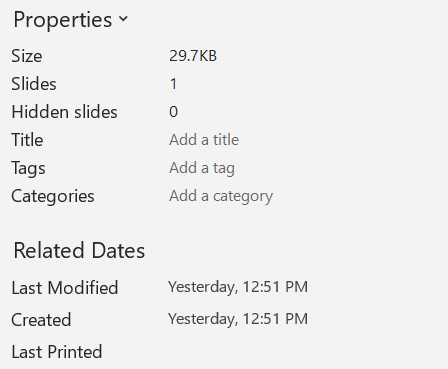
下圖顯示原始的文件屬性。
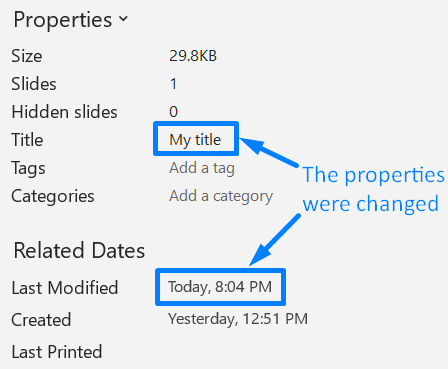
以下範例會變更標題與最後儲存時間,並將結果寫入新檔案:
const aspose = require("aspose.slides.via.java");
const java = require("java");

const sourceFile = "sample.pptx";
const outputFile = "sample_with_updated_properties.pptx";
const presentationInfo = aspose.PresentationFactory.getInstance().getPresentationInfo(sourceFile);
const documentProperties = presentationInfo.readDocumentProperties();

documentProperties.setTitle("Quarterly sales report");
documentProperties.setLastSavedTime(java.newInstanceSync("java.util.Date"));

presentationInfo.updateDocumentProperties(documentProperties);
const outputStream = java.newInstanceSync("java.io.FileOutputStream", outputFile);
try {
    presentationInfo.writeBindedPresentation(outputStream);
} finally {
    outputStream.close();
}
下圖顯示已更新的文件屬性。
實用連結
關於相關的安全檢查與保護設定,請參閱以下文章:
常見問題
如何檢查字型是否已嵌入以及是哪一些字型?
載入簡報,並使用Presentation.getFontsManager。呼叫FontsManager.getEmbeddedFonts取得已嵌入的字型,並呼叫FontsManager.getFonts取得簡報使用的字型。將兩者結果比較,即可找出需要渲染卻未嵌入的字型。
如何快速判斷檔案是否包含隱藏投影片以及其數量?
當儲存的文件中繼資料足夠時,透過PresentationFactory.getPresentationInfo與PresentationInfo.readDocumentProperties讀取DocumentProperties.getHiddenSlides。此方式適用於輕量清單。如果簡報已在記憶體中被修改,或儲存的中繼資料可能缺失或過時,需驗證即時值,則請遍歷Presentation.getSlides並檢查每張投影片的Slide.getHidden方法。
我可以偵測是否使用自訂投影片尺寸與方向,且是否與預設不一致嗎?
可以。載入簡報後呼叫Presentation.getSlideSize。使用SlideSize.getType、SlideSize.getSize、SlideSize.getOrientation將目前設定與預設的預設值與尺寸進行比較。
是否有快速方法檢查圖表是否引用外部資料來源?
有。定位每個Chart,並呼叫ChartData.getDataSourceType。若為外部活頁簿,請呼叫ChartData.getExternalWorkbookPath。資料來源類型與路徑可辨識外部參考,但要確認目標是否可用則需額外的資源檢查。
如何評估可能減慢渲染或 PDF 匯出的「沉重」投影片?
沒有單一的複雜度屬性。遍歷Presentation.getSlides以及每張投影片的BaseSlide.getShapes集合。利用形狀數量以及大型影像、效果、動畫或多媒體的存在作為篩選指標,並在將投影片視為確定的效能瓶頸前,先對代表性的渲染或匯出進行測量。