
Convert OpenDocument Presentations in Python
Introduction
Aspose.Slides for Python via Java allows you to convert OpenDocument (ODP) presentations to formats such as PDF, HTML, TIFF, XPS, PPT, and PPTX. ODP conversion uses the same API as PowerPoint conversion: load the source file with Presentation and select the output format with SaveFormat.
Convert ODP to PDF
Follow the installation instructions before running the example. Place an ODP presentation named pres.odp in the working directory. The following code starts the JVM if necessary, loads the presentation, and saves it as pres.pdf.
import jpype
import asposeslides

if not jpype.isJVMStarted():
    jpype.startJVM()

from asposeslides.api import Presentation, SaveFormat

presentation = Presentation("pres.odp")
try:
    presentation.save("pres.pdf", SaveFormat.Pdf)
finally:
    presentation.dispose()
OpenDocument Presentation in Different Applications
An ODP presentation may look different in PowerPoint and LibreOffice/OpenOffice Impress because these applications support different presentation features and rendering behaviors. Review converted presentations when their layout depends on complex formatting.
Compatibility differences can affect:
- Tables, including their stacking order relative to other shapes and support for picture fills.
- Text rotation and alignment.
- Picture, gradient, and pattern fills applied to text.
- Numbered and bulleted lists.
The image below shows a list created in LibreOffice Impress:
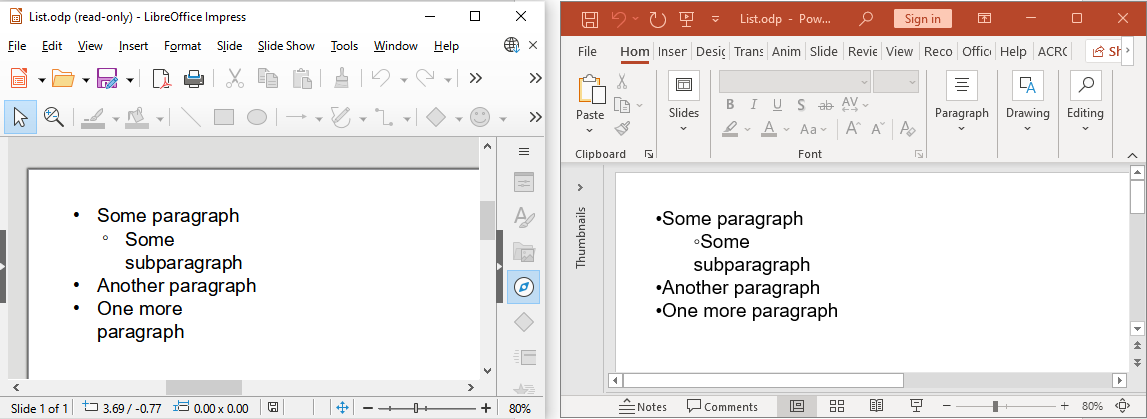
Aspose.Slides saves ODP lists for compatibility with LibreOffice/OpenOffice Impress.
For details about feature compatibility, see Microsoft’s guide to the OpenDocument Presentation format.
FAQ
What if the formatting of my ODP file changes after conversion?
ODP and PowerPoint use different presentation models. Tables, fonts, and fill styles may render differently. Check that the required fonts are available, review the output, and adjust the layout or formatting if necessary.
Do I need OpenOffice or LibreOffice installed to convert ODP files?
No. Aspose.Slides for Python via Java processes presentations without either application. A compatible Java runtime and the Python package are required.
Can I customize PDF output when converting an ODP presentation?
Yes. Use PdfOptions to configure PDF export settings, such as image quality and compression.
Can I convert ODP presentations on a server or in a container?
Yes. Install the Python package, a compatible Java runtime, and the fonts required by your presentations in the target environment. No office application is needed.