
Aspose.Slides cho Xamarin
Giới thiệu
Xamarin là một khung làm việc được sử dụng cho phát triển di động trong .NET C#. Xamarin có các công cụ và thư viện mở rộng khả năng của nền tảng .NET. Nó cho phép các nhà phát triển xây dựng ứng dụng cho hệ điều hành Android.
API Aspose.Slides hoạt động trên nền tảng Xamarin. Để đạt được điều này, gói Aspose.Slides .NET thêm một DLL riêng cho Xamarin. Aspose.Slides cho Xamarin hỗ trợ hầu hết các tính năng có trong phiên bản .NET:
- chuyển đổi và xem bản trình bày.
- chỉnh sửa nội dung trong bản trình bày: văn bản, hình dạng, biểu đồ, SmartArt, âm thanh/video, phông chữ, v.v.
- xử lý hoạt ảnh, hiệu ứng 2D, WordArt, v.v.
- xử lý siêu dữ liệu và thuộc tính tài liệu.
- in, sao chép, hợp nhất, so sánh, chia tách, v.v.
Chúng tôi đã cung cấp một bảng so sánh đầy đủ các tính năng ở một phần khác gần cuối trang này.
Trong API Aspose.Slides cho Xamarin, các lớp, không gian tên, logic và hành vi càng giống càng tốt với phiên bản .NET. Bạn có thể chuyển đổi các ứng dụng Aspose.Slides .NET của mình sang Xamarin với chi phí tối thiểu.
Ví dụ nhanh
Bạn có thể sử dụng Aspose.Slides cho Xamarin để xây dựng và sử dụng ứng dụng C# của mình thông qua Slides cho Android.
Chúng tôi cung cấp một ví dụ ứng dụng Android qua Xamarin sử dụng Aspose.Slides để hiển thị các slide bản trình bày và thêm một hình dạng mới lên slide khi chạm. Bạn có thể tìm mã nguồn đầy đủ của các ví dụ trên GitHub.
Hãy bắt đầu bằng việc tạo một ứng dụng Xamarin Android:

Đầu tiên, chúng ta tạo một bố cục nội dung sẽ chứa một ImageView, các nút Prev và Next:
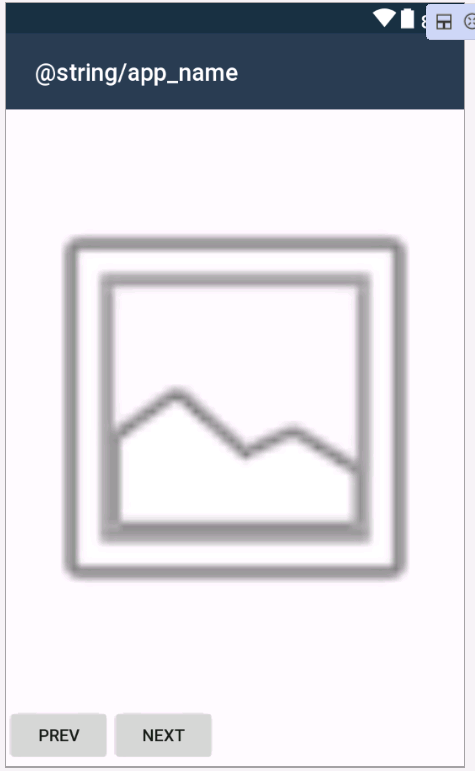
XML - content_main.xml - Tạo bố cục nội dung
 <LinearLayout
    xmlns:android="http://schemas.android.com/apk/res/android"
    xmlns:app="http://schemas.android.com/apk/res-auto"
    xmlns:tools="http://schemas.android.com/tools"
    android:orientation=    "vertical"
    android:layout_width="match_parent"
    android:layout_height="match_parent"
    tools:showIn="@layout/activity_main">
    <LinearLayout
        android:orientation="horizontal"
        android:layout_width="match_parent"
        android:layout_height="match_parent"
        android:layout_weight="1"
        android:id="@+id/linearLayout1">
        <ImageView
            android:src="@android:drawable/ic_menu_gallery"
            android:layout_width="match_parent"
            android:layout_height="match_parent"
            android:id="@+id/imageView"
            android:scaleType="fitCenter" />
    </LinearLayout>

    <LinearLayout
        android:orientation="horizontal"
        android:layout_width="match_parent"
        android:layout_height="match_parent"
        android:layout_weight="10"
        android:id="@+id/linearLayout2">
        <Button
            android:text="Prev"
            android:layout_width="wrap_content"
            android:layout_height="wrap_content"
            android:id="@+id/buttonPrev" />
        <Button
            android:text="Next"
            android:layout_width="wrap_content"
            android:layout_height="wrap_content"
            android:id="@+id/buttonNext"/>
    </LinearLayout>
</LinearLayout>
Ở đây, chúng ta tham chiếu thư viện “Aspose.Slides.Droid.dll” có chứa một bản trình bày mẫu (“HelloWorld.pptx”) vào thư mục Assets của ứng dụng Xamarin và thêm việc khởi tạo của nó vào MainActivity:
C# - MainActivity.cs - Khởi tạo
[Activity(Label = "@string/app_name", Theme = "@style/AppTheme.NoActionBar", MainLauncher = true)]
public class MainActivity : AppCompatActivity
{
    private Aspose.Slides.Presentation presentation;

    protected override void OnCreate(Bundle savedInstanceState)
    {
        base.OnCreate(savedInstanceState);
        SetContentView(Resource.Layout.activity_main);
    }

    protected override void OnResume()
    {
        if (presentation == null)
        {
            using (Stream input = Assets.Open("HelloWorld.pptx"))
            {
                presentation = new Aspose.Slides.Presentation(input);
            }
        }
    }

    protected override void OnPause()
    {
        if (presentation != null)
        {
            presentation.Dispose();
            presentation = null;
        }
    }
}
Hãy thêm hàm để hiển thị các slide Prev và Next khi nhấn các nút:
C# - MainActivity.cs - Hiển thị slide khi nhấn nút Prev và Next
[Activity(Label = "@string/app_name", Theme = "@style/AppTheme.NoActionBar", MainLauncher = true)]
public class MainActivity : AppCompatActivity
{
    private Button buttonNext;
    private Button buttonPrev;
    ImageView imageView;

    private Aspose.Slides.Presentation presentation;

    private int currentSlideNumber;

    protected override void OnCreate(Bundle savedInstanceState)
    {
        base.OnCreate(savedInstanceState);
        SetContentView(Resource.Layout.activity_main);
    }

    protected override void OnResume()
    {
        base.OnResume();
        LoadPresentation();
        currentSlideNumber = 0;
        if (buttonNext == null)
        {
            buttonNext = FindViewById<Button>(Resource.Id.buttonNext);
        }

        if (buttonPrev == null)
        {
            buttonPrev = FindViewById<Button>(Resource.Id.buttonPrev);
        }

        if(imageView == null)
        {
            imageView= FindViewById<ImageView>(Resource.Id.imageView);
        }

        buttonNext.Click += ButtonNext_Click;
        buttonPrev.Click += ButtonPrev_Click;
        RefreshButtonsStatus();
        ShowSlide(currentSlideNumber);
    }

    private void ButtonNext_Click(object sender, System.EventArgs e)
    {
        if (currentSlideNumber > (presentation.Slides.Count - 1))
        {
            return;
        }

        ShowSlide(++currentSlideNumber);
        RefreshButtonsStatus();
    }

    private void ButtonPrev_Click(object sender, System.EventArgs e)
    {
        if (currentSlideNumber == 0)
        {
            return;
        }

        ShowSlide(--currentSlideNumber);
        RefreshButtonsStatus();
    }

    protected override void OnPause()
    {
        base.OnPause();
        if (buttonNext != null)
        {
            buttonNext.Dispose();
            buttonNext = null;
        }

        if (buttonPrev != null)
        {
            buttonPrev.Dispose();
            buttonPrev = null;
        }

        if(imageView != null)
        {
            imageView.Dispose();
            imageView = null;
        }

        DisposePresentation();
    }

    private void RefreshButtonsStatus()
    {
        buttonNext.Enabled = currentSlideNumber < (presentation.Slides.Count - 1);
        buttonPrev.Enabled = currentSlideNumber > 0;
    }

    private void ShowSlide(int slideNumber)
    {
        Aspose.Slides.Drawing.Xamarin.Size size = presentation.SlideSize.Size.ToSize();
        Aspose.Slides.Drawing.Xamarin.Bitmap bitmap = presentation.Slides[slideNumber].GetThumbnail(size);
        imageView.SetImageBitmap(bitmap.ToNativeBitmap());
    }

    private void LoadPresentation()
    {
        if(presentation != null)
        {
            return;
        }

        using (Stream input = Assets.Open("HelloWorld.pptx"))
        {
            presentation = new Aspose.Slides.Presentation(input);
        }
    }

    private void DisposePresentation()
    {
        if(presentation == null)
        {
            return;
        }

        presentation.Dispose();
        presentation = null;
    }

}
Cuối cùng, hãy triển khai một hàm để thêm một hình ellipse khi chạm vào slide:
C# - MainActivity.cs - Thêm ellipse bằng cách nhấp vào slide
 private void ImageView_Touch(object sender, Android.Views.View.TouchEventArgs e)
{
    int[] location = new int[2];
    imageView.GetLocationOnScreen(location);
    int x = (int)e.Event.GetX();
    int y = (int)e.Event.GetY();
    int posX = x - location[0];
    int posY = y - location[0];

    Aspose.Slides.Drawing.Xamarin.Size presSize = presentation.SlideSize.Size.ToSize();

    float coeffX = (float)presSize.Width / imageView.Width;
    float coeffY = (float)presSize.Height / imageView.Height;
    int presPosX = (int)(posX * coeffX);
    int presPosY = (int)(posY * coeffY);
    int width = presSize.Width / 50;

    int height = width;
    Aspose.Slides.IAutoShape ellipse = presentation.Slides[currentSlideNumber].Shapes.AddAutoShape(Aspose.Slides.ShapeType.Ellipse, presPosX, presPosY, width, height);
    ellipse.FillFormat.FillType = Aspose.Slides.FillType.Solid;

    Random random = new Random();
    Aspose.Slides.Drawing.Xamarin.Color slidesColor = Aspose.Slides.Drawing.Xamarin.Color.FromArgb(random.Next(256), random.Next(256), random.Next(256));
    ellipse.FillFormat.SolidFillColor.Color = slidesColor;
    ShowSlide(currentSlideNumber);
}
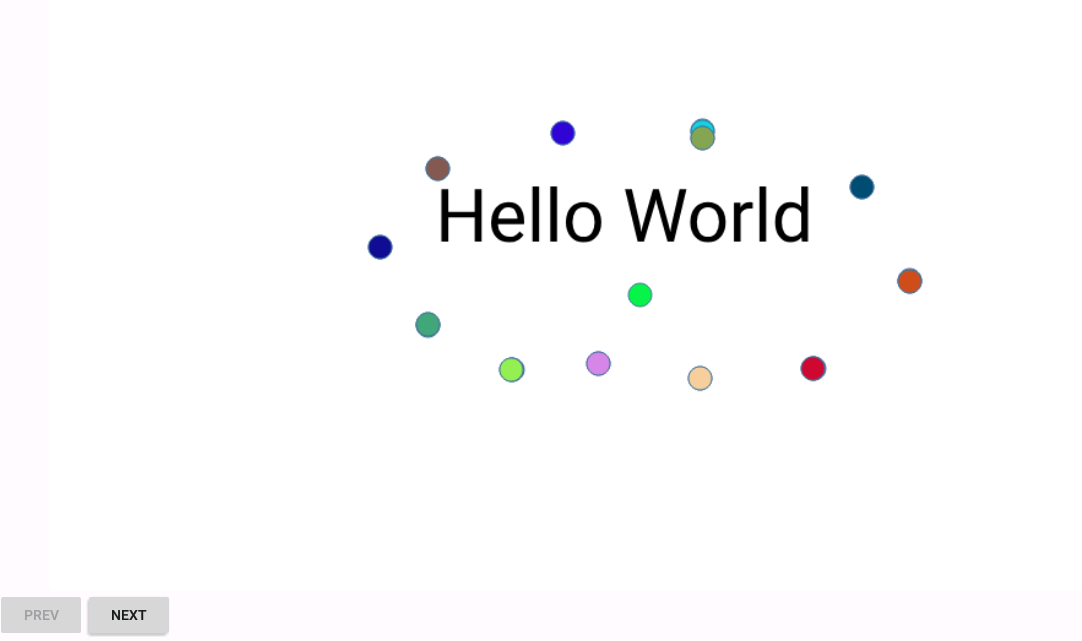
Mỗi lần nhấp vào slide bản trình bày sẽ thêm một ellipse có màu ngẫu nhiên:
Các tính năng được hỗ trợ
| TÍNH NĂNG | Aspose.Slides for .NET | Aspose.Slides for Xamarin |
|---|---|---|
| Các tính năng bản trình bày: | ||
| Tạo bản trình bày mới |

|
|
| Mở/luựu định dạng PowerPoint 97 - 2003 |
|
|
| Mở/luựu định dạng PowerPoint 2007 |
|
|
| Hỗ trợ phần mở rộng PowerPoint 2010 |
|
|
| Hỗ trợ phần mở rộng PowerPoint 2013 |
|
|
| Hỗ trợ tính năng PowerPoint 2016 | bị hạn chế | bị hạn chế |
| Hỗ trợ tính năng PowerPoint 2019 | bị hạn chế | bị hạn chế |
| Chuyển đổi PPT sang PPTX |
|
|
| Chuyển đổi PPTX sang PPT |
|
|
| PPTX trong PPT | bị hạn chế | bị hạn chế |
| Xử lý Theme |
|
|
| Xử lý Macro |
|
|
| Xử lý thuộc tính tài liệu |
|
|
| Bảo vệ bằng mật khẩu |
|
|
| Trích xuất văn bản nhanh |
|
|
| Nhúng phông chữ |
|
|
| Hiển thị bình luận |
|
|
| Ngắt các tác vụ chạy lâu |
|
|
| Định dạng xuất: | ||
|
|
|
|
| XPS |
|
|
| HTML |
|
|
| TIFF |
|

|
| ODP | bị hạn chế | bị hạn chế |
| SWF | bị hạn chế | bị hạn chế |
| SVG |
|
|
| Định dạng nhập: | ||
| HTML | bị hạn chế | bị hạn chế |
| ODP |
|
|
| THMX |
|
|
| Các tính năng master slide: | ||
| Truy cập tất cả master slide hiện có |
|
|
| Tạo/xóa master slide |
|
|
| Sao chép master slide |
|
|
| Các tính năng layout slide: | ||
| Truy cập tất cả layout slide hiện có |
|
|
| Tạo/xóa layout slide |
|
|
| Sao chép layout slide |
|
|
| Các tính năng slide: | ||
| Truy cập tất cả slide hiện có |
|
|
| Tạo/xóa slide |
|
|
| Sao chép slide |
|
|
| Xuất slide ra hình ảnh |
|
|
| Tạo/chỉnh sửa/xóa các phần của slide |
|
|
| Các tính năng notes slide: | ||
| Truy cập tất cả notes slide hiện có |
|
|
| Các tính năng shape: | ||
| Truy cập tất cả shape trên slide |
|
|
| Thêm shape mới |
|
|
| Sao chép shape |
|
|
| Xuất các shape riêng ra hình ảnh |
|
|
| Các loại shape được hỗ trợ: | ||
| Tất cả các loại shape được định sẵn |
|
|
| Khung hình ảnh |
|
|
| Bảng |
|
|
| Biểu đồ |
|
|
| SmartArt |
|
|
| Sơ đồ cổ |
|
|
| WordArt |
|
|
| Đối tượng OLE, ActiveX | bị hạn chế | bị hạn chế |
| Khung video |
|
|
| Khung âm thanh |
|
|
| Kết nối |
|
|
| Các tính năng group shape: | ||
| Truy cập group shape |
|
|
| Tạo group shape |
|
|
| Bỏ nhóm các group shape hiện có |
|
|
| Các tính năng hiệu ứng shape: | ||
| Hiệu ứng 2D | bị hạn chế | bị hạn chế |
| Hiệu ứng 3D |
|
|
| Các tính năng văn bản: | ||
| Định dạng đoạn văn |
|
|
| Định dạng phần văn bản |
|
|
| Các tính năng hoạt ảnh: | ||
| Xuất hoạt ảnh sang SWF |
|
|
| Xuất hoạt ảnh sang HTML |
|
|