
母片
Contents
[
Hide
]
Master slide 在 PowerPoint 中形成投影片繼承階層的最上層。母片 定義背景、徽標與文字格式等通用設計元素。版面投影片 會從母片繼承,而 普通投影片 則從版面投影片繼承。
本文示範如何使用 Aspose.Slides for Java 建立、修改和管理母片。
新增母片
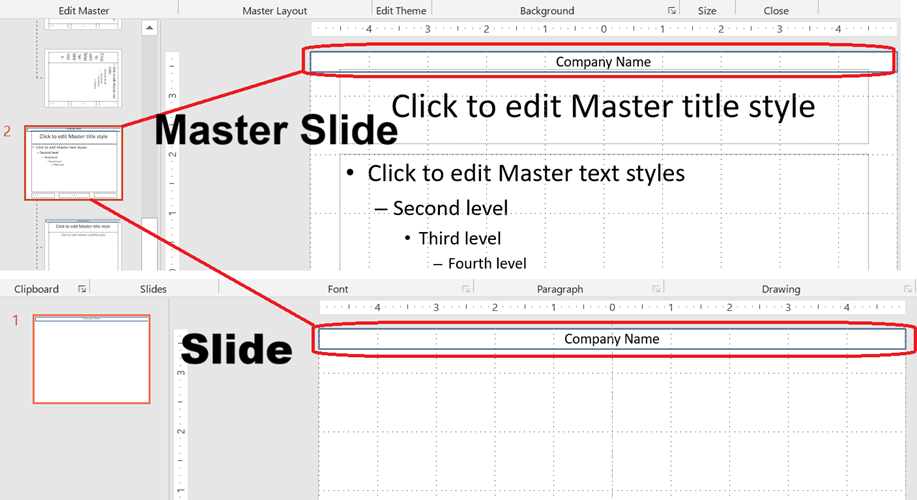
此範例示範如何透過複製預設母片來建立新母片,隨後透過版面繼承將公司名稱橫幅加入所有投影片。
static void addMasterSlide() {
    Presentation presentation = new Presentation();
    try {
        // 複製預設母片。
        IMasterSlide defaultMasterSlide = presentation.getMasters().get_Item(0);
        IMasterSlide newMasterSlide = presentation.getMasters().addClone(defaultMasterSlide);

        // 在母片上方加入公司名稱橫幅。
        IAutoShape textBox = newMasterSlide.getShapes().addAutoShape(ShapeType.Rectangle, 0, 0, 720, 25);
        textBox.getTextFrame().setText("Company Name");
        IParagraph paragraph = textBox.getTextFrame().getParagraphs().get_Item(0);
        paragraph.getParagraphFormat().getDefaultPortionFormat().getFillFormat().setFillType(FillType.Solid);
        paragraph.getParagraphFormat().getDefaultPortionFormat().getFillFormat().getSolidFillColor().setColor(Color.BLACK);
        textBox.getFillFormat().setFillType(FillType.NoFill);

        // 將新母片指派給版面投影片。
        ILayoutSlide layoutSlide = presentation.getLayoutSlides().get_Item(0);
        layoutSlide.setMasterSlide(newMasterSlide);

        // 將版面投影片指派給簡報中的第一張投影片。
        presentation.getSlides().get_Item(0).setLayoutSlide(layoutSlide);
    } finally {
        presentation.dispose();
    }
}
💡 註記 1: 母片提供在所有投影片上套用一致品牌或共用設計元素的方式。對母片所做的任何變更都會自動反映在相依的版面與普通投影片上。 💡 註記 2: 添加到母片的任何圖形或格式化會被版面投影片繼承,進而被使用這些版面的所有普通投影片繼承。
下圖說明在母片上加入的文字方塊如何自動呈現在最終投影片上。
存取母片
您可以使用簡報的母片集合來存取母片。以下說明如何取得並使用它們:
static void accessMasterSlide() {
    Presentation presentation = new Presentation();
    try {
        IMasterSlide firstMasterSlide = presentation.getMasters().get_Item(0);

        // 變更背景類型。
        firstMasterSlide.getBackground().setType(BackgroundType.OwnBackground);
    } finally {
        presentation.dispose();
    }
}
移除母片
母片可以透過索引或參照的方式移除。
static void removeMasterSlide() {
    Presentation presentation = new Presentation("sample.pptx");
    try {
        // 依索引移除母片。
        presentation.getMasters().removeAt(0);

        // 依參照移除母片。
        IMasterSlide firstMasterSlide = presentation.getMasters().get_Item(0);
        presentation.getMasters().remove(firstMasterSlide);
    } finally {
        presentation.dispose();
    }
}
移除未使用的母片
有些簡報包含未使用的母片。移除這些母片可協助減少檔案大小。
static void removeUnusedMasterSlide() {
    Presentation presentation = new Presentation();
    try {
        // 移除所有未使用的母片(即使已標記為 Preserve)。
        presentation.getMasters().removeUnused(true);
    } finally {
        presentation.dispose();
    }
}